

Main menu
Deutsch · English · Español · Français · Italiano · Magyar · Nederlands · Português · Shqip · Slovenčina · Suomi · Македонски · Русский · 中文(中国) · 中文(台灣) · 日本語
The Lazarus main menu contains the following entries:
{| class="wikitable" |- | File Edit Search View Source Project Run Package Tools Window Help |} As usual, the options can be selected either by placing the mouse cursor over the menu option and clicking the left mouse button, or by typing Alt+F on the keyboard (provided the main menu window has focus: if it has not, hit Tab repeatedly to cycle focus through the various windows until the desired window has its title bar highlighted in colour). To reach the menu bar on macOS, the keyboard shortcut is Ctrl+F2.
File
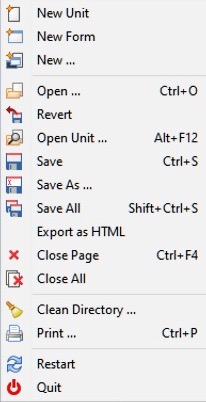
- New Unit: Creates a new Unit file (Pascal Source).
- New Form: Creates a new Form: both the visual on-screen window and the associated Pascal source file.
- New ...: Offers a pop-up menu box with a variety of new document types to create.
- Open: Offers a pop-up Dialog Box to enable you to navigate the filesystem and choose an existing file to open.
- Revert: Abandon editing changes and restore the file to its original state.
- Open Unit...: Offers a list of recently edited unit files, and an opportunity to select one to open.
- Save: Save the current file, using its original filename. If there is no name, the system will prompt for one (just like Save As).
- Save As: Allows you to choose a directory and filename for saving the current file.
- Save All: Saves all the files attached to the editor, not just the current one selected.
- Export As HTML: Export the contents of the current file to a new file in HTML format.
- Close Page: Closes the current file, prompting whether to save all editor changes.
- Close All: Close all files currently open in the editor. Prompt for saving changes.
- Clean directory: Offers a dialog with a series of editable filters for removing files from the current directory. Useful for removing .bak files and remnants of former Delphi projects.
- Print...: Uses the system printer to print the selected file. This menu item may not appear by default if you are not using Windows; you will then need to install
$Lazdir/components/printers/design/printers4lazide.pasand re-compile the IDE. - Restart: Re-start Lazarus - useful if files have become hopelessly scrambled!
- Quit: Exit Lazarus, after prompting for saving all edited files.
Edit
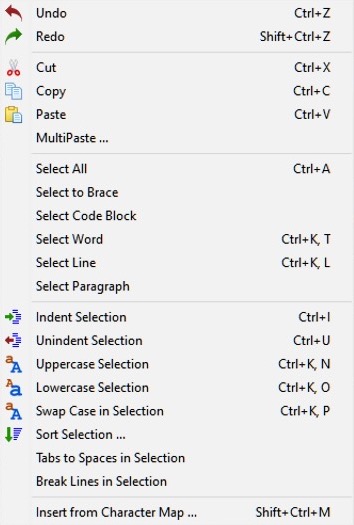
- Undo: Undo the last edit action, leaving the Editor in the state just before the last action.
- Redo: Re-instates the last action that was reversed by Undo.
- Cut: Remove the selected text or other item and place it on the Clipboard.
- Copy: Make a copy of the selected text, leaving the original in place, and placing the copy on the Clipboard.
- Paste: Places the contents of the Clipboard at the cursor position. If text has been selected at the cursor position, the contents of the Clipboard will replace the selected text.
- MultiPaste...: Shows a dialog to modify and paste the text that you copied to the clipboard into the Source Editor. This is helpful for HTML, SQL and (re)formatting text.
- Select All: Selects all of the text in the Source Editor.
- Select to Brace: Selects text inclusive of parentheses. Cursor must be positioned before the opening parenthesis.
- Select Code Block: As of Lazarus 2.0.10 and trunk r48100 this is NOT IMPLEMENTED.
- Select Line: Selects the complete line on which the cursor is currently located.
- Select Paragraph: Selects the complete paragraph in which the cursor is located. A paragraph is delineated by blank lines before and after the text.
- Indent Selection: Move the selected text to the right by the amount specified in Environment -> Editor options -> General -> Block indent. This feature is useful for formatting your Pascal source code to show the underlying Block structure.
- Unindent selection: Removes one level of indenting, moving the text to the left by the amount specified in Block indent.
- Uppercase Selection: Convert selected text to uppercase.
- Lowercase Selection: Convert selected text to lowercase.
- Swap Case in Selection: Convert selected text to lowercase or uppercase.
- Sort Selection...: Sort lines (or words or paragraphs) alphabetically; options for ascending or descending order, case sensitive or insensitive. In the middle of program source code, of course, it makes no sense, but if you have a list you need to have sorted this will do the trick.
- Tabs to Spaces in Selection: Converts any tabs in the selected text to the number of spaces specified by Environment -> Editor options -> General -> Tab widths. The number of spaces is not a fixed quantity, but is the number needed to fill the remaining width of the tab.
- Break Lines in Selection: If any lines in the selected text are longer than 80 characters or the number specified in Environment -> Editor options -> Display -> Right Margin, then the line is broken at a word boundary and continued on the next line.
- Insert from Character Map...: Allows insertion of non-keyboard symbols such as accented characters, picked from a pop-up character map.
Search
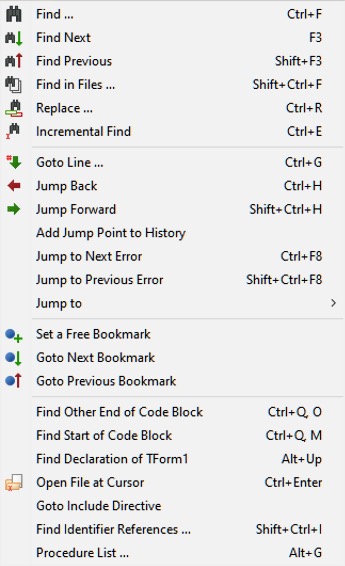
- Find...: Similar to the facility in almost all graphic text editors: a pop-up dialog box appears allowing the entry of search text, with options such as case sensitivity, whole words, origin, scope and direction of search.
- Find Next: Search again in the forward direction for the previously entered text string.
- Find Previous: Search again in the backwards direction for the previously entered text string.
- Find in Files...: Search for text string in files: pop-up dialog with options all open files, all files in Project, or all directories; masks available for selecting file types.
- Replace...: Similar to Find; shows a pop-up dialog with a place to enter search text and replacement text, and options for case sensitivity, direction of search etc.
- Incremental Find: Search for the text while you are entering the text. Example: after you choose "Incremental Find" if you press "l" the first "l" will be highlighted. If then you press "a", the editor will find the first occurrence of "la" and so on.
- Goto Line...: Move editing cursor to specified line in the file in the source editor.
- Jump Back: Jump to previous position. Every time you jump to an error or find a declaration, the IDE saves the current source position.
- Jump Forward: Jump to next position. Undoes a Jump back.
- Add Jump Point to History: Add the current source position to the jump history.
- Jump to Next Error: Jump to the position in the source file of the next reported error.
- Jump to Previous Error: Jump to the position in the source file of the previous reported error.
- Jump to >: Opens a sub-menu with the following menu items:
- Jump to Interface: Jump to the start of the Interface section.
- Jump to Interface uses: Jump to the start of the Interface section uses clause.
- Jump to Implementation: Jump to the start of the Implementation section
- Jump to Implementation uses: Jump to the start of the Implementation section uses clause.
- Jump to Initialization: Jump to the start of the Initialization section.
- Set a Free Bookmark: Mark the current line where the cursor is located with the next available (free) numbered bookmark, and add this to the list of bookmarks. Note that a pop-up menu (obtained by right-clicking with the mouse on the appropriate line of the source file) gives a larger range of Bookmark options, allowing the number of a bookmark to be specified, or allowing the user to jump to a numbered bookmark, not just the next or previous ones.
- Goto Next Bookmark: Go to the next bookmark in the numerical sequence.
- Goto Previous Bookmark: Go to the previous bookmark in the numerical sequence.
- Find Other End of Code Block: If positioned on a begin, finds the corresponding end and vice versa.
- Find Start of Code Block: Moves to the begin of the procedure or function in which the cursor is placed, otherwise to the start of the implementation section.
- Find Declaration at Cursor: Finds the place at which the identifier on which the cursor is placed is declared. This may be in the same file or another file already open in the Editor; if the file is not open, it will be opened (so if a procedure or function is declared, for example, in classesh.inc , this will be opened in the Editor). (More)
- Open File at Cursor: Opens the file whose name the cursor is placed. Useful for looking at Include files or the files containing other Units used in the project.
- Goto Include Directive: If the cursor is located in a file which is Included in another file, goes to the place in the other file that called the Include file.
- Find Identifier References: Produces a list of all the lines in the current file, or the current project or all attached files, in which an identifier is mentioned.
- Procedure List: Produces a list of all Procedures and Functions in the current file, with the line numbers where they are defined.
View
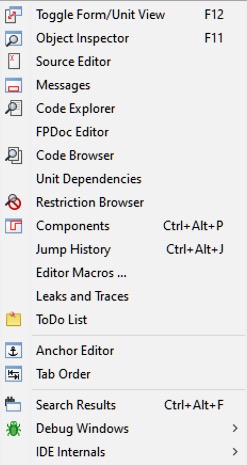
Controls the display of various windows and panels on the screen.
- Toggle Form/Unit View: Toggles whether the Source Editor or the current Form is placed on the top layer of the Desktop, and given focus. If the Source Editor has focus, then you can edit the source code; if the Form is given focus, you can manipulate the components on the desktop and edit the appearance of the Form. The easiest way to toggle the display between Editor and Form is to use the
F12key on the keyboard, but the same effect is achieved by selecting this option on the Main Menu. - Object Inspector: The window that usually occupies the left side of the Desktop, and displays the features of the Form which is on the desktop. Clicking with the mouse on any component of the form will cause the details of that component to be displayed in the Object Inspector. There is a panel at the top which shows the tree-structure of the current project, and the components of the form may optionally be selected in this panel: this will also cause the corresponding details to be displayed in the Object Inspector. The main lower panel has two tabs which allow selection of either Properties or Events to be displayed. Selection of Properties causes features such as name, color, caption, font, size etc to be displayed: there are two columns, the left showing the property, and the right showing the value associated with that property. Selection of Events displays two columns: the left lists the possible events such as MouseClick or KeyDown associated with that component, and the right shows the action that results from that event. If there is no action defined, then clicking in the appropriate box or on the button causes the Source Editor to be displayed, with the cursor already positioned in a dummy Procedure declaration, waiting for event-defining code to be typed in.
- Source Editor: The main window in which source code is edited. Its behaviour is very like that of most other graphical text editors, so that the mouse can move the cursor over the displayed text, and clicking with the left mouse button while dragging the mouse will select and highlight text. Right clicking with the mouse displays a pop-up menu, it includes the usual Edit Cut, Copy or Paste functions, Find Declaration and Open File at Cursor. The top of the Source Editor window has a number of tabs, corresponding to the files that are open for the current project; clicking on any tab makes that file visible, and you can move easily from file to file, copying and pasting between files and performing most of the normal editing functions. The Source Editor performs color syntax highlighting on the code, with different colors for punctuation marks, comments, string constants etc. It will also maintain the level of indentation from line to line as you type in code, until you change the indentation. The function and appearance of the Source Editor are very configurable from the Main Menu by selecting Environment -> Editor options and then selecting one of several tabs in the pop-up dialog box.
- Messages: A window that displays compiler messages, showing the progress of a successful compilation or listing the errors found.
- Code Explorer: A window usually placed to the right of the IDE which displays, in tree form, the structure of the code in the current unit or program.
- FPDoc Editor: FPDoc Editor is the Free Pascal documentation tool which is specifically designed to create help files for individual units of Pascal source code.
- Code Browser
- Restriction Browser: Lists the limitations for various compiler targets.
- Unit Dependencies: Opens a pop-up dialog window that shows, in a tree-like manner, the structure of dependencies of the currently open unit file. Most of the files listed as dependencies will have their own boxes, which allow the dependencies of the individual files to be explored, often in a highly recursive manner.
- Components:
- Jump History:
- ToDo List: Search the project files to find all ToDo comments.
- Anchor Editor: The anchor editor allows the editing of the AnchorSide, Anchors and BorderSpacing properties of the selected controls.
- Tab Order:
- Search Results: A window that displays the results of find in files.
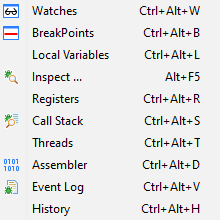
- Debug windows >: Opens a sub-menu with several menu items for operating and configuring the debugger.
- Watches: Opens a pop-up windows which shows the values of variables and expressions ("watches") when the debugged application is paused.
- BreakPoints: Opens a pop-up window which lists the breakpoints you have set, displays information about the breakpoints and enables some operations on those breakpoints.
- Local Variables: Opens a window which lists the local variables and their current values for the current function/procedure.
- Registers: Opens a pop-up window which shows This window shows the content of the registers of your CPU.
- Call Stack: Opens a pop-up dialog which shows the stack of function calls.
- Threads: Opens a pop-up window which displays a list of all the threads in your application.
- Assembler: Opens a pop-up window which shows an assembler view of the current code.
- Event Log: Opens a pop-up window which provides a place into which the debugger will log a configurable record of the occurrence of various events.
- History: Opens a pop-up window which shows a list of locations where the application was previously stopped or paused.
- IDE Internals >: Opens a sub-menu with several menu items for
- About FPC: Opens a pop-up window with two tabs:
- FPC Values used by the IDE: Lists various information about Lazarus and FPC including versions, environmental variables, global IDE options, project options, defines, unit paths, units etc.
- FPC output: Lists details including the operating system, FPC macros,
fpc.cfgoptions, FPC library paths etc.
- About IDE: Opens a pop-up window with four tabs:
- General: Lists Lazarus IDE version information, global IDE options, working directory, startup parameters and environment variables.
- Modified: Lists modified project files.
- Help: Lists details of the Lazarus help and its included databases.
- Externals Tools: Lists details of external tools if any have been added to the IDE.
- What Needs Building: Opens a pop-up window which shows the build status of all files in the project.
- Debug Output: Opens a pop-up window which shows the commands and answers between the IDE and the debugger. This information is not useful for normal debug operation.
- About FPC: Opens a pop-up window with two tabs:
- Enter Full Screen: [macOS only]
Source
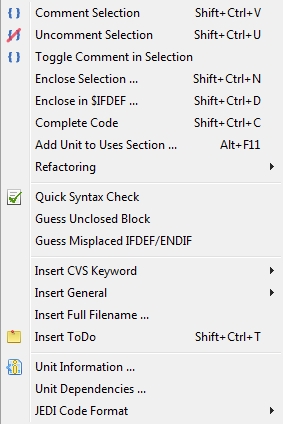
- Comment Selection: Comment out the currently selected text.
- Uncomment Selection: Uncomment the currently selected text.
- Toggle Comment in Selection: Comment out or uncomment the currently selected text.
- Enclose Selection...: Enclose the currently selected text with a statement such as Try...Finally.
- Enclose in $IFDEF...: Enclose the currently selected text with an IFDEF (conditional defines) statement.
- Complete Code:
- Add Unit to Uses Section: Add one or more Units to the uses section in the current file.
- Refactoring: Open the Refactoring sub-menu.
- Quick Syntax Check: Run a quick syntax check.
- Guess Enclosed Block: Let the editor end the enclosed block, such as a missing "End" in an "If" statement.
- Guess Misplaced IFDEF/ENDIF: Let the editor correct a misplaced conditional defines statement.
- Insert CVS Keyword...: Insert a CVS keyword, such as "Author" or "Date".
- Insert General: Insert a general value, such as a "GPL Statement".
- Insert Full Filename...: Insert the filename.
- Insert ToDo: Insert a ToDo comment.
- Unit Information...: Displays information about the current unit in the source editor.
- Unit Dependencies...: Display the dependencies for the current unit.
- JEDI Code Format: View the JEDI Code Format options for the project.
Project
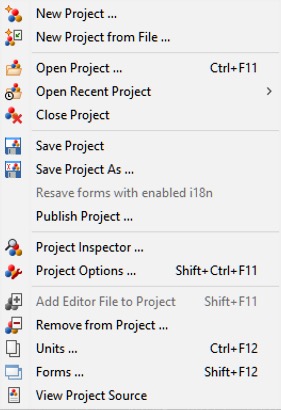
- New Project: Create a new project. A pop-up dialog window appears offering a choice of types of project to create.
- New Project from File: A Navigation dialog window appears, alowing selection of a file from which to create a new project.
- Open Project Open a project which has already been created and saved. A navigation dialog appears with a list of Lazarus Project Information (.lpi) files from which a project may be chosen.
- Open Recent Project: Displays a pop-up list of recent projects on which you have been working, and allows selection of one of these.
- Close Project Close the current project.
- Save Project: Similar to File -> Save: all the files of the current project are saved; if they have not previously been saved, there is a prompt for filename(s)- similar to Save Project As...
- Save Project As...: Prompts for filename to save project. A default filename of Project1.lpi is offered, but you should choose your own filename. Lazarus will not permit you to use the same name for the Project file and the Unit File (see below).
- Publish Project: Creates a copy of the whole project. If you want to send someone just the sources and compiler settings of your code, this function is your friend. A normal project directory contains a lot of information. Most of it is not needed to be published: the .lpi file contains session information (like caret position and bookmarks of closed units) and the project directory contains a lot of .ppu, .o files and the executable. To create a lpi file with only the base information and only the sources, along with all sub directories use "Publish Project". In the dialog you can setup the exclude and include filter, and with the command after you can compress the output into one archive. See Lazarus IDE Tools
- Project Inspector: Opens a pop-up dialog with a tree-like display of the files in the current project. Allows you to add, remove or open selected files, or change options of the project.
- Project Options...: Opens a pop-up dialog window with tabs for setting:
- Project Options for Application (Title, Output Target file name), Forms (allowing you to select among the available forms, make them Auto-create at start of application) and Info (specifying whether editor information should be saved for closed files, or only for project files); and
- Compiler options which allows configuration of the compiler. Tabs include Paths which allows definition of search paths for units, include files, libraries etc, as well as allowing choice of widget type for the forms (gtk, gnome, win32); Parsing which allows choice of rules for parsing source programs, Code which allows choice of optimisation for faster or smaller programs, choice of target processor, types of checks, heap size etc; Linking allowing choice of whether or how to use debugging, static or dynamic libraries, and whether to pass options through to the linker; Messages to define what type of messages should be generated during error conditions; Other which allows decision to use default configuration file (fpc.cfg) or some other file; Inherited which shows a tree structure diagram to indicate how options have been inherited from units already incorporated; Compilation which allows definition of commands to be executed before or after the compiler is launched and can allow use of Make files.
- Add Editor File to Project: Add the file currently being edited to the Project
- Remove from Project: Gives a pop-up menu of files available for removal from project.
- Units...: Opens a pop-up dialog window with a list of the unit files in the current project.Clicking with the mouse on a filename selects that file; click on Open to display that file in the Source Editor. Checking the Multi box allows several files to be selected simultaneously, and they will all be opened in the Source Editor (but only one at a time will be displayed). This Menu Option is rather like the Project -> Project Inspector option, but only displays the list of Unit files and allows them to be opened.
- Forms...: Opens a pop-up dialog window with a list of the Forms in the current project, and allows the selection of one or more of them for display.
- View Project Source: No matter which file you are editing, takes you to the Lazarus PRoject file (.lpr) or the main .pas file if there is no .lpr.
Run
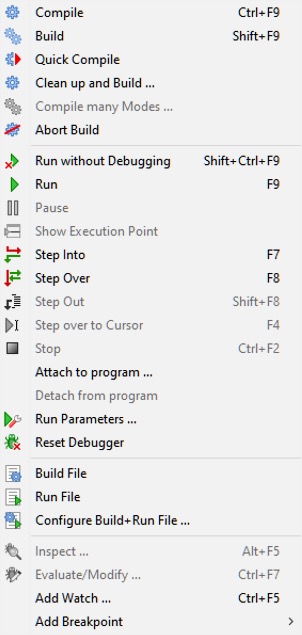
- Compile: Compiles the project file and any other changed files in the project.
- Build: Builds (compiles) all files in the project.
- Quick Compile: Compiles the files in the project that have changed.
- Clean up and Build...: Cleans up and builds specified types of files in the project.
- Abort build: Stop the build process while it is running - either you have remembered that you did something silly and want to stop the build, or the system seems to be taking far too long and something is obviously wrong.
- Run without debugging: This is the same as Run below, but the application is not run under control of the debugger.
- Run: This is the usual way to launch the compiler and, if compilation is successful, to start execution of the application under control of the debugger. What actually happens is that Lazarus saves a copy of your files, then starts the compiler and linker, then begins execution of the final linked binary program.
- Pause: Suspend execution of the currently running program. This may allow you to inspect any output that has been generated; execution may be resumed by selecting Run again.
- Show Execution Point: Shows the current execution point.
- Step Into: Used in conjunction with the debugger, causes execution of the program one step at a time up to a bookmarked point in the source.
- Step Over: Causes stepwise execution up to the statement marked, then skips the marked statement, and continues execution at normal speed. Useful in trying to isolate a statement that introduces a logical error.
- Step Out: Step out of the current code block.
- 'Step over to Cursor:
- Stop: Cease execution of the running program. Cannot be resumed by selecting Run; this will start the program again from the beginning (re-compiling if necessary).
- Run Parameters: Opens a multi-page pop-up window which allows command-line options and parameters to be passed to the program to be executed; allows selection of display to run program (eg a remote X terminal may be used in Linux); some system Environment variables may be overridden.
One very important use of this sub-menu is to activate a terminal window in which conventional Pascal console input/output is displayed. If you are developing a console-mode Pascal program (ie one that doesn't use the Graphical User Interface with its forms, buttons and boxes) then you should check the box for "Use launching application". The first time you do this on Linux and try the Compile/Run sequence, you will probably get a rude message to say
"xterm: Can't execvp /usr/share/lazarus//tools/runwait.sh: Permission denied".If this happens, you need to change the permissions on the appropriate file (for example using chmod +x filename; you might have to do this as root. After this, each time you launch you program, a console box will appear and all your text i/o (readln, writeln etc) will appear in it.
After your program has finished execution, a message "Press enter" appears on the screen. Thus any output your program generated will remain on the screen until you have had a chance to read it; after you press 'enter' the console window closes.
On Linux, if the above message "xterm: Can't execvp /usr/share/lazarus//tools/runwait.sh: Permission denied" does not appear after checking the box for "Use launching application", type /usr/bin/xterm $(TargetCmdLine) and check Use launching application (xterm is installed on almost all Linux systems).
See the separate tutorial on Console Mode Pascal programming.
- Reset debugger: Restores the debugger to its original state, so that breakpoints and values of variables etc are forgotten.
- Build file: Compile (build) just the file that is currently open in the Editor.
- Run file: Compile, link and execute just the currently open file.
- Configure Build + Run File: Opens a multi-page tabbed window with options to allow for build of just this file when Build Project is selected, allows selection of the working directory, the use of various Macros, etc. Then Builds and Runs the file.
These last three options enable you to open (and maintain) a test project. Use File -> Open to open an .lpr file, pressing cancel on the next dialog to open this file as "normal source" file.
- Inspect...: Inspect a value when the program is paused.
- Evaluate/Modify...: Evaluate or modify an expression or value when the program is paused.
- Add Watch...: Add a variable to the watch list.
- Add Breakpoint...: Add a breakpoint, which will will pause execution of the program at that line of code.
Package
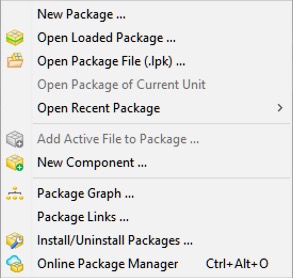
- New Package...: Create a new package.
- Open Loaded Package...: Open one of the files in the selected package.
- Open Package File (.lpk)...: Displays a list of installed packages, with an invitation to open one or more of them, or to select various general or compiler options.
- Open Package of Current Unit: Open the package for the unit currently in the editor.
- Open Recent Package: Open a package that was opened recently.
- Add Active File to Package...: Place the file (currently in the editor) into a package.
- New Component: Create a new component.
- Package Graph...: Displays a dialog showing the relationships of the packages currently being used (if you aren't using any other packages, the Lazarus package and the FCL and LCL will be displayed).
- Package Links...: Opens a dialog which displays package links by name and lists the version, group (Global, Online, User), whether the package is valid, the pathname/URL, and when last opened. The dialog also contains options to delete selected packages and rescan package files. Package links help the IDE to find package filenames by name.
- [[IDE Window: Installed Packages|Install/Uninstall Packages...]]: Install or uninstall one or more packages.
- Online Package Manager: Opens a dialog which downloads the current list of packages in the remote repository and enables you to manage the download, installation and uninstallation of the packages currently available.
Tools
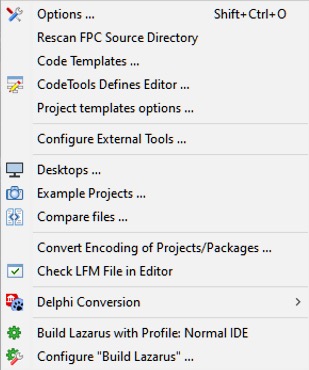
- Options...: View and change the options and settings in the Lazarus IDE.
- macOS: From Lazarus 2.2 onwards, the Options... dialog has been relocated to Lazarus > Preferences.
- Re-scan FPC Source directory Looks through the directory again. Lazarus uses the fpc sources to generate correct event handlers and while looking for declarations. If somebody changes the directory in the environment options, then this directory is rescanned, to make sure Lazarus uses the version stored in that location. But if this directory has changed without Lazarus noticing, then you may get some errors when designing forms or doing "Find declaration". If you get such an error, you can do two things:
- Check the FPC source directory setting in the environment option.
- Re-scan FPC source directory.
- Code Templates...: View the code templates that are available.
- CodeTools Defines Editor...: Edit the code templates.
- Project templates options...: Set the options for the project templates.
- Configure External Tools: Allows the user to add various external tools (programs and macros) to the toolkit.
- Desktops...: Shows a dialog to help manage different desktop configurations and set the default.
- Example Projects...: View the example projects that are available.
- Compare files...: Allows comparison between two files (or, usually, two versions of the same file) to find differences. Options to ignore white space at beginning or end of lines or differences in line termination: CR+LF versus LF). Useful for checking if there have been changes since last CVS update etc.
- Convert Encoding of Projects/Packages...: Shows a dialog to enable the conversion of the encoding of files in a project or a package.
- Check LFM File in Editor: Allows inspection of the LFM file which contains the settings that describe the current form.
- Delphi Conversion >: Opens a sub-menu which helps in porting Delphi applications to Lazarus by makes the necessary changes to the source file.
- Convert Delphi Unit to Lazarus: Converts a Delphi unit to Lazarus
- Convert Delphi Project to Lazarus Project: Converts a Delphi project file to Lazarus.
- Convert Delphi Package to Lazarus Package: Converts a Delphi package to Lazarus.
- Convert binary DFM file to text LFM + Check Syntax: Converts the Form Description files from Delphi to Lazarus.
See also: Lazarus For Delphi Users and Code Conversion Guide.
- Build Lazarus with Profile: Normal IDE: Launches a re-build of Lazarus from the most recently downloaded or updated SVN files. Hit the button and sit back to watch it happen! (track the process on your Messages window).
- Configure "Build Lazarus"...: Allows the user to determine which parts of Lazarus should be re-built, and how. For example, you could select to have just the LCL re-built, or to have everything except the examples built; you can select which LCL interface to use (ie which set of widgets), and you can select the target operating system and specify a different target directory.
Window
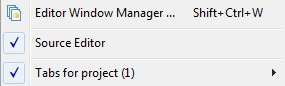
Contains a list of the currently opened files and the available windows such as Source Editor, Object Inspector and Project Inspector. Clicking on the name of one of the windows brings it to the foreground and gives it focus.
Help
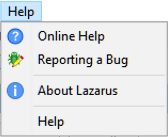
At present this has four selections:
- Online Help which at present opens a browser window that contains a picture of the running cheetah and a few links to the Lazarus, Free Pascal and Wiki websites
- Reporting a bug Opens the wiki page which describes how to report a bug.
- About Lazarus Displays an About dialog with some information about Lazarus. Note that for Lazarus 2.2 this has been moved to the Apple-compliant Lazarus Application Menu: Lazarus > About Lazarus.
- Help Launches the CHM file viewer containing FPC and Lazarus documentation.
Help can be configured from Tools > Options > Help > Help Options.
From the Free Pascal wiki, page "Main menu", as it stood on 2023-06-26 after a change by Martin, out of the wiki's dump of 2024-05-26. Copyright stays with the author who wrote it, according to the old wiki's Licensing page. If you have concerns about this material, message the admin.
Talk about this page
Nobody has opened a bench for this page yet. Sign in to open one.