

IDE Window: Debug History
English · Русский
Navigation
Main Menu > View > Debug Windows > History
Important
You must setup the debugger and start the project to debug it. Only then this window will be useful.
Debug History
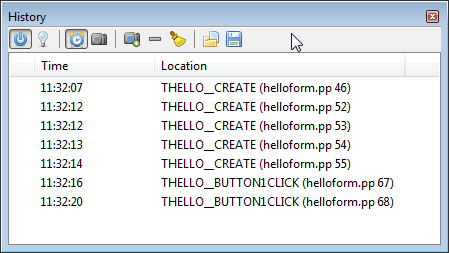
The History window shows a list of locations where the application was previously stopped or paused. (e.g. Hit Breakpoint, stopped after stepping). Entries can also be added by none-breaking Breakpoints.
Each time an entry is added locals, watches, stack and threads that are shown/evaluated at the time are stored. The history window allows to select each entry and view the stored values. Stored values can be viewed in there normal viewer windows (e.g. Watch window) which will follow the selection of the history window.
Limitations
- The history only affects Watches, Locals, Threads, and Stack Window.
Other Windows are not affected. Not affected windows keep showing the current data while a history entry is selected
- Only Watches and Locals in the top stackframe of the current thread are automatically evaluated (available, even if the related viewer windows were closed). Other data is only kept, if it was displayed at the time. (e.g. if the user manually selected another frame, and viewed the watches in the watch window.
- Data evaluation can be aborted, if the user runs or steps the application before the data is ready. In this case it is not available in the history
Data Displayed
- The time when the entri was taken. This does not indicate how much time the app was running, as it includes paused time.
- The location: if available method name (format depends on type of debug info), and source line. This refers to the thread that was active at the time.
Automatic entries vs (User-taken-) Snapshots
The main list automatically has an entry added for every time the debugger pauses the app. This list will also remove older entries and keep only the last n entries.
The 2nd list contains only entries the user selected. Those entries are kept until after the end of the debug session. Entries can be added to this list by either the snapshot button, or the breakpoint-property "take snapshot".
Interface
Double click
Selects or deselects an entry. If an entry is selected, then Watch list, Local variables, Stack and Thread show the history content.
 Power
If powered off, now history entries will be created.
 Enable
Indicates/Toggles, if history is shown in other windows. Uses the history entry last set by double click
 /
 Choose list
Selects list of snapshot. Automatically created entries, created at each step/pause (if power=on). Contains up to the last 25 entries. User selected snapshots or snapshots by watches with "take snapshot" option. The list is not limited.
 Add to selected snapshot list
Adds the current entry to the user selected list. The entry remains in the automatic list, until it is replaced by newer entries.
 Remove
Deletes one entry from the current list.
 Delete all
Deletes all entries from the current list.
 /
 Export/Import
Exports/Imports all entries, including the values for the watches, locals, stack and threads
See also
From the Free Pascal wiki, page "IDE Window: Debug History", as it stood on 2021-02-01 after a change by Trev, out of the wiki's dump of 2024-05-26. Copyright stays with the author who wrote it, according to the old wiki's Licensing page. If you have concerns about this material, message the admin.
Talk about this page
Nobody has opened a bench for this page yet. Sign in to open one.