

IDE Window: Local Variables
Deutsch · English · Français · Русский
Navigation
Main Menu > View > Debug Windows > Local Variables
Important
You must setup the debugger and start the project to debug it. Only then this window will be useful.
Local variables
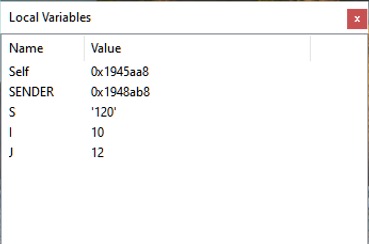
This is the list of the local variables and their current values of the current function/procedure.
Data displayed
Name
The mangled name of the variable. Normally the compiler converts the Pascal identifier to uppercase. You will see local variables only if the procedure was compiled with debugging information.
Values
The current value of the local variable.
Note: The values are shown in a very basic form. e.g Objects are shown as pointer, instead of structure. You may get more information by adding a variable to the Watches window.
Scope (Stackframe, Thread, History)
The values are evaluated according to the scope set in the Thread and Call Stack dialogs. Default is the current Thread and top stack frame. Both (Stack and Frame) dialogs offer to change the "current" Frame/Thread. The Watches window will follow this selection.
It is also possible to select previously displayed values, using the History dialog.
See also
From the Free Pascal wiki, page "IDE Window: Local Variables", as it stood on 2021-02-01 after a change by Trev, out of the wiki's dump of 2024-05-26. Copyright stays with the author who wrote it, according to the old wiki's Licensing page. If you have concerns about this material, message the admin.
Talk about this page
Nobody has opened a bench for this page yet. Sign in to open one.