

Main menu/zh CN
Deutsch · English · Español · Français · Italiano · Magyar · Nederlands · Português · Shqip · Slovenčina · Suomi · Македонски · Русский · 中文(中国) · 中文(台灣) · 日本語
主菜单
主菜单包括如下内容: File(文件) Edit(编辑) Search(查找) View(查看) Project(工程) Run(运行) components(构件) Tools(工具) Environment(环境) Windows(窗口) Help(帮助)
通常情况下,你可以通过鼠标左键来点击相应的菜单功能,也可以通过热键Alt+相应热键字母(如果焦点不在菜单上,你可以使用Alt键和方向键选择菜单)
文件子菜单
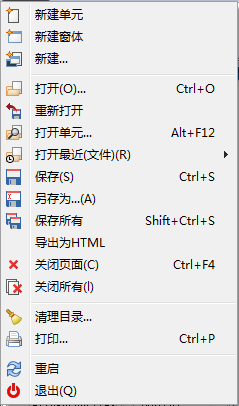
- 新建单元: 创建一个新的单元文件(Pascal 源代码).
- 新建窗体: 创建一个新的窗体: 提供可视化窗口以及Pascal源代码.
- 新建 ...: 弹出一个对话框,(screenshot) 可以选择各种类型的文档进行创建。
- 打开: 弹出一个对话框,可以浏览文件,并选择文件打开。
- 重新打开: 放弃你对打开文件所进行的编辑,恢复到该文件的初始状态。
- 打开单元...: 弹出一个对话框,让你从中选择一个。
- 打开最近(文件): 列出你最近编辑的文件, 让你从中选择一个。
- 保存: 保存当前文件, 使用其当前文件名,如果该文件未命名, 系统将提示你取一个(类似于另存为)。
- 另存为: 允许您选择一个目录和文件名保存当前文件。
- 保存所有: Lazarus翻译成“全选”,个人认为翻译成“保存所有”更好一点,顾名思义,将所有文件都保存下来。
- 导出为HTML: 导出为HTML文件。
- 关闭页面: 关闭当前文件, 提示你是否保存已编辑过的文件。
- 关闭所有: 关闭当前文件编辑器中所有的文件,提示保存已编辑的文件。
- 清理目录: 提供可编辑的过滤器,从目录中清理项目临时文件。
- 打印..: 打印当前文件。
- 重启: 退出并重新启动Lazarus。
- 退出: 退出Lazarus,会提示你保存所有修改过的文件

编辑子菜单
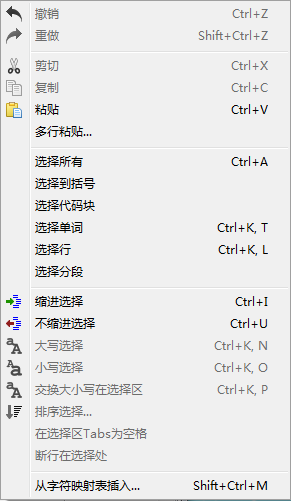
- 撤销: 撤销最后一次操作, 返回到上一步操作时状态。
- 重做: 重新最后的操作,取消撤销。
- 剪切: 删除选定的文本或其他项目,并将其放置在剪贴板中。
- 复制: 复制选定的文本
- 粘贴: 将剪贴板中文本复制到光标位置,如果光标位置有选定文本,剪贴板中的内容将取代所选文本。
- 缩进所选: 将光标所选内容安装Lazarus设置缩进(环境->Options->Editor->普通->代码折叠)。这个将你的Pascle代码格式化,使之结构整齐。
- 取消所选缩进: 删除你所选文本一个级别的缩进。
- 封装所选: 提供一个窗口列表出一些逻辑上可以封装所选文本,如(begin ... end; try ... except; try ... finally; repeat ... until; { ... } 等等).该功能可以将所选代码包含在begin ... end;或者其他所选的块结构中.
- 转换所选为大写: 转换选择的文本为大写.
- 转换所选为小写: 转换选择的文本为小写.
- 制表符转为空格: 将选择文本中的制表符转换为空格。在Environment -> Editor options -> General -> Tab widths中可以设置制表符宽度。
- 选中节自动换行: 如果选择的内容所在行超出80个字符将不再显示,使用此功能,将会换行显示,Environment -> Editor options -> Display -> Right Margin, 设置显示宽度。
- 注释选择: 注释选中的文本,即在行前加 // 。
- 取消注释: 移除注释信息。
- 排序所选: 排序所选内容,按字母顺序、区分大小写等等,在列表中对分类进行排序,它将非常有用。
- 选择: 允许选择文本块、所有、到括号、段落、行、单词等。
- 从字符映射表插入: 允许插入非键盘符号,如重音字符。
- 插入文本: 弹出菜单,允许插入标准文本,如CVS关键字(作者、日期、标题等)或GPL信息,用户名或当前时间与日期。
- 自动完成代码: 它可以节省你很多时间,在你获取或设置属性时,或使用方法时,你可以得到相关提示。在事件中加入方法,可参见Lazarus IDE工具。
- 解析过程: 使用选定文本(一条语句或多条),以创建一个新的过程。
查找子菜单
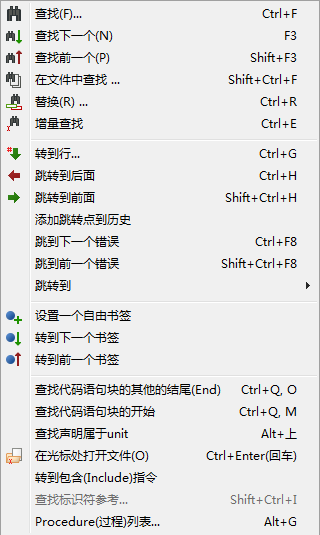
- 查找: 和大多编辑器一样,弹出一个搜索对话框,输入要搜索的内容,可以按大小写、全字匹配、范围、方向等查找。
- 查找下一个, 查找上一个: 向上或向下再次搜索指定内容。
- 在文件中查找: 在文件中搜索指定内容:在弹出的对话框中设置参数,可以按打开的文件,设定的目录,及筛选文件来查找。
- 替换: 等同于 查找; 在弹出的替换对话框中,输入要搜索及要替换的内容。可以按区分大小写的方式,向上或向下进行替换操作。
- 增量搜索: 高亮显示你搜索的字符串。如,选择增量搜索后,你按L后,将会高亮L显示,如果你再按A,编辑器会查找下一个LA并高亮显示。
- 转到行: 移动光标到指定行。
- 跳转到后一个:跳转到原来的位置。IDE会记录你的光标位置,根据它来决定你跳转或返回位置。
- 跳转到前一个: 跳转到下一个位置。跳回来。
- 添加跳转点到历史: 添加跳转位置到历史记录。
- 查看跳转历史: 查看跳转点:功能未实现。
- 跳转到下一错误, 跳转到上一错误: 跳转到上一个或下一个错误处。
- 设置一个自由书签:标记当前光标所在位置用作书签。在源文件中点击右键,在弹出来的菜单中跳到书签和切换书签进行跳转操作。
- 跳转到下一书签, 跳转到上一书签: 跳转到下一个或上一个书签。
- 查找代码区段结束: 如果定位在beign处,则找到相应的end处,反之亦然。
- 查找代码区段开始: 移动光标到过程或函数的begin处。
- 在光标处查找声明: 查找选择的标识符被声明的地方,如文件没有被打开(如果是一个过程或函数的声明,如classesh.inc),将会被打开。
- 在光标处打开文件名: 如果选择的内容是文件,将会打开它。你可以看看单元中引用的文件。
- 前往包含指示处: 如果光标定位在包含的文件处,那么将打开包含的文件。
'''
- 查找标识符参考: Produces a list of all the lines in the current file, or the current project or all attached files, in which an identifier is mentioned. (
显示包含标识符的过程(函数)列表。) - 重命名标识符: 允许开发人员重命名一个标识符。
- 过程列表: 显示当前文件中定义的过程(函数)。
查看子菜单
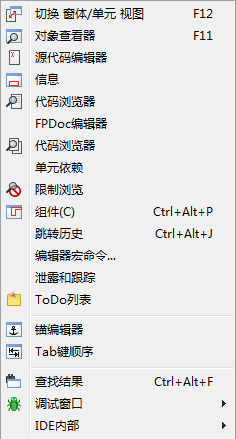
控制屏幕上的各种窗口和面板显示。
- 对象观察器: 通常显示在编辑器的左侧,它显示了控件的属性选项。用鼠标选择列表中的控件,会显示它们的属性信息。也可以在窗体中选择控件来改变它们的属性值。
主面板中的标签“属性”:用来改变控件显示属性,如名称、颜色,标题、字体、大小等(两列中,左侧为属性,右来输入或选择属性值)。 “事件”:列表控件允许的事件,如点击、双击等。点击...在源代码编辑器中编写相应事件。 “常用”:显示常用的属性和事件列表(你也可以右击属性,也添加到“常用”中)。 “限制“,控件在各平台中的支持情况。
- 源代码编辑器: 编辑源代码的地方。和大多图形化文本编辑器一样,可以使用鼠标定位输入位置,并支持高亮代码。右击将弹出菜单,通常包含:复制、剪切、粘贴功能。源代码编辑器顶部可多个选项卡,你可以单击来切换不同的源文件来编辑它。源代码编辑器支持缩进和语法高亮,你可以在“Environment”->"Editor"中设置相应参数。
- 代码浏览器: 以树形方式显示定义的信息。“显示类别“:它通常只显示名称、接口部分与实现部分的定义。点击+展开显示更多。直到具体的常量、类型、变量及过程、函数的声明。如果修改了源代码,你需要点击“刷新”,来刷新文件结构。
- 单元...:显示单元文件,显示包含的文件,并可以编辑它。允许显示多个文件,同时打开并编辑它。
- 窗体...: 显示当前窗体列表,允许选择一个或多个。
- 查看单元信赖关系: 以树状形式显示单元文件的信赖关系。
- 切换窗体/单元 视图 F12: 切换源代码编辑器和窗体。你也可以按F12键来切换。
- 消息:显示编译器消息,编译进度或编译错误的信息。
- 查找结果: 显示找到文件的结果。
- 调试窗口: 在子菜单中选择用于操作和配置的调试器。具体可以参看调试器。
源代码子菜单
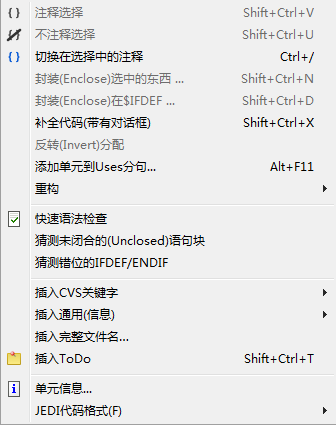
- Comment Selection: Comment out the currently selected text.
- Uncomment Selection: Uncomment the currently selected text.
- Toggle Comment in Selection: Comment out or uncomment the currently selected text.
- Enclose Selection...: Enclose the currently selected text with a statement such as Try...Finally.
- Enclose in $IFDEF...: Enclose the currently selected text with an IFDEF (conditional defines) statement.
- Complete Code:
- Add Unit to Uses Section: Add one or more Units to the uses section in the current file.
- Refactoring: Open the Refactoring sub-menu.
- Quick Syntax Check: Run a quick syntax check.
- Guess Enclosed Block: Let the editor end the enclosed block, such as a missing "End" in an "If" statement.
- Guess Misplaced IFDEF/ENDIF: Let the editor correct a misplaced conditional defines statement.
- Insert CVS Keyword...: Insert a CVS keyword, such as "Author" or "Date".
- Insert General: Insert a general value, such as a "GPL Statement".
- Insert Full Filename...: Insert the filename.
- Insert ToDo: Insert a ToDo comment.
- Unit Information...: Display information about the current unit.
- Unit Dependencies...: Display the dependencies for the current unit.
- JEDI Code Format: View the JEDI Code Format options for the project.
工程子菜单
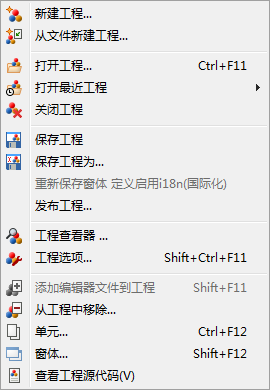
- 新建工程...: 在弹出的对话框中,选择工程类型,以创建一个新工程。
- 从文件新建工程...: 打开“选择程序源代码”窗口,选择一个文件,以创建新的项目。
- 打开工程... 打开“打开工程文件(*.lpi)”窗口,选择一个工程文件,以打开工程。
- 打开最近的工程...: 显示最近打开的工程列表,以供选择。
- 保存工程: 等同于“文件”->“保存”,将当前工程文件全部保存,如果工程文件未保存,将提示保存它。
- 工程另存为...: 输入工程名后,另存工程,默认工程名为Project1.lpi;Lazarus不允许你使用相同名称做为项目文件、单元文件名。(参见 下文)。
- 发布工程...: 创建整个项目的副本。一个正常的项目目录包含了大量信息,大部分不需要再作发布:lpi文件包含会话信息(如光标位置,单元标签等),项目目录也包含了很多ppu、o及可执行文件。此功能在对话框中你可以设置过滤器排除掉那些无用的文件;也可以使用命令压缩为一个文件。参见 Lazarus IDE 工具。
- 工程浏览器: 以树状列出当前工程包含的文件及需要的包,你可以删除,或打开选择的文件,也可以添加文件到工程。
- 工程选项...: 配置工程,在这里,你可以设置程序标题,目标文件名等详细信息。
- 编译器选项 ...: (Recently moved here from the Run Menu). Opens a multi-page tabbed window which allows configuration of the compiler. Tabs include Paths which allows definition of search paths for units, include files, libraries etc, as well as allowing choice of widget type for the forms (gtk, gnome, win32); Parsing which allows choice of rules for parsing source programs, Code which allows choice of optimisation for faster or smaller programs, choice of target processor, types of checks, heap size etc; Linking allowing choice of whether or how to use debugging, static or dynamic libraries, and whether to pass options through to the linker; Messages to define what type of messages should be generated during error conditions; Other which allows decision to use default configuration file (fpc.cfg) or some other file; Inherited which shows a tree structure diagram to indicate how options have been inherited from units already incorporated; Compilation which allows definition of commands to be executed before or after the compiler is launched and can allow use of Make files.
- 添加代码编辑器中的文件到工程: 添加文件到当前项目。
- 从工程中移除...: 在弹出的窗口中,选择文件,以从当前工程中移除。
- View Source: 显示代码编辑器。
- 显示 ToDo 列表:显示与此项目有关的待办事项。它将列出项目中的TODO注释(//TODO)。
新版本(如1.0.14),Ctrl+Shift+T键,在当前位置添加一个TODO。格式如// TODO : 待办说明。
运行子菜单
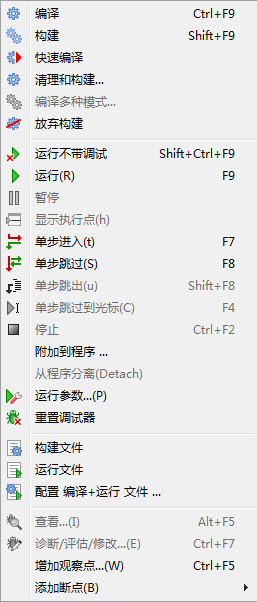
- 构建: 构建(即编译)项目。
- 构建所有: 编译项目中所有的文件。
- 中止构建: 停止构建,一旦它运行——停止时会造成一些异常,如IDE失去响应。(你需要在任务管理器中关闭IDE进程)
- 运行: 常用的方式编译程序,如果成功将开始运行程序;实际情况时,Lazarus保存编辑的文件,启动编译器和链接器。最后执行链接后的可执行程序。
- 暂停: 暂停执行当前正在运行的程序,这样你可以检查调试输出。通过“运行”可进行恢复。
- 单步进入: 与调试器配合使用,程序一步一步的执行。
- Step over: Causes stepwise execution up to the statement marked, then skips the marked statement, and continues execution at normal speed. Useful in trying to isolate a statement that introduces a logical error.
- 运行到光标处: 执行到光标所在位置,然后停止。通过“运行“恢复程序继续执行。
- 停止: 停止当前正在运行的程序。无法通过“运行”恢复,这将再次启动程序。
- 带参数运行: 打开“带参数运行”窗口,将参选参数传递给程序。你可以选择一个运行终端(如X终端);一些系统环境变量可以被覆盖。
其用途时,在Pascal控制台显示终端窗口。
如果你正在开发一个控制台模式的Pascal程序(即不使用图形界面),你应该勾选"使用运行的应用程序"。
当你尝试编译/运行程序时,会得到错误消息:
"xterm: Can't execvp /usr/share/lazarus//tools/runwait.sh: Permission denied".(大意为:权限不足。)
如果出现这种情况,你需要设置程序的拥有可执行权限(如使用 chmod +x 文件名);程序启动后,程序的所有输入/输出都将在控制台中显示。
程序执行完毕,“Press Enter”显示在屏幕上,这时,程序之前的输入/输出都将在屏幕上显示,直至你按Enter关闭控制台窗口。
注意: 作为当前版本,对Windows用户,没有控制台命令。直到Lazarus团队的adressess说,下面一行应该工作(on WinXP -- someone please update for other Windowses)
C:\Windows\system32\cmd.exe /C ${TargetCmdLine}
参见Pascal 控制台模式的单独教程。
- 重置调试器: 恢复调试器到最初状态,这时候,变量、断点的值都将重置。
- 构建文件: 编译(构建)当前文件。
- 运行文件: 编译、链接并执行当前文件。
- 配置 编译+运行 文件: 打开“配置构建”窗口,进行构建设置。
--Feibaicamel 14:28, 31 12月 2009 (CET)
包子菜单
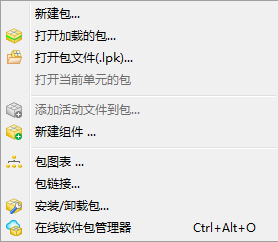
- 打开包: 显示已安装的包列表1,打开一个或更多,或选择普通或编译器选项。
- 打开包文件: 打开包文件。
- 打开最近的包: 打开最近使用的包。
- 将活动单元添加到包: 将单元文件添加到包中。
- 包关系图: 显示当前正在使用的软件包关系图(如果你没有使用其他包,将显示Lazarus包和FCL及LCL包。)
- 配置已安装的包:如果你已经创建了一些组件,此项允许你配置它们。


(注意:配图与介绍并不符合,因为Lazarus版本不同,但大多项是相似的,你可以参照着使用。)
工具子菜单
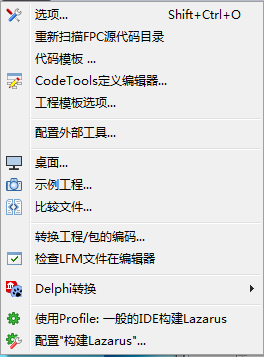
- 配置外部工具: 允许用户添加各种外部工具(通常是宏)。
- 快速语法检查: 非实际编译任何源文件,只进行语法快速检查。在开发大的或复杂的程序时,使用此项将节省你的时间;因为编译代码时错误是不可避免的。
- 猜测未关闭的块: 这是个有用的工具,假设你的一个复杂的嵌套块,缺少end块,使用此项功能可能会帮到你。
- 猜测错位的IFDEF/ENDIF: 如果你有一个复杂的嵌套,缺少或错位endif时,此项功能会帮到你。
- 生成资源字符串: Makes the selected string a resource string by placing it in the resourcestrings section. An advantage of resource strongs is you can change them without the need to recompile your project!
- 比较Diff: 允许两个文件进行比较(通常是文件的不同版本)。允许设置一些选项进行比较。
- 在编辑器中检查LFM文件: 检查lfm文件。
- 转化Delphi单元成Lazarus单元: 将Delphi单元文件转换为Lazarus单元文件。参见Lazarus为Delphi用户 和 代码转换指南。
- 转换DFM文件为LFM: 将Delphi DFM 文件转换为Lazarus的LFM文件。参见Lazarus为Delphi用户 和 代码转换指南。
- 构建Lazarus: 重新构建Lazarus,按下按钮,等待构建。(在消息窗口会有状态显示。)
- 配置 ”构建Lazarus: 允许用户确定Lazarus哪部分重建,以及如何重建。如,你可以重建LCL,或一些小部分,你可以选择目标系统,并指定不同目录。
- 重新扫描FPC源代码目录: 如果改变了环境目录,可以使用此功能让Lazarus重新扫描源目录。如果扫描失败,你需要检查“工具”->“选项”中配置FPC源目录。及重新扫描FPC源代码目录。
窗口子菜单
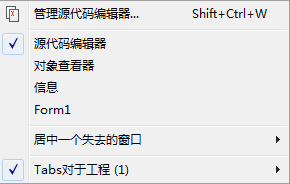
Contains a list of the currently opened files and the available windows such as Source Editor, Object Inspector and Project Inspector. Clicking on the name of one of the windows brings it to the foreground and gives it focus.
帮助子菜单
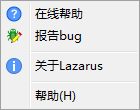
At present this has three selections:
- Online Help which at present opens a browser window that contains a picture of the running cheetah and a few links to the Lazarus, Free Pascal and Wiki websites
- Reporting a bug opens the wiki page, which describe the bug reporting procedure
- About Lazarus Displays a pop-up box with some information about Lazarus.
Help can be configured with [Tools|Options|Help]
From the Free Pascal wiki, page "Main menu/zh CN", as it stood on 2021-12-08 after a change by Kupferstecher, out of the wiki's dump of 2024-05-26. Copyright stays with the author who wrote it, according to the old wiki's Licensing page. If you have concerns about this material, message the admin.
Talk about this page
Nobody has opened a bench for this page yet. Sign in to open one.