

Main menu/it
Deutsch · English · Español · Français · Italiano · Magyar · Nederlands · Português · Shqip · Slovenčina · Suomi · Македонски · Русский · 中文(中国) · 中文(台灣) · 日本語
Il Menù Principale
Il menù principale contiene le seguenti voci: File Modifica Cerca Visualizza Progetto Esegui Package Strumenti Ambiente Finestre Aiuto
Come di consueto, le opzioni possono essere selezionate sia collocando il cursore del mouse sulla voce di menù e cliccando con il tasto sinistro del mouse, che digitando Alt-F sulla tastiera (purché il menù principale sia la finestra attiva: se non ce l'ha, premere ripetutamente il tasto TAB per passare da una finestra all'altra fino a che la finestra desiderata ha la barra del titolo attiva).
Le sotto-voci del menù File
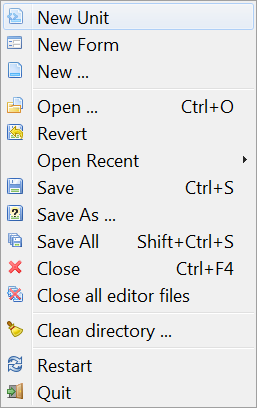
- Nuova Unit: Crea un nuovo Unit file (Sorgente Pascal).
- Nuova Form: Crea una nuova Form: sia la finestra visibile sullo schermo che il file sorgente Pascal associato.
- Nuovo ...: Presenta un menù a discesa (screenshot) con una varietà di nuovi tipi di documento da creare.
- Apri: Presenta una finestra di dialogo a discesa che permette la navigazione del filesystem e la scelta di un file esistente per aprirlo.
- Ripristino: Abbandona le modifiche effettuate e ripristina il file al suo stato originale.
- Apri Recente: Presenta un elenco di file modificati di recente e la possibilità di sceglierne uno.
- Salva: Salva il file corrente, utilizzando il suo nome file originale. Se è senza nome, il sistema ne proporrà uno (proprio come per Salva Come).
- Salva Come: Permette di scegliere una directory ed un nome file per il salvataggio del file corrente.
- Salva Tutto: Salva tutti i file presenti sull'editor, non solo quello selezionato.
- Chiudi: Chiude il file corrente, proponendo se salvare tutte le modifiche effettuate sull'editor.
- Chiudi tutti i file dell'editor: Chiude tutti i file attualmente aperti sull'editor. Propone di salvare le modifiche.
- Pulisci directory: Presenta una finestra di dialogo con una serie di filtri modificabili per la rimozione dei file dalla directory corrente. Utile per rimuovere i file .bak ed i file residui di precedenti progetti Delphi.
- Stampa: Utilizza la stampante di sistema per stampare il file selezionato. Questa voce di menù non appare in modo predefinito; è necessario installare $Lazdir/components/printers/design/printers4lazide.pas e ricompilare la IDE
- Riavvia: Riavvia Lazarus - utile se i file si sono mescolati disperatamente!
- Esci: Esce da Lazarus, dopo aver proposto il salvataggio di tutti i file modificati.

Le sotto-voci del menu Edit
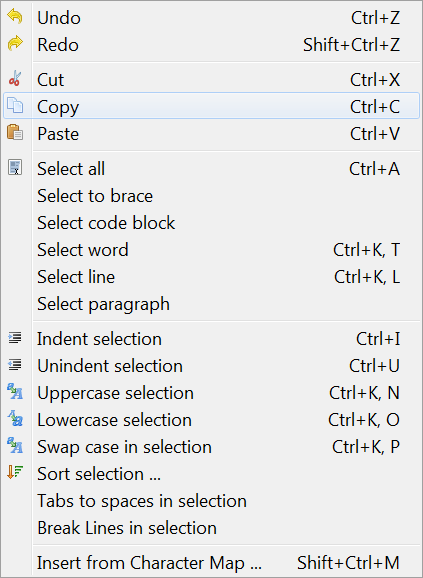
- Annulla: Annulla l'ultima azione eseguita riportando l'editor allo stato precedente all'azione.
- Ripristina: Reimposta l'ultima azione che è stata annullata da Undo.
- Taglia: Rimuove il testo selezionato o un altro elemento e lo copia negli appunti.
- Copia: Copia il testo selezionato, lasciando il testo originale a posto e lo copia sugli appunti.
- Incolla: Incolla il contenuto degli appunti alla posizione del cursore. Se il testo è stato selezionato alla posizione del cursore. Il contenuto degli appunti rimuoverà il testo selezionato.
- Indenta Selezione: Sposta il testo selezionato a destra in base al valore specificato in Ambiente - Opzioni dell editor - Generale - Indentazione di blocco. Questa caratteristica è utilizzata di frequente per la formattazione del tuo codice Pascal per mostrare blocco di struttura sottostante.
- De-Indenta Selezione: Rimuove un livello di indentazione, muovendo il testo a sinistra in base al valore specificato nell'indentazione.
- Chiusura selezione: Fornisce un menu popup con un numero di opzioni per chiudere il testo selezionato.
(begin ... end; try ... except; try ... finally; repeat ... until; { ... } etc).
- Selezione in maiuscolo: Converte il testo selezionato in maiuscolo.
- Selezione in minuscolo: Converte il testo selezionato in minuscolo.
- Tabulazioni nella selezione in spazi: Converte ogni tabulazione nel testo selezionato in spazi specificati in Ambiente -> Opzioni dell editor -> Generale -> Lunghezze di Tabulazioni. Il numero di spazi non e' una quantita' fissa, ma e' il numero necessario per riempire il testo residuo con una tabulazione.
- Linee spezzate nella selezione: Quando ogni linea nel testo selezionato e' piu' lunga di 80 caratteri o del numero specificato in Ambiente -> Opzioni dell editor -> Visualizza -> Margine Destro Visibile, questa viene spezzata con un delimitatore e continua nella riga successiva.
- Commenta la selezione: Inserisce il testo selezionato all'interno di commenti inserendo // su ogni linea.
- Decommenta la selezione: Rimuove i commenti.
- Sort selection: Ordina le linee (parole oppure paragrafi) in ordine alfabetico; opzioni in ordine crescente o decrescente, case sensitive or insensitive. In mezzo al sorgente del programma, naturalmente, non ha senso, ma se hai una lista da ordinare, verra' applicato uno stratagemma.
- Seleziona: Permette la selezione di un blocco di testo. Le opzioni includono seleziona tutto, seleziona in graffe, seleziona paragrafo o linea etc.
- Inserisce dalla mappa caratteri: Permette l'inserimento di un simbolo non presente in tastiera come i caratteri accentati, scelti da una finestra popup con la mappa di caratteri.
- Inserisci testo: Visualizza un menu pop-up che permette l'inserimento di un testo standard come parole chiavi del CVS (Author, Date, Header etc) oppure Note GPL, username o data e ora.
- Completa codice: Completa il codice vicino il cursore. E' sensibile al contesto e ti aiuta molto. Per esempio: Completa le classi aggiungendo variabili private, Metodi di accesso Get e Set aggiungendo il corpo dei motodi. Sulle assegnazioni delle variabili (e.g. i:=03) aggiunge la dichiarazione della variabile. On forward defined procedures it adds the procedure bodies. On event assignments (OnClick:=) it adds the method definition and the method body. See Lazarus IDE Tools.
- Estrai procedure: Usa il testo selezionato (una dichiarazione o una serie di dichiarazioni) per costruire una nuova procedure.
Il sotto-menu cerca
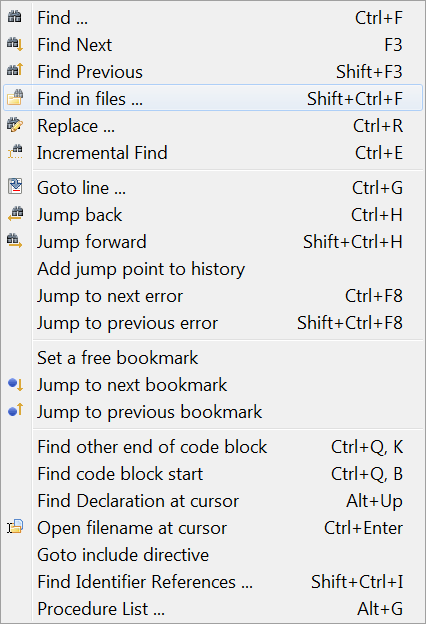
- Cerca: Simile alle funzionalita' in quasi tutti gli editor di testo: Visualizza una finestra di dialogo pop-up che permette l'inserimento di una stringa di testo per la ricerca con opzioni come case sensitive, parole intere, origine, visibilita e direzione di ricerca.
- Trova successivo, Trova precedente: Cerca nuovamente il testo inserito precedentemente nella direzione specificata.
- Trova nei file: Cerca la stringa di testo all'interno dei file: pop-up dialog with options all open files, all files in project, or all directories; masks available for selecting file types.
- Find in files: Search for text string in files: pop-up dialog with options all open files, all files in project, or all directories; masks available for selecting file types.
- Replace: Similar to Find; shows pop-up dialog with place to enter search text string and replacement text, and options for case sensitivity, direction etc.
- Incremental find: Search for the string while you are entering the search string. Example: after you choose "Incremental Find" if you press "l" the first "l" will be highlighted. If then you press "a", the editor will find the next "la" and so on.
- Vai alla linea: Muove il cursore di editing su una specifica linea del file.
- Salta indientro: Salta alla posizione precedente. Ogni volta, saltando in un errore o cercando una dichiarazione l'ide salva la posizione corrente. Con questa funzione puoi saltare indietro con la cronologia.
- Salta avanti: Salta alla posizione successiva.
- Aggiunge un salto alla cronologia: Aggiunge la posizione corrente alla cronologia dei salti.
- Visualizza cronologia salti: Visualizza la lista dei jump points: Non ancora implementato.
- Salta al prossimo errore, Salta all'errore precendete: Jump to the positions in the source file of the next or previous reported error.
- Set a free bookmark: mark the current line where the cursor is located with the next available (free) numbered bookmark, and add this to the list of bookmarks. Note that a pop-up menu (obtained by right-clicking with the mouse on the appropriate line of the source file) gives a larger range of Bookmark options, allowing the number of a bookmark to be specified, or allowing the user to jump to a numbered bookmark, not just the next or previous ones.
- Jump to next bookmark, Jump to previous bookmark: Jump to next or previous bookmark in the numerical sequence.
- Find other end of code block: If positioned on a begin, finds the corresponding end or vice versa.
- Find code block start: Moves to the begin of the procedure or function in which the cursor is placed.
- Find Declaration at cursor: Finds the place at which the selected identifier is declared. This may be in the same file or another file already open in the Editor; if the file is not open, it will be opened (so if a procedure or function is declared, for example, in classesh.inc , this will be opened in the Editor).
- Open filename at cursor: Opens the file whose name is selected at the cursor. Useful for looking at Include files or the files containing other Units used in the project.
- Goto include directive: If the cursor is positioned in a file which is Included in another file, goes to the place in the other file that called the Include file.
'''
- Find Identifier References: Produces a list of all the lines in the current file, or the current project or all attached files, in which an identifier is mentioned.
- Rename Identifier: Allows developer to rename an identifier. A pop-up menu asks the developer to specify whether renaming is to occur in the current file only, or throughout the project, or in all open or attached files etc. You can even rename the identifier if it occurs in comments. You would use this feature, for example, if the compiler told you that an identifier already existed, so you need a new name for your own identifier.
- Procedure List: Produces a list of all Procedures and Functions in the current file, with the line numbers where they are defined.
The View sub-menu
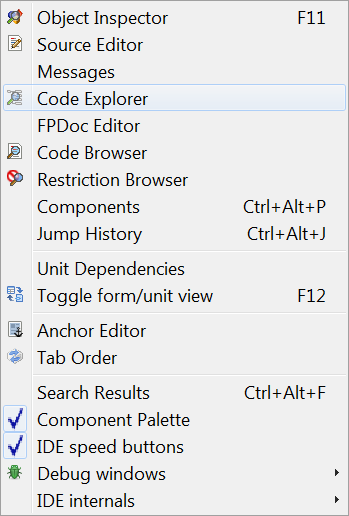
Controls the display of various windows and panels on the screen.
-
Object Inspector: The window that usually occupies the left side of the Desktop, and displays the features of the Form which is on the desktop. Clicking with the mouse on any component of the form will cause the details of that component to be displayed in the Object Inspector. There is a panel at the top which shows the tree-structure of the current project, and the components of the form may optionally be selected in this panel: this will also cause the corresponding details to be displayed in the Object Inspector. The main lower panel has two tabs which allow selection of either Properties or Events to be displayed. Selection of Properties causes features such as name, color, caption, font, size etc to be displayed: there are two columns, the left showing the property, and the right showing the value associated with that property. Selection of Events displays two columns: the left lists the possible events such as MouseClick or KeyDown associated with that component, and the right shows the action that results from that event. If there is no action defined, then clicking in the appropriate box or on the ...
button causes the Source Editor to be displayed, with the cursor already positioned in a dummy Procedure declaration, waiting for event-defining code to be typed in.
-
Source Editor: The main window in which source code is edited. Its behaviour is very like that of most other graphical text editors, so that the mouse can move the cursor over the displayed text, and clicking with the left mouse button while dragging the mouse will select and highlight text. Right clicking with the mouse displays a pop-up menu, it includes the usual Edit Cut, Copy or Paste functions, Find Declaration and Open File at Cursor. The top of the Source Editor window has a number of tabs, corresponding to the files that are open for the current project; clicking on any tab makes that file visible, and you can move easily from file to file, copying and pasting between files and performing most of the normal editing functions. The Source Editor performs color syntax highlighting on the code, with different colors for punctuation marks, comments, string constants etc. It will also maintain the level of indentation from line to line as you type in code, until you change the indentation. The function and appearance of the Source Editor are very configurable from the Main Menu by selecting Environment -> Editor options and then selecting one of several tabs in the pop-up dialog box.
-
Code Explorer: A window usually placed on the right of the Desktop which displays, in tree form, the structure of the code in the current unit or program. It usually opens with just the Unit name and branches for Interface and Implementation sections, but clicking on the +
box to the left of any branch will open up its sub-branches or twigs, in more and more detail until individual constants, types and variables are displayed as well as procedure and function declarations. If you change the file displayed in the main Source Editor window, you need to click on the Refresh button of the Code Explorer to display the structure of the new file.
-
Units...: Opens a pop-up dialog window with a list of the unit files in the current project.Clicking with the mouse on a filename selects that file; click on Open to display that file in the Source Editor. Checking the Multi box allows several files to be selected simultaneously, and they will all be opened in the Source Editor (but only one at a time will be displayed). This Menu Option is rather like the Project -> Project Inspector option, but only displays the list of Unit files and allows them to be opened.
-
Forms...: Opens a pop-up dialog window with a list of the Forms in the current project, and allows the selection of one or more of them for display.
-
View Unit Dependencies: Opens a pop-up dialog window that shows, in a tree-like manner, the structure of dependencies of the currently open unit file. Most of the files listed as dependencies will have their own +
boxes, which allow the dependencies of the individual files to be explored, often in a highly recursive manner.
-
Toggle form / unit view F12: Toggles whether the Source Editor or the current Form is placed on the top layer of the Desktop, and given focus. If the Source Editor has focus, then you can edit the source code; if the Form is given focus, you can manipulate the components on the desktop and edit the appearance of the Form. The easiest way to toggle the display between Editor and Form is to use the F12 key on the keyboard, but the same effect is achieved by selecting this option on the Main Menu.
-
Messages: A window that displays compiler messages, showing the progress of a successful compilation or listing the errors found.
-
Search Results: A window that displays the results of find in files.
-
Debug windows: Opens a pop-up menu with several options for operating and configuring the Debugger. See below where the debugger is described.
The Project sub-menu
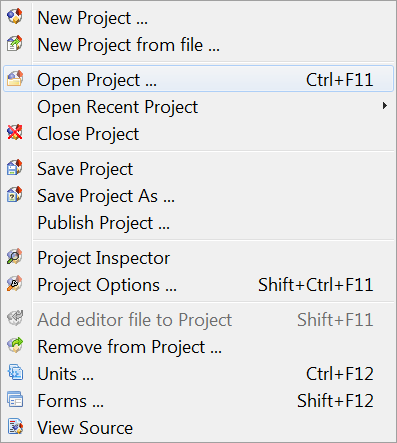
- New Project: Create a new project. A pop-up dialog window appears offering a choice of types of project to create.
- New Project from file: A Navigation dialog window appears, alowing selection of a file from which to create a new project.
- Open Project Open a project which has already been created and saved. A navigation dialog appears with a list of Lazarus Project Information (.lpi) files from which a project may be chosen.
- Open Recent Project: Displays a pop-up list of recent projects on which you have been working, and allows selection of one of these.
- Save Project: Similar to File -> Save: all the files of the current project are saved; if they have not previously been saved, there is a prompt for filename(s)- similar to Save Project As...
- Save Project As...: Prompts for filename to save project. A default filename of Project1.lpi is offered, but you should choose your own filename. Lazarus will not permit you to use the same name for the Project file and the Unit File (see below).
- Publish Project: Creates a copy of the whole project. If you want to send someone just the sources and compiler settings of your code, this function is your friend. A normal project directory contains a lot of information. Most of it is not needed to be published: the .lpi file contains session information (like caret position and bookmarks of closed units) and the project directory contains a lot of .ppu, .o files and the executable. To create a lpi file with only the base information and only the sources, along with all sub directories use "Publish Project". In the dialog you can setup the exclude and include filter, and with the command after you can compress the output into one archive. See Lazarus IDE Tools
- Project Inspector: Opens a pop-up dialog with a tree-like display of the files in the current project. Allows you to add, remove or open selected files, or change options of the project.
- Project Options...: Opens a pop-up dialog window with tabs for setting options for Application (Title, Output Target file name), Forms (allowing you to select among the available forms, make them Auto-create at start of application) and Info (specifying whether editor information should be saved for closed files, or only for project files).
- Compiler options ...: (Recently moved here from the Run Menu). Opens a multi-page tabbed window which allows configuration of the compiler. Tabs include Paths which allows definition of search paths for units, include files, libraries etc, as well as allowing choice of widget type for the forms (gtk, gnome, win32); Parsing which allows choice of rules for parsing source programs, Code which allows choice of optimisation for faster or smaller programs, choice of target processor, types of checks, heap size etc; Linking allowing choice of whether or how to use debugging, static or dynamic libraries, and whether to pass options through to the linker; Messages to define what type of messages should be generated during error conditions; Other which allows decision to use default configuration file (fpc.cfg) or some other file; Inherited which shows a tree structure diagram to indicate how options have been inherited from units already incorporated; Compilation which allows definition of commands to be executed before or after the compiler is launched and can allow use of Make files.
- Add editor file to Project: Add the file currently being edited to the Project
- Remove from Project: Gives a pop-up menu of files available for removal from project.
- View Source: No matter which file you are editing, takes you back to the main program file (.lpr)or the main .pas file if there is no .lpr.
- View ToDo List:Opens a dialog box with a list of ToDo items associated with this project. This will list any ToDo comments in your project (lines commencing //TODO), and any others in the Lazarus units you have used. You need to Refresh the ToDo items in the dialog (using arrow symbol button of toolbar) before new 'ToDos' appear. The first column of the ToDo list contains numbers you have allocated to your ToDo comments; a simple //TODO comment will appear as a zero, but a comment of //TODO999 (for example) will place the number 999 in the first column. Remember there should be no spaces on the line before //TODO and ToDo comments added after the last save will not be shown!
The Run sub-menu
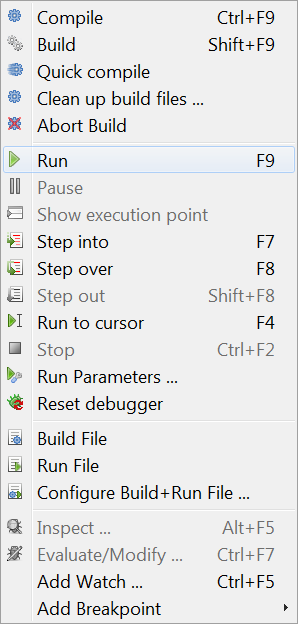
- Build: Causes Lazarus to build (ie compile) any files in the project that have been changed since the last build.
- Build all: Builds all files in the project, whether or not there have been any changes.
- Abort build: Stop the build process once it is running - either you have remembered that you did something silly and want to stop the build, or the system seems to be taking far too long and something is obviously wrong.
- Run: This is the usual way to launch the compiler and, if compilation is successful, to start execution of the application. What actually happens is that Lazarus saves a copy of your files, then starts the compiler and linker, then begins execution of the final linked binary program.
- Pause: Suspend execution of the currently running program. This may allow you to inspect any output that has been generated; execution may be resumed by selecting Run again.
- Step into: Used in conjunction with the debugger, causes execution of the program one step at a time up to a bookmarked point in the source.
- Step over: Causes stepwise execution up to the statement marked, then skips the marked statement, and continues execution at normal speed. Useful in trying to isolate a statement that introduces a logical error.
- Run to cursor: Causes execution at normal speed (ie NOT one statement at a time) until the statement is reached where the cursor is located; then stops. Resume execution at normal speed by selecting Run.
- Stop: Cease execution of the running program. Cannot be resumed by selecting Run; this will start the program again from the beginning (re-compiling if necessary).
- Run Parameters: Opens a multi-page pop-up window which allows command-line options and parameters to be passed to the program to be executed; allows selection of display to run program (eg a remote X terminal may be used in Linux); some system Environment variables may be overridden.
One very important use of this sub-menu is to activate a terminal window in which conventional Pascal console input/output is displayed. If you are developing a console-mode Pascal program (ie one that doesn't use the Graphical User Interface with its forms, buttons and boxes) then you should check the box for "Use launching application". The first time you do this and try the Compile/Run sequence, you will probably get a rude message to say
"xterm: Can't execvp /usr/share/lazarus//tools/runwait.sh: Permission denied".
If this happens, you need to change the permissions on the appropriate file (for example using chmod +x filename, or using the Windows utility for changing permissions); you might have to do this as root. After this, each time you launch you program, a console box will appear and all your text i/o (readln, writeln etc) will appear in it.
After your program has finished execution, a message "Press enter" appears on the screen. Thus any output your program generated will remain on the screen until you have had a chance to read it; after you press 'enter' the console window closes.
Note: as for the current version, there is no prepared console command for Windows users. Until the Lazarus team adressess that, the following line should work (on WinXP -- someone please update for other Windowses)
C:\Windows\system32\cmd.exe /C ${TargetCmdLine}
See the separate tutorial on Console Mode Pascal programming.
- Reset debugger: Restores the debugger to its original state, so that breakpoints and values of variables etc are forgotten.
- Build file: Compile (build) just the file that is currently open in the Editor.
- Run file: Compile, link and execute just the currently open file.
- Configure Build + Run File: Opens a multi-page tabbed window with options to allow for build of just this file when Build Project is selected, allows selection of the working directory, the use of various Macros, etc. Then Builds and Runs the file.
These last three options enable you to open (and maintain) a test project. Use File -> Open to open an .lpr file, pressing cancel on the next dialog to open this file as "normal source" file.
The Package sub-menu
- Open Package: Displays a list of installed packages, with an invitation to open one or more of them, or to select various general or compiler options.
- Open Package File: Open one of the files in the selected package.
- Open Recent Package: Open a package that was opened recently.
- Add Active Unit to Package: Place the unit file (currently in the editor) into a package.
- Package Graph: Displays a graph showing the relationships of the packages currently being used (if you aren't using any other packages, the Lazarus package and the FCL and LCL will be displayed).
- Configure custom components: If you have created some components, allows you to configure them.


The Tools sub-menu
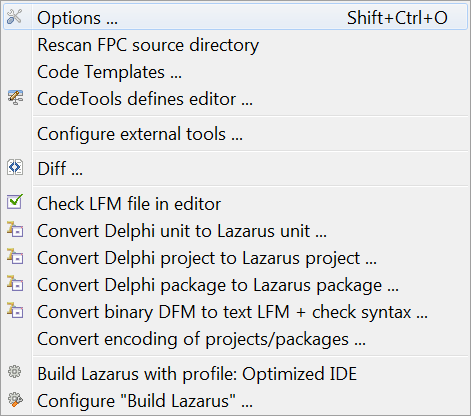
- Configure custom tools: Allows the user to add various external tools (usually macros) to the toolkit
- Quick syntax check: Perform a quick check of the syntax in your source file without actually compiling anything. Essential step in developing long or complicated programs, where you don't want to waste time compiling if the code is wrong.
- Guess unclosed block: useful utility if you have a complex nested block structure and you have left out an 'end' somewhere
- guess misplaced IFDEF/ENDIF: useful if there is a complex or nested macro structure and you think you have left out an ENDIF directive
- Make resource string: Makes the selected string a resource string by placing it in the resourcestrings section. An advantage of resource strongs is you can change them without the need to recompile your project!
- Diff: Allows comparison between two files (or, usually, two versions of the same file) to find differences. Options to ignore white space at beginning or end of lines or differences in line termination: CR+LF versus LF). Useful for checking if there have been changes since last CVS update etc.
- Check LFM file in editor: Allows inspection of the LFM file which contains the settings that describe the current form
- Convert Delphi unit to Lazarus unit: Helps in porting Delphi applications to Lazarus; makes the necessary changes to the source file. See Lazarus For Delphi Users and Code Conversion Guide.
- Convert DFM file to LFM: For porting from Delphi to Lazarus: converts the Form Description files from Delphi to Lazarus. See Lazarus For Delphi Users and Code Conversion Guide.
- Build Lazarus: Launches a re-build of Lazarus from the most recently downloaded or updated SVN files. Hit the button and sit back to watch it happen! (track the process on your Messages window).
- Configure "Build Lazarus": Allows the user to determine which parts of Lazarus should be re-built, and how. For example, you could select to have just the LCL re-built, or to have everything except the examples built; you can select which LCL interface to use (ie which set of widgets), and you can select the target operating system and specify a different target directory.
The Environment sub-menu
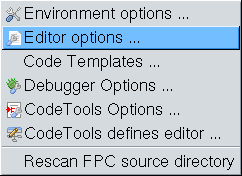
- Environment options: Displays a multi-page window with tabs for
- Files - allowing the user to specify path to default directory, compiler, source directory and temporary directory for compilation;
- Desktop - options for Language, Auto save behaviour, saving desktop properties, hints for component palette and speed buttons;
- Windows, to allow specification of size and behaviour of the various windows;
- Form Editor - choose colours for editing forms;
- Object Inspector - choose colour and height of items;
- Backup - specify how to backup files when editing;
- Naming - specify what extension to use in naming pascal files ('.pp' or '.pas'), whether to save files with names in lowercase, whether to perform auto-delete or auto-rename.
- Editor options: Multi-page window, with tabs for
- General - determines behaviour like auto-indent, bracket highlighting, drag-drop editing, scrolling, syntax highlighting, showing hints, size of block indent and tabs, limit of Undo;
- Display - options for showing line numbers, presence of gutters, size and type of font for editor, and contains a preview panel showing the colours of the various syntax features such as comments, directives, punctuation, errors and breakpoints;
- Key Mappings - options to select Lazarus or Turbo Pascal scheme;
- Color - allows choice of colour scheme for text features, for a number of language types such as Object Pascal, C++, Perl, HTML, XML and shell scripts. It shows preview panel again (for whichever language is selected);
- Code Tools - allows selection of features like Identifier Completion, tooltips, specification of template file names, specific templates for code completion.
- Debugger Options: Multi-page window with tabs for
- General - choose debugger: none, GNU debugger (gdb) or gdb through SSH, specify search paths for debuggers,and specific options for chosen debugger;
- Event log - specify whether to clear log on run, and which messages to display;
- Language Exceptions - select which exceptions can be ignored;
- OS Exceptions - allows user to add certain signals which apply to current operating system (not implemented).
- Code Tool Options: Multi-page window, tabs for
- General - Allows entry of additional source search paths, specify Jumping Method;
- Code Creation - determines whether created code is added before or after certain features;
- Words - determines whether Pascal keywords are to be entered in upper or lower case, or as Capitalised Words;
- Line Splitting - establish rules about where lines are allowed to be split (before or after punctuation, after keywords etc);
- Space - decide whether a space is to be added automatically before or after certain syntactic features such as keywords or punctuation marks.
- Code Tools Defines Editor: Here you can see all IDE internal definitions to parse sources. You will see all the defines, unit, source, include paths for all source directories. Beginning with the settings of the current FPC, the defines for the Lazarus Source directory, all package directories and project directories.
Most of these settings are auto generated and read only.
- Re-scan FPC Source directory Looks through the directory again. Lazarus uses the fpc sources to generate correct event handlers and while looking for declarations. If somebody changes the directory in the environment options, then this directory is rescanned, to make sure lazarus uses the version stored in that location. But if this directory has changed without lazarus noticing, then you may get some errors when designing forms or doing "Find declaration". If you get such an error, you can do two things:
- Check the fpc source directory setting in the environment option.
- Re-scan FPC source directory.
The Windows sub-menu
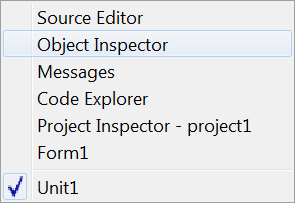
Contains a list of the currently opened files and the available windows such as Source Editor, Object Inspector and Project Inspector. Clicking on the name of one of the windows brings it to the foreground and gives it focus.
The Help sub-menu
At present this has three selections:
- Online Help which at present opens a browser window that contains a picture of the running cheetah and a few links to the Lazarus, FreePascal and WiKi websites
- Reporting a bug opens the wiki page, which describe the bug reporting procedure
- Configure Help which opens a pop-up menu with options to select viewers and databases from which to read Help information. This option allows the user to specify either the on-line documents section of the Lazarus-CCR website, some other website containing the documents, or a local store for the documentation (this would eventually become the default, when the Help system is fully developed).
At present by default, if you place your Editor cursor over any keyword from the FreePascal Components Library FCL, the RunTime Library RTL or the Lazarus Components Library LCL, and then press <<F1>> you will be taken by your default browser to the appropriate definition on the website. Be aware that your browser may be located on another desktop on your machine (eg in Linux), and you may not see the information immediately; of course if you are not connected to the internet you cannot get this information. THIS SECTION STILL REPRESENTS WORK IN PROGRESS
- About Lazarus Displays a pop-up box with some information about Lazarus.
Eventually there will be a full on-line Help service, with information about Pascal syntax, the use of the IDE, how to use, modify or create Components, and hints on how to perform certain tasks. This part of the Documentation section (the thing you are currently reading) represents the beginning of the process. We need contributions from anyone who feels able to provide them: the WiKi is very easy to edit.
From the Free Pascal wiki, page "Main menu/it", as it stood on 2021-12-08 after a change by Kupferstecher, out of the wiki's dump of 2024-05-26. Copyright stays with the author who wrote it, according to the old wiki's Licensing page. If you have concerns about this material, message the admin.
Talk about this page
Nobody has opened a bench for this page yet. Sign in to open one.