

IDE Window: Code Explorer
Deutsch · English · Français · Português
Navigation
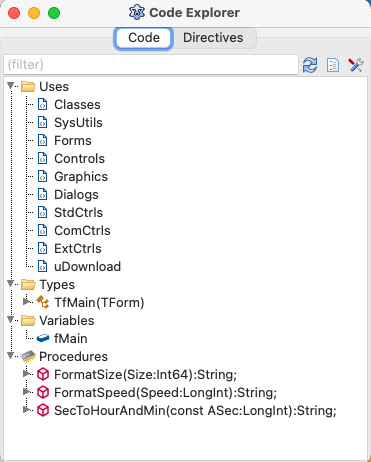
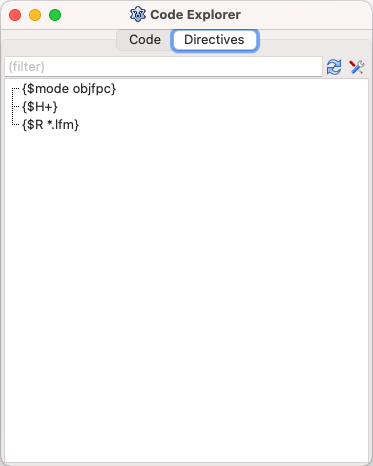
The Code Explorer dialog is reached from the Lazarus IDE Main Menu > View > Code Explorer menu item.
Overview
The Code Explorer dialog has two tabs: Code and Directives. The Code tab shows the Pascal structure - types, variables, constants, classes, etc and the Code Observer. The Directives tab shows the compiler directives structure - $MODEs, $IFDEFs, $DEFINEs, $INCLUDEs, etc.
The Code Explorer dialog usually opens with the 'Code tab displaying the Unit name and branches for Interface and Implementation sections, but clicking on the box to the left of any branch will open up its sub-branches, in more and more detail until individual constants, types and variables are displayed as well as procedure and function declarations. If you change the file displayed in the main Source Editor window, you need to click on the Refresh button of the Code Explorer to display the structure of the new file.
Double click on the nodes to jump to the corresponding position in the source editor.
HINT: The Code Explorer is a floating window. That means you can leave it open and switch freely between other floating windows like the source editor or the Object Inspector.
Toolbar Buttons
- Filter (text field above treeview): For example 'to' will show all identifiers containing 'to'. Like 'Button', 'IntToStr'.
- Refresh: Click on this toolbar button to rebuild the Code Explorer treeview, forcing the unit currently shown in the source editor to be reparsed. This is useful if you have made changes in the Editor since first opening the Code Explorer window, and you don't have the option to refresh On Idle set.
- Show Source Nodes (code tab only): Click on this toolbar button to...
- Options: This toolbar button opens the dialog for the setup options for configuring the Code Explorer. See the Code Explorer Options dialog for more details.
Context menu - Code tab
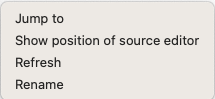
- Jump to: The same effect as double-clicking on a node in the treeview (see above).
- Show position of source editor: Shows the current position in the source editor.
- Refresh: The same effect as clicking on the toolbar Refresh button (see above).
- Rename: Opens the Find or Rename Identifier dialog.
Context menu - Directives tab
- Jump to: The same effect as double-clicking on a node in the treeview (see above).
- Show position of source editor: Shows the current position in the source editor.
- Refresh: The same effect as clicking on the toolbar Refresh button (see above).
From the Free Pascal wiki, page "IDE Window: Code Explorer", as it stood on 2021-02-04 after a change by Trev, out of the wiki's dump of 2024-05-26. Copyright stays with the author who wrote it, according to the old wiki's Licensing page. If you have concerns about this material, message the admin.
Talk about this page
Nobody has opened a bench for this page yet. Sign in to open one.