

IDE Window: Code Explorer Options
Deutsch · English
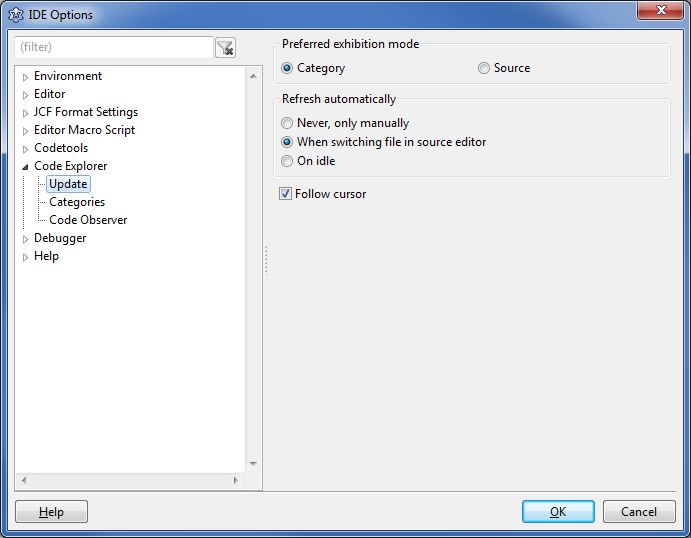 The dialog is explained here: IDE Window: Code Explorer
Update
Preferred Exhibition Mode
- Category - sort all declarations into categories like constants, variables, types, procedures, ...
- Source - show all declarations as they are in the source
Refresh automatically
- Never, only manually - only when pressing the Refresh button
- When switching file in source editor - when switching to another unit
- On idle - whenever the user does not type or move the mouse
Categories
Shows the available categories. Check all that you want to see in the code explorer.
The category Code Observer exists since 0.9.27 and lists uncommon or hard to read code fragments. You can set the details in the next option page.
Code Observer
Complexity
- Long procedures
Lists all procedures with more lines of code than in the edit field to the right. Long procedures are hard to read by others. Use the Extract Procedure tool to split it into several procedures. - Many parameters
Lists all procedures with more parameters than in the edit field to the right. - Many nested procedures
Lists all procedures with more nested sub procedures than in the edit field to the right.
Empty constructs
- Empty procedures
Lists all procedures without code. They can contain comments and directives. The code below will be listed under linux.
begin
  {$IFDEF win32}write;{$ENDIF}
end;- Empty blocks
Lists all empty blocks, like begin..end and repeat..until. Blocks containing comments are not listed. Empty blocks can be endless loops or forgotten to clean up. - Empty class sections
Lists all empty class sections like private, public, protected.
Style
- Unnamed Constants
Lists all literal constants in statements, that means constants that have no name. You can define in the text fields below what should not be listed. - Unsorted visibility
Lists all class sections, that are not sorted. For example if a private section comes behind a public section. - Unsorted members
Lists all class variables, methods and properties that are not sorted alphabetically.
Other
- Wrong indentation
Lists all places with suspicious indentation. For example: In the next example the then statement was accidentally deleted:
for i:=0 to 10 do
  if i=0 then
writeln('');- Published properties without default
Lists all properties without a default value. For example:
published
  property Flag: booolean read FFlag write SetFlag;
Since FPC 2.2.4 such properties are treated as if they have the nodefault specifier. That means they are always saved to the lfm.
- ToDos
Lists alls ToDos. See the ToDo list.
Ignore next unnamed constants
These constants will not be listed in the unnamed category. Examples:
0
1
'a'
'abc'
#3
#$3
Ignore constants in next functions
Constants passed as parameters to the following functions will not be listed in the unnamed category. There are two types. For example:
Write
.ParamByName
Note the point in front of ParamByName.
Result:
Write('A'); // 'A' will be ignored
MemStream.Write('A'); // 'A' will be listed
DataModule1.SQLQuery1.Params.ParamByName('ART_ID').AsString; // will be ignored
ParamByName('ART_ID').AsString; // will be listed
From the Free Pascal wiki, page "IDE Window: Code Explorer Options", as it stood on 2020-07-13 after a change by Arent, out of the wiki's dump of 2024-05-26. Copyright stays with the author who wrote it, according to the old wiki's Licensing page. If you have concerns about this material, message the admin.
Talk about this page
Nobody has opened a bench for this page yet. Sign in to open one.