

IDE Window: Anchor Editor
Deutsch · English · Français · Русский
Navigation
Main Menu > View > Anchor Editor
Using the Anchor Editor
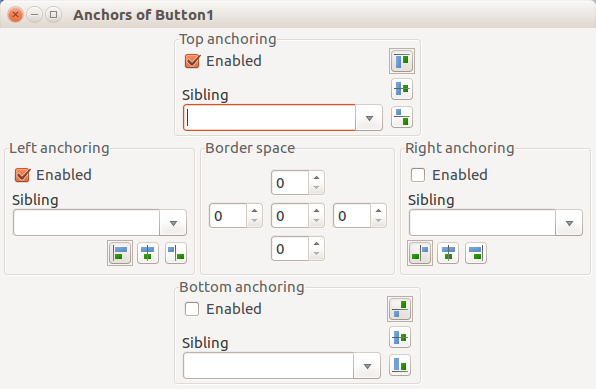
The anchor editor allows the editing of the AnchorSide, Anchors and BorderSpacing properties of the selected controls.
This page describes how the editor works. If you want to know how these properties themselves work, see Anchor Sides.
Hint: This window is a floating window, you can leave it open while switching between designer and anchor editor.
The 'Enabled' checkboxes correspond to the Anchor properties of the control(s). The top side uses the akTop enumeration, the Left side the akLeft enumeration and so forth.
The Sibling is the AnchorSide[xxx].Control property. You can set it to empty (nil), the parent of the control(s) or one of the siblings (controls with the same parent).
The three speedbuttons correspond to the AnchorSides[xxx].Side property.
The borderspacing has five properties: Around, Left, Top, Right and Bottom. The Around property is the center edit field. The Top is the top edit field and so forth.
See also
- Anchor Sides for more detail on using the Anchor Editor.
- Autosize, Layout Automatic control sizing and positioning so it adapts to changes in font, theme and text or other content. Especially helpful for cross-platform applications and multi-language environments.
- High DPI
From the Free Pascal wiki, page "IDE Window: Anchor Editor", as it stood on 2021-02-02 after a change by Trev, out of the wiki's dump of 2024-05-26. Copyright stays with the author who wrote it, according to the old wiki's Licensing page. If you have concerns about this material, message the admin.
Talk about this page
Nobody has opened a bench for this page yet. Sign in to open one.