

IDE Window: Desktops
Desktops
Desktops expand the IDE configuration. They are containers for the following states:
- IDE windows states, positions and sizes
- Window page settings in the environment options
- Completion window size
- IDE Coolbar settings
- Editor Toolbar settings
- Component palette settings
For example, it is possible to make a desktop that shows the Source Editor, Object Inspector and Messages windows.
A "Debug" desktop simplifies running an application for debugging. For example, the debug desktop can additionally show the "Call Stack" window and hide the Object Inspector and other windows that are not needed when debugging.
Dialog "Manage desktops"
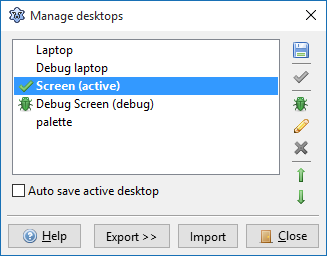
This dialog can be called from the IDE's Tools menu. It allows you to create/delete/rename desktops and choose any of them as the debug desktop. It is also possible to export (or import) desktops to (or from) XML files.
If you see "grayed" listbox items, then those grayed-out desktops are incompatible with the current docked/undocked state of the IDE.
From the Free Pascal wiki, page "IDE Window: Desktops", as it stood on 2016-09-26 after a change by HowardPC, out of the wiki's dump of 2024-05-26. Copyright stays with the author who wrote it, according to the old wiki's Licensing page. If you have concerns about this material, message the admin.
Talk about this page
Nobody has opened a bench for this page yet. Sign in to open one.