

IDE Window: Package Graph
Navigation
The Package Graph dialog is accessible via the Lazarus IDE Main Menu > Package > Package Graph.
Overview
The package graph shows the currently loaded packages and which package uses which, and which package is used by which.
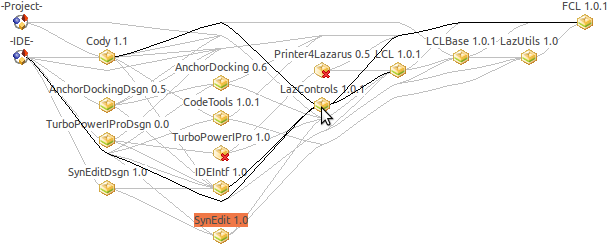
Move the mouse cursor over nodes and edges to highlight dependencies.
Click on a package to see some general information about it in the window below.
Usage
Double click on a package to open the Package Editor for this package.
Double click on a project to open the Project Inspector.
Double click on the IDE to configure the installed packages.
Packages are automatically unloaded, when they are not used anymore.
State
A package can have one of the following states:
- Installed - the package is installed. An installed package is compiled into the IDE and its classes are available in the component palette.
- AutoCreated - the package is part of the IDE, it can not be uninstalled.
- Install on next start - the package is not yet installed, but will be compiled into the IDE and will be installed after exiting the IDE and starting the new IDE. You compile a new IDE in Tools -> Build Lazarus.
- Uninstall on next start (unless needed by an installed package) - This package was installed automatically because it was needed by a package that was installed normally. When the normally installed package is uninstalled this package will be uninstalled as well.
From the Free Pascal wiki, page "IDE Window: Package Graph", as it stood on 2021-02-02 after a change by Trev, out of the wiki's dump of 2024-05-26. Copyright stays with the author who wrote it, according to the old wiki's Licensing page. If you have concerns about this material, message the admin.
Edited on wiki.freepascal.org by 5 people, 2006–2021
From the official wiki's backup of 26 May 2024: who edited this page there, and when. Edits made there after that date were not recorded, and the earlier versions are not shown here; the main page says why.
| When | Who | What changed |
|---|---|---|
| Mattias2 | ||
| Mattias2 | ||
| Swen | (minor) | |
| Swen | (minor) | |
| Mattias2 | State | |
| Mattias2 | ||
| Mattias2 | ||
| Jwdietrich | ||
| FTurtle | (minor) | |
| FTurtle | ||
| Trev | Add linked navigation breadcrumbs; add page links for options; | |
| Trev | Navigation: Tweak text (minor) |
Talk about this page
Nobody has opened a bench for this page yet. Sign in to open one.