

BGRABitmap tutorial 11
Deutsch · English · Español · Français
This tutorial shows how to combine transformations. A sample project can be found in BGRABitmap AggPas.
Create a new project
Create a new project and add a reference to BGRABitmap, the same way as in the first tutorial.
Affine transformation of a radial gradient
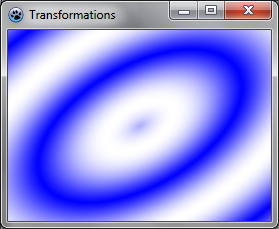
Here is an affine transformation applied on a gradient like we did with textures:
uses BGRAGradientScanner, BGRATransform;

procedure TForm1.FormPaint(Sender: TObject);
var image: TBGRABitmap;
    grad: TBGRAGradientScanner;
    affine: TBGRAAffineScannerTransform;
begin
  image := TBGRABitmap.Create(ClientWidth,ClientHeight, BGRABlack );

  grad := TBGRAGradientScanner.Create(BGRA(0,0,255),BGRAWhite,gtRadial,PointF(0,0),PointF(1,0),True,True);

  affine := TBGRAAffineScannerTransform.Create(grad);
  affine.Scale(150,80);
  affine.RotateDeg(-30);
  affine.Translate(ClientWidth/2, ClientHeight/2);

  image.Fill(affine);

  affine.free;
  grad.free;

  image.Draw(Canvas,0,0,True);
  image.free;
end;
The base gradient is radial, centered at origin (0,0), of radius 1.
The affine transformation does the following:
- stretch the gradient to a size of 150x80
- rotate 30 degrees in counterclockwise direction
- center it in the form
The Fill instruction draws the result into the image.
Run the program
You should obtain a blue and white ellipse gradient.
Combine with a twirl
We can add another transformation to it like this:
var image: TBGRABitmap;
    grad: TBGRAGradientScanner;
    affine: TBGRAAffineScannerTransform;
    twirl: TBGRATwirlScanner;
begin
  image := TBGRABitmap.Create(ClientWidth,ClientHeight, BGRABlack );

  grad := TBGRAGradientScanner.Create(BGRA(0,0,255),BGRAWhite,gtRadial,PointF(0,0),PointF(1,0),True,True);

  affine := TBGRAAffineScannerTransform.Create(grad);
  affine.Scale(150,80);
  affine.RotateDeg(-30);
  affine.Translate(ClientWidth/2, ClientHeight/2);

  twirl := TBGRATwirlScanner.Create(affine,Point(ClientWidth div 2, ClientHeight div 2),100);
  image.Fill(twirl);
  twirl.Free;

  affine.free;
  grad.free;

  image.Draw(Canvas,0,0,True);
  image.free;
end;
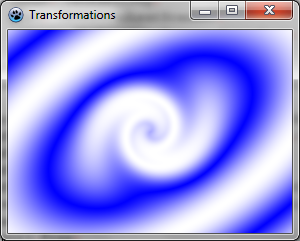
Here, we simply create a twirl transformation applied to the previous one, and fill with it.
Run the program
Now the center of the gradient is twirled.
Use a custom scanner
We may want to create our own gradient generator. Here is for example a multiply gradient:
type
  { TBGRAMultiplyScanner }

  TBGRAMultiplyScanner = class(TBGRACustomScanner)
    function ScanAt(X, Y: Single): TBGRAPixel; override;
  end;

{ TBGRAMultiplyScanner }

function TBGRAMultiplyScanner.ScanAt(X, Y: Single): TBGRAPixel;
  function cycle512(value: integer): integer; inline;
  begin
    result := value and 511;
    if result >= 256 then result := 511-result;
  end;

var
  mul: integer;
begin
  mul := cycle512(round(x*y));
  result := BGRA(mul,mul,mul,255);
end;
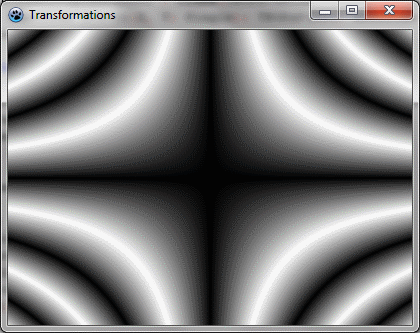
It is derived from TBGRACustomScanner to be used for filling, and the ScanAt function is overridden. It computes the product of both coordinates and make a cycle of 512 with it (from 0 to 255 and then from 255 down to 0).
Let's draw it on the screen with a simple affine transformation:
var image: TBGRABitmap;
    grad: TBGRAMultiplyScanner;
    affine: TBGRAAffineScannerTransform;
begin
  image := TBGRABitmap.Create(ClientWidth,ClientHeight, BGRABlack );

  grad := TBGRAMultiplyScanner.Create;
  affine := TBGRAAffineScannerTransform.Create(grad);
  affine.Scale(6,4);
  affine.Translate(ClientWidth/2, ClientHeight/2);
  image.Fill(affine);
  affine.free;
  grad.free;

  image.Draw(Canvas,0,0,True);
  image.free;
end;
Run the program
It should look like this:
Make it beautiful
Add some colors by modifying the ScanAt procedure of the multiply gradient:
var
  mul: integer;
begin
  mul := round(x*y);
  result := BGRA(cycle512(round(x*10)),cycle512(mul),cycle512(round(y*10)),255);
end;
The red and blue intensities are filled with a cycle of x and y positions.
And add some rotation:
  affine := TBGRAAffineScannerTransform.Create(grad);
  affine.Scale(6,4);
  affine.RotateDeg(-30);
  affine.Translate(ClientWidth/2, ClientHeight/2);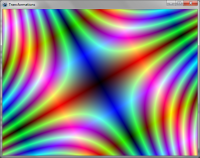
Previous tutorial (texture mapping) Next tutorial (text functions)
From the Free Pascal wiki, page "BGRABitmap tutorial 11", as it stood on 2023-05-20 after a change by Circular, out of the wiki's dump of 2024-05-26. Copyright stays with the author who wrote it, according to the old wiki's Licensing page. If you have concerns about this material, message the admin.
Talk about this page
Nobody has opened a bench for this page yet. Sign in to open one.