

BGRABitmap tutorial 11/es
Deutsch · English · Español · Français
Esta tutoría muestra como combinar transformaciones.
Crear un nuevo proyecto
Crea un nuevo proyecto y añade referencia a BGRABitmap, de la misma forma que en el primer tutorial.
Transformación afín de un degradado radial
Aquí se aplica una transformación afín en un gradiente como lo hicimos con las texturas:
uses BGRAGradientScanner, BGRATransform;

procedure TForm1.FormPaint(Sender: TObject);
var image: TBGRABitmap;
    grad: TBGRAGradientScanner;
    affine: TBGRAAffineScannerTransform;
begin
  image := TBGRABitmap.Create(ClientWidth,ClientHeight, BGRABlack );

  grad := TBGRAGradientScanner.Create(BGRA(0,0,255),BGRAWhite,gtRadial,PointF(0,0),PointF(1,0),True,True);

  affine := TBGRAAffineScannerTransform.Create(grad);
  affine.Scale(150,80);
  affine.RotateDeg(-30);
  affine.Translate(ClientWidth/2, ClientHeight/2);

  image.Fill(affine);

  affine.free;
  grad.free;

  image.Draw(Canvas,0,0,True);
  image.free;
end;
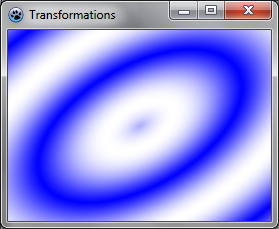
El gradiente de base es radial, con centro en el origen (0,0), de radio 1.
Las transformaciones afines hacen lo siguiente:
- Tramo de la pendiente a un tamaño de 150x80
- Rotar 30 grados en dirección a la izquierda
- Centrar en la forma
La instrucción Fill dibuja el resultado en la imagen.
Ejecuta el programa
Usted debe obtener un gradiente de elipse azul y blanco.
Combinar con un giro
Podemos agregar otra transformación de esta manera:
var image: TBGRABitmap;
    grad: TBGRAGradientScanner;
    affine: TBGRAAffineScannerTransform;
    twirl: TBGRATwirlScanner;
begin
  image := TBGRABitmap.Create(ClientWidth,ClientHeight, BGRABlack );

  grad := TBGRAGradientScanner.Create(BGRA(0,0,255),BGRAWhite,gtRadial,PointF(0,0),PointF(1,0),True,True);

  affine := TBGRAAffineScannerTransform.Create(grad);
  affine.Scale(150,80);
  affine.RotateDeg(-30);
  affine.Translate(ClientWidth/2, ClientHeight/2);

  twirl := TBGRATwirlScanner.Create(affine,Point(ClientWidth div 2, ClientHeight div 2),100);
  image.Fill(twirl);
  twirl.Free;

  affine.free;
  grad.free;

  image.Draw(Canvas,0,0,True);
  image.free;
end;
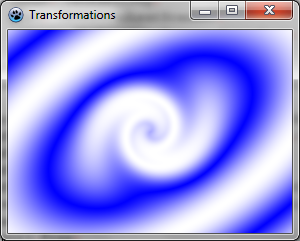
En este sentido, basta con crear una transformación de giro aplicado a la anterior, y rellenar con ella.
Ejecuta el programa
Ahora el centro del gradiente está girado.
Usar un escáner personalizado
Es posible que desee crear un generador de gradientes. Aquí está por ejemplo, un gradiente multiplicador:
type
  { TBGRAMultiplyScanner }

  TBGRAMultiplyScanner = class(TBGRACustomScanner)
    function ScanAt(X, Y: Single): TBGRAPixel; override;
  end;

{ TBGRAMultiplyScanner }

function TBGRAMultiplyScanner.ScanAt(X, Y: Single): TBGRAPixel;
  function cycle512(value: integer): integer; inline;
  begin
    result := value and 511;
    if result >= 256 then result := 511-result;
  end;

var
  mul: integer;
begin
  mul := cycle512(round(x*y));
  result := BGRA(mul,mul,mul,255);
end;
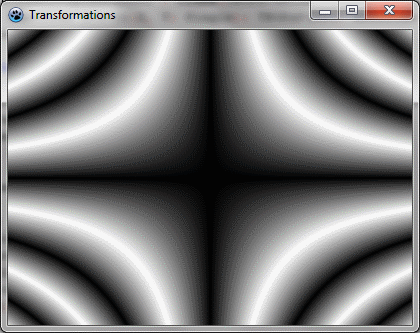
Se deriva de TBGRACustomScanner para ser utilizados para el rellenado y la función ScanAt se anula. Calcula el producto de las dos coordenadas y hace un ciclo de 512 con él (de 0 a 255 y luego a partir de 255 a 0).
Vamos a dibujar en la pantalla con una sencilla transformación afín:
var image: TBGRABitmap;
    grad: TBGRAMultiplyScanner;
    affine: TBGRAAffineScannerTransform;
begin
  image := TBGRABitmap.Create(ClientWidth,ClientHeight, BGRABlack );

  grad := TBGRAMultiplyScanner.Create;
  affine := TBGRAAffineScannerTransform.Create(grad);
  affine.Scale(6,4);
  affine.Translate(ClientWidth/2, ClientHeight/2);
  image.Fill(affine);
  affine.free;
  grad.free;

  image.Draw(Canvas,0,0,True);
  image.free;
end;
Ejecuta el programa
Debería verse como esto :
Que se vea hermoso
Añade algunos colores modificando el procedimiento ScanAt del gradiente multiplicador :
var
  mul: integer;
begin
  mul := round(x*y);
  result := BGRA(cycle512(round(x*10)),cycle512(mul),cycle512(round(y*10)),255);
end;
Las intensidades de rojo y azul están llenos de un ciclo de las posiciones x e y.
Y añade un poco de rotación:
  affine := TBGRAAffineScannerTransform.Create(grad);
  affine.Scale(6,4);
  affine.RotateDeg(-30);
  affine.Translate(ClientWidth/2, ClientHeight/2);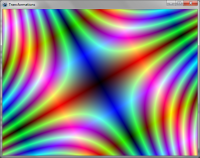
Tutoría anterior (mapeo de texturas) | Siguiente tutoría (funciones de texto)
From the Free Pascal wiki, page "BGRABitmap tutorial 11/es", as it stood on 2020-02-09 after a change by Trev, out of the wiki's dump of 2024-05-26. Copyright stays with the author who wrote it, according to the old wiki's Licensing page. If you have concerns about this material, message the admin.
Edited on wiki.freepascal.org by 6 people, 2011–2020
From the official wiki's backup of 26 May 2024: who edited this page there, and when. Edits made there after that date were not recorded, and the earlier versions are not shown here; the main page says why.
| When | Who | What changed |
|---|---|---|
| Lainz | New page: {{BGRABitmap_tutorial_11}} {{BGRABitmap_tutorial_index/es}} This tutorial shows how to combine transformations. === Crear un nuevo proyecto === Crea un nuevo proyecto y añade referenc... | |
| Lainz | (minor) | |
| Lainz | link: siguiente tutorial (minor) | |
| Circular | Usar un escáner personalizado: rotation later (minor) | |
| Iskraelectrica | (minor) | |
| Lainz | Introducción / Tutoría (minor) | |
| Chronos | ||
| Vincent | Text replace - "delphi>" to "syntaxhighlight>" (minor) | |
| Trev | Fixed syntax highlighting; deleted category already in page template (minor) |
Talk about this page
Nobody has opened a bench for this page yet. Sign in to open one.