

Catalog · How the catalog works
Yutani-Building-better-worlds

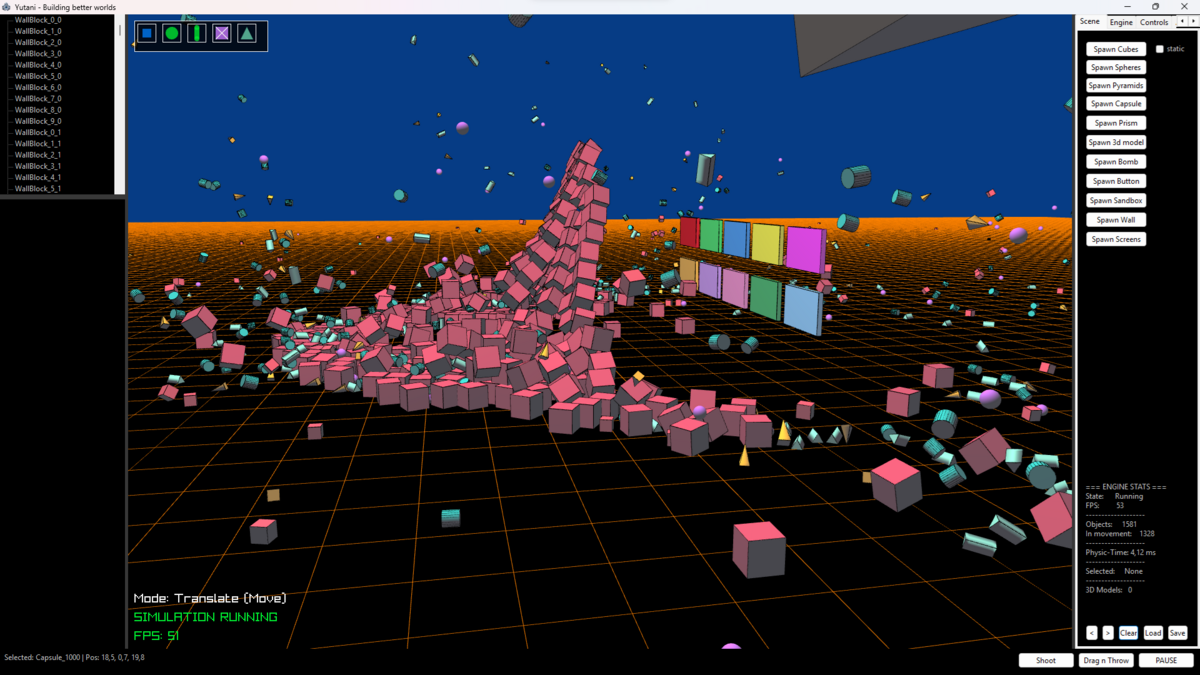
A high-performance, multi-threaded 3D Sandbox & Multimedia Framework for Delphi. Powered by Jolt Physics, Raylib, R3D, SDL3, MiniAudio, TinySoundFont, libmpv, RecastNavigation, VerySimpleLua, GameNetworkingSockets, and Skia4Delphi.
- ★ 3 on GitHub
Anyone may press Interesting, signed in or not. It helps others find this project.
README
Yutani-Building-better-worlds (Alpha v0.649)
A high-performance, multi-threaded 3D Sandbox & Multimedia Framework for Delphi.
Powered by Jolt Physics, Raylib, R3D, SDL3, MiniAudio, TinySoundFont, libmpv, RecastNavigation, VerySimpleLua, GameNetworkingSockets, and Skia4delphi.
Sample video: https://youtu.be/uUjvsre8F4g
(thats the sf2 used in sample video "FluidR3 GM.sf2" get it at https://github.com/urish/cinto/tree/master/media ❗
Welcome to Yutani, a cutting-edge, fully asynchronous 3D Multimedia & Physics Engine written from scratch in Object Pascal.
This framework breaks the boundaries of traditional Delphi development by fusing industry-standard C-libraries into a highly optimized, thread-safe VCL sandbox ecosystem. No bloated form-designers, no legacy overhead—just pure, high-performance spatial engineering.
Started as "sample" in Joltphysics4delphi repo, it got a bit too big, it had to get its own name.
💡 A personal note: To be completely honest, I don't know how far I can get this thing since I am still learning 3D development—I've only been doing real 3D dev for about a month now! But I love the challenge, it's mutating into a giant powerhouse, and I try to push it as far as I possibly can. (And for the first time, I think playing Second Life wasn't totally useless :D)
🛠️ The Tech-Stack Powering the Core:
- 3D Physics Core: Powered by Jolt Physics via a robust, custom multi-threaded wrapper with precise continuous collision detection (CCD).
- Blazing Fast Rendering: Driven by Raylib & r3d, utilizing custom GLSL shaders for advanced lighting and shadows directly on the GPU.
- Procedural Textures & HUD : Fully generated via Skia4Delphi inside memory buffers for crisp, transparent, high-DPI vector interfaces.
- Cinematic Multimedia: Integrated libmpv engine streaming hardware-accelerated video feeds straight into real-time 3D OpenGL textures.
- Input Layer: Multi-threaded SDL3 Gamepad Core featuring button mapping and zero-latency feedback.
- Advanced Audio Engine: A high-performance Tri-engine setup providing complete, asynchronous acoustic control. MiniAudio drives the low-level hardware communication, real-time 3D spatial sound, and HRTF room attenuation. TinySoundFont handles on-the-fly SF2 synthesis for dynamic music sequences and retro soundtracks. SedaiAudio completes the trio as a procedural sound-design laboratory, delivering real-time synthesis (FM, Subtractive, Additive, Wavetable) and Karplus-Strong physical modeling for generative sound effects without asset overhead. (Note: SedaiAudio is interfaces dynamically via sedaiaudio.dll under GPL-3.0, keeping the core Yutani engine framework under Apache-2.0).
- AI Pathfinding & Navigation: We will use RecastNavigation for automated 3D NavMesh generation directly from Jolt geometry, allowing smooth asynchronous entity pathfinding.
- Dynamic Gameplay Scripting: Embedded VerySimpleLua engine to script entity logic, triggers, and game rules at runtime without re-compiling the core.
Status: Work in Progress (Alpha v0.649)
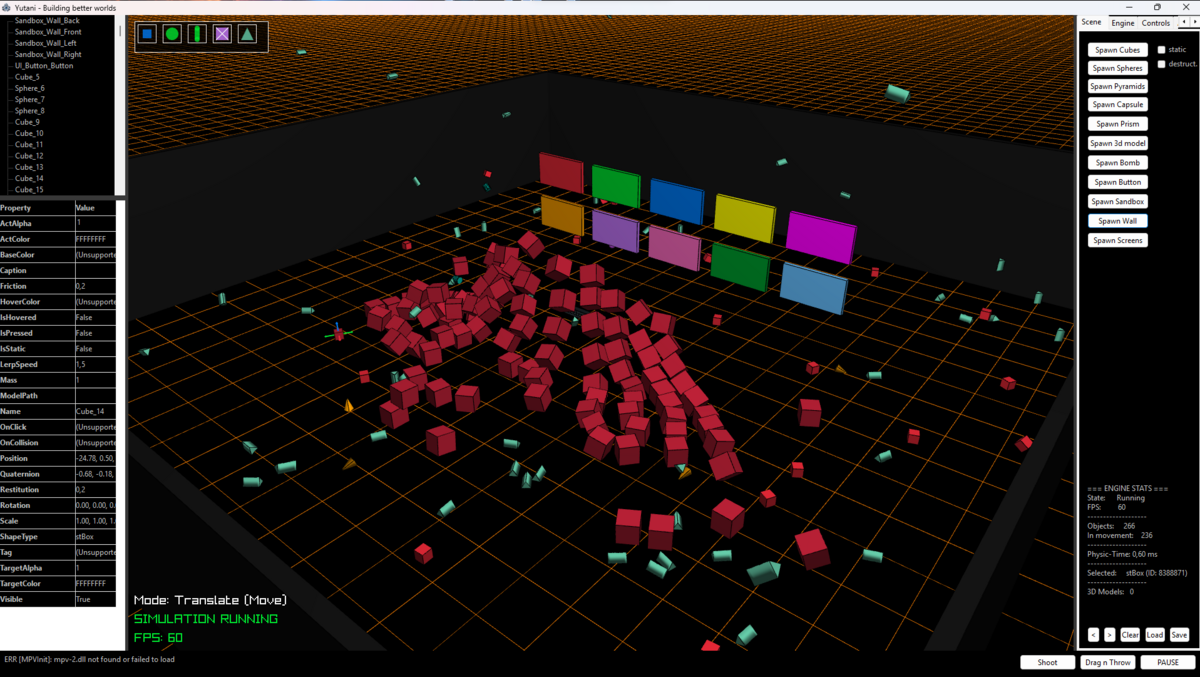
✨ Features
🦾 Core Physics System (Jolt Physics)
- World Simulation: Full asynchronous physics initialization, automated broadphase optimizations, and gravity control.
- Rigid Bodies: Complete state synchronization (
Static,Kinematic,Dynamic) with seamless position, rotation, and custom scale transformations. - Collision Shapes: Native wrappers for Box, Sphere, Capsule, Cylinder, Tapered shapes, Convex Hulls, Compound shapes, Meshes, and Heightfields.
- Physics Interactions: Real-time application of forces, torques, linear/angular impulses, and precise velocity controls.
🔍 Advanced Collision & Queries
- 3D Raycasting: Screen-to-world raycasting for precise object grabbing, context selection, and mouse interaction.
- Shape Casting (Sweeps): Advanced
CastShapeandCollideShapeimplementations for swept-sphere and swept-capsule testing, crucial for smooth character navigation. - Table-based Layering: Explicit object filtering via highly customized BroadPhase and ObjectLayer tables.
- Collision Groups: GroupFilter and SubGroupID management to enforce complex collision rules (e.g., ignoring attached attachments or inner ragdoll constraints).
🚀 Complex Engine Subsystems
- Virtual Characters & Avatars: Fully integrated
CharacterVirtualbindings with customized step-up/stair-walking algorithms and isolated rotation axis constraints (locking X/Z to keep characters perfectly upright). - Ragdolls & Skeletons: Full skeleton joint hierarchy mapping (Hinge, SwingTwist, Cone) with runtime ragdoll activation/deactivation.
- Vehicles: Deep controller mechanics supporting engines, transmissions, anti-roll bars, differential gears, and custom track/wheel physics for cars and motorcycles.
- Soft Bodies: Foundation for deformable objects built directly from custom vertex and edge maps.
- AI Navigation & Pathfinding (Recast/Detour): Automatic voxelization of 3D world meshes into walkable NavMeshes. Intelligent spatial steering, agent avoidance, and dynamic corridor paths for virtual entities.
- Runtime Scripting Interface (Lua): Full binding layer exposing engine functions, entity transforms, and sound triggers to lightweight Lua scripts for instant gameplay prototyping.
🎮 Input & Spatial Audio (SDL3, MiniAudio & TinySoundFont)
- **Threaded Input Core: Multi-threaded SDL3 Gamepad integration supporting hot-plugging, custom axis mapping, and deadzone stabilization.
- **3D Positional Acoustics: Audio rendering via MiniAudio4Delphi for real-time sound attenuation and space-aware acoustic feedback on physics impacts.
- **Dynamic Soundtrack Synthesis: Integration of TinySoundFont4Delphi allowing on-the-fly MIDI sequencing and .sf2 SoundFont playback directly within the 3D environment.
🪐 Multimedia & Video Pipeline (libmpv)
- Direct GPU Texture Mapping: Utilizes
libmpv's native OpenGL context rendering (libMPV.Render_gl.pas) to stream video feeds directly into Raylib 3D textures without crushing CPU or VRAM bandwidth. - Spatial Interactive Screens: Interact with floating video panels using raycasts, move them in 3D space, and toss them around with Jolt physics while videos keep playing live.
🎨 Procedural UI, HUD & Texturing (Skia4Delphi)
- Zero-Image Architecture: Entirely procedural 2D/3D asset pipeline. No heavy
.pngor.bmpfiles needed—everything is drawn mathematically in memory. - High-DPI Vector HUD: Crisp, modern, transparent HUD elements and custom menus drawn via Skia, avoiding restrictive legacy Win32 VCL styling blocks.
- Procedural 3D Textures: Generate dynamic signs, indicators, and textures on the fly and map them directly onto Jolt rigid bodies.
🛠️ Editor, Environment & Tooling
- Full Local Gizmo System: Local-space Translate, Rotate, and Scale Gizmos (toggled via CTRL) that scale dynamically to remain grabbable at any distance.
- Object Inspector (RTTI): Fully asynchronous property editor using Delphi RTTI. Modify Mass, Friction, Restitution, Scale, and Position live from a dark-themed TStringGrid.
- Safe Editing System: Dynamic detach-on-grab mechanism that safely pulls bodies out of the physics simulation during gizmo scaling and safely re-attaches them without physics jitters.
- Advanced Shading & Weather: Custom GLSL shaders for real-time ambient/diffuse shading, moving procedural cloud layers, a horizon-to-zenith gradient skybox, and a full Day/Night progression cycle.
- Dynamic Fake Shadows: Shadow maps that scale in size and fade out realistically based on an object's Y-height.
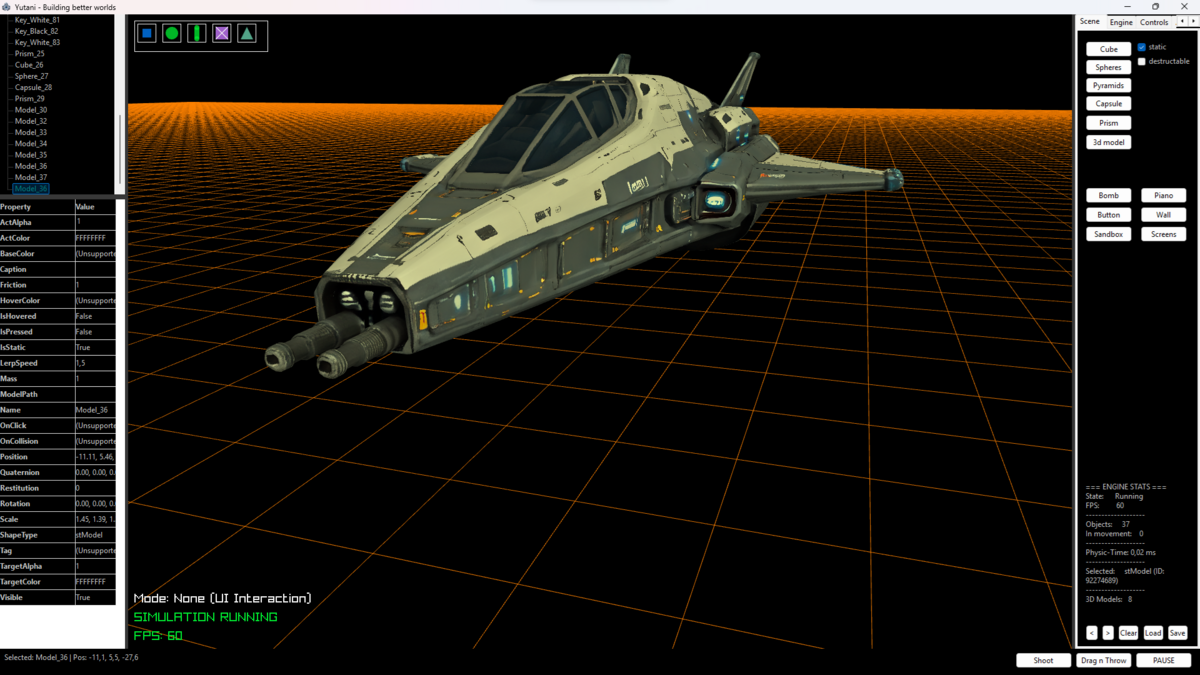
My first spaceship 🤤
slowly getting ready to explore the new universe
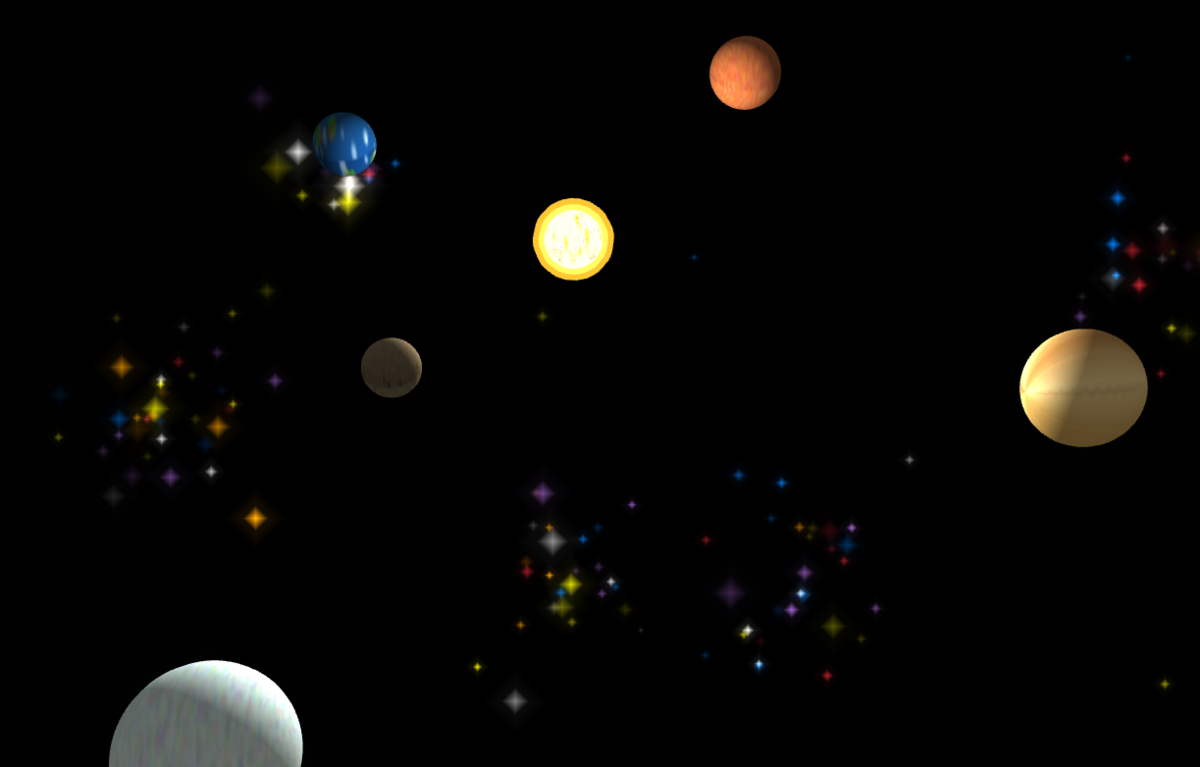
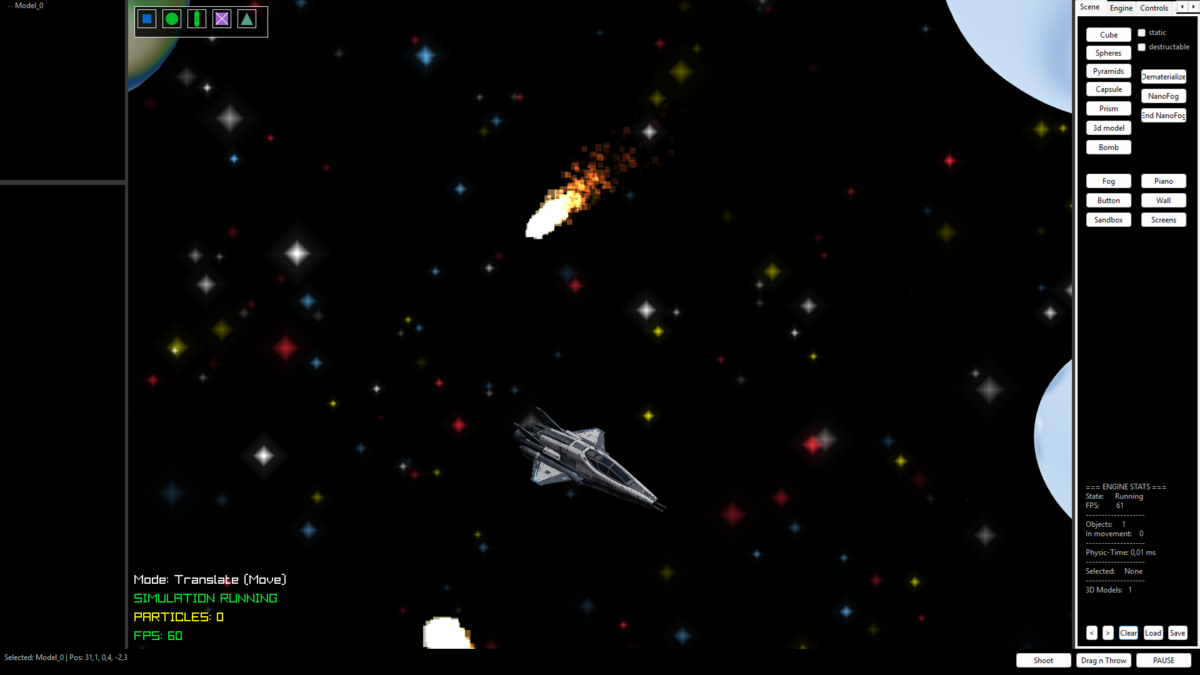
💡 Instabile warp drive reactors: Interstellar flights are currently strictly experimental. The current warp drives cause severe local reality distortions and cognitive perception warps. Planets moving at hyperspeed are not a bug—it’s just the engine frying your brain. Use at your own risk!
⌨️ Controls
- CTRL: Toggle between Move / Rotate / Scale Gizmos
- Middle Mouse Click + Drag: Rotate Editor Camera
- WASD: Move Editor Camera
- Mouse Wheel: Zoom In / Out
- ALT + Q / E: Select previous / next Actor in Hierarchy
- F10 on selected send alive highlighter
- ALT + Left Click — Change focus target of the Third-Person camera to the clicked surface point
- F2 Split screen mode
- ---vehicles---
- F11 posess whatever selected as vehicle & rotate
- Shift & F11 Change control type
- F12 leave posessed vehicle
- CTRL show/hide mouse cursor
- W / S — Pitch (Tilt Up / Down)
- A / D — Yaw (Turn Left / Right)
- R / F — Throttle / Speed Up / Speed Down
- Q / E — Fly up / Down
Exe and sample project included
Latest Changes:
v0.649:
- Refactored TPiano class out of Yutani.Core into Yutani.VCL3D
- Sandbox no longer owns a FPiano reference; TPiano is now instantiated and owned by the caller via TVCL3D.SpawnPiano
- Piano gizmo linking now uses Name='PianoBody' + IsPianoKey scan instead of the FPiano pointer, so the feature keeps working without the sandbox knowing about TPiano
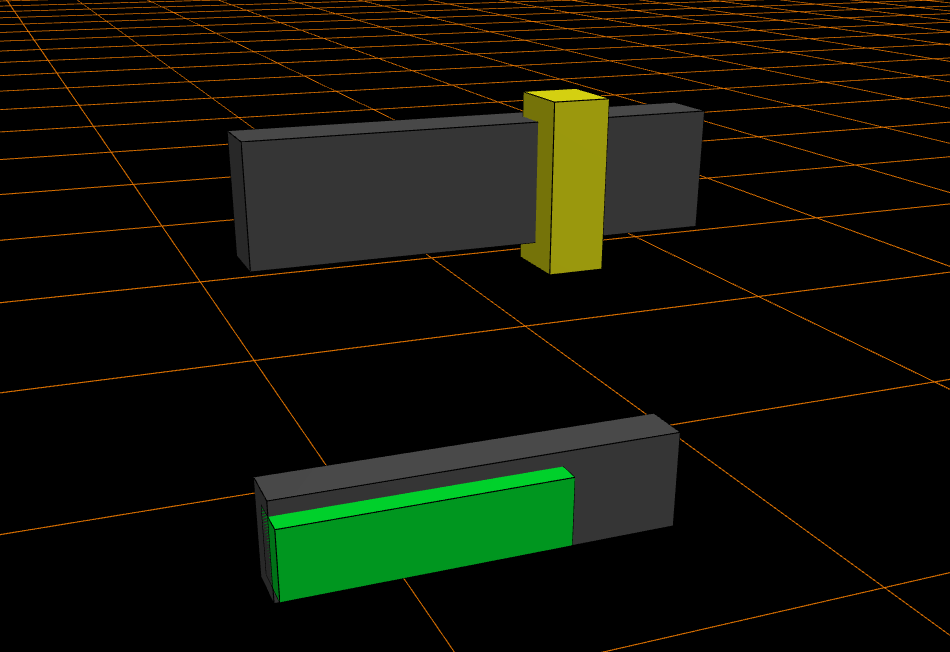
- Added TVCL3D.SpawnTrackbar and TVCL3D.SpawnProgressBar std controls alongside the existing SpawnButton
- Added new shape types stTrackbar and stProgressBar to TShapeType. Both render as a composite actor (dark base block + protruding front part) styled like the existing stButton.
- Added generic published Integer property 'ItemPosition' on TA3DComponent. For stTrackbar / stProgressBar this holds the current value as a 0..1000 promille (caller maps to Min..Max). For other actors the field is unused and free for any future integer state the caller wants to attach to an actor.
- 3D Trackbar is now fully interactive: click+drag the knob to change ItemPosition live (mouse X maps to 0..1000 promille).
- 3D Progress Bar is driven externally via ItemPosition (use TVCL3D.SetProgressBarValue or the Object Inspector).
- F12 now leaves posessed object, split screen moved to F2
- Moved holodeck & Land in single units Yutani.Worlds.Land, Yutani.Worlds.Holodeck
- Added world bones unit Yutani.Worlds.YourWorld
- Added unit Yutani.Worlds.WorldTransitions
- New world Transition effects: Warp, BlinkEye, Fade
- New Engine tab Combobox for transition effect setting
- Space reset/load/save functions added
- Space radar minimap now real 3d & added zoom btns
- Alt + Q/E now for select object
- Ctrl while in vehicle/avatar shows/hides mouse cursor
- Added checkbox beside Wall spawn btn for bomb on/off
v0.648:
- Warp core stability improved, interstellar space flight now safer.
- Replaced the chunk-based distant-solar-system generation with a strict one-system-at-a-time galaxy lifecycle. The player can never see two star systems fully rendered at the same time anymore - departure, empty void and approach are now distinct phases.
- Star systems fade out smoothly as the camera leaves, an empty void pause gives the player a clear "crossing space" moment, then a new system fades in directly in the flight direction. Total hop time ~30 seconds, not minutes.
- Visited star systems are persisted to SQLite so revisits reproduce the exact same layout. Deterministic procedural gen keyed off a 3D hash of the galaxy cell ensures the same coordinates always yield the same system.
- Ambient dust / rock particle system: 600 small drifting specks in a shell around the camera, dark gray / brown palette so they read as actual debris instead of pixel noise. Drift slowly and respawn when they wander too far so the layer is always present.
- Galaxy minimap overlay (top-right): shows the player as a white dot with a flight-direction arrow, the current system in green, the next target system in yellow during approach, and every previously discovered system as a gray dot. 10000u range, 10s DB cache so the overlay does not query SQLite every frame.
- All galaxy lifecycle distances exposed as published properties on TSpaceWorld for runtime tuning from a settings dialog (FadeStart, FadeEnd, TargetPickDistance, TargetApproachFadeStart, ArriveDistance, MinTravelTime, plus Phase / CurrentVisibility / NextVisibility / CurrentSeed / NextSeed for HUD readouts).
- HUD shows the currently selected controller type (green while driving)
- Successfully defeated some Evil self replicating space thread-Bugs
- Improved Terraforming Planetary Surface textures
- Space now pauses on pause too
- Eliminated startup window flash by teleporting the Raylib window off-screen during creation before reparenting it into the VCL control.
- Save/Load Scene now works for 3d models too, (only full path atm)
- Stabilized nanofog and bomb
- Slowmotion can do now fastmotion too (Trackbar max 200 now)
- Pressing F11 again changes direction 45 degrees, click somewhere outside and then F11 to leave
- Loading screen now shows on mainform center, not screen center
- Added mass rain spawn spinedit and btns in form and removed ugly internal test hud
- Added checkbox to show/hide infos internal and on form
- Space has now 0 Gravity and no more ground, except 4x4 block for spacestation later
- Moved MiniAudio to Yutani.Audio
- Added Yutani.Avatar.Controls unit
- Connected audio engines (MiniAudio & TinySoundFont) to slow motion too (try the audio tab test btn in slowmotion :D)
- Fixed spawn not showing while pause, caused by new materialize spawn effect (now no effect on pause)
- Fixed loadscene spawned everything while pause first at 0,0,0, now ..on pause already correct
- Added units Yutani.Chaos.Skia, Yutani.Avatar.Animations, Yutani.Render.PlanarReflections
- Added First Person, Spectator, Orbit and RigidBody avatar controllers on top of the existing ThirdPerson / Flight / Vehicle trio
- Shift+F11 cycles through all 7 controller types live, rebuilds the active controller in place and keeps CamYaw/Pitch
- F11 now possesses with whatever controller type is selected (default is still Vehicle so old muscle memory keeps working)
- Added Mouselook via TYutaniInputManager (Start/Stop/PollMouseLook), cursor hides and snaps to viewport center, combines with gamepad look
- Camera smoothing on the base controller: CamSmoothing for soft chase feel and BeginCameraTransition for cinematic swaps on possess and Shift+F11 (no more zack, camera flies to the new spot)
- Camera collision on the base controller raycasts from the look anchor towards the desired camera position and pulls the camera in to just before the hit so it never clips through walls
- Avatar facing rotates the body to match the movement direction so the avatar no longer slides in place - enabled by default on ThirdPerson, FirstPerson and RigidBody
- Mouse wheel zoom on every controller with adjustable CamDist; clamp via MinCamDist / MaxCamDist so settings dialogs can tweak the range
- First Person ADS: hold right mouse to zoom, wheel adjusts ADS target FOV live so the player can swap magnification tiers while aiming
- Velocity-driven footstep audio trigger fires OnFootstep at an interval inversely proportional to horizontal speed - wire to MiniAudio from the sandbox to actually play the sample
- TYutaniAvatarSettings record (sensitivity, deadzones, FOV, pitch clamps) ready to be wired into a settings dialog later
- RigidBody controller is force/torque based instead of SetLinearVelocity, uses RayCast ground check so jumping works on ramps and stairs
- Orbit controller auto-rotates around the avatar for showcase scenes, manual look overrides auto-rotation while the stick is touched
- HUD shows the currently selected controller type (green while driving)
- Per-pad input API on TYutaniInputManager (GetInputsForPad / GetPlayerState) so each gamepad's state can be read in isolation
- TYutaniMultiPlayerManager + TYutaniPlayerSlot enable 2-player local couch-coop - slot 0 is keyboard/mouse, slot 1 is gamepad 1
- Split-screen rendering via rlViewport: scene is drawn twice per frame, once per player's camera, clipped to left/right half of the window
- F12 toggles split-screen on the fly using the first two items in the scene as avatars (quick test) - for production call EnableSplitScreen explicitly from the VCL
- HUD line shows SPLIT SCREEN status (purple) vs Single-player (gray)
- F11 possess is blocked while split-screen is active so the two modes cannot fight over the camera pointer
- All camera / avatar / wheel / ADS / footstep settings exposed as published properties so a VCL settings dialog can tweak them live
- Standalone factory function YutaniCreateAvatarController decouples controller spawning from the sandbox so external tools and the split-screen manager can build controllers without a sandbox reference
- Mouselook writes only into the per-pad slot 0 buffer so the mouse (single physical device) does not leak into player 2's gamepad axis
- During split-screen, FCam1 is mirrored onto FCamera each frame so shadow camera centering, distance culling and the existing render pipeline see a valid view position without needing a separate pass
- Render3DScene split into Render3DSceneCore (the actual scene pipeline) plus a thin wrapper that runs it twice with rlViewport for split-screen
v0.647:
- Added a skia4delphi rendered, threaded, transparent holographic loading screen overlay for world transitions.
- Moved heavy procedural planet texture generation to on-demand loading to fix startup freezes.
- Made the loading screen trigger its own asynchronous fade-out and self-destruct without blocking the render loop.
- Added a skia4delphi rendered sci-fi particle stream intro from the logo to form the "YUTANI" text.
- Implemented floating origin system to eliminate physics jitter on planet surfaces
- Added Solar System generation with suns, orbiting planets, moons, and proper lighting (Darksides)
- Implemented dynamic sun lighting with Shader integration for planet models
- Added comet collisions triggering surface impact particle bursts
- Added slow-motion compatibility (TimeScale) for space simulation
- Refined star distribution with cluster-based generation and galaxy-style coloring
- Added Landing Autopilot System (F9): Smooth cinematic approach to planetary surfaces
- Added Planetary Surface Camera Mode: Walk on Mario-Galaxy style little planets with correct surface normals and straight horizons
- Added Planetary Orbit Cam (F8) for construction and building mechanics
- Added Second Life style ALT+Click focus camera system
- Added vehicle flight control system (F11): Possess any object and fly it with WASD/QERF physics thrust with a rigid Third-Person camera
- Refactored startup intro to form the logo and text entirely from a dynamic Skia4Delphi particle stream.
v0.646:
- Added space skybox
- Removed space skybox, built real infinite procedural cosmos (Yutani.Worlds.Space: star sprites, nebulae, comets, planets)
- Added Yutani.Worlds.Space.Textures: Skia-rendered procedural planet surfaces (Rocky, Earth, Mars, Gas Giant, Ice)
- Planets are now textured 3D spheres (Mario Galaxy scale)
- Comets now spray hundreds of flame particles (white-hot → dark red)
- Nebulae use circular gradient billboards
- Atmosphere glow uses two-layer circular billboards
- Far plane extended to 10000 during space rendering
- Stars use 4-pointed gradient sprites with twinkle
- Chunk-based infinite procedural generation (deterministic per chunk)
- Added SQLite.dll cause I think I Need it...later :D
v0.645:
Added new yutani.render.nanofog unithttps://github.com/user-attachments/assets/b9df7c07-8160-479a-8271-9885242cc695
v0.644:
Changed beam spawn effect to new particle materialization
Added button dematerialization - demat actual object
Added functions: DematerializeSelectedObject,  DematerializeActor(Actor: TA3DComponent)
v0.643:
Fixed 3D Model Gizmo Resizing
Scene Save/Load: The physics state (IsStatic) is now correctly serialized and restored.
Added sample Scene. Load it, and objects falling down like i paused them here.
Enhanced Slow Motion System: Added property and trackbar to dynamically adjust the exact slow-motion speed multiplier (0.05x to 1.0x) on the fly.
Added Yutani.AliveHighlighter3d Select object, press F10 to send or Hide
Added unit Yutani.Worlds.Island - WorldBase Island now partly working
Added unit Yutani.Render.Particles and already working too
Added fog button, 10k particles spawn
Added particles on bomb explosion
v0.642:
Fixed textures black or blueish on 3d models from far distance
Fixed spawned 3d model now same size like ghost preview
Added new gizmo mode Uniform Scale (Corner Resize)
Raised tinysoundfont thread idle timeout from 2s to 5s to allow sustained notes (e.g., piano) to fully decay and ring out without being abruptly cut off.
Integrated Yutani.VoronoiFracture: Dynamically generates real 3D Voronoi fragments when destructable objects take heavy impact. The system now successfully creates custom Raylib meshes with lighting, injects them into the Jolt Physics engine, and applies explosion forces.
Note: Fracture system is basically working now, but fragment rendering
(some transparency/normal issues) and physics colliders (misalignment, floating, minor jitter)
are not fully correct yet and require further headaches. :P
v0.641:
Added 3d working piano connected to tinysoundfont
Added loadsoundfont btn in audio tab
Added unit yutani.audio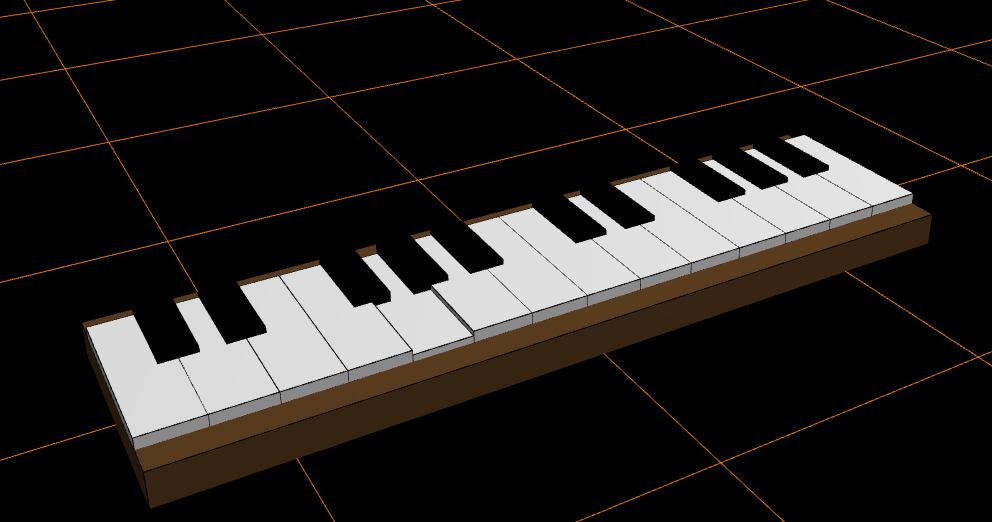
v0.64:
Added TWorldBaseType = wbLand, wbSpace, wbHolodeck, wbIsland
Added WorldBase selection combobox in engine tab
Added TSpawnEffectType = spefNone, spefBeam, spefFade
Added Checkbox chkAntialias
Added Spinedit to set Gravity
Added isDestructable Checkbox and property in TA3DComponent/SpawnREquest
Improved Lighting System Reworked the GLSL light shader to prevent color washing on lit surfaces. Lighting is now calculated multiplicatively, preserving deep blacks and vibrant base colors while ensuring shadows darken surfaces correctly.
Added Yutani.VoronoiFracture unit
v0.63:
Added Fullscreen btn,
Added Audio tab, Master Volume Control Trackbar &  Audio test btn
Added TinySoundFont wrapper & dll
Added RecastNavigationDelphi Units
Added VerySimple.Lua Units & dll
Added GameNetworkingSockets4delphi wrapper & dlls
v0.62:
Changed project name for new single repo out of the joltphysics wrapper repo
Added MRX Gamepad Core & SDL3.dll
Added new Tab Controls
Added skia4delphi rendered splash intro
Added OnActorDestroyed event
Fixed bombs not getting removed after explode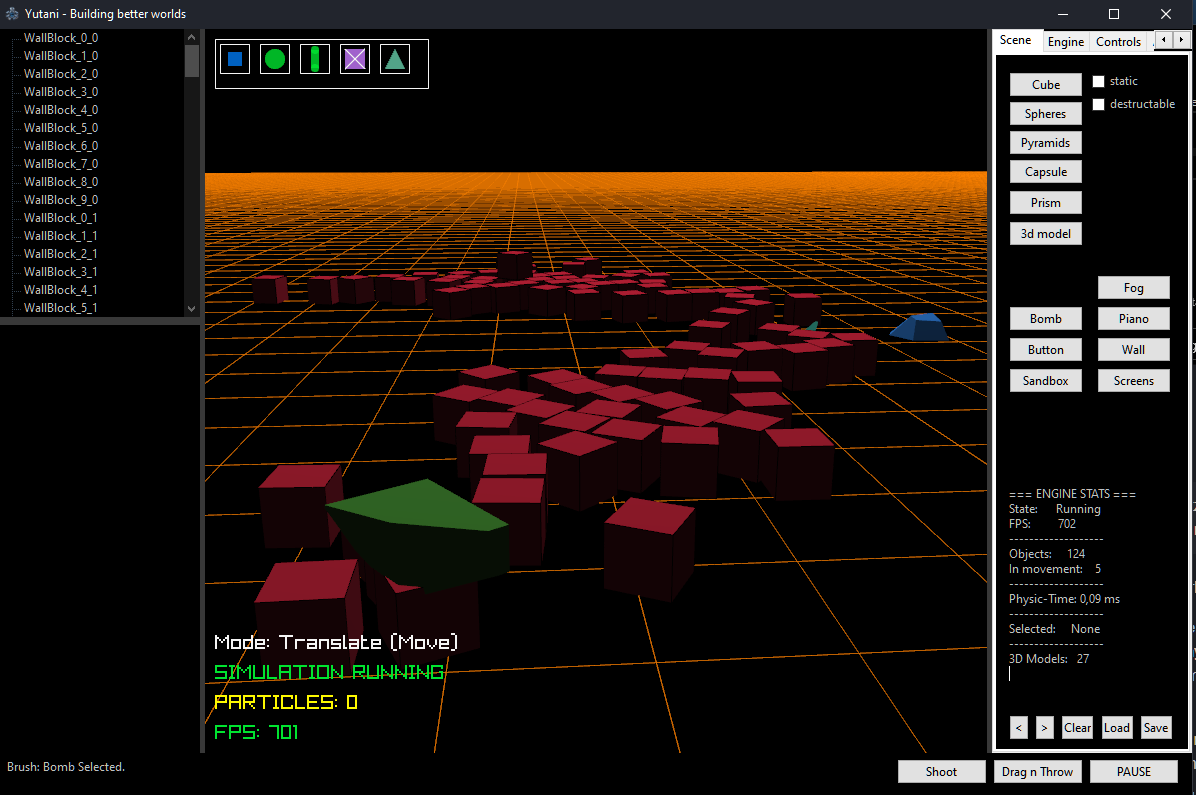
700 fps on rtx 2060s... not bad :D
includes:
Raylib Delphi Wrapper https://github.com/GuvaCode/ray4laz
Raylib 3d https://github.com/LaMitaOne/r3d-delphi
MiniAudio4Delphi https://github.com/LaMitaOne/MiniAudio4Delphi
JoltPhysics4Delphi https://github.com/LaMitaOne/JoltPhysics4Delphi
MRX Gamepad Core https://github.com/LaMitaOne/MRX-Gamepad-Core
TinySoundFont4Delphi https://github.com/LaMitaOne/Tinysoundfont4delphi
RecastNavigationDelphi https://github.com/Kromster80/RecastNavigationDelphi
VerySimpleLua https://github.com/Dennis1000/verysimplelua
GameNetworkingSockets4delphi https://github.com/LaMitaOne/GameNetworkingSockets4delphi
Yutani Voronoi-Destruction-Engine https://github.com/LaMitaOne/Yutani-Voronoi-Destruction-Engine
Yutani Particle Engine https://github.com/LaMitaOne/Yutani-Particle-Engine
Yutani Skia Holographic Splash https://github.com/LaMitaOne/Yutani-Skia-Holographic-Splash
Yutani CHAOS - Complete Holographic AI Operating System Interface https://github.com/LaMitaOne/Yutani.CHAOS
Yutani PathTracing https://github.com/LaMitaOne/Yutani.Render.PathTracing
Yutani Universe Former https://github.com/LaMitaOne/Yutani.UniverseFormer
Yutani GPU particle monster https://github.com/LaMitaOne/Yutani-GPU-Particles
SedaiAudio for Delphi https://github.com/LaMitaOne/SedaiAudio4Delphi
Get mpv2 dll: https://sourceforge.net/projects/mpv-player-windows/
3D Test Models by https://kenney.nl/
🌐 Recommended 3D Model Sources
Looking for more .glb / .gltf assets to test in the sandbox? Check out these awesome free resources:
- Kenney | Quaternius | Kay Lousberg
- Poly Pizza | Poly Haven | The Base Mesh
- SketchFab https://upsampler.com/free-image-to-3d-no-signup
📄 License
This project is licensed under the Apache License 2.0 - see the LICENSE file for details. This protects the core Yutani Engine assets, graphics, and unique architecture configurations while enabling powerful open-source expansion.
"The engine is the code you write." — John Carmack.
🛸 Trivia / Easter Egg
Fun Fact: The very first custom 3D .glb model successfully loaded and simulated into this engine's pipeline was the iconic M577 Alien APC. So choosing the name Yutani wasn't just a random sci-fi choice—it was practically hardcoded by fate! 🪐
and btw... yes, my little asus ux305ca with fanless intel m3 does even this still, space scene running 100fps
Cultural Note: In Japanese, Yutani (由谷) translates to "Valley of Origin"...
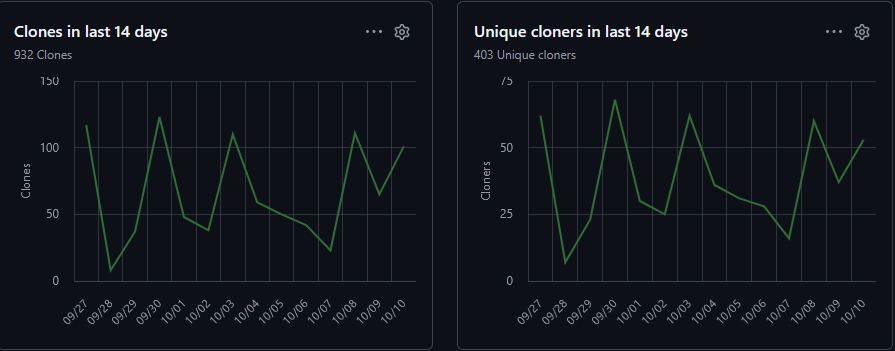
First 14 days ... not posted it anywhere... Delphi/Pascal is alive and kickin