

IDE Window: Watch list/de
Wichtig
Sie müssen den Debugger einrichten und das zu untersuchende Projekt starten. Nur dann wird dieses Fenster hilfreich sein.
Liste der überwachten Ausdrücke
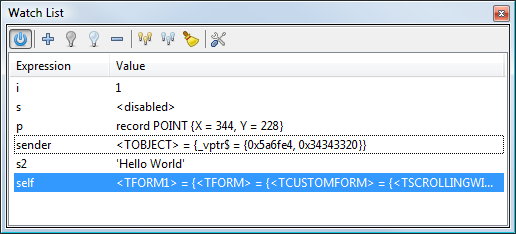
The "Watch List" shows the values of variables and expressions ("watches") when the debugged application is paused. (e.g. reached a breakpoint).
Expressions can be local or global variables, (certain) properties, or pascal expressions (limited support, e.g. "a+1"). See here for more information
Angezeigte Daten
Die Anzeige besteht aus zwei Spalten:
- Ausdruck: der zu überwachende Ausdruck oder Variable
- Wert: der aktuelle Wert des Ausdrucks
Mit einem Doppelklick auf einen Eintrag kann dieser bearbeitet werden.
Scope (Stackframe, Thread, History)
The values are evaluated according to the scope set in the Thread and Stack dialog. Default is the current Thread and top stack frame. Both (Stack and Frame) dialog offer to change the "current" Frame/Thread. The watch window will follow this selection.
It is also possible to select previously displayed values, using the History dialog.
Spezielle Werte
<invalid>
Der Wert ist aktuell nicht verfügbar. Can be caused, if the debugger is not active or the debugged app not currently paused.
<evaluating>
Value is currently retrieved. A result will be show soon
<disabled>
The expression is excluded from evaluation. See Disable/Enable buttons (light bulbs)
Error...
The value could not be evaluated. (Error in Expression or Variable not available in selected scope.
Interface
Toolbar
 Power
Enables/Disables all updates. This does not affect the enabled/disabled state of individual watches. This will freeze the current display.
 Hinzufügen
Add a new expression. This will open the Watch property dialog. (It is also possible to double click an empty line in the list)
 Aktivieren/
 Deaktivieren
Enables/Disables individual watches from evaluation. This can be used to prevent spending time on evaluation, if a watch is not available in the current scope.
 Löschen
Deletes the selected Watch(es)
 Alle aktivieren/
 Alle deaktivieren
Enables/Disables all watches from evaluation.
 Alle löschen
Cleans the list
 Eigenschaften
Change the expression or properties of the current/selected watch. (Also possible by double clicking the watch)
Kontextmenü 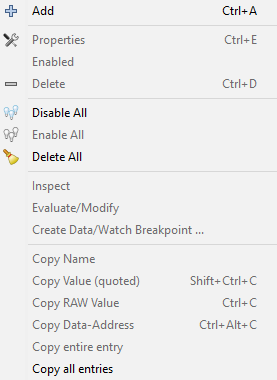
Zusätzlich zu den obigen Funktionen erlaubt das Kontextmenü:
Überprüfung
Opens the current watch in the Debug-Inspector
Auswerten/Ändern
Opens the current watch in the Evaluate/Modify window
Datenhaltepunkt erzeugen
Opens the dialog to create a new watchpoint based on the current watch (stop if wachted value is changed or accessed)
Namen kopieren
kopiert den Ausdruck in die Zwischenablage
Wert kopieren
kopiert den Wert in die Zwischenablage
Watch Properties
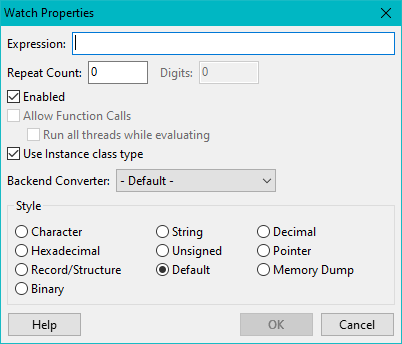
Ausdruck
An Expression for which the evaluated value should be shown. Expressions can be local or global variables, (certain) properties, or pascal expressions (limited support, e.g. "a+1").
Wiederholungen
nicht implementiert
Ziffern
nicht implementiert
Eingeschaltet
See Enable/Disable above
Funktionsaufrufe zulassen
noch nicht unterstützt
Use Instance class type
Objects are normally shown according to the declaration of the watched expression. Watching "Sender: TObject" will only show you data that is declared on TObject. However object variables can contain objects of inherited classes. Sender may be a TForm. Using this the debugger will find the actual class of the object and display all data.
Stil
How to display the data. If a style can not be applied, default will be used.
"Repeat Count"
is implemented in Lazarus 1.1 (SVN, trunk). It can be used to get array slices. The watch specifies the first element of the array "A[7]" (must have an index). With a "Repeat count" of 20, this shows A[7] to A[26].
It can also be used with a dynamic array (no index given). Then it specifies haw many elements to show, beginning with DynA[0]
Siehe auch
- Watch-Points (Data-Breakpoints)
- Evaluate Window
- Debug Inspector
- Debug History
From the Free Pascal wiki, page "IDE Window: Watch list/de", as it stood on 2014-05-06 after a change by Swen, out of the wiki's dump of 2024-05-26. Copyright stays with the author who wrote it, according to the old wiki's Licensing page. If you have concerns about this material, message the admin.
Talk about this page
Nobody has opened a bench for this page yet. Sign in to open one.