

BGRABitmap tutorial 6
Deutsch · English · Español · Français
This tutorial shows you how to use different line styles and shapes.
Create a new project
Create a new project and add a reference to BGRABitmap, the same way as in the first tutorial.
Add a painting handler
With the object inspector, add an OnPaint handler and write:
procedure TForm1.FormPaint(Sender: TObject);
var image: TBGRABitmap;
    c: TBGRAPixel;
begin
  image := TBGRABitmap.Create(ClientWidth, ClientHeight, clBtnFace);
  c := clWindowText;

  image.RectangleAntialias(80,80,300,200, c, 50);

  image.Draw(Canvas,0,0,True);
  image.free;
end;
Run the program
This should draw a rectangle with a wide black pen.
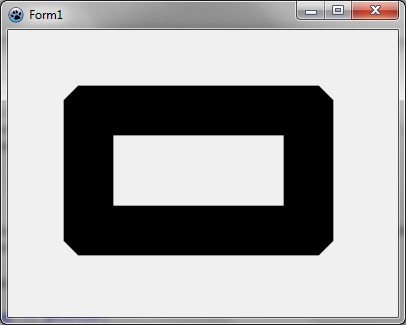
Change join style
If you want round corners, you can specify:
image.JoinStyle := pjsRound;Run the program
This should draw a rectangle with a wide black pen with rounded corners.
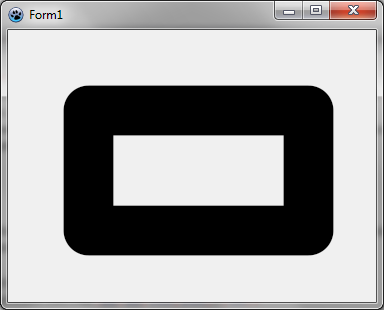
Mix join styles
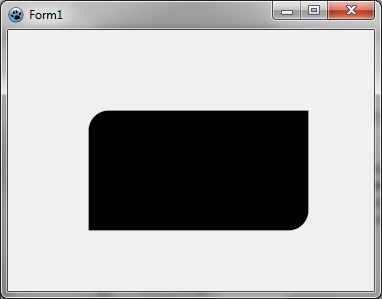
You can mix join styles for a rectangle like this:
image.FillRoundRectAntialias(80,80,300,200, 20,20, c, [rrTopRightSquare,rrBottomLeftSquare]);This function use round corners by default, but you can override it with square corners or bevel corners. You should obtain the following image.
Change pen style
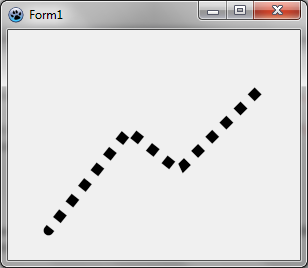
You can draw a dotted line like this:
    image.JoinStyle := pjsBevel;
    image.PenStyle := psDot;
    image.DrawPolyLineAntialias([PointF(40,200), PointF(120,100), PointF(170,140), PointF(250,60)],c,10);
Note that the pen style can be defined independently of a bitmap by using the TBGRAPenStroker class of the BGRAPen1 unit.
You should obtain the following image. Notice that line begins with a round cap.
Change line cap
You can draw a polyline with a square cap like this:
    image.JoinStyle := pjsBevel;
    image.LineCap := pecSquare;
    image.PenStyle := psSolid;
    image.DrawPolyLineAntialias([PointF(40,200), PointF(120,100), PointF(170,140), PointF(250,60)],c,10);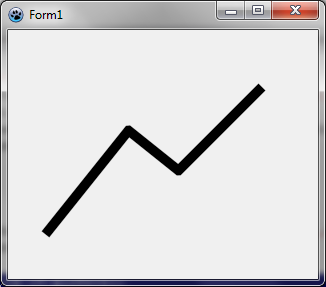
Opened line drawing
You can draw a line which is opened, i.e. the end of the line is rounded inside.
image.DrawPolyLineAntialias([PointF(40,200), PointF(120,100), PointF(170,140), PointF(250,60)],c,10,False);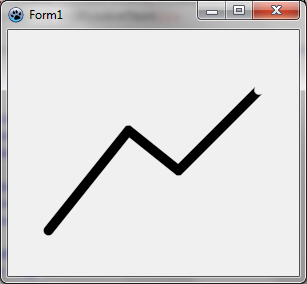
This way you can connect lines one after another without drawing the junction twice, which is useful with semi-transparent drawing. You can compare it like this:
    c := BGRA(0,0,0,128);

    image.DrawLineAntialias(40,150, 120,50, c, 10);
    image.DrawLineAntialias(120,50, 170,90, c, 10);
    image.DrawLineAntialias(170,90, 250,10, c, 10);

    image.DrawLineAntialias(40,250, 120,150, c, 10, False);
    image.DrawLineAntialias(120,150, 170,190, c, 10, False);
    image.DrawLineAntialias(170,190, 250,110, c, 10, True);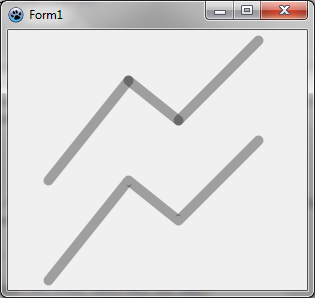
Previous tutorial (layers and masks) Next tutorial (splines)
From the Free Pascal wiki, page "BGRABitmap tutorial 6", as it stood on 2024-02-15 after a change by Circular, out of the wiki's dump of 2024-05-26. Copyright stays with the author who wrote it, according to the old wiki's Licensing page. If you have concerns about this material, message the admin.
Talk about this page
Nobody has opened a bench for this page yet. Sign in to open one.