

BGRABitmap tutorial 6/es
Deutsch · English · Español · Français
Esta tutoría muestra como usar diferentes tipos de líneas y figuras.
Crear un nuevo proyecto
Crea un nuevo proyecto y añade referencia a BGRABitmap, de la misma forma que en la primer tutoría.
Añade un manejador de pintado
Con el inspector de objetos, añade un manejador OnPaint y escribe :
procedure TForm1.FormPaint(Sender: TObject);
var image: TBGRABitmap;
    c: TBGRAPixel;
begin
  image := TBGRABitmap.Create(ClientWidth, ClientHeight, clBtnFace);
  c := clWindowText;

  image.RectangleAntialias(80,80,300,200, c, 50);

  image.Draw(Canvas,0,0,True);
  image.free;
end;
Ejecuta el programa
Esto debe dibujar un rectángulo con un lápiz negro ancho.
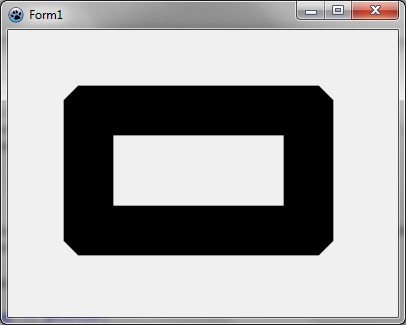
Cambiar estilo de unión
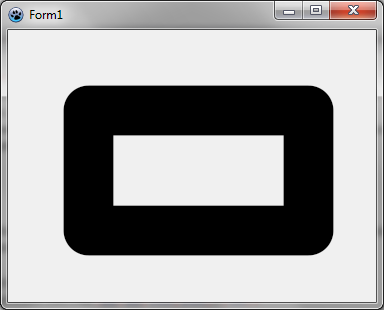
Si desea esquinas redondeadas, puede especificar:
image.JoinStyle := pjsRound;Ejecuta el programa
Esto debe dibujar un rectángulo con un lápiz negro ancho con esquinas redondeadas.
Mezclar estilos de unión
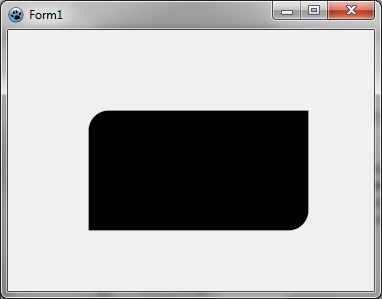
Usted puede mezclar estilos de unión en un rectángulo como este:
image.FillRoundRectAntialias(80,80,300,200, 20,20, c, [rrTopRightSquare,rrBottomLeftSquare]);Esta función utiliza esquinas redondeadas de forma predeterminada, pero se puede reemplazar con esquinas rectas o curvas bisel. Usted debe obtener la siguiente imagen.
Cambiar el estilo de la pluma
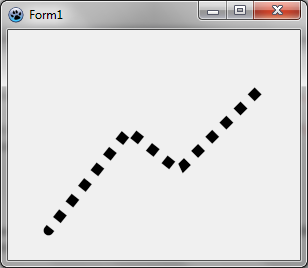
Usted puede dibujar una línea de puntos así:
    image.JoinStyle := pjsBevel;
    image.PenStyle := psDot;
    image.DrawPolyLineAntialias([PointF(40,200), PointF(120,100), PointF(170,140), PointF(250,60)],c,10);
Usted debe obtener la siguiente imagen. Observe que la línea comienza con una tapa redonda.
Cambio extremo de línea
Puede dibujar una polilínea con una tapa cuadrada de esta manera:
    image.JoinStyle := pjsBevel;
    image.LineCap := pecSquare;
    image.PenStyle := psSolid;
    image.DrawPolyLineAntialias([PointF(40,200), PointF(120,100), PointF(170,140), PointF(250,60)],c,10);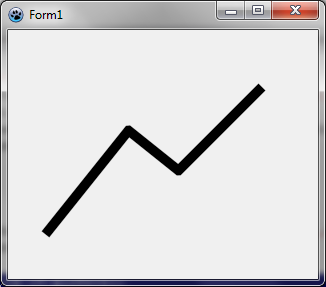
Dibujo de línea abierta
Usted puede dibujar una línea que se abre, es decir, el final de la línea se completa en el interior.
image.DrawPolyLineAntialias([PointF(40,200), PointF(120,100), PointF(170,140), PointF(250,60)],c,10,False);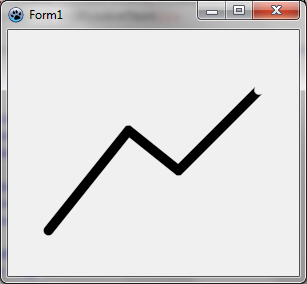
De esta manera usted puede conectar líneas, uno tras otro sin llamar la unión en dos ocasiones, lo cual es útil con el dibujo semi-transparente. Se puede comparar la siguiente manera:
    c := BGRA(0,0,0,128);

    image.DrawLineAntialias(40,150, 120,50, c, 10);
    image.DrawLineAntialias(120,50, 170,90, c, 10);
    image.DrawLineAntialias(170,90, 250,10, c, 10);

    image.DrawLineAntialias(40,250, 120,150, c, 10, False);
    image.DrawLineAntialias(120,150, 170,190, c, 10, False);
    image.DrawLineAntialias(170,190, 250,110, c, 10, True);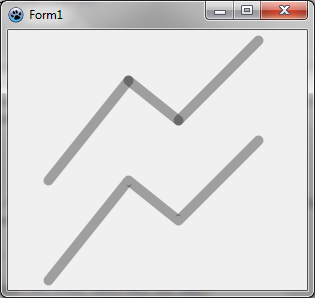
Tutoría anterior (capas y máscaras) | Siguiente tutoría (splines)
From the Free Pascal wiki, page "BGRABitmap tutorial 6/es", as it stood on 2024-02-15 after a change by Circular, out of the wiki's dump of 2024-05-26. Copyright stays with the author who wrote it, according to the old wiki's Licensing page. If you have concerns about this material, message the admin.
Edited on wiki.freepascal.org by 6 people, 2011–2024
From the official wiki's backup of 26 May 2024: who edited this page there, and when. Edits made there after that date were not recorded, and the earlier versions are not shown here; the main page says why.
| When | Who | What changed |
|---|---|---|
| Lainz | New page: {{BGRABitmap_tutorial_6}} {{BGRABitmap_tutorial_index/es}} Este tutorial muestra como usar diferentes tipos de líneas y figuras. === Crear un nuevo proyecto === Crea un nuevo proyecto... | |
| Lainz | missing '|' (minor) | |
| Iskraelectrica | (minor) | |
| Lainz | tutoría (minor) | |
| Chronos | ||
| Vincent | Text replace - "delphi>" to "syntaxhighlight>" (minor) | |
| Trev | Fixed syntax highlighting; deleted category already in page template (minor) | |
| Circular | Añade un manejador de pintado: auto-convert color types |
Talk about this page
Nobody has opened a bench for this page yet. Sign in to open one.