

ZenGL Tutorial 2/es
English · Español · Français · Русский
Este tutorial muestra como crear una Fuente ZenGL (.zfi) y como dibujar texto.
Crear Fuente ZenGL
Para crear una fuente ZenGL necesitas descargar ZenFont que es un generador de fuentes.
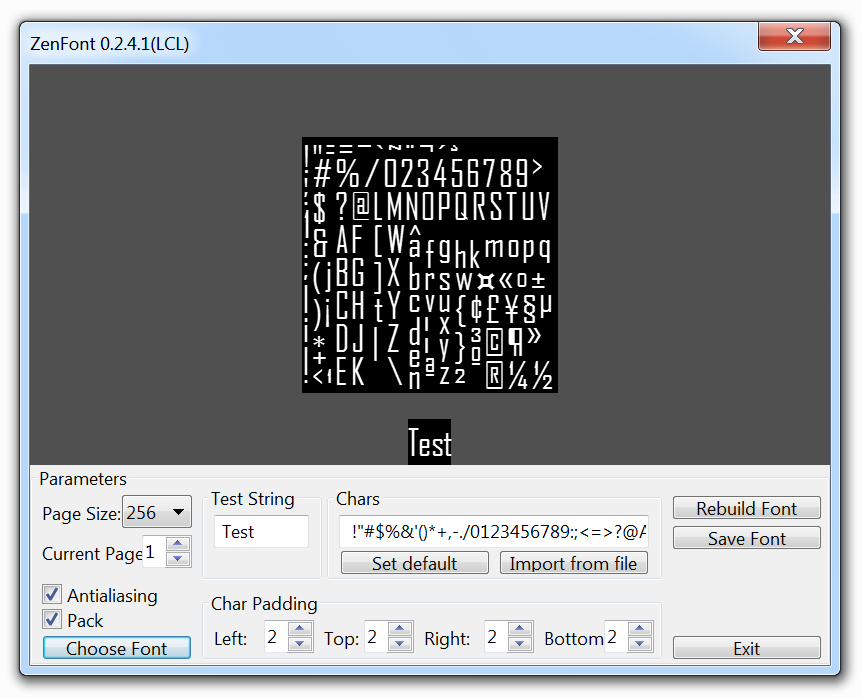
Cuando obtengas ZenFont abrelo y verás algo parecido a esto:
Agency FB-Regular-18pt.zfi
Usa las opciones para personalizar tu fuente y luego presiona "Save font" y elige el nombre de archivo que quieras (un nombre de archivo es generado automáticamente con el nombre de la fuente y el tamaño). Los archivos generados son los .zfi con algunas imágenes .tga.
Una vez que tenemos la fuente creada necesitamos seguir estos pasos para dibujar en la ventana de ZenGL.
Crear programa
- Crea un nuevo programa de pascal y añade referencia a ZenGL como fue explicado en el primer tutorial.
- Crea estos directorios:
projectname\bin
projectname\data
projectname\project
- Save your project in "projectname\project".
- Coloca la fuente que has creado en "projectname\data"
- Ve a Proyecto > Opciones > Rutas en Nombre del archivo final escribe "..bin\project1".
Agrega codigo
Variables:
var
  dirRes     : String {$IFNDEF DARWIN} = '../data/' {$ENDIF}; // este es el directorio donde se colocan los recursos
  fnt        : zglPFont; // esta es la fuente que usaremos
Carga la fuente en una variable:
procedure Init;
begin
  fnt := font_LoadFromFile( dirRes + 'Agency FB-Regular-18pt.zfi' );
end;
Procedimiento de dibujo (aqui dibujaremos nuestro texto con la fuente cargada):
procedure Draw;
var
  rect: zglTRect;
begin
  text_Draw( fnt, 0, 0, 'Sample Text. Press ESC to EXIT.' );

  text_DrawEx( fnt, 32, 32, 1.5, 0, 'Sample Text with DrawEx - Scale 1.5 - Alpha 150', 150 );

  rect.H:=128;
  rect.W:=400;
  rect.X:=0;
  rect.Y:=96;

  pr2d_rect(rect.X,rect.Y,rect.W,rect.H,$FFFFFF,100);

  text_DrawInRect(fnt,rect,
  'Sample multiline text in rect.' + #10 +
  'Sample multiline text in rect.'+ #10 +
  'Sample multiline text in rect.');
end;
Este es un codigo para salir de nuestra aplicación presionando ESC:
procedure Timer;
begin
  if key_Press( K_ESCAPE ) Then zgl_Exit();
  key_ClearState();
end;
Resultado
Puedes ver el texto con la fuente que creamos y otro texto escalado con alpha.
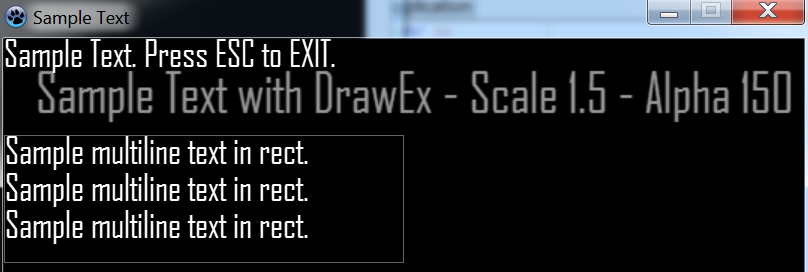
El codigo resultante es algo parecido a esto:
 program project1;

 {$IFDEF WINDOWS}
   {$R *.res}
 {$ENDIF}
 {$DEFINE STATIC}

 uses
   {$IFNDEF STATIC}
   zglHeader
   {$ELSE}
   zgl_main,
   zgl_screen,
   zgl_window,
   zgl_timers,
   zgl_keyboard,
   zgl_font,
   zgl_text,
   zgl_textures,
   zgl_textures_tga,
   zgl_primitives_2d,
   zgl_utils,
   zgl_math_2d
   {$ENDIF}
   ;

 var
   dirRes     : String {$IFNDEF DARWIN} = '../data/' {$ENDIF};
   fnt        : zglPFont;

 procedure Init;
  begin
   fnt := font_LoadFromFile( dirRes + 'Agency FB-Regular-18pt.zfi' );
  end;

 procedure Draw;
  var
   rect: zglTRect;
  begin
   text_Draw( fnt, 0, 0, 'Sample Text. Press ESC to EXIT.' );

   text_DrawEx( fnt, 32, 32, 1.5, 0, 'Sample Text with DrawEx - Scale 1.5 - Alpha 150', 150 );

   rect.H:=128;
   rect.W:=400;
   rect.X:=0;
   rect.Y:=96;

   pr2d_rect(rect.X,rect.Y,rect.W,rect.H,$FFFFFF,100);

   text_DrawInRect(fnt,rect,
   'Sample multiline text in rect.' + #10 +
   'Sample multiline text in rect.'+ #10 +
   'Sample multiline text in rect.');
 end;

 procedure Timer;
  begin
   if key_Press( K_ESCAPE ) Then zgl_Exit();
   key_ClearState();
  end;

 Begin
   {$IFNDEF STATIC}
   zglLoad( libZenGL );
   {$ENDIF}

   timer_Add( @Timer, 16 );

   zgl_Reg( SYS_LOAD, @Init );
   zgl_Reg( SYS_DRAW, @Draw );

   zgl_Enable( APP_USE_UTF8 );

   wnd_SetCaption( 'Sample Text' );

   wnd_ShowCursor( TRUE );

   scr_SetOptions( 800, 600, REFRESH_MAXIMUM, FALSE, FALSE );

   zgl_Init();
 End.
From the Free Pascal wiki, page "ZenGL Tutorial 2/es", as it stood on 2020-03-03 after a change by Trev, out of the wiki's dump of 2024-05-26. Copyright stays with the author who wrote it, according to the old wiki's Licensing page. If you have concerns about this material, message the admin.
Talk about this page
Nobody has opened a bench for this page yet. Sign in to open one.