

ZenGL Tutorial 2
English · Español · Français · Русский
This tutorial show how to create a ZenGL Font (.zfi) and how to draw text.
Create ZenGL Font
To create a ZenGL Font you need to download ZenFont that is a Font generator.
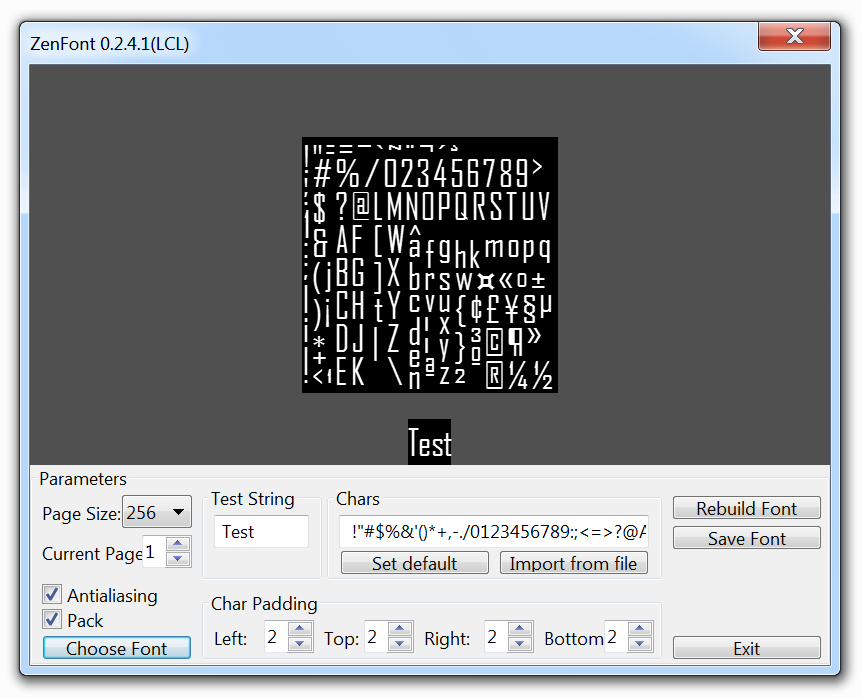
When you got ZenFont open it and you will see something like this:
Agency FB-Regular-18pt.zfi
Use the options to customize your font and then press "Save font" and chose the filename you want (some filename is generated automatically with
the font name and size). The files generated are the .zfi file with some .tga images.
Once we have a font created we need to follow those steps to draw in the ZenGL window.
Create program
- Create a new pascal program and add reference to ZenGL like was explained in the first tutorial.
- Create those directories:
projectname\bin
projectname\data
projectname\project
- Save your project in "projectname\project".
- Put the font you has created in "projectname\data"
- Go to Project > Options > Paths in Target file name write "..\bin\project1".
Add code
Variables:
var
  dirRes     : String {$IFNDEF DARWIN} = '../data/' {$ENDIF}; // this is the directory where resources are placed
  fnt        : zglPFont; // this is the font we will use
Load the font in a variable:
procedure Init;
begin
  fnt := font_LoadFromFile( dirRes + 'Agency FB-Regular-18pt.zfi' );
end;
Draw procedure (here we will draw our text with the loaded font):
procedure Draw;
var
  rect: zglTRect;
begin
  text_Draw( fnt, 0, 0, 'Sample Text. Press ESC to EXIT.' );

  text_DrawEx( fnt, 32, 32, 1.5, 0, 'Sample Text with DrawEx - Scale 1.5 - Alpha 150', 150 );

  rect.H:=128;
  rect.W:=400;
  rect.X:=0;
  rect.Y:=96;

  pr2d_rect(rect.X,rect.Y,rect.W,rect.H,$FFFFFF,100);

  text_DrawInRect(fnt,rect,
  'Sample multiline text in rect.' + #10 +
  'Sample multiline text in rect.'+ #10 +
  'Sample multiline text in rect.');
end;
This is some code to exit our application pressing ESC:
procedure Timer;
begin
  if key_Press( K_ESCAPE ) Then zgl_Exit();
  key_ClearState();
end;
Result
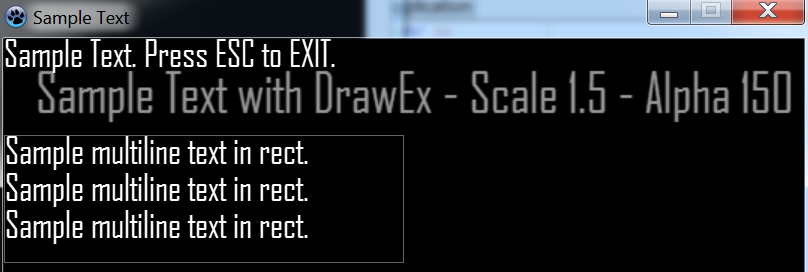
You can see text with the font we created and other text scaled with alpha.
The resulting code is something like this:
program project1;

{$IFDEF WINDOWS}
  {$R *.res}
{$ENDIF}
{$DEFINE STATIC}

uses
  {$IFNDEF STATIC}
  zglHeader
  {$ELSE}
  zgl_main,
  zgl_screen,
  zgl_window,
  zgl_timers,
  zgl_keyboard,
  zgl_font,
  zgl_text,
  zgl_textures,
  zgl_textures_tga,
  zgl_primitives_2d,
  zgl_utils,
  zgl_math_2d
  {$ENDIF}
  ;

var
  dirRes     : String {$IFNDEF DARWIN} = '../data/' {$ENDIF};
  fnt        : zglPFont;

procedure Init;
begin
  fnt := font_LoadFromFile( dirRes + 'Agency FB-Regular-18pt.zfi' );
end;

procedure Draw;
var
  rect: zglTRect;
begin
  text_Draw( fnt, 0, 0, 'Sample Text. Press ESC to EXIT.' );

  text_DrawEx( fnt, 32, 32, 1.5, 0, 'Sample Text with DrawEx - Scale 1.5 - Alpha 150', 150 );

  rect.H:=128;
  rect.W:=400;
  rect.X:=0;
  rect.Y:=96;

  pr2d_rect(rect.X,rect.Y,rect.W,rect.H,$FFFFFF,100);

  text_DrawInRect(fnt,rect,
  'Sample multiline text in rect.' + #10 +
  'Sample multiline text in rect.'+ #10 +
  'Sample multiline text in rect.');
end;

procedure Timer;
begin
  if key_Press( K_ESCAPE ) Then zgl_Exit();
  key_ClearState();
end;

Begin
  {$IFNDEF STATIC}
  zglLoad( libZenGL );
  {$ENDIF}

  timer_Add( @Timer, 16 );

  zgl_Reg( SYS_LOAD, @Init );
  zgl_Reg( SYS_DRAW, @Draw );

  zgl_Enable( APP_USE_UTF8 );

  wnd_SetCaption( 'Sample Text' );

  wnd_ShowCursor( TRUE );

  scr_SetOptions( 800, 600, REFRESH_MAXIMUM, FALSE, FALSE );

  zgl_Init();
End.
From the Free Pascal wiki, page "ZenGL Tutorial 2", as it stood on 2020-03-03 after a change by Trev, out of the wiki's dump of 2024-05-26. Copyright stays with the author who wrote it, according to the old wiki's Licensing page. If you have concerns about this material, message the admin.
Talk about this page
Nobody has opened a bench for this page yet. Sign in to open one.