

VirtualTreeview
Deutsch · English · Español · Français · Polski
About
VirtualTreeview is a TTreeView control built from ground up.
Its main characteristics are :
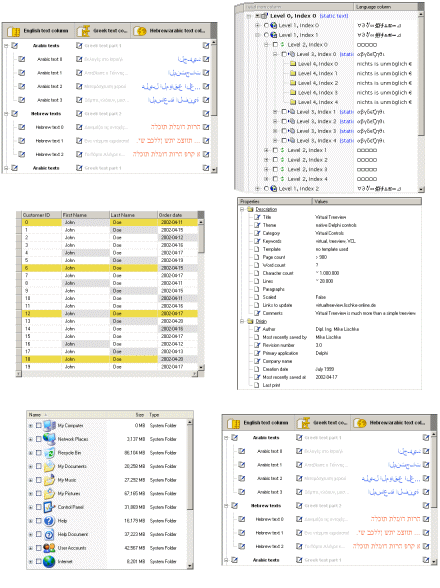
- it is extremely fast. Adding one million nodes takes only ~700 milliseconds
- very small memory foot print. by only allocating about 60 bytes per node
- optimized for high speed access. It takes as few as 0.5 seconds to traverse one million nodes
- Multiselection is supported
- Drawing the entire tree to a bitmap or the printer is supported
- fixed background image can be used
- Hot style for nodes is supported
- Nodes can have individual heights
- Sorting via compare callback
- Support for unicode
- Multiple columns are supported
- ... and many more
This component was designed for cross-platform applications.
Author
Author: Mike Lischke
Old LCL Port: Joerg Thaler,Christian Ulrich
New LCL Port: Luiz Américo
License
LGPL or Mozilla Public Licence 1.1
Download
See the project releases page
Note that v5.5.3.1 is included in Lazarus v2.0+, there is not need for a separate download. However, to avoid naming conflicts, a "laz" prefix was added to package, unit and components:
<thead>
</thead> <tbody>
TVirtualDrawTree<br /> TVTHeaderPopupMenu</td>
TLazVirtualDrawTree<br /> TLazVTHeaderPopupMenu</td>
</tbody>
Repository
You can checkout the source code from GitHub
It's possible to use both Subversion and Git clients
Subversion:
svn co https://github.com/blikblum/VirtualTreeView-Lazarus/branches/lazarus-v5Replace lazarus_v5 by lazarus_v4 or lazarus_master to get a different version. For more info how to use Subversion, see GitHub help
Git:
git clone https://github.com/blikblum/VirtualTreeView-Lazarus.gitBug report / Feature request
For patches / pull requests, here. Newcomers to GitHub may want to read the help
Change Log
- 02/06/2016 - 4.8.7 R4 and 5.5.3 R1 - First release of 5x branch + moved to GitHub
- 20/10/2012 - 4.8.7 LCL R2 - Compatibility with Lazarus 1.0 + 64 bit support
- 18/02/2011 - 4.8.7 LCL R1 - Sync with 4.8 branch + misc fixes
- 11/02/2010 - 4.8.6 - First stable release of the new port
Dependencies / System Requirements
Versions 4.x or 5.x
- Lazarus 1.6 or newer
- fpc 2.6.4 or newer
- LCL Extensions 0.6 or newer
Version 6.x (lazarus_master branch)
- Lazarus 1.6 or newer
- fpc 3.1 (trunk) or newer
- LCL Extensions 0.6 or newer
Installation
- In Lazarus v2.0+ the virtualtreeview package is installed by default. Note, however, that everything has been renamed with a "laz" prefix (see above table) to avoid possible naming conflicts. It is subsequently assumed that you want to install one of the github versions in addition to the built-in version.
- If new to Lazarus, read Install Packages
- In Lazarus v2.0 or older, uninstall the built-in version first: go to "Package" > "Install/uninstall packages", select "virtualtreeview_package 5.5.3.1" in the left list, click "Uninstall selection" and "Save and rebuild IDE". Note: This is not required in Lazarus v2.2 or newer.
- Download the LCL Extensions package and extract it to a directory (lazarus\components\lclextensions or other of your preference).
- Download the Virtual Treeview package and extract it to a directory (lazarus\components\virtualtreeview or other of your preference).
- Open lclextensions_package.lpk in LCL Extensions directory and click "Use / Add to project"
- Open virtualtreeview_package.lpk in the package editor and click "Use / Install". Rebuild the IDE.
Help
A comprehensive help file in .chm format() can be found within the GIT repository 1 in the subdirectory Help.
A tutorial and numerous code samples can be found in this forum VirtualTreeview Example for Lazarus, in the Demos Subdirectory of the VirtualTreeView GIT 2, and in the SVN of freepascal.org 3
()Beginning with Windows 7, additional security measures were introduced for .chm Files, if you either download a .chm file directly via the browser (without going through a .zip file), or open the file from a network drive. The lock causes the problem that after opening the .chm file you will see only the table of contents, while the actual contents are missing. To manually release the lock use the Windows Explorer (Right Mouse Click - Properties - "Unblock"). This works with Windows 10 (4/2021) as well.
See also
From the Free Pascal wiki, page "VirtualTreeview", as it stood on 2022-02-10 after a change by Wp, out of the wiki's dump of 2024-05-26. Copyright stays with the author who wrote it, according to the old wiki's Licensing page. If you have concerns about this material, message the admin.
Talk about this page
Nobody has opened a bench for this page yet. Sign in to open one.