

TReplaceDialog
English · Français · Русский · 中文(中国)
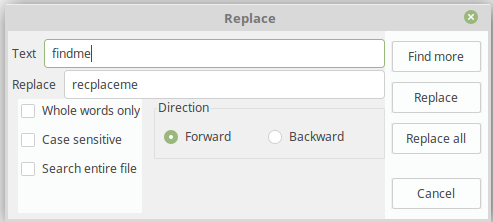
TReplaceDialog  is a component that aids in search and replace textinformation. It can be found on the Dialogs tab of the Component Palette.
 ]]
Usage
An example to use a TReplaceDialog with a TSynEdit. The OnReplace will be executed when the 'Replace' button within the dialog is pressed.
procedure TMyForm.Button1Click(Sender: TObject);
begin
  ReplaceDialog1.Execute();
end;

procedure TMyForm.ReplaceDialog1Replace(Sender: TObject);
var
  k: integer;
begin
  with Sender as TReplaceDialog do begin
    opt := [];
    if frReplace in Options then
      opt := [ssoReplace];
    if frReplaceAll in Options then
      opt := [ssoReplaceAll];
    k := TSynEdit1.SearchReplaceEx( FindText, ReplaceText, opt, Position );
    if k>=0 then
      TSynEdit1.SetFocus()
    else
      Beep();
  end;
end;
See also
From the Free Pascal wiki, page "TReplaceDialog", as it stood on 2020-03-01 after a change by Trev, out of the wiki's dump of 2024-05-26. Copyright stays with the author who wrote it, according to the old wiki's Licensing page. If you have concerns about this material, message the admin.
Talk about this page
Nobody has opened a bench for this page yet. Sign in to open one.