

TRadioButton/ja
Deutsch · English · Français · Suomi · 日本語
TRadioButton  は相互排他的 - もし1つのボタンが選択されると、同じグループの他のものが選択できない - に他のラジオボタンともに機能するボタン選択を現すコンポーネントである。TRadioButtonはコンポーネントパレットのStandardタブで選択できる。
FormでTRadioButtonを使うには、単にコンポーネントパレットStandardから、選んでフォーム上でクリックし、配置する。
ラジオボタンは何でも選択可能なので、通常は単一のラジオボタンを用いることは意味をなさない。そのため、個々のラジオボタンの代わりにTRadioGroupを用いることもできる。
ソースコードのどこからでも、クエリ、Status := <RadioButton>.Checked;により、有効か、無効かラジオボタンの状態を取得できる。通常のブール値としてCheckedを使うことができる。このため、割り当て、<RadioButton>.Checked := True;が可能である。
簡単な例
- 新しいアプリケーションを作り、3つのラジオボタンを配置する。
- オブジェクトインスペクタタブのプロパティで名前をRadioButton1...3から、rbRed、rbGreen、rbBlueに変更する。
- 同様にそれらのラジオボタンのキャプションをRed、Green、Blueに変更する。
- フォームにTButtonを加え、そのキャプションをDraw new、その名前をbtnPaintに変更する。
- OnClickをオブジェクトインスペクタで選択し、[...]をクリックし、TButtonに対しOnClickイベントハンドラを作る。
- 以下のコードを加える:
procedure TForm1.btnPaintClick(Sender: TObject);
begin
  if rbRed.Checked   then Color:=clRed;
  if rbGreen.Checked then Color:=clLime;
  if rbBlue.Checked  then Color:=clBlue;
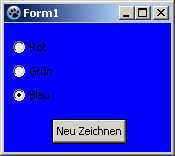
end;- アプリケーションでは、以下のように見えるはずである:
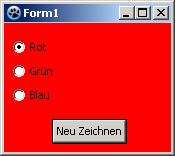 ->
イベントの使い方
上の例との相違は、ボタンのクリックではなく、すでにラジオボタンの1つが選択された状態で再描画することである。
ソースコードより、ボタンとそのOnClickイベントハンドラを削除することにより、前の例を変更できる。新しい例もまた、簡単に作れる:
- 新しいアプリケーションを作り、フォームに3つのラジオボタンを配置する。
- オブジェクトインスペクタプロパティタブで、その名前をRadioButton1...3からrbRed、rbGreen、rbBlueへ変更する。
- 同様にラジオボタンのキャプションもRed、Green、Blueに変更する。
- ここでラジオボタンにOnChangeイベントハンドラを作る。すべてのラジオボタンに対して、オブジェクトインスペクタイベントタブでOnChangeイベントを選択し[...]をクリックするか、そのうえでダブルクリックする。
- クリックされたラジオボタンに応じて、ラジオボタンのOnChangeイベントハンドラにフォームの色を変更させるため:
procedure TForm1.rbRedChange(Sender: TObject);
begin
  Self.Color:=clRed;    //「Self」で、メソッドが存在するオブジェクトを選択する(メソッド:rbRedChange/オブジェクト:Form1)
end;

procedure TForm1.rbGreenChange(Sender: TObject);
begin
  Form1.Color:=clLime;  //直接オブジェクト''Form1''を選択できるが、お粗末である。
                        //なぜなら、クラス「Form1」の他のオブジェクトが生成されてないからだ
end;                    //訳注: clLimeとなっているが本文中ではclGreenである

procedure TForm1.rbBlueChange(Sender: TObject);
begin
  Color:=clBlue;        //もしくは「Self」を取り除く、そしてコンパイラは自動的に
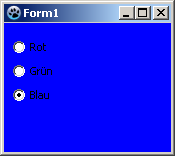
end; //それ自身のオブジェクトを探し出すだろう- アプリケーションを実行すると、このように見えるはずだ:
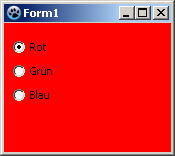 ->
グルーピング
ラジオボタンをフォームに追加すると、そのフォームが親(ラジオボタンを含むコントロール)となる。ラジオボタンを選択するたびに(クリックまたはコードによって)、各設定で<RadioButton>.Checked:=True;が行われると、同じ親を持つ異なるラジオボタンが選択されているかどうかを確認し、もしそうであれば、そのプロパティCheckedがFalseに変更される。
もし複数のラジオボタンをフォームで使い、異なる、独立した選択を提供するように設計したいのであれば、ラジオボタンをグループ化しなければならない。このため完成したコンポーネントTRadioGroupがある、または(例えば、TPanel、TGroupBox、TNotebook、TPageControlなどで)コントロールにまとめることになる。
以下の例はどのようにラジオボタンをまとめることができるかを示している:
簡単な例を変更するか、新しいアプリケーションを作り:
- 初めにStandardコンポーネントパレットのTGroupBoxをフォームに配置する必要がある。
- その名前をgbColorへ、そのキャプションをColorに変更する。
- ここで、このグループボックスをrbRed、rbGreen、rbBlueへサブクラス化する:
- 変更したプロジェクトで、引き続きオブジェクトインスペクタにあるラジオボタンをgbColorへ向けて、ドラッグアンドドロップによりで移動する。
-
新しいプロジェクトで、GroupBoxで挿入するためにクリックすることにより、それらの後に3つのラジオボタンを挿入し、名前をrbRed、rbGreen、rbBlueへ、キャプションをRed、Green、Blueへ変更する。
- そして、2番目のTGroupBoxをフォームに配置し、gbBrightness、とキャプションをBrightness名づける。
- このグループボックスはまた3つのラジオボタンをもち、名前をrbBrightDark、rbBrightMedDark、rbBrightBright、そしてキャプションをDark、MediumDark、Brightと名づける。
- 新しいアプリケーションを作った場合、フォームにボタンを追加しbtnPaint、キャプションDraw newと名づけなければならない。
- btnPaintのOnClickイベントハンドラのコードを以下に変更する:
procedure TForm1.btnPaintClick(Sender: TObject);
begin
  if rbRed.Checked   then Color:=Brightness or clRed;
  if rbGreen.Checked then Color:=Brightness or clLime;
  if rbBlue.Checked  then Color:=Brightness or clBlue;
end;- そして、さらにTForm1のprivate節にコード
function Brightness: TColor;を書き、[CTRL] + [Shift] + [c] (コード補完)を押す。関数が生成される。以下のコードを入力する:
function TForm1.Brightness: TColor;
begin
  Result:=0;
  if rbBrightMedDark.Checked then Result:=$888888;
  if rbBrightBright.Checked  then Result:=$DDDDDD;
end;- アプリケーションを実行すると、グループ化された独立したラジオボタンを用いることができ、以下のように見えるだろう:
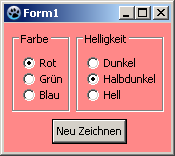 ->
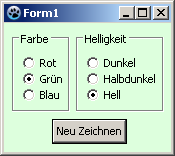
以下も参照のこと
- TRadioButton doc
- TRadioGroup - Usage of RadioGroups\
- TToggleBox - Usage of Toggleboxes\
- TCheckBox - Usage of CheckBoxes\
From the Free Pascal wiki, page "TRadioButton/ja", as it stood on 2024-03-20 after a change by Ariben, out of the wiki's dump of 2024-05-26. Copyright stays with the author who wrote it, according to the old wiki's Licensing page. If you have concerns about this material, message the admin.
Edited on wiki.freepascal.org by 1 person, 2024
From the official wiki's backup of 26 May 2024: who edited this page there, and when. Edits made there after that date were not recorded, and the earlier versions are not shown here; the main page says why.
| When | Who | What changed |
|---|---|---|
| Ariben | Created page | |
| Ariben | ||
| Ariben | 以下も参照のこと | |
| Ariben | ||
| Ariben | 簡単な例 | |
| Ariben | イベントの使い方 | |
| Ariben | グルーピング | |
| Ariben | 簡単な例 | |
| Ariben | イベントの使い方 | |
| Ariben | グルーピング | |
| Ariben | イベントの使い方 |
Talk about this page
Nobody has opened a bench for this page yet. Sign in to open one.