

TListBox/ja
Deutsch · English · Français · Suomi · 日本語
TListBox  は、ユーザーが1つ選択する必要がある(スクロール可能な)短い文字列のリストを表示するコンポーネントである。コンポーネントパレットのStandardタブで利用できる。
TListBoxにあるstringsはTStrings型であるItemsプロパティに格納されている。そのため、TStringListまたはその親であるTStringsにあるように、リストボックス内に文字列を割り当て、もしくは取り除くことができる。
これはForm1のTListBox ListBox1の使い方のいくつかの例である:
リストボックスを埋める
オブジェクトインスペクタにより
- フォーム上のListBoxを1回のクリックで選択する。
- PropertiesタブでObject Inspectorに移動し、Itemsというプロパティを選択する。
- 3つの点があるボタンをクリックする。String Editorが開く。
- テキストを入力し、OKで作業を確認する。
ボタンクリックでコードにより
フォームに、名前がbtnFillでキャプションがfill ListBoxとなるTButtonを追加する。そのボタンのOnClickイベントハンドラには、以下のコードを記述する:
procedure TForm1.btnFillClick(Sender: TObject);
begin
  ListBox1.Items.Clear;             //Delete all existing strings
  ListBox1.Items.Add('First line');
  ListBox1.Items.Add('Line with random number '+IntToStr(Random(100)));
  ListBox1.Items.Add('Third line');
  ListBox1.Items.Add('Even a random number '+IntToStr(Random(100)));
end;
StringListの割り当て
フォームに、名前がbtnFillでキャプションがfill ListBoxとなるTButton/jaを追加する。そのボタンのOnClickイベントハンドラには、以下のコードを記述する:
procedure TForm1.btnFillClick(Sender: TObject);
var
  myStringList: TStringList;
begin
  myStringList:=TStringList.Create;               //StringListを作る
  myStringList.Add('This is the first line.');   //新しい行を追加する
  myStringList.Add('This is the second first line.');
  myStringList.Add('This is the third line.');
  myStringList.Add('etc.');
  ListBox1.Items.Assign(myStringList);            //ListBox1にStringListの内容を割り当てる
  myStringList.Free;                              //メモリからStringListを解放する
end;
文字列を追加する
- ボタンクリックでコードにより埋める、を拡張し、TEditと名前がbtnAddでキャプションがadd stringのTButtonを追加し、Edit1のTextプロパティを"" - 空の文字列に変更する。
- ボタンのイベントハンドラOnClickに以下のコードを書く:
procedure TForm1.btnAddClick(Sender: TObject);
begin
  ListBox1.Items.Add(Edit1.Text);
  Edit1.Text:='';
end;
文字列を削除する
デフォルトでは、ListBoxで1行のみを選択できるように設定されている。ListBoxで複数の行を選択する場合は、MultiSelectプロパティをTrueに設定する必要がある。
ItemIndexで
procedure TForm1.btnDelClick(Sender: TObject);
begin
  if ListBox1.ItemIndex > -1 then    //リストボックスの文字列が選択されたときのみ削除
    ListBox1.Items.Delete(ListBox1.ItemIndex);
end;
all selected strings
procedure TForm1.btnDelClick(Sender: TObject);
var
  i: Integer;
begin
  if ListBox1.SelCount > 0 then                 //リストボックスの少なくとも1つの文字列が選択されたときのみ削除する
    for i:=ListBox1.Items.Count - 1 downto 0 do //すべてのアイテムをイテレート
      if ListBox1.Selected[i] then              //もし選択されたら...
        ListBox1.Items.Delete(i);               //...そのアイテム(文字列)を削除
end;
所有者によって書かれたリストボックス
一般的には、リストボックスをユーザーによって設定されたテーマに従わせることが有効である。ある場合(例えば、色彩の多い表面を持つゲームをプログラムするため)ではこの標準から逸脱し、自身の選択に従ってコントロールを描くことができる。 これを、
- 上の例を変更するか、TListBox ListBox1をもつ新しいアプリケーションを作る
- オブジェクトインスペクタでListBox1のプロパティ、StyleをlbOwnerDrawFixedへ変更する。
- オブジェクトインスペクタのイベントタブで[...]ボタンをクリックすることで、OnDrawItemイベントに対するイベントハンドラを作る。
- イベントハンドラに以下のコードを加える:
procedure TForm1.ListBox1DrawItem(Control: TWinControl; Index: Integer;
  ARect: TRect; State: TOwnerDrawState);
var
  aColor: TColor;                       //背景色
begin
  if (Index mod 2 = 0)                  //インデクスがどのアイテムか知らせる
    then aColor:=$FFFFFF                //背景色として1秒ごとにアイテムが白になる
    else aColor:=$EEEEFF;               //背景色として1秒ごとにアイテムが桃になる
  if odSelected in State then aColor:=$0000FF;  //もしアイテムが選択されると、背景色は赤となる。
  ListBox1.Canvas.Brush.Color:=aColor;  //背景色を設定する
  ListBox1.Canvas.FillRect(ARect);      //塗りつぶされた四角形を描く

  ListBox1.Canvas.Font.Bold:=True;      //フォントを「太字」に設定する
  ListBox1.Canvas.TextRect(ARect, 2, ARect.Top+2, ListBox1.Items[Index]);  //アイテムテキストを描く
end;
と書くことができる。
Note: リストボックスアイテムのパラメータ:
Control:
複数のコントロール(例えば、複数のリストボックス)がこのハンドルにアクセスする場合、どれがこのイベントを発生させたかわかる。それがTListBoxかどうか、'''ListBox1.Canvas.FillRect(ARect)また、
TListBox(Control).Canvas.FillRect(ARect)'''の代わりに、事前に問い合わせるべきであり
if Control is TListBox then
  TListBox(Control).Canvas.FillRect(ARect);
と書くことができる。 Index: アクセスできるように、アイテムの場所を特定する '''
<ListBox>.Items[Index]. ARect:背景を描くために必要な、四角形を描写する。 State:''' 通常、フォーカスされた、選択されたなどアイテムの状態。
- 例では以下のように見えるはずである:
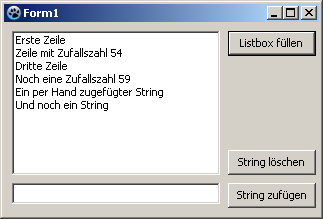 ->
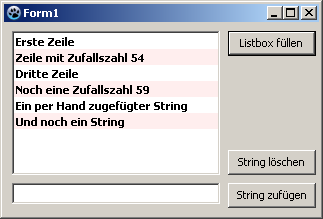
See also
From the Free Pascal wiki, page "TListBox/ja", as it stood on 2024-03-22 after a change by Ariben, out of the wiki's dump of 2024-05-26. Copyright stays with the author who wrote it, according to the old wiki's Licensing page. If you have concerns about this material, message the admin.
Talk about this page
Nobody has opened a bench for this page yet. Sign in to open one.