

TComboBox
Deutsch · English · Español · Français · Suomi · 日本語
A TComboBox  is a combination of an edit box and a (drop-down) list allowing one of several options to be chosen.
Usage
To use a TComboBox on a form, you can simply select it on the Standard tab of the Component Palette and place it by clicking on the form.
In the ComboBox, the stored strings are stored in the property Items, that is of type TStrings. Thus you can assign or remove strings in the ComboBox, as in a TStringList or its parent TStrings.
Here are a few examples to use a combobox ComboBox1 on a form Form1:
Fill ComboBox
By the Object Inspector
- Select the ComboBox on your form with one click.
- Go in the Object Inspector in the Properties tab on the property Items.
- Click on the button with the three dots. The String Editor opens.
- Enter your text and confirm your work with OK.
By code when you create the form
- Create the OnCreate event handler for the form, by clicking on your form, use the Object Inspector, the tab events, select the OnCreate event and click the button [...] or double click the button in the form.
- In the source editor, you now insert the desired selection texts, for our example, you write as follows:
procedure TForm1.FormCreate(Sender: TObject);
begin
  ComboBox1.Items.Clear;             //Delete all existing choices
  ComboBox1.Items.Add('Red');        //Add an choice
  ComboBox1.Items.Add('Green');
  ComboBox1.Items.Add('Blue');
  ComboBox1.Items.Add('Random Color');
end;
Make that something happens after the selection
Like all components, even the TComboBox provides various events, that are called when the user use the combobox. To respond to a change of the selection in the ComboBox, you can use the OnChange event:
- Doubleclick the ComboBox on the form or choose the OnChange event in the Object Inspector and click on the button [...].
- The event handler is created, now you can insert your desired source, in our example we want to change the background color of the form:
procedure TForm1.ComboBox1Change(Sender: TObject);
begin
  case ComboBox1.ItemIndex of  //what entry (which item) has currently been chosen
    0: Color:=clRed;
    1: Color:=clGreen;
    2: Color:=clBlue;
    3: Color:=Random($1000000);
  end;
end;- Start your application, the selection changes the background color of the form.
Events
The OnGetItems event is invoked when widgetset items list can be populated, so it is triggered when the button of the combo box is pressed.
Owner drawn ComboBox
In general, it is advantageous to let the ComboBox show in the theme the user has chosen in his settings. In some cases (for example, to program a game with a colorful surface), you can deviate from this standard and draw it according to your own choice. This is how this works:
Note: Parameters of ComboBoxDrawItem:
Control:
If multiple controls (e.g. multiple ComboBoxes) access this event handle, you know which control caused the event. In our example, instead ofComboBox1.Canvas.FillRect(ARect)you could also writeTComboBox(Control).Canvas.FillRect(ARect). However, you should still check in advance, whether it is a TComboBox:if Control is TComboBox then TComboBox(Control).Canvas.FillRect(ARect);Index: Specifies the item location, so you have access to the string
<ComboBox>.Items[Index].
ARect: Describes the rectangle, which is necessary for drawing the background.
State: Status of the items, whether normal, focused, selected etc.
Draw a filled rectangle
- You can modify the example Fill ComboBox by code when you create the form.
- Change from ComboBox1 in the Object Inspector the property Style to csOwnerDrawFixed.
- Create in the Object Inspector the event handler for the event OnDrawItem, by clicking on the button [...].
- Add the following code to the handler:
procedure TForm1.ComboBox1DrawItem(Control: TWinControl; Index: Integer;
  ARect: TRect; State: TOwnerDrawState);
var
  ltRect: TRect;

  procedure FillColorfulRect(aCanvas: TCanvas; myRect: TRect);              //paint random color
  // Fills the rectangle with random colours
  var
    y: Integer;
  begin
    for y:=myRect.Top to myRect.Bottom - 1 do begin
      aCanvas.Pen.Color:=Random($1000000);
      aCanvas.Line(myRect.Left, y, myRect.Right, y);
    end;
  end;

begin
  ComboBox1.Canvas.FillRect(ARect);                                         //first paint normal background
  ComboBox1.Canvas.TextRect(ARect, 22, ARect.Top, ComboBox1.Items[Index]);  //paint item text

  ltRect.Left   := ARect.Left   + 2;                                        //rectangle for color
  ltRect.Right  := ARect.Left   + 20;
  ltRect.Top    := ARect.Top    + 1;
  ltRect.Bottom := ARect.Bottom - 1;

  ComboBox1.Canvas.Pen.Color:=clBlack;
  ComboBox1.Canvas.Rectangle(ltRect);                                       //draw a border

  if InflateRect(ltRect, -1, -1) then                                       //resize rectangle by one pixel
    if Index = 3 then
      FillColorfulRect(ComboBox1.Canvas, ltRect)                            //paint random color
    else begin
      case Index of
        0: ComboBox1.Canvas.Brush.Color := clRed;
        1: ComboBox1.Canvas.Brush.Color := clGreen;
        2: ComboBox1.Canvas.Brush.Color := clBlue;
      end;
      ComboBox1.Canvas.FillRect(ltRect);                                    //paint colors according to selection
    end;
end;- Your example might look like:
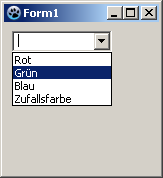 ->
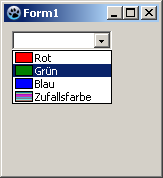
Preceded image
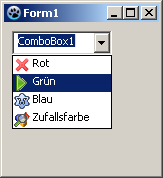
In this example, we load a few images in a TImageList and draw them in front of the items in the combobox. It is a simple example which only generally show what you can do. I don't run explicitly details, such as checking, whether the corresponding image exists etc. in this example. This should be done by you depending on the need.
- Create an application analogous example Fill ComboBox by code when you create the form.
- Change from ComboBox1 in the Object Inspector the property Style to csOwnerDrawFixed.
- Add a TImageList from the component palette Common controls on your form.
- The Height and Width of 16 pixels is preset in ImageList1. We allow this. To fit neatly the images into our combo box, we make the property ItemHeight from ComboBox1 to 18 in the Object Inspector.
- Add four images in the ImageList:
- Doubleclick ImageList1 or leftclick ImageList1 and select ImageList Editor....
- Click on Add and select an image (see <Lazarus directory>/images/... there are various images or icons in 16x16px size).
- Have you added four images, confirm your work with [OK].
- Create in the Object Inspector the event handler for the event OnDrawItem, by clicking on the button [...].
- Add the following code to the handler:
procedure TForm1.ComboBox1DrawItem(Control: TWinControl; Index: Integer;
  ARect: TRect; State: TOwnerDrawState);
begin
  ComboBox1.Canvas.FillRect(ARect);                                         //first paint normal background
  ComboBox1.Canvas.TextRect(ARect, 20, ARect.Top, ComboBox1.Items[Index]);  //paint item text
  ImageList1.Draw(ComboBox1.Canvas, ARect.Left + 1, ARect.Top + 1, Index);  //draw image according to index on canvas
end;- Your example might look like:
-> 
Styles
csSimple
csSimple represents itself a simple edit box with a list box underneath. The list box is only shown, if there's enough height allocated. By default the height is set to shown the edit box only.
There's no dropdown icon to show the list box. Items can be changed by using keyboard (arrow keys), or by clicking an an item, if the control is high enough to show the items list.
csSimple style is Windows specific. Non-widows widgetset most likely don't implement and fall back to csDropDown.
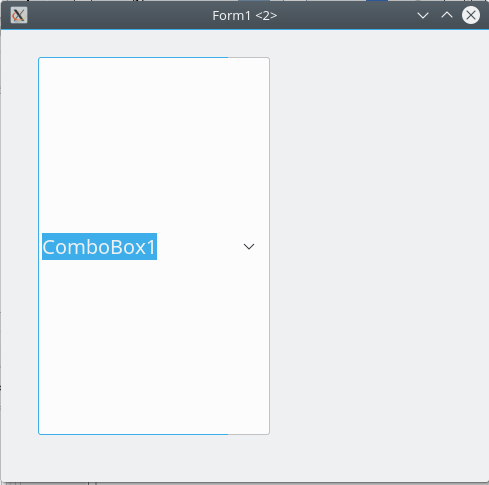
Here's an example of (non-autosized) csSimple ComboBox on two different widgetset. (as of Lazarus 2.0.8):
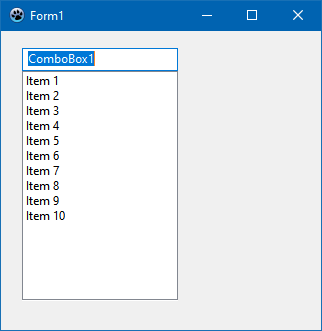
Win32
Gtk2
Proposed Features
ReadOnly
ReadOnly property has been deprecated since 2017. It has been removed as of today.
However, it's possible to reinstate ReadOnly property as a mirror of TEdit readonly.
The complexity of ComboBox is that it bears features of both ListBox and Edit (but it's not a descendant of either). While ComboBox does provides the means to change the selection (just like TEdit), it might be helpful also to make the edit box readonly. (Note, that this is different to csDropDownList. ccDropDownList typically implements a dropdown as a button).
How, ReadOnly property is expected to work:
- it's available for any ComboBox style
- it's does not influence or is not influenced by any ComboBox style selected or changed (unlike the previous implementation of ReadOnly)
- if set to true, the edit box (if supported by the comboBox style on the widgetset) becomes ReadOnly (in terms of TEdit). The content cannot be changed by any text input actions (such as editing, pasting, or dragging the text around).
:* the combobox value CAN be changed by selecting a different item from the dropdown, by either using a mouse (or respective key combinations, i.e. up or down arrows)
TextHint
As ComboBox bears traits of TEdit, it's should be possible to set TextHint for comboBox, if the value is empty.
Introduce TextHint property that should act similar to TEdit
- if text value of combobox is empty, the TextHint should be presented (in the colors and font style, that's applicable to the current widgetset theme)
See also
From the Free Pascal wiki, page "TComboBox", as it stood on 2022-09-13 after a change by Paskal, out of the wiki's dump of 2024-05-26. Copyright stays with the author who wrote it, according to the old wiki's Licensing page. If you have concerns about this material, message the admin.
Talk about this page
Nobody has opened a bench for this page yet. Sign in to open one.