

TCheckGroup/zh CN
Deutsch · English · Français · Suomi · Русский · 中文(中国) · 日本語
A TCheckGroup  is a control that comprises a group of TCheckBox items physically and logically grouped together on a container component.
用法
To use a TCheckGroup on a form, you can simply select it on the Standard tab of the Component Palette and place it by clicking on the form. 要在窗体上使用TCheckGroup,您可以简单地在控件面板的Standard选项卡上选择它,并在窗体上单击,将其加入到窗口中。
小例子
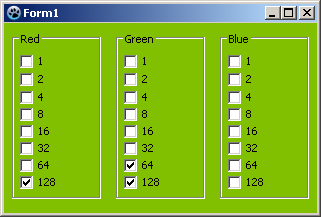
这个例子改变窗体的背景颜色。这个颜色是通过添加单独的颜色组件来确定的。
- 创建一个新的应用程序,并在您的窗体上放置一个TCheckGroup组件
- in the object inspector change the property Name of CheckGroup1 to cgRed and the caption to Red
在对象检查器中修改CheckGroup1的属性Name为cgRed,标题为Red
- 为“cgRed”添加复选框:
- 在对象检查器中选择“cgRed”的属性“Items”
- 点击按钮[…],则打开字符串编辑器
- 每行输入一个数字,“1 2 4 8 16 32 64 128”,然后按“OK”键完成输入
- 在cgRed上单击右键再单击Copy复制这个 TCheckGroup
- 在窗体的空白处单击右键选择insert, 这将创建名为“cgRed1”的TCheckGroup
- 现在改变Name 属性为 cgGreen , Caption 属性改为 Green
- 插入一个TCheckGroup并更改名称为“cgBlue”和标题为“Blue”
- 只要点击复选框,颜色就会改变:
- 在对象检查器中通过点击在事件“OnItemClick”旁边[…]按钮创建" cgRed "的" OnItemClick "事件处理程序
- 选择“cgGreen”和“cgBlue”也是这个事件处理程序,通过选择每个CheckGroup组件的事件“OnItemClick”旁边的组合框,选择“cgRedItemClick”
- 在事件处理程序中编写以下代码:
procedure TForm1.cgRedItemClick(Sender: TObject; Index: integer);
var
  i, c: Integer;
begin
  c := $000000;                                          // 最开始颜色是黑色的
  for i:=0 to 7 do begin                                 // test Items 0..7 of all Checkgroups
    if cgRed.Checked[i]   then c := c + 1 shl i;         // 红色的量  $000000..$0000FF
    if cgGreen.Checked[i] then c := c + 1 shl (i + 8);   // 绿色的量  $000000..$00FF00
    if cgBlue.Checked[i]  then c := c + 1 shl (i + 16);  // 蓝色的量  $000000..$FF0000
  end;
  Color := c;
end;- start your program, it could look like:
访问复选框
TCheckGroup中的每个项目都有一个Checked属性,可以将它们全部设置为Checked
for i := 0 to MyCheckGroup.items.Count-1 do   // check all the categories we found.
    MyCheckGroup.Checked[i] := true;
您可以使用TCheckGroup在运行时添加项目。Items,它是TStrings列表。要向集合中添加一个新的复选框,只需执行MyCheckGroup.Items.add('CheckThis');类似地,要删除所有项,清空列表,MyCheckGroup.Items.clear;
See also
From the Free Pascal wiki, page "TCheckGroup/zh CN", as it stood on 2023-02-04 after a change by Clzwf, out of the wiki's dump of 2024-05-26. Copyright stays with the author who wrote it, according to the old wiki's Licensing page. If you have concerns about this material, message the admin.
Edited on wiki.freepascal.org by 1 person, 2023
From the official wiki's backup of 26 May 2024: who edited this page there, and when. Edits made there after that date were not recorded, and the earlier versions are not shown here; the main page says why.
| When | Who | What changed |
|---|---|---|
| Clzwf | Created page | |
| Clzwf | Usage | |
| Clzwf | Accessing the Check Boxes |
Talk about this page
Nobody has opened a bench for this page yet. Sign in to open one.