

TCheckGroup
Deutsch · English · Français · Suomi · Русский · 中文(中国) · 日本語
A TCheckGroup  is a control that comprises a group of TCheckBox items physically and logically grouped together on a container component.
Usage
To use a TCheckGroup on a form, you can simply select it on the Standard tab of the Component Palette and place it by clicking on the form.
Small example
It changes the background color of a form. This color is determined by adding the individual color components:
- create a new application and place a TCheckGroup on your form
- in the object inspector change the property Name of CheckGroup1 to cgRed and the caption to Red
- add the checkboxes for cgRed:
- in the object inspector select the property Items of cgRed
- click on the button [...], the character chain editor opens
- write among one another 1 2 4 8 16 32 64 128 and complete the entry with the OK button
- copy this TCheckGroup by right click cgRed in the form and click on Copy
- right-click the form and click on Insert, which creates TCheckGroup named cgRed1
- now change the Name of cgRed1 to cgGreen and the Caption to Green
- insert even a TCheckGroup and change the name to cgBlue and the caption to Blue
- whenever a CheckBox is clicked, the color will change:
- in the object inspector create the OnItemClick event handler of cgRed by clicking the button [...] next to the event OnItemClick
- select for cgGreen and cgBlue also this event handler, by choosing each next to the event OnItemClick ComboBox cgRedItemClick
- write following code in the event handler:
procedure TForm1.cgRedItemClick(Sender: TObject; Index: integer);
var
  i, c: Integer;
begin
  c := $000000;                                          // first the color is black
  for i:=0 to 7 do begin                                 // test Items 0..7 of all Checkgroups
    if cgRed.Checked[i]   then c := c + 1 shl i;         // amount of red   $000000..$0000FF
    if cgGreen.Checked[i] then c := c + 1 shl (i + 8);   // amount of green $000000..$00FF00
    if cgBlue.Checked[i]  then c := c + 1 shl (i + 16);  // amount of blue  $000000..$FF0000
  end;
  Color := c;
end;- start your program, it could look like:
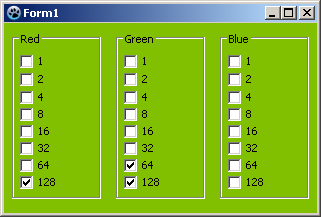
Accessing the Check Boxes
Each item in the TCheckGroup has a Checked property, to set them all to checked do
for i := 0 to MyCheckGroup.items.Count-1 do   // check all the categories we found.
    MyCheckGroup.Checked[i] := true;
You can add items at run time by using TCheckGroup.Items, its a TStrings list. To add an new checkbox to the set, just do MyCheckGroup.Items.add('CheckThis'); Similarly, to remove all items, clear the list, MyCheckGroup.Items.clear;
See also
From the Free Pascal wiki, page "TCheckGroup", as it stood on 2022-03-08 after a change by Dbannon, out of the wiki's dump of 2024-05-26. Copyright stays with the author who wrote it, according to the old wiki's Licensing page. If you have concerns about this material, message the admin.
Talk about this page
Nobody has opened a bench for this page yet. Sign in to open one.