

Sample Graphics/es
English · Español
Galería de Gráficos
Esta galería es para mostrar los diseños que pueden ser creados desde Lazarus y sus herramientas de dibujo, como BGRABitmap.
La mayoría de los ejemplos están incluidos en los paquetes BGRABitmap y BGRAControls.
gdgfx
Nombre: gdgfx 'Gráficos Degradados'
Autor: Lainz
Descripción: Muestra como crear botones y degradados con y sin transparencia en Lazarus usando BGRABitmap y una versión mejorada de Double Gradient que soporta alpha.
Notas: Testeado en Win32. La descarga incluye la versión usada de BGRABitmap y DoubleGradient.
Imágen: 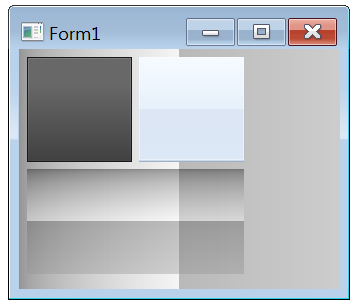
Arriba-Izquierda: 'como el boton de instalación de flash player' / Arriba-Derecha: 'como la barra del explorador de win7' / Abajo: degradado doble con alpha / Fondo: igual que abajo.
Descargar: gdgfx.7z (60.01 KB)
Botón Flash Player
Agrega un nuevo TPaintBox, establece 'btn1' como su nombre. Ve al evento OnPaint y agrega este código:
var
  tempbmp1, tempbmp2: TBGRABitmap;
begin
  // Fondo Degradado
  tempbmp1:=TBGRABitmap.Create(btn1.Width,btn1.Height,BGRA(104,104,104,255));
  tempbmp1.Canvas.GradientFill(Rect(1,Round(btn1.Height*0.25),btn1.Width-1,btn1.Height-1),$686868,$404040,gdVertical);

  // Borde Recuadro
  tempbmp1.Canvas.Brush.Color:=$181818;
  tempbmp1.Canvas.FrameRect(btn1.ClientRect);

  // Degradado de Luz
  tempbmp2:=TBGRABitmap.Create(btn1.Width,btn1.Height,BGRA(0,0,0,0));
  tempbmp2.GradientFill(1,1,btn1.Width-1,btn1.Height-1,
  BGRA(255,255,255,34),
  BGRA(255,255,255,10), gtLinear,
  PointF(btn1.ClientRect.Right,btn1.ClientRect.Top),
  PointF(btn1.ClientRect.Right,btn1.ClientRect.Bottom),
  dmDrawWithTransparency,True,False);
  tempbmp2.AlphaFillRect(2,2,btn1.Width-2,btn1.Height-2,0);

  // Fusionar Bitmaps
  tempbmp1.Canvas.Draw(0,0,tempbmp2.Bitmap);

  // Pintar en Canvas
  btn1.Canvas.Draw(0,0,tempbmp1.Bitmap);

  // Liberar Bitmaps
  tempbmp1.Free;
  tempbmp2.Free;
end;
Barra del Explorador de Windows 7
Agrega un nuevo TPaintBox, establece 'btn2' como su nombre. Ve al evento OnPaint y agrega este código:
var
  backBmp, lightBmp: TBGRABitmap;
  gradBmp: TBitmap;
begin
  // Gradiente Degradado
  gradBmp := DoubleGradientFill(
              btn2.ClientRect,
              $FFFAF5,$FAF0E6,
              $F4E6DC,$F7E9DD,
              gdVertical,gdVertical,gdVertical,0.5);

  // Usar como Fondo
  backBmp := TBGRABitmap.Create(gradBmp);
  gradBmp.Free;

  // Degradado de Luz
  lightBmp:= TBGRABitmap.Create(btn2.Width,btn2.Height,BGRA(0,0,0,0));
  lightBmp.Rectangle(0,0,btn2.Width,btn2.Height-2,
     BGRA(255,255,255,100),
     dmSet);
  lightBmp.SetHorizLine(0,btn2.Height-1,btn2.Width-1,BGRA(160,175,195,255));
  lightBmp.SetHorizLine(0,btn2.Height-2,btn2.Width-1,BGRA(205,218,234,255));

  // Fusionar Bitmaps
  backBmp.PutImage(0,0,lightBmp,dmDrawWithTransparency);
  lightBmp.Free;

  // Pintar en Canvas
  backBmp.Draw(btn2.Canvas,0,0,True);
  backBmp.Free;
end;
Degradado Doble con Alpha
Agrega un nuevo TPaintBox, establece 'btn3' como su nombre. Ve al evento OnPaint y agrega este código:
var
  myBitmap: TBGRABitmap;
begin
  myBitmap:= DoubleGradientAlphaFill(
  btn3.ClientRect,
  BGRA(0,0,0,100),BGRA(255,255,255,100),
  BGRA(100,100,100,100),BGRA(150,150,150,100),
  gdVertical,gdVertical,gdVertical,0.5);
  btn3.Canvas.Draw(0,0,myBitmap.Bitmap);
  myBitmap.Free;
end;
Barras de Progreso
Una barra de progreso es un componente en una interfáz gráfica de usuario que cubre el progreso de una tarea, como una descarga o transferencia de archivo.
Barra de Progreso Flash Player
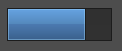 'Como la barra de progreso del instalador de flash player'. Requiere BGRABitmap y Double Gradient con Alpha.
Agrega un nuevo TPaintBox, establece 'progressbar' como su nombre. Ve al evento OnPaint y agrega este código:
var
  ABitmap, ABitmap2: TBGRABitmap; ARect: TRect;
begin
  // Inicialización
  // Self.Color:=$004D4D4D;
  ABitmap:=TBGRABitmap.Create(progressbar.Width,progressbar.Height);
  ARect:=progressbar.ClientRect;

  // Porcentaje de Progreso
  ARect.Right:=Round(ABitmap.Width*0.75);

  // Fondo Degradado
  ABitmap.Canvas.GradientFill(progressbar.ClientRect,$303030,$323232,gdVertical);

  // Borde del Fondo
  ABitmap.Rectangle(0,0,ABitmap.Width,ABitmap.Height,BGRA(28,28,28,255),dmSet);

  // Progreso Degradado
  ABitmap2:=DoubleGradientAlphaFill(
  ARect,
  BGRA(102,163,226,255),BGRA(83,135,186,255),
  BGRA(75,121,175,255),BGRA(56,93,135,255),
  gdVertical,gdVertical,gdVertical,0.5);

  // Borde del Progreso
  ABitmap2.Rectangle(0,0,ARect.Right,ARect.Bottom,BGRA(28,28,28,255),dmSet);

  // Luz del Progreso
  ABitmap2.Rectangle(1,1,ARect.Right-1,ARect.Bottom-1,BGRA(153,212,255,100),dmDrawWithTransparency);

  // Fusionar Bitmaps
  ABitmap.Canvas.Draw(0,0,ABitmap2.Bitmap);

  // Dibujar Bitmap
  progressbar.Canvas.Draw(0,0,ABitmap.Bitmap);

  // Liberar Bitmaps
  ABitmap.Free;
  ABitmap2.Free;
end;
Puedes cambiar el 'Porcentaje' del progreso cambiando esta linea:
  // Porcentaje del Progreso - 33%
  ARect.Right:=Round(ABitmap.Width*0.33);

  // Porcentaje del Progreso - 90%
  ARect.Right:=Round(ABitmap.Width*0.90);
From the Free Pascal wiki, page "Sample Graphics/es", as it stood on 2020-02-26 after a change by Trev, out of the wiki's dump of 2024-05-26. Copyright stays with the author who wrote it, according to the old wiki's Licensing page. If you have concerns about this material, message the admin.
Talk about this page
Nobody has opened a bench for this page yet. Sign in to open one.