

Double Gradient
Deutsch · English
Now 'DoubleGradientAlphaFill' & 'nGradientAlphaFill' are included in BGRABitmap in the unit 'BGRAGradients'.
Double Gradient
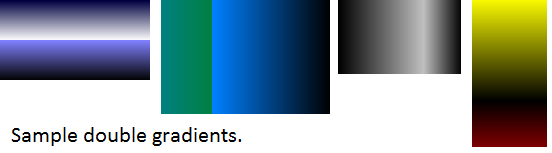
Unit
DoubleGradient
unit doublegradient;

{$mode objfpc}{$H+}

interface

uses
  Classes, Graphics;

function DoubleGradientFill(ARect: TRect; AStart1,AStop1,AStart2,AStop2: TColor;
  ADirection1,ADirection2,APos: TGradientDirection; AValue: Single): TBitmap;

implementation

function DoubleGradientFill(ARect: TRect; AStart1,AStop1,AStart2,AStop2: TColor;
  ADirection1,ADirection2,APos: TGradientDirection; AValue: Single): TBitmap;
var
  ABitmap: TBitmap; ARect1,ARect2: TRect;
begin
  ABitmap := TBitmap.Create;
  ABitmap.Width:=ARect.Right;
  ABitmap.Height:=ARect.Bottom;
  if AValue <> 0 then ARect1:=ARect;
  if AValue <> 1 then ARect2:=ARect;
  if APos = gdVertical then begin
    ARect1.Bottom:=Round(ARect1.Bottom * AValue);
    ARect2.Top:=ARect1.Bottom;
  end
  else if APos = gdHorizontal then begin
    ARect1.Right:=Round(ARect1.Right * AValue);
    ARect2.Left:=ARect1.Right;
  end;
  if AValue <> 0 then ABitmap.Canvas.GradientFill(ARect1,AStart1,AStop1,ADirection1);
  if AValue <> 1 then ABitmap.Canvas.GradientFill(ARect2,AStart2,AStop2,ADirection2);
  Result:=ABitmap;
end;

end.
DoubleGradientAlpha
This requires BGRABitmap.
unit doublegradientalpha;

{$mode objfpc}{$H+}

interface

uses
  Classes, Graphics,
  BGRABitmap, BGRABitmapTypes;

function DoubleGradientAlphaFill(ARect: TRect; AStart1,AStop1,AStart2,AStop2: TBGRAPixel;
  ADirection1,ADirection2,APos: TGradientDirection; AValue: Single): TBGRABitmap;

implementation

function DoubleGradientAlphaFill(ARect: TRect; AStart1,AStop1,AStart2,AStop2: TBGRAPixel;
  ADirection1,ADirection2,APos: TGradientDirection; AValue: Single): TBGRABitmap;
var
  ABitmap: TBGRABitmap; ARect1,ARect2: TRect; APoint1,APoint2,APoint3,APoint4: TPointF;
begin
  ABitmap := TBGRABitmap.Create(ARect.Right,ARect.Bottom);
  if AValue <> 0 then ARect1:=ARect;
  if AValue <> 1 then ARect2:=ARect;
  if APos = gdVertical then begin
    ARect1.Bottom:=Round(ARect1.Bottom * AValue);
    ARect2.Top:=ARect1.Bottom;
  end
  else if APos = gdHorizontal then begin
    ARect1.Right:=Round(ARect1.Right * AValue);
    ARect2.Left:=ARect1.Right;
  end;
  if ADirection1 = gdVertical then begin
    APoint1:=PointF(ARect1.Left,ARect1.Top);
    APoint2:=PointF(ARect1.Left,ARect1.Bottom);
  end
  else if ADirection1 = gdHorizontal then begin
    APoint1:=PointF(ARect1.Left,ARect1.Top);
    APoint2:=PointF(ARect1.Right,ARect1.Top);
  end;
  if ADirection2 = gdVertical then begin
    APoint3:=PointF(ARect2.Left,ARect2.Top);
    APoint4:=PointF(ARect2.Left,ARect2.Bottom);
  end
  else if ADirection2 = gdHorizontal then begin
    APoint3:=PointF(ARect2.Left,ARect2.Top);
    APoint4:=PointF(ARect2.Right,ARect2.Top);
  end;
  if AValue <> 0 then
  ABitmap.GradientFill(ARect1.Left,ARect1.Top,ARect1.Right,ARect1.Bottom,
  AStart1,AStop1,gtLinear,APoint1,APoint2,dmDrawWithTransparency,True,False);
  if AValue <> 1 then
  ABitmap.GradientFill( ARect2.Left,ARect2.Top,ARect2.Right,ARect2.Bottom,
  AStart2,AStop2,gtLinear,APoint3,APoint4,dmDrawWithTransparency,True,False);
  Result:=ABitmap;
end;

end.
Usage
First you must have a 'TBitmap' to store the gradient, then you can draw the image, for example, in all the 'Form1' visible area:
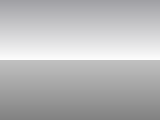
This is the result (using DoubleGradientFill).
procedure TForm1.FormPaint(Sender: TObject);
var
  ABitmap: TBitmap;
begin
  ABitmap:=DoubleGradientFill(Self.ClientRect,clMedGray,clWhite,clSilver,clGray,gdVertical,gdVertical,gdVertical,0.50);
  Self.Canvas.Draw(0,0,ABitmap);
  ABitmap.Free
end;
If you use DoubleGradientAlphaFill first add BGRABitmap and BGRABitmapTypes in the Uses section, then use the function:
var
  myBitmap: TBGRABitmap;
begin
  myBitmap:= DoubleGradientAlphaFill(
  Self.ClientRect,
  BGRA(0,0,0,10),BGRA(255,255,255,100),
  BGRA(100,100,100,255),BGRA(150,150,150,10),
  gdVertical,gdVertical,gdVertical,0.5);
  Self.Canvas.Draw(0,0,myBitmap.Bitmap);
  myBitmap.Free;
end;
Editor
You can use the 'Double Gradient Editor' that is a GUI to instantly see the result (only for double gradients), save to a bitmap file, save to '*.doublegradient' session file or just copy code to clipboard to use in lazarus.
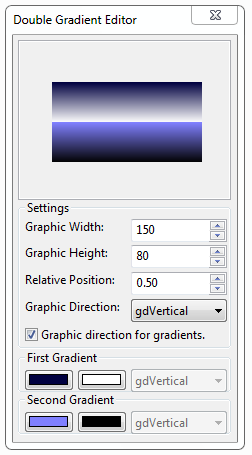
- To access the menu right click the ScrollBox (gradient area):
- Save bitmap.. Show a dialog to save as a *.bmp file.
- Load gradient.. Show a dialog to load a *.doublegradient session file.
- Save gradient.. Show a dialog to save the current session settings to a file.
- Copy code to clipboard.. Just copy the settings as text in the clipboard, then you can use it to paste in lazarus source editor to call the doublegradientfill procedure.
- default.doublegradient: this file has the last settings in the editor, is loaded at startup, saved when you close the application.
Double Gradient Editor 1.0 Source Code dbgdedit1.0.zip (5.64 KB)
You are free to edit and improve this editor, this is free of charge.
nGradient
With this unit 'ngradient' you can easily make gradients for toolbars, buttons, etc. Save the below code in a text file 'ngradient.pas' and add 'ngradient' in the 'uses' section of your project.
Unit
nGradientFill
Copy the code and save to a text file 'ngradient.pas':
unit ngradient;

{$mode objfpc}{$H+}

interface

uses
  Classes, Graphics;

type
  TnGradientInfo = record
    StartColor,StopColor:TColor;
    Direction: TGradientDirection;
    endPercent:single; // This is not the percent of the width, this is the percent of the end of the rect- which means, if this value is 1 - the rect could be from 0.99 to 1 and needs not be from 0 to 1
  end;

function nGradientFill(ARect: TRect;APos: TGradientDirection; AGradient: array of TnGradientInfo): TBitmap;

implementation

function nGradientFill(ARect: TRect;APos: TGradientDirection; AGradient: array of TnGradientInfo): TBitmap;
var
  i:integer;
  AnRect,OldRect: TRect;
begin
  Result := TBitmap.Create;
  Result.Width:=ARect.Right-ARect.Left;
  Result.Height:=ARect.Bottom-ARect.Top;
  OldRect := ARect;
  if APos = gdVertical then OldRect.Bottom := ARect.Top
     else OldRect.Right := ARect.Left ;   // upside down...  in case of i = 0...

  for i := 0 to high(AGradient) do
      begin
      AnRect:=OldRect;
      if APos = gdVertical then
         begin
         AnRect.Bottom:=Round((ARect.Bottom-ARect.Top) * AGradient[i].endPercent + ARect.Top);
         AnRect.Top:=OldRect.Bottom;
         end
        else
         begin
         AnRect.Right:=Round((ARect.Right-ARect.Left) * AGradient[i].endPercent + ARect.Left);
         AnRect.Left:=OldRect.Right;
         end;

      Result.Canvas.GradientFill(AnRect,AGradient[i].StartColor,AGradient[i].StopColor,AGradient[i].Direction);
      OldRect := AnRect;
      end;
end;
nGradientAlphaFill
This requires BGRABitmap.
Copy the code and save to a text file 'ngradientalpha.pas':
unit ngradientalpha;

{$mode objfpc}{$H+}

interface

uses
  Classes, Graphics, BGRABitmap, BGRABitmapTypes;

type
  TnGradientInfo = record
    StartColor, StopColor : TBGRAPixel;
    Direction             : TGradientDirection;
    endPercent            : single;
  end;

function nGradientAlphaFill(ARect: TRect;APos: TGradientDirection;
  AGradient: array of TnGradientInfo): TBGRABitmap;

implementation

function nGradientAlphaFill(ARect: TRect;APos: TGradientDirection;
  AGradient: array of TnGradientInfo): TBGRABitmap;
var
  i:integer; AnRect, OldRect: TRect; Point1, Point2: TPointF;
begin
  Result := TBGRABitmap.Create(ARect.Right-ARect.Left,ARect.Bottom-ARect.Top);
  OldRect := ARect;
  if APos = gdVertical then OldRect.Bottom := ARect.Top else OldRect.Right := ARect.Left;
  for i := 0 to high(AGradient) do
  begin
    AnRect:=OldRect;
    if APos = gdVertical then begin
      AnRect.Bottom:=Round((ARect.Bottom-ARect.Top) * AGradient[i].endPercent + ARect.Top);
      AnRect.Top:=OldRect.Bottom;
      Point1:=PointF(AnRect.Left,AnRect.Top);
      Point2:=PointF(AnRect.Left,AnRect.Bottom);
    end
    else begin
     AnRect.Right:=Round((ARect.Right-ARect.Left) * AGradient[i].endPercent + ARect.Left);
     AnRect.Left:=OldRect.Right;
     Point1:=PointF(AnRect.Left,AnRect.Top);
     Point2:=PointF(AnRect.Right,AnRect.Top);
    end;
  Result.GradientFill(AnRect.Left,AnRect.Top,AnRect.Right,AnRect.Bottom,
  AGradient[i].StartColor,AGradient[i].StopColor,gtLinear,Point1,Point2,dmDrawWithTransparency,True,False);
  OldRect := AnRect;
  end;
end;

end.
Usage
If you use nGradientAlphaFill first add BGRABitmap and BGRABitmapTypes in the Uses section, then use the function:
var
   myBitmap: TBGRABitmap;
   AGradInfo: array [0..1] of TnGradientInfo;
begin
  AGradInfo[0].Direction:=gdVertical;
  AGradInfo[0].endPercent:=0.50;
  AGradInfo[0].StartColor:=BGRA(0,0,0,200);
  AGradInfo[0].StopColor:=BGRA(255,255,255,100);

  AGradInfo[1].Direction:=gdVertical;
  AGradInfo[1].endPercent:=1.00;
  AGradInfo[1].StartColor:=BGRA(0,0,0,100);
  AGradInfo[1].StopColor:=BGRA(255,255,255,50);

  myBitmap:= nGradientAlphaFill(Self.ClientRect,gdVertical,Agradinfo);
  Self.Canvas.Draw(0,0,myBitmap.Bitmap);
  myBitmap.Free;
end;
Editor
nGradient Editor is an updated version of Double Gradient Editor with a lot of changes and improvements, like the ability to create gradients with 'n' number of gradients.
With nGradient Editor you can use 'n' (number) of gradients.
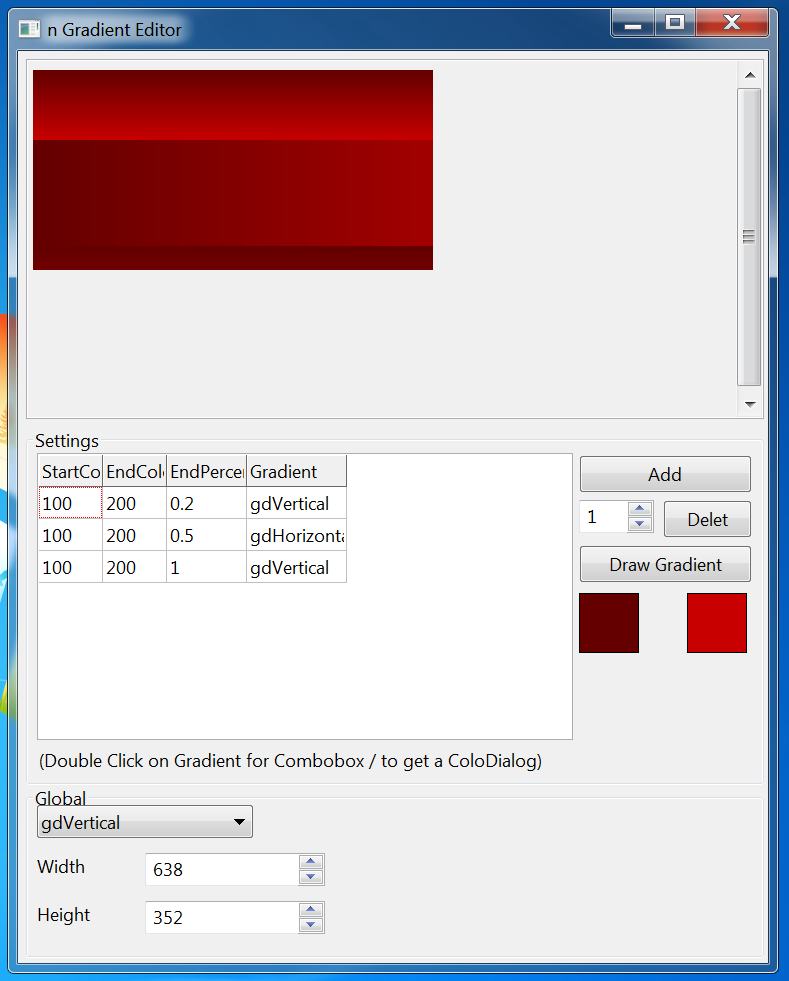
nGradient Editor 1.1 (With alpha support) Source Code ngdedit1.1alpha.zip (22.58 KB) / forum attach
Note: This editor doesn't use BGRABitmap, this uses their own Alpha procedures.
nGradient Editor 1.1 Source Code ngdedit1.1.zip (26.14 KB) / forum attach
From the Free Pascal wiki, page "Double Gradient", as it stood on 2020-02-14 after a change by Trev, out of the wiki's dump of 2024-05-26. Copyright stays with the author who wrote it, according to the old wiki's Licensing page. If you have concerns about this material, message the admin.
Talk about this page
Nobody has opened a bench for this page yet. Sign in to open one.