

Double Gradient/de
Deutsch · English
Jetzt sind 'DoubleGradientAlphaFill' & 'nGradientAlphaFill' in BGRABitmap enthalten, in der Unit 'BGRAGradients'.
Double Gradient
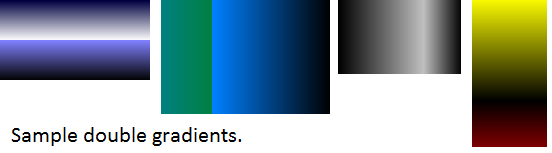
Unit
DoubleGradient
unit doublegradient;

{$mode objfpc}{$H+}

interface

uses
  Classes, Graphics;

function DoubleGradientFill(ARect: TRect; AStart1,AStop1,AStart2,AStop2: TColor;
  ADirection1,ADirection2,APos: TGradientDirection; AValue: Single): TBitmap;

implementation

function DoubleGradientFill(ARect: TRect; AStart1,AStop1,AStart2,AStop2: TColor;
  ADirection1,ADirection2,APos: TGradientDirection; AValue: Single): TBitmap;
var
  ABitmap: TBitmap; ARect1,ARect2: TRect;
begin
  ABitmap := TBitmap.Create;
  ABitmap.Width:=ARect.Right;
  ABitmap.Height:=ARect.Bottom;
  if AValue <> 0 then ARect1:=ARect;
  if AValue <> 1 then ARect2:=ARect;
  if APos = gdVertical then begin
    ARect1.Bottom:=Round(ARect1.Bottom * AValue);
    ARect2.Top:=ARect1.Bottom;
  end
  else if APos = gdHorizontal then begin
    ARect1.Right:=Round(ARect1.Right * AValue);
    ARect2.Left:=ARect1.Right;
  end;
  if AValue <> 0 then ABitmap.Canvas.GradientFill(ARect1,AStart1,AStop1,ADirection1);
  if AValue <> 1 then ABitmap.Canvas.GradientFill(ARect2,AStart2,AStop2,ADirection2);
  Result:=ABitmap;
end;

end.
DoubleGradientAlpha
Diese Unit erfordert BGRABitmap.
unit doublegradientalpha;

{$mode objfpc}{$H+}

interface

uses
  Classes, Graphics,
  BGRABitmap, BGRABitmapTypes;

function DoubleGradientAlphaFill(ARect: TRect; AStart1,AStop1,AStart2,AStop2: TBGRAPixel;
  ADirection1,ADirection2,APos: TGradientDirection; AValue: Single): TBGRABitmap;

implementation

function DoubleGradientAlphaFill(ARect: TRect; AStart1,AStop1,AStart2,AStop2: TBGRAPixel;
  ADirection1,ADirection2,APos: TGradientDirection; AValue: Single): TBGRABitmap;
var
  ABitmap: TBGRABitmap; ARect1,ARect2: TRect; APoint1,APoint2,APoint3,APoint4: TPointF;
begin
  ABitmap := TBGRABitmap.Create(ARect.Right,ARect.Bottom);
  if AValue <> 0 then ARect1:=ARect;
  if AValue <> 1 then ARect2:=ARect;
  if APos = gdVertical then begin
    ARect1.Bottom:=Round(ARect1.Bottom * AValue);
    ARect2.Top:=ARect1.Bottom;
  end
  else if APos = gdHorizontal then begin
    ARect1.Right:=Round(ARect1.Right * AValue);
    ARect2.Left:=ARect1.Right;
  end;
  if ADirection1 = gdVertical then begin
    APoint1:=PointF(ARect1.Left,ARect1.Top);
    APoint2:=PointF(ARect1.Left,ARect1.Bottom);
  end
  else if ADirection1 = gdHorizontal then begin
    APoint1:=PointF(ARect1.Left,ARect1.Top);
    APoint2:=PointF(ARect1.Right,ARect1.Top);
  end;
  if ADirection2 = gdVertical then begin
    APoint3:=PointF(ARect2.Left,ARect2.Top);
    APoint4:=PointF(ARect2.Left,ARect2.Bottom);
  end
  else if ADirection2 = gdHorizontal then begin
    APoint3:=PointF(ARect2.Left,ARect2.Top);
    APoint4:=PointF(ARect2.Right,ARect2.Top);
  end;
  if AValue <> 0 then
  ABitmap.GradientFill(ARect1.Left,ARect1.Top,ARect1.Right,ARect1.Bottom,
  AStart1,AStop1,gtLinear,APoint1,APoint2,dmDrawWithTransparency,True,False);
  if AValue <> 1 then
  ABitmap.GradientFill( ARect2.Left,ARect2.Top,ARect2.Right,ARect2.Bottom,
  AStart2,AStop2,gtLinear,APoint3,APoint4,dmDrawWithTransparency,True,False);
  Result:=ABitmap;
end;

end.
Gebrauch
Erstens benötigen Sie eine 'TBitmap' um den Gradienten zu speichern, dann können Sie das Image zeichnen, beispielsweise im gesamten sichtbaren Bereich der 'Form1':
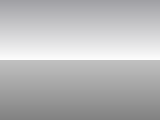
Dies ist das Ergebnis (verwendet DoubleGradientFill).
procedure TForm1.FormPaint(Sender: TObject);
var
  ABitmap: TBitmap;
begin
  ABitmap:=DoubleGradientFill(Self.ClientRect,clMedGray,clWhite,clSilver,clGray,gdVertical,gdVertical,gdVertical,0.50);
  Self.Canvas.Draw(0,0,ABitmap);
  ABitmap.Free
end;
Wenn Sie 'DoubleGradientAlphaFill' benutzen, fügen Sie zuerst 'BGRABitmap' und 'BGRABitmapTypes' in der Sektion Uses hinzu, dann wenden Sie die Funktion an:
var
  myBitmap: TBGRABitmap;
begin
  myBitmap:= DoubleGradientAlphaFill(
  Self.ClientRect,
  BGRA(0,0,0,10),BGRA(255,255,255,100),
  BGRA(100,100,100,255),BGRA(150,150,150,10),
  gdVertical,gdVertical,gdVertical,0.5);
  Self.Canvas.Draw(0,0,myBitmap.Bitmap);
  myBitmap.Free;
end;
Editor
Sie können aber auch den 'Double Gradient Editor' verwenden. Das ist ein GUI-Programm, das sofort ein sichtbares Ergebnis liefert (nur bei doppelten Gradienten). Speichern Sie den Gradienten in einer Bitmap-Datei (oder als '*.doublegradient' Sitzungsdatei) oder kopieren Sie einfach den Code in die Zwischenablage um ihn in Lazarus zu verwenden.
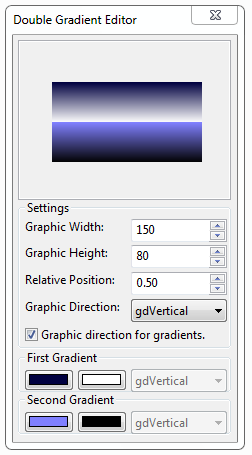
- Ein Rechtsklick auf die Scrollbox (den Gradientenbereich) zeigt das Kontextmenü an:
- Save bitmap.. Zeigt einen Dialog zum Speichern als *.bmp Datei.
- Load gradient.. Zeigt einen Dialog zum Laden einer *.doublegradient Sitzungsdatei.
- Save gradient.. Zeigt einen Dialog zum Speichern der aktuellen Einstellungen in einer Sitzungsdatei.
- Copy code to clipboard.. Kopiert einfach die Einstellungen in Textform in die Zwischenablage, die Sie dann im Lazarus-Quelltexteditor einfügen können, um die 'doublegradientfill'-Prozedur aufzurufen.
- default.doublegradient: Diese Datei enthält die letzten Einstellungen im Editor, wird beim Start geladen und beim Programmende gespeichert.
Double Gradient Editor 1.0 Source Code dbgdedit1.0.zip (5.64 KB)
Bearbeiten und verbessern Sie diesen Editor nach Belieben, natürlich kostenlos.
nGradient
Mit dieser Unit 'ngradient' können Sie ganz einfach Farbverläufe (= Gradienten) für Toolbars, Schaltflächen, etc... erzeugen. Speichern Sie den untenstehenden Code in einer Textdatei 'ngradient.pas' und fügen Sie 'ngradient' im Abschnitt 'uses' von Ihrem Projekt hinzu.
Unit
nGradientFill
Kopieren Sie den Code und speichern Sie ihn in einer Textdatei namens 'ngradient.pas':
unit ngradient;

{$mode objfpc}{$H+}

interface

uses
  Classes, Graphics;

type
  TnGradientInfo = record
    StartColor,StopColor:TColor;
    Direction: TGradientDirection;
    endPercent:single; // This is not the percent of the width, this is the percent of the end of the rect- which means, if this value is 1 - the rect could be from 0.99 to 1 and needs not be from 0 to 1
  end;

function nGradientFill(ARect: TRect;APos: TGradientDirection; AGradient: array of TnGradientInfo): TBitmap;

implementation

function nGradientFill(ARect: TRect;APos: TGradientDirection; AGradient: array of TnGradientInfo): TBitmap;
var
  i:integer;
  AnRect,OldRect: TRect;
begin
  Result := TBitmap.Create;
  Result.Width:=ARect.Right-ARect.Left;
  Result.Height:=ARect.Bottom-ARect.Top;
  OldRect := ARect;
  if APos = gdVertical then OldRect.Bottom := ARect.Top
     else OldRect.Right := ARect.Left ;   // upside down...  in case of i = 0...

  for i := 0 to high(AGradient) do
      begin
      AnRect:=OldRect;
      if APos = gdVertical then
         begin
         AnRect.Bottom:=Round((ARect.Bottom-ARect.Top) * AGradient[i].endPercent + ARect.Top);
         AnRect.Top:=OldRect.Bottom;
         end
        else
         begin
         AnRect.Right:=Round((ARect.Right-ARect.Left) * AGradient[i].endPercent + ARect.Left);
         AnRect.Left:=OldRect.Right;
         end;

      Result.Canvas.GradientFill(AnRect,AGradient[i].StartColor,AGradient[i].StopColor,AGradient[i].Direction);
      OldRect := AnRect;
      end;
end;
nGradientAlphaFill
Diese Unit erfordert BGRABitmap.
Kopieren Sie den Code und speichern Sie ihn in einer Textdatei namens 'ngradientalpha.pas':
unit ngradientalpha;

{$mode objfpc}{$H+}

interface

uses
  Classes, Graphics, BGRABitmap, BGRABitmapTypes;

type
  TnGradientInfo = record
    StartColor, StopColor : TBGRAPixel;
    Direction             : TGradientDirection;
    endPercent            : single;
  end;

function nGradientAlphaFill(ARect: TRect;APos: TGradientDirection;
  AGradient: array of TnGradientInfo): TBGRABitmap;

implementation

function nGradientAlphaFill(ARect: TRect;APos: TGradientDirection;
  AGradient: array of TnGradientInfo): TBGRABitmap;
var
  i:integer; AnRect, OldRect: TRect; Point1, Point2: TPointF;
begin
  Result := TBGRABitmap.Create(ARect.Right-ARect.Left,ARect.Bottom-ARect.Top);
  OldRect := ARect;
  if APos = gdVertical then OldRect.Bottom := ARect.Top else OldRect.Right := ARect.Left;
  for i := 0 to high(AGradient) do
  begin
    AnRect:=OldRect;
    if APos = gdVertical then begin
      AnRect.Bottom:=Round((ARect.Bottom-ARect.Top) * AGradient[i].endPercent + ARect.Top);
      AnRect.Top:=OldRect.Bottom;
      Point1:=PointF(AnRect.Left,AnRect.Top);
      Point2:=PointF(AnRect.Left,AnRect.Bottom);
    end
    else begin
     AnRect.Right:=Round((ARect.Right-ARect.Left) * AGradient[i].endPercent + ARect.Left);
     AnRect.Left:=OldRect.Right;
     Point1:=PointF(AnRect.Left,AnRect.Top);
     Point2:=PointF(AnRect.Right,AnRect.Top);
    end;
  Result.GradientFill(AnRect.Left,AnRect.Top,AnRect.Right,AnRect.Bottom,
  AGradient[i].StartColor,AGradient[i].StopColor,gtLinear,Point1,Point2,dmDrawWithTransparency,True,False);
  OldRect := AnRect;
  end;
end;

end.
Gebrauch
If you use nGradientAlphaFill first add BGRABitmap and BGRABitmapTypes in the Uses section, then use the function: Wenn Sie 'nGradientAlphaFill' benutzen, fügen Sie zuerst 'BGRABitmap' und 'BGRABitmapTypes' in der Sektion Uses hinzu, dann wenden Sie die Funktion an:
var
   myBitmap: TBGRABitmap;
   AGradInfo: array [0..1] of TnGradientInfo;
begin
  AGradInfo[0].Direction:=gdVertical;
  AGradInfo[0].endPercent:=0.50;
  AGradInfo[0].StartColor:=BGRA(0,0,0,200);
  AGradInfo[0].StopColor:=BGRA(255,255,255,100);

  AGradInfo[1].Direction:=gdVertical;
  AGradInfo[1].endPercent:=1.00;
  AGradInfo[1].StartColor:=BGRA(0,0,0,100);
  AGradInfo[1].StopColor:=BGRA(255,255,255,50);

  myBitmap:= nGradientAlphaFill(Self.ClientRect,gdVertical,Agradinfo);
  Self.Canvas.Draw(0,0,myBitmap.Bitmap);
  myBitmap.Free;
end;
Editor
Der nGradient-Editor ist eine aktualisierte Version des 'Double Gradient Editor' mit zahlreichen Veränderungen und Verbesserungen, wie der Fähigkeit, Farbverläufe mit 'n-fachen' Gradienten zu erzeugen.
Mit dem nGradient-Editor können Sie 'n-fache' Gradienten erzeugen.
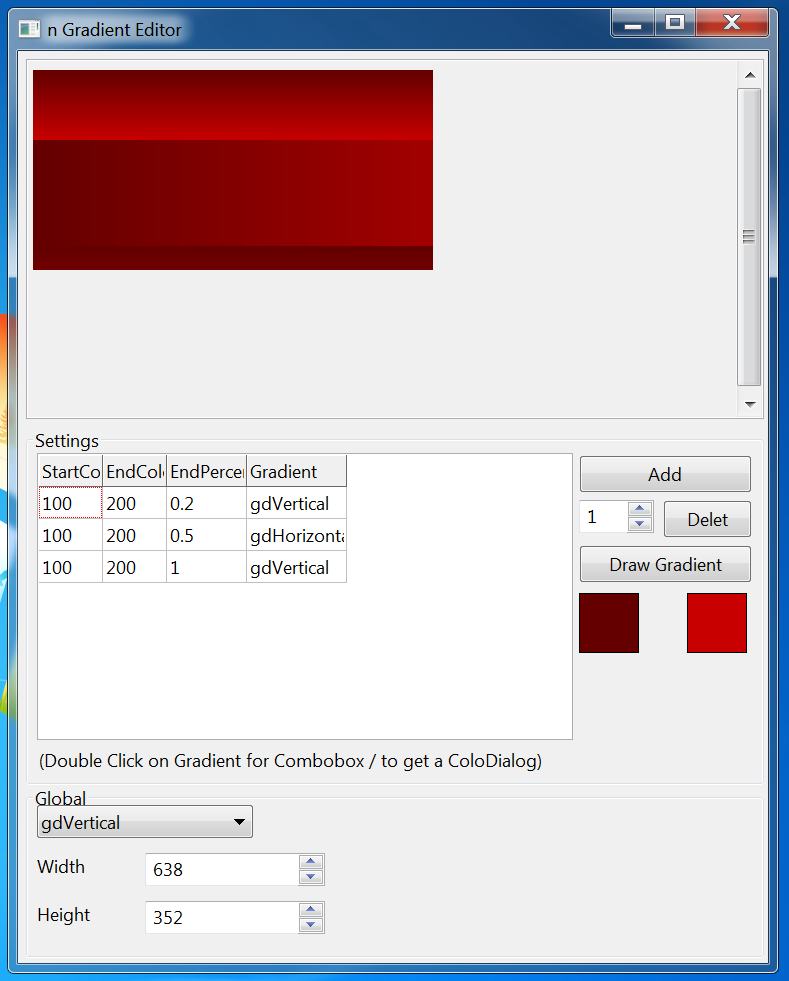
nGradient Editor 1.1 (With alpha support) Source Code ngdedit1.1alpha.zip (22.58 KB) / forum attach
Anmerkung: Dieser Editor benutzt nicht BGRABitmap, sondern seine eigenen Alpha-Prozeduren.
nGradient Editor 1.1 Source Code ngdedit1.1.zip (26.14 KB) / forum attach
From the Free Pascal wiki, page "Double Gradient/de", as it stood on 2020-02-14 after a change by Trev, out of the wiki's dump of 2024-05-26. Copyright stays with the author who wrote it, according to the old wiki's Licensing page. If you have concerns about this material, message the admin.
Talk about this page
Nobody has opened a bench for this page yet. Sign in to open one.