

IDE Window: External Tools/fr
Deutsch · English · Français · Português
Capture d'écran
Outils->Configurer les outils personnalisés...
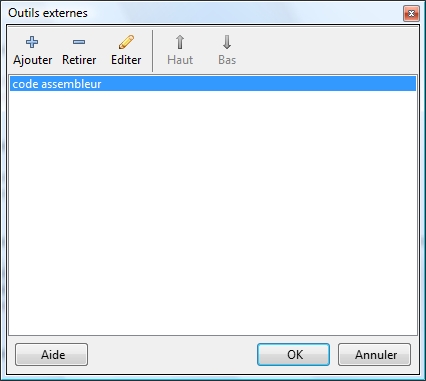
Ajouter
Ouvre la boite de dialogue outil externe pour ajouter un nouvel outil.
Retirer
Efface l'item sélectionné courant. Il vous demandera l'autorisation de le faire.
Éditer
Ouvre la boite de dialogue de outil externe pour éditer l'outil actuellement choisi .
Haut
Déplace l'item courant une position vers le haut.
Bas
Déplace l'item courant une posotion vers le bas.
Ok
Enregistre les changements et ferme la boite de dialogue.
Annuler
Annule les changements et ferme la boite de dialogue.
From the Free Pascal wiki, page "IDE Window: External Tools/fr", as it stood on 2007-07-13 after a change by Paulatreides, out of the wiki's dump of 2024-05-26. Copyright stays with the author who wrote it, according to the old wiki's Licensing page. If you have concerns about this material, message the admin.
Edited on wiki.freepascal.org by 1 person, 2007
From the official wiki's backup of 26 May 2024: who edited this page there, and when. Edits made there after that date were not recorded, and the earlier versions are not shown here; the main page says why.
| When | Who | What changed |
|---|---|---|
| Paulatreides | New page: {{IDE Window: External Tools}} = Add = Opens the External Tool dialog to add a new tool. = Remove = Delete the currently selected item. It will ask, if yo... | |
| Paulatreides | ||
| Paulatreides | ||
| Paulatreides | ||
| Paulatreides | ||
| Paulatreides | ||
| Paulatreides | ||
| Paulatreides | ||
| Paulatreides | Up | |
| Paulatreides | Haut | |
| Paulatreides | Down | |
| Paulatreides | Ok | |
| Paulatreides | Cancel | |
| Paulatreides | Ajouter | |
| Paulatreides | Ajouter | |
| Paulatreides | Retirer | |
| Paulatreides | Éditer | |
| Paulatreides | Éditer | |
| Paulatreides | Éditer | |
| Paulatreides | Down | |
| Paulatreides | ||
| Paulatreides | Capture d'écran | |
| Paulatreides | Capture d'écran (Outils->Configurer les outils personnalisés...) |
Talk about this page
Nobody has opened a bench for this page yet. Sign in to open one.