

IDE Window: External Tool/fr
Deutsch · English · Español · Français · Português
Note: Les outils externes sont globaux , non spécifiques à un projet.
Capture d'écran
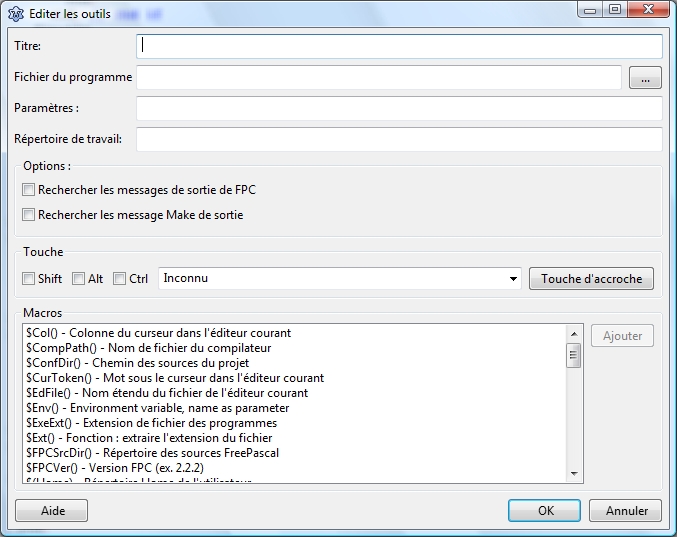
Titre
Le nom tel qu'il sera montré dans le menu de l'IDE.
Fichier du Programme
Le chemin complet vers l'outil . Par exemple :
/usr/bin/ppc386
Paramètres
Les paramètres en ligne de commande. Par exemple :
-l test.pas
Répertoire de travail
Le répertoire, où mettre en marche l'outil. Tous les chemins relatifs le seront à celui ci.
Options
Recherche les messages de sortie de FPC
Analyse la sortie à la recherche des messages de FPC et se penche sur les erreurs .
Rechercher les messages Make de sortie
Analyse la sortie à la recherche des messages de make et se penche sur les erreurs.
Touche
Defini le raccourci pour cet outil. C'est facultatif.
Macros
Vous pouvez employer des macros dans programfilename, les paramètres et le répertoire de travail.
Voir les macros de l'IDE dans les répertoires et les noms de fichiers.
Example
Add a function to checkout Lazarus sources from the repository. This example shows how to do this if you are on windows and have tortoisesvn installed. First create a batch-file in the folder lazarus\tools. (e.g lazarus\tools\checkout_lazarus_win.bat)
tortoiseproc /command:checkout /url:"http://svn.freepascal.org/svn/lazarus/trunk/" /path:"..\"
Then choose <Tools><Configure External Tools> from the lazarus main menu and setup the following.
- Title: Checkout Lazarus
- Program Filename: $LazarusDir()\tools\checkout_lazarus_win.bat
- Working Directory: $LazarusDir()\tools\
If you want to add an additional function to update the Lazarus sources from repository, then you can create another batch-file with the following content.
tortoiseproc /command:update /path:"..\"
From the Free Pascal wiki, page "IDE Window: External Tool/fr", as it stood on 2009-07-07 after a change by Paulatreides, out of the wiki's dump of 2024-05-26. Copyright stays with the author who wrote it, according to the old wiki's Licensing page. If you have concerns about this material, message the admin.
Talk about this page
Nobody has opened a bench for this page yet. Sign in to open one.