

Revision 1 of 2, by Martin on 12-13-2023. The page as it is now.
Debugger Setup
Configure the IDE
Updating from an older IDE
Older versions of Lazarus were only providing the GdbMI backend. It is highly recommended to update to Fp-Debugger or LLDB+FpDebug as indicated for your OS below.
Please note that many other wiki pages may be outdated and still refer only to GDB.
Choosing the correct debugger backend
The Lazarus IDE provides several debuggers (backends). The page Status of the debugger backends provides an overview.
The list below indicates which backend is recommended for your environment.
<table> <thead> <tr> <th class="partial"><p>Operating System</p></th> <th class="unknown"><p>Hardware</p></th> <th class="working"><p>Recommended<br /> debugger backend</p></th> <th class="working"><p>Recommended<br /> debug info</p></th> <th class="unknown"><p>Notes</p></th> </tr> </thead> <tbody> <tr> <td class="partial" style="text-align:left"><p>Windows 32/64bit</p></td> <td class="unknown"><p>Intel/AMD<br /> i386 or x86_64</p></td> <td class="working"><p>Fp-Debugger</p></td> <td class="working"><p>DWARF-3</p></td> <td class="unknown"><p>Includes cross debugging of a 32bit app on a 64bit system</p></td> </tr> <tr> <td class="partial" style="text-align:left"><p>Windows 32bit<br /> </p> <div style="font-size:0.7em"> <p>Cross 64bit</p> </div></td> <td class="unknown"><p>Intel/AMD<br /> x86_64</p></td> <td class="working"><p>GdbMi</p></td> <td class="working"><p>DWARF-2 with sets</p></td> <td class="unknown"><p><u><strong>Only</strong></u> <strong>cross debugging</strong> of a 64bit app on a 32bit system</p></td> </tr> <tr> <td class="partial" style="text-align:left"><p>Windows</p></td> <td class="unknown"><p>ARM / AArch64 / other</p></td> <td class="working"><p>GdbMi</p></td> <td class="working"><p>DWARF-2 with sets</p></td> <td class="unknown"><p>You may also try "GdbMI+FpDebug"</p></td> </tr> <tr> <td class="partial" style="text-align:left"><p>Linux</p></td> <td class="unknown"><p>Intel/AMD<br /> i386 or x86_64</p></td> <td class="working"><p>Fp-Debugger</p></td> <td class="working"><p>DWARF-3</p></td> <td class="unknown"><p>If RTL or packages have debug info, ensure it is the exact same type as for the project</p></td> </tr> <tr> <td class="partial" style="text-align:left"><p>Linux</p></td> <td class="unknown"><p>ARM / AArch64 / other</p></td> <td class="working"><p>GdbMi</p></td> <td class="working"><p>DWARF-2 with sets</p></td> <td class="unknown"><p>You may also try "GdbMI+FpDebug"</p></td> </tr> <tr> <td class="partial" style="text-align:left"><p>Mac</p></td> <td class="unknown"><p>Intel/AMD x86_64<br /> AArch64 (e.g. M1)</p></td> <td class="working"><p>LLDB+FpDebug</p></td> <td class="working"><p>DWARF-3</p></td> <td class="unknown"></td> </tr> <tr> <td class="partial" style="text-align:left"><p>Embedded AVR</p></td> <td class="unknown"></td> <td class="working"><p>FpDebug-avr package</p></td> <td class="working"><p>DWARF-2 or 3</p></td> <td class="unknown"><p>Requires gdb server</p></td> </tr> <tr> <td class="partial" style="text-align:left"><p>Remote</p></td> <td class="unknown"><p>Any supported by GDB</p></td> <td class="working"><p>Gdb-Server</p></td> <td class="working"><p>DWARF-2 with sets</p></td> <td class="unknown"><p>Debugging on a different PC or VM</p></td> </tr> <tr> <td class="partial" style="text-align:left"><p>Other</p></td> <td class="unknown"><p>Any supported by GDB</p></td> <td class="working"><p>GdbMi</p></td> <td class="working"><p>DWARF-2 with sets</p></td> <td class="unknown"></td> </tr> <tr> <td class="partial" style="text-align:left"><p>Any OS<br /> Debug with <b>STDIN/STDOUT redirect</b><br /> </p> <div style="font-size:0.7em"> <p>(via "Run Parameters" command line: >file < file)</p> </div></td> <td class="unknown"><p>Any supported by GDB</p></td> <td class="working"><p>GdbMi</p></td> <td class="working"><p>DWARF-2 with sets</p></td> <td class="unknown"></td> </tr> </tbody> </table>
Setting up the debugger backend for the IDE
The following settings should be made once, after you installed Lazarus. They are often already set by default.
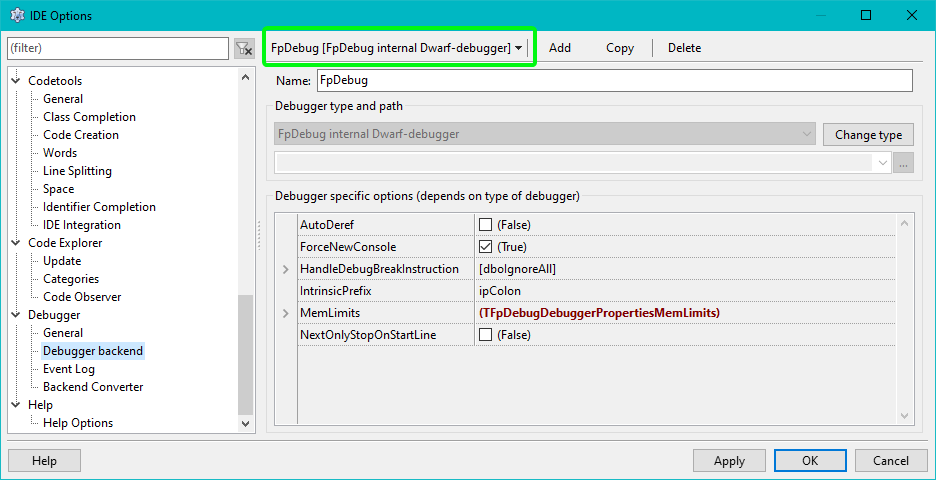
The settings can be found under
<center>
<u>Tools > Options > Debugger > Debugger Backend</u>
</center>
<center>
 The image shows where to find the option dialog. On Mac the dialog is under "Preferences"
</center>
<div style="min-width:20%; display:table;">
- Select the correct backend on top of the page
- The Fp-Debugger does not require a path.
- If you have an LLDB or Gdb(MI) based debugger you must set the path to the gdb or lldb exe under "Debugger type and path"
- On Linux/Unix/Mac systems it may be something like "/usr/bin/gdb" or "/usr/bin/lldb"
- On Windows it should be in a folder called "mingw\bin\" under the directory in which Lazarus is installed.
- On Status of the debugger backends you find a list of all backends with details on further settings.
- For the GdbMI debugger under Lazarus 2.0 and up, enable the option "FixIncorrectStepOver" in the property grid.
</div>
The backend can also be set on a per project config. For details see IDE Window: Project Options - Debugger Backend
Project Options
<figure> <img src="Dbg_setup_project1.png" title="Dbg_setup_project1.png" /> <figcaption>Dbg_setup_project1.png</figcaption> </figure>
<div style="min-width:20%; display:table;">
In order to debug your project, you need to tell the IDE to compile it in a special way, which provides additional information required by the debugger.
The required settings are made in the "Project Options" dialog:
- Please note: This will considerably increase the size of your executable (See FAQ). If you want to build a release version of your software you should switch those settings off (see also Build Modes)
</div>
\
<figure> <img src="lazarus_projectopts_dbg.png" title="lazarus_projectopts_dbg.png" /> <figcaption>lazarus_projectopts_dbg.png</figcaption> </figure>
<div style="min-width:20%; display:table;">
- You must enable "Generate Debug Info for GDB"
- You must enable "Run uses the debugger (disable for release mode)"
- You should set "Type of debug info" as recommended for your PC.
- If you set this to a non supported type, the IDE will prompt you for a correct setting when you try to start the debugger.
- Automatic: Lets fpc choose. Can not be used with all backends.
- Stabs: Old and outdated. Supported by GDB only (maybe LLDB without FpDebug). Should not be used
- Dwarf 2: Minimal setting. Can not display watches for "set of". Issues with detecting PChar vs AnsiString. Should not be used
- Dwarf 2 with sets: GDB friendly. Issues with detecting PChar vs AnsiString
- Dwarf 3: Best setting for FpDebug.
- None of them can currently display "property" with getter function.
- You should not enable "Use external debug symbols"
(It is a recommendation not to use this) - You must not enable "Strip symbols from executable"
You can use the "Build modes". The "..." button brings of a dialog to create "release and debug mode". In this case you should still check the "Type of debug info".
</div>
\
<figure> <img src="Dbg_setup_project4.png" title="Dbg_setup_project4.png" /> <figcaption>Dbg_setup_project4.png</figcaption> </figure>
<div style="min-width:20%; display:table;">
- Use optimization "Level 0" ("Level 1" may be used, but in some cases may cause issues)\
- Do not use "Link Smart"
</div>
\
GDB / LLDB Version
GDB 7.5 requires Lazarus 1.4 or higher.
GDB 7.7.1 seems to work well with Lazarus 1.2.4.
On macOS: lldb is part of the Apple developer tools
See also
-
IDE Options / Configuration Lazarus 2.0.x (and before)
IDE Window: Debugger OptionsLazarus 2.2 (and up)
Debugger General Options and Debugger Backend Options -
Project Option / Command line args, Environment, and launcher app: Run -> Run Parameters
-
The FAQ for the default "GNU Debugger" in Lazarus: GDB Debugger Tips
-
Alternative debuggers in Lazarus: Debugger Status Includes a feature map and default-key-strokes
From the Free Pascal wiki, page "Debugger Setup", as it stood on 2023-12-13 after a change by Martin, out of the wiki's dump of 2024-05-26. Copyright stays with the author who wrote it, according to the old wiki's Licensing page. If you have concerns about this material, message the admin.