

IDE Window: DebuggerClassOptionsFrame
About
This article describes the "Debugger backend" settings in the Lazarus options dialog. Reachable via the Tools/Options menu.
Before Lazarus 2.2 these options used to be part of: IDE Window: Debugger Options
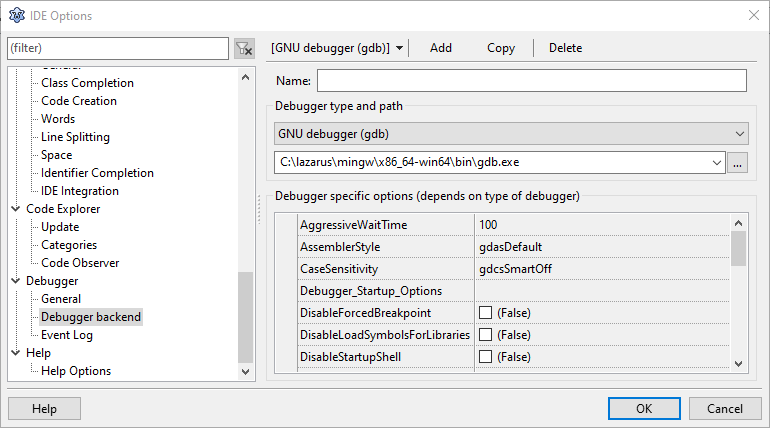
Lazarus comes with different backends to its Debugger. Each of them has its own set of options. This page does not describe the individual backends, but how to create a configuration entry for any of them.
Which backends you can choose from depends on the package you have installed.
Available backends are:
LLDB based backends were created with MacOS in mind. They may work on other platform if you can get a well working LLDB for the platform. The backend does not usually receive any maintenance for none MacOS.
Options
Note: To switch between back-ends use the "Backend drop-down" in the Toolbar.
Do not use the "Debugger type and path". Those two dropdowns should only be used to setup new entries ("Add" button)
Using "Debugger type and path" for existing entries changes the name suffix, and change project specific debugger settings if they refer the selected entry
Main Toolbar
Backend drop-down
Choose the backend that the IDE should use by default. Projects can within their "Project Options" choose an alternate backend (from the list of backends configured here in the global options)
The chosen backend is also the backend that you are editing on this page. If you want to edit a backend that is not your default, then you must temporarily change to it.
The drop-down shows the user specified "Name" (instance name) of the backend as configured in the settings below. The name can be left empty, in which case the drop-down will show the class-name of the backend.
For each class there can only be one un-named backend. The un-named backends are for compatibility with older versions of Lazarus (before 2.2). Older versions of Lazarus will only see the un-named entries. This is because older Lazarus only provided storage for one set of settings per backend-class.
Add
Create a new backend
Copy
Create a new backend, by copying the current
Delete
Delete the current backend
Settings
Name
A name to identify the backend.
Also see compatibility remarks above.
Debugger Path and type
The class of the backend.
If the backend requires an external exe, then this must be set in the path field. E.g., GDB based backends need the path to gdb, and LLDB based backends need the path to lldb.
Changing the backend can loose properties configured for the current backend. Properties present in both backends are usually preserved (e.g. between gdb and gdbserver many properties are present in both)
Properties
Settings specific to the selected backend.
See also
From the Free Pascal wiki, page "IDE Window: DebuggerClassOptionsFrame", as it stood on 2021-02-05 after a change by Martin, out of the wiki's dump of 2024-05-26. Copyright stays with the author who wrote it, according to the old wiki's Licensing page. If you have concerns about this material, message the admin.
Talk about this page
Nobody has opened a bench for this page yet. Sign in to open one.