Sign in Join

Live chat for Free Pascal, Lazarus, Delphi and every Pascal programmer.

Mailing lists / lazarus / 2015-02

Lazarus Release Candidate 1 of 1.4

67 messages · 19 people · –

Reply by email Subscribe to this list Your subscription

Read-only archive. Use j and k to move between messages.

Mattias Gaertner

The Lazarus team would like to announce the first release candidate for the upcoming Version 1.4.

We would like to invite all users to test this release candidate. Please read below why everybody really should join the testing now.

News in this Version
http://wiki.lazarus.freepascal.org/Lazarus_1.4.0_release_notes

On Windows the installer now allows 2 independent installations. http://wiki.lazarus.freepascal.org/Multiple_Lazarus#Installation_of_multiple_Lazarus

About the release process:
http://wiki.lazarus.freepascal.org/Lazarus_1.4_fixes_branch#Roadmap_to_1.4

The 1.4RC1 is built with fpc 2.6.4.

The release candidate is available for download on SourceForge: http://sourceforge.net/projects/lazarus/files/

Choose your CPU, OS, distro and then the "Lazarus 1.4RC1" directory.

Minimum requirements:
Windows: 98, 2k, XP, Vista, 7, 32 or 64bit.
On 64bit it is recommended to use the 32bit IDE.
Win98 IDE needs building with flag -dWIN9XPLATFORM. FreeBSD/Linux: gtk 2.8 or qt4.5, 32 or 64bit.
Mac OS X: 10.5 to 10.10, 10.9+ without IDE debugger (gdb works), LCL only 32bit, non LCL apps can be 64bit.

== Why should everybody (including you) test the release candidate? ==

In the past weeks the Lazarus team has stabilized the 1.4 fixes branch. The resulting 1.4RC1 is now stable enough to be used by any one for test purposes.

However many of the fixes and new features that where committed since the release of 1.2 required changes to the code of existing features too. While we have tested those ourself, there may still be problems that only occur with very specific configurations or one project in a million.

Yes, it may be that you are the only person with a project, that will not work in the new IDE. So if you do not test, we can not fix it.

Please do not wait for the final release, in order to test. It may be too late. Once the release is out we will have to be more selective about which fixes can be merged for further 1.4.x releases. So it may be, that we can not merge the fix you require. And then you will miss out on all the new features.

== How to test ==

Download and install the 1.4RC1.
- On Windows you can install as a 2ndary install, that will not affect your current install: http://wiki.lazarus.freepascal.org/Multiple_Lazarus#Installation_of_multiple_Lazarus
- On other platforms, if you install to a new location you need to use --primary-config-path

In either case you should make backups. (including your primary config)

Open your project in the current Lazarus (1.2.6), and use "Publish Project" from the project menu. This creates a clean copy of your project.

You can then open that copy in the RC1. Please test:
- If you can edit forms in the designer
- rename components / change properties in Object inspector / Add new events
- Add components to form / Move components on form
- Frames, if you use them
- If you can navigate the source code (e.g. jump to implementation)
- Auto completion in source code
- Compile, debug and run
- Anything else you use in your daily work

Mattias

Reply by email

Howard Page-Clark
to Mattias Gaertner
Mattias Gaertner wrote
The Lazarus team would like to announce the first release candidate for the upcoming Version 1.4. ...

Huge thanks to the team who have laboured to produce this latest marvel.

It installed flawlessly (on my Windows 7 machine) in about 40 seconds, and was ready to roll! I've never seen such a snappy install for a full-featured development environment before.

Recompiled the last three projects I worked on (chewing its way through scores of files) without any problems. No bugs to report yet.

Thanks again.

Howard

---
This email has been checked for viruses by Avast antivirus software. http://www.avast.com

Reply by email

Dejan Boras
to Howard Page-Clark

Compiled a few of my projects, works on Fedora 21 x64. But trying to rebuild the IDE gives:

File "/usr/lib64/lazarus/ide/cmdlinedebugger.pp" not found.

Howard Page-Clark wrote 33 lines
On 16/02/2015 22:38, Mattias Gaertner wrote: > The Lazarus team would like to announce the first release candidate > for the upcoming Version 1.4. ... > Huge thanks to the team who have laboured to produce this latest marvel. It installed flawlessly (on my Windows 7 machine) in about 40 seconds, and was ready to roll! I've never seen such a snappy install for a full-featured development environment before. Recompiled the last three projects I worked on (chewing its way through scores of files) without any problems. No bugs to report yet. Thanks again. Howard --- This email has been checked for viruses by Avast antivirus software. http://www.avast.com -- _______________________________________________ Lazarus mailing list http://lists.lazarus.freepascal.org/mailman/listinfo/lazarus

-------------- next part --------------
An HTML attachment was scrubbed...
URL: <http://lists.lazarus.freepascal.org/pipermail/lazarus/attachments/20150217/59a08fdd/attachment.html>

Reply by email

Luca Olivetti
to Mattias Gaertner: The Lazarus team would like to announce the first release candidate for the upcoming…

El 16/02/15 a les 23:38, Mattias Gaertner ha escrit:

Show quoted text 6 lines
== How to test == Download and install the 1.4RC1. - On Windows you can install as a 2ndary install, that will not affect your current install: http://wiki.lazarus.freepascal.org/Multiple_Lazarus#Installation_of_multiple_Lazarus - On other platforms, if you install to a new location you need to use --primary-config-path

I used the svn copy and made a different test (note that I modified the useride target in the makefile to add the pcp):

C:\laz_1_4>make useride
./lazbuild.exe --pcp=config --lazarusdir=. --build-ide= SetPrimaryConfigPath NewValue="config" -> "C:\laz_1_4\config" primary config path: C:\laz_1_4\config\
NOTE: Building Lazarus IDE with profile "Build IDE with Packages" TBuildManager.SetBuildTargetIDE OS=win32 CPU=i386 WS=win32 ERROR: Broken dependency: camviewpkg 0.0>camviewpkg 0.0 make: *** [useride] Error 3

I'll build a standard ide to see what happens, but the above procedure worked until now.
Oh, and I have a one line patch to dbgrids.pas, but Jesus didn't acknowledge it yet:

http://bugs.freepascal.org/view.php?id=27232

Bye

Luca Olivetti Wetron Automation Technology http://www.wetron.es Tel. +34 935883004 Fax +34 935883007

Reply by email

Luca Olivetti
to Luca Olivetti

El 17/02/15 a les 12:00, Luca Olivetti ha escrit:

Show quoted text 25 lines
El 16/02/15 a les 23:38, Mattias Gaertner ha escrit: > == How to test == > > Download and install the 1.4RC1. > - On Windows you can install as a 2ndary install, that will not affect your current install: > http://wiki.lazarus.freepascal.org/Multiple_Lazarus#Installation_of_multiple_Lazarus > - On other platforms, if you install to a new location you need to use --primary-config-path I used the svn copy and made a different test (note that I modified the useride target in the makefile to add the pcp): C:\laz_1_4>make useride ./lazbuild.exe --pcp=config --lazarusdir=. --build-ide= SetPrimaryConfigPath NewValue="config" -> "C:\laz_1_4\config" primary config path: C:\laz_1_4\config\ NOTE: Building Lazarus IDE with profile "Build IDE with Packages" TBuildManager.SetBuildTargetIDE OS=win32 CPU=i386 WS=win32 ERROR: Broken dependency: camviewpkg 0.0>camviewpkg 0.0 make: *** [useride] Error 3 I'll build a standard ide to see what happens, but the above procedure worked until now.

Sorry, that was a PEBKAC (just yesterday I removed one of the packages to use the upstream one instead of what I cooked myself). Now the "make bigide" is stuck (i.e. it doesn't proceed)

C:\lazextra\rx\tooledit.pas(109,15) Error: (3058) There is no method in an ances
tor class to be overridden: "TCustomRxDateEdit.Change;" C:\lazextra\rx\tooledit.pas(112,15) Error: (3058) There is no method in an ances
tor class to be overridden: "TCustomRxDateEdit.DoButtonClick(TObject);" C:\lazextra\rx\tooledit.pas(219,1) Fatal: (10026) There were 2 errors compiling
module, stopping
Fatal: (1018) Compilation aborted
Error: C:\FPC\2.6.4\bin\i386-Win32\ppc386.exe returned an error exitcode (normal
if you did not specify a source file to be compiled) Compiling package rxnew 2.4.2.120: stopped with exit code 1 (3104) Compiling C:\laz_1_4\components\jcf2\Settings\SetWordList.pas (3104) Compiling C:\laz_1_4\components\jcf2\Settings\SetAlign.pas (3104) Compiling C:\laz_1_4\components\jcf2\Settings\SetReplace.pas (3104) Compiling C:\laz_1_4\components\jcf2\Settings\SetUses.pas (3104) Compiling C:\laz_1_4\components\jcf2\Settings\SetPreProcessor.pas TLazPackageGraph.CompileRequiredPackages ERROR="Exit code 1" ERROR: BuildLazarusIDE: Compile AutoInstall Packages failed.

I had to interrupt it with CTRL+C

Oh, and I have a one line patch to dbgrids.pas, but Jesus didn't acknowledge it yet: http://bugs.freepascal.org/view.php?id=27232

Bye

Luca Olivetti Wetron Automation Technology http://www.wetron.es Tel. +34 935883004 Fax +34 935883007

Reply by email

Mattias Gaertner
to Luca Olivetti
[...] > ERROR: Broken dependency: camviewpkg 0.0>camviewpkg 0.0 > make: *** [useride] Error 3

It means it can't find camviewpkg.lpk.
Maybe the error message can be improved for lazbuild.

Show quoted text 8 lines
[...] Sorry, that was a PEBKAC (just yesterday I removed one of the packages to use the upstream one instead of what I cooked myself). Now the "make bigide" is stuck (i.e. it doesn't proceed) C:\lazextra\rx\tooledit.pas(109,15) Error: (3058) There is no method in an ances tor class to be overridden: "TCustomRxDateEdit.Change;"

Have you seen this:
http://wiki.lazarus.freepascal.org/Lazarus_1.4.0_release_notes#TEditButton_was_rewritten ?

Show quoted text 20 lines
C:\lazextra\rx\tooledit.pas(112,15) Error: (3058) There is no method in an ances tor class to be overridden: "TCustomRxDateEdit.DoButtonClick(TObject);" C:\lazextra\rx\tooledit.pas(219,1) Fatal: (10026) There were 2 errors compiling module, stopping Fatal: (1018) Compilation aborted Error: C:\FPC\2.6.4\bin\i386-Win32\ppc386.exe returned an error exitcode (normal if you did not specify a source file to be compiled) Compiling package rxnew 2.4.2.120: stopped with exit code 1 (3104) Compiling C:\laz_1_4\components\jcf2\Settings\SetWordList.pas (3104) Compiling C:\laz_1_4\components\jcf2\Settings\SetAlign.pas (3104) Compiling C:\laz_1_4\components\jcf2\Settings\SetReplace.pas (3104) Compiling C:\laz_1_4\components\jcf2\Settings\SetUses.pas (3104) Compiling C:\laz_1_4\components\jcf2\Settings\SetPreProcessor.pas TLazPackageGraph.CompileRequiredPackages ERROR="Exit code 1" ERROR: BuildLazarusIDE: Compile AutoInstall Packages failed. I had to interrupt it with CTRL+C

It didn't stop automatically? Can you reproduce it?

Mattias

Reply by email

Martin Frb
to Dejan Boras: Compiled a few of my projects, works on Fedora 21 x64. But trying to rebuild the IDE…
Dejan Boras wrote
Compiled a few of my projects, works on Fedora 21 x64. But trying to rebuild the IDE gives: File "/usr/lib64/lazarus/ide/cmdlinedebugger.pp" not found.

It never was in this location. But yes it has moved. So if you have an old lazbuild, or previous IDE it will not build (a package must be added by hand).

I only tested 1.4RC on windows, and had no issues recompiling.

Which method do you use to build? IDE, Lazbuild, ...?

And does (temporarily) cleaning the old config dir help?

Reply by email

Luca Olivetti
to Mattias Gaertner: On Tue, 17 Feb 2015 12:12:55 +0100 It means it can't find camviewpkg.lpk. Maybe the error…

El 17/02/15 a les 12:25, Mattias Gaertner ha escrit:

Show quoted text 7 lines
> C:\lazextra\rx\tooledit.pas(109,15) Error: (3058) There is no method in > an ances > tor class to be overridden: "TCustomRxDateEdit.Change;" Have you seen this: http://wiki.lazarus.freepascal.org/Lazarus_1.4.0_release_notes#TEditButton_was_rewritten ?

No, but I just got the svn version of rxnew, and the author read it ;-)

Show quoted text 6 lines
> TLazPackageGraph.CompileRequiredPackages ERROR="Exit code 1" > ERROR: BuildLazarusIDE: Compile AutoInstall Packages failed. > > I had to interrupt it with CTRL+C It didn't stop automatically? Can you reproduce it?

I did it twice, I waited for a couple of minutes with no disk activity then hit CTRL+C. I suppose that if I reinstall the broken version of rx I can trigger it again...let me try....mmh, it seems I cannot find a way to install the broken package, make useride just uses the good version now.

Bye

Luca Olivetti Wetron Automation Technology http://www.wetron.es Tel. +34 935883004 Fax +34 935883007

Reply by email

Dejan Boras
to Martin Frb: It never was in this location. But yes it has moved. So if you have an old lazbuild, or…

Rebuilding works after cleaning out the compiled units/ lib/ and bin/ out of the profile directory.

Martin Frb wrote 25 lines
On 17/02/2015 07:32, Dejan Boras wrote: > Compiled a few of my projects, works on Fedora 21 x64. But trying to > rebuild the IDE gives: > > File "/usr/lib64/lazarus/ide/cmdlinedebugger.pp" not found. > It never was in this location. But yes it has moved. So if you have an old lazbuild, or previous IDE it will not build (a package must be added by hand). I only tested 1.4RC on windows, and had no issues recompiling. Which method do you use to build? IDE, Lazbuild, ...? And does (temporarily) cleaning the old config dir help? -- _______________________________________________ Lazarus mailing list http://lists.lazarus.freepascal.org/mailman/listinfo/lazarus

-------------- next part --------------
An HTML attachment was scrubbed...
URL: <http://lists.lazarus.freepascal.org/pipermail/lazarus/attachments/20150217/c54ea67d/attachment.html>

Reply by email

JuuS
to Mattias Gaertner: The Lazarus team would like to announce the first release candidate for the upcoming…

Hi,

Totally interested in helping test RC1...but...I'm scared.

I have Lazarus 1.2.6 installed now and I would like to install RC1 to a separate directory structure.

I've downloaded the 3 fpc/laz RC1 DEB files and am ready to go except:

I'm working in Kubuntu 14.04.

I'm new-ish with Linux, and with DEB packages before this I've simply right clicked and allowed the system to install them. I assume this will overwrite my existing Laz install. So how do I use the deb file such that I consistently get the packages into a new directory structure that will work separately from 1.2.6? using a dpkg switch?

If I get to this desired structure, I assume I will need to do the makes manually, yes? (first time...<shiver>).

Also you said "if you install to a new location you need to use":

--primary-config-path

I've done some searching and can find no reference to this switch, I don't even know which program (lazarus? FPC? DPKG?) would expect this switch.

Any help, links or whatever, would be appreciated. Once I've convinced myself that I can get the RC onto my system and it will play nicely, I will install and test.

Thanks in advance,

Julius

Mattias Gaertner wrote 71 lines
The Lazarus team would like to announce the first release candidate for the upcoming Version 1.4. We would like to invite all users to test this release candidate. Please read below why everybody really should join the testing now. News in this Version http://wiki.lazarus.freepascal.org/Lazarus_1.4.0_release_notes On Windows the installer now allows 2 independent installations. http://wiki.lazarus.freepascal.org/Multiple_Lazarus#Installation_of_multiple_Lazarus About the release process: http://wiki.lazarus.freepascal.org/Lazarus_1.4_fixes_branch#Roadmap_to_1.4 The 1.4RC1 is built with fpc 2.6.4. The release candidate is available for download on SourceForge: http://sourceforge.net/projects/lazarus/files/ Choose your CPU, OS, distro and then the "Lazarus 1.4RC1" directory. Minimum requirements: Windows: 98, 2k, XP, Vista, 7, 32 or 64bit. On 64bit it is recommended to use the 32bit IDE. Win98 IDE needs building with flag -dWIN9XPLATFORM. FreeBSD/Linux: gtk 2.8 or qt4.5, 32 or 64bit. Mac OS X: 10.5 to 10.10, 10.9+ without IDE debugger (gdb works), LCL only 32bit, non LCL apps can be 64bit. == Why should everybody (including you) test the release candidate? == In the past weeks the Lazarus team has stabilized the 1.4 fixes branch. The resulting 1.4RC1 is now stable enough to be used by any one for test purposes. However many of the fixes and new features that where committed since the release of 1.2 required changes to the code of existing features too. While we have tested those ourself, there may still be problems that only occur with very specific configurations or one project in a million. Yes, it may be that you are the only person with a project, that will not work in the new IDE. So if you do not test, we can not fix it. Please do not wait for the final release, in order to test. It may be too late. Once the release is out we will have to be more selective about which fixes can be merged for further 1.4.x releases. So it may be, that we can not merge the fix you require. And then you will miss out on all the new features. == How to test == Download and install the 1.4RC1. - On Windows you can install as a 2ndary install, that will not affect your current install: http://wiki.lazarus.freepascal.org/Multiple_Lazarus#Installation_of_multiple_Lazarus - On other platforms, if you install to a new location you need to use --primary-config-path In either case you should make backups. (including your primary config) Open your project in the current Lazarus (1.2.6), and use "Publish Project" from the project menu. This creates a clean copy of your project. You can then open that copy in the RC1. Please test: - If you can edit forms in the designer - rename components / change properties in Object inspector / Add new events - Add components to form / Move components on form - Frames, if you use them - If you can navigate the source code (e.g. jump to implementation) - Auto completion in source code - Compile, debug and run - Anything else you use in your daily work Mattias -- _______________________________________________ Lazarus mailing list http://lists.lazarus.freepascal.org/mailman/listinfo/lazarus
Reply by email

Mattias Gaertner
to JuuS
Show quoted text 5 lines
[...] I have Lazarus 1.2.6 installed now and I would like to install RC1 to a separate directory structure. I've downloaded the 3 fpc/laz RC1 DEB files and am ready to go except:

Lazarus 1.2.6 and 1.4 use the same compiler. If you installed 1.2.6 from our sourceforge site, then you only need to update the lazarus deb. It doesn't hurt to install the fpc debs though. deb is clever enough to figure it out.
Note: In a few months FPC 3.0 will be released. The following Lazarus 1.4.x release will use that.

Show quoted text 7 lines
I'm working in Kubuntu 14.04. I'm new-ish with Linux, and with DEB packages before this I've simply right clicked and allowed the system to install them. I assume this will overwrite my existing Laz install. So how do I use the deb file such that I consistently get the packages into a new directory structure that will work separately from 1.2.6? using a dpkg switch?

These deb files are not made for parallel installation.

As always: Before installing a new Lazarus version make a backup of your "~/.lazarus" directory.

Installing the 1.4 deb will replace the old 1.2.6. You can downgrade by installing the 1.2.6 deb.
When starting the IDE it will give you an "upgrade" or "downgrade" message. Note that "downgrade" from 1.4 to 1.2.x may loose some settings.

You can install a second Lazarus version in parallel. Do you want that?

Mattias

Reply by email

Graeme Geldenhuys
to Mattias Gaertner: The Lazarus team would like to announce the first release candidate for the upcoming…
Mattias Gaertner wrote
The Lazarus team would like to announce the first release candidate for the upcoming Version 1.4.

Thanks to all that helped make this one possible. I looked through the changelog, and there are some really nice features and fixes. eg: fpdebug, external hint renderer fix, parallel package compilation (its high time we work our multi-core CPUs), editor toolbar enabled by default - just to name a few.

Keep up the good work!

Regards,
- Graeme -

fpGUI Toolkit - a cross-platform GUI toolkit using Free Pascal http://fpgui.sourceforge.net/

Reply by email

Kamen Ketev

When I load project says:

Component Class: TDateEdit
Error reading deData.DialogTitle: Unknown property: "Dialog Title"...

Why you remove this property? How can fix the problem? Kamen

-------- ?????????? ????? --------
??: Mattias Gaertner
???????: [Lazarus] Lazarus Release Candidate 1 of 1.4 ??:
????????? ??: ???????, 2015, ???????? 17 00:38:28 EET

The Lazarus team would like to announce the first release candidate for the upcoming Version 1.4.

We would like to invite all users to test this release candidate.

Please read below why everybody really should join the testing now.

News in this Version

http://wiki.lazarus.freepascal.org/Lazarus_1.4.0_release_notes

On Windows the installer now allows 2 independent installations.

http://wiki.lazarus.freepascal.org/Multiple_Lazarus#Installation_of_multiple_Lazarus

About the release process:

http://wiki.lazarus.freepascal.org/Lazarus_1.4_fixes_branch#Roadmap_to_1.4

The 1.4RC1 is built with fpc 2.6.4.

The release candidate is available for download on SourceForge:

http://sourceforge.net/projects/lazarus/files/

Choose your CPU, OS, distro and then the "Lazarus 1.4RC1" directory.

Minimum requirements:

Windows: 98, 2k, XP, Vista, 7, 32 or 64bit.

On 64bit it is recommended to use the 32bit IDE.

Win98 IDE needs building with flag -dWIN9XPLATFORM.

FreeBSD/Linux: gtk 2.8 or qt4.5, 32 or 64bit.

Mac OS X: 10.5 to 10.10, 10.9+ without IDE debugger (gdb works),

LCL only 32bit, non LCL apps can be 64bit.

== Why should everybody (including you) test the release candidate? ==

In the past weeks the Lazarus team has stabilized the 1.4 fixes branch. The resulting 1.4RC1 is now stable enough to be used by any one for test purposes.

However many of the fixes and new features that where committed since the release of 1.2 required changes to the code of existing features too. While we have tested those ourself, there may still be problems that only occur with very specific configurations or one project in a million.

Yes, it may be that you are the only person with a project, that will not work in the new IDE. So if you do not test, we can not fix it.

Please do not wait for the final release, in order to test. It may be too late. Once the release is out we will have to be more selective about which fixes can be merged for further 1.4.x releases. So it may be, that we can not merge the fix you require. And then you will miss out on all the new features.

== How to test ==

Download and install the 1.4RC1.

- On Windows you can install as a 2ndary install, that will not affect your current install:

http://wiki.lazarus.freepascal.org/Multiple_Lazarus#Installation_of_multiple_Lazarus

- On other platforms, if you install to a new location you need to use --primary-config-path

In either case you should make backups. (including your primary config)

Open your project in the current Lazarus (1.2.6), and use "Publish Project" from the project menu. This creates a clean copy of your project.

You can then open that copy in the RC1. Please test:

- If you can edit forms in the designer

- rename components / change properties in Object inspector / Add new events

- Add components to form / Move components on form

- Frames, if you use them

- If you can navigate the source code (e.g. jump to implementation)

- Auto completion in source code

- Compile, debug and run

- Anything else you use in your daily work

Mattias
Reply by email

Kamen Ketev

Thanks.

-------- ?????????? ????? --------
??: Juha Manninen
???????: Re: [Lazarus] Lazarus Release Candidate 1 of 1.4 ??: Lazarus mailing list
????????? ??: ???????, 2015, ???????? 17 16:06:02 EET

Kamen Ketev > wrote 9 lines
When I load project says: Component Class: TDateEdit Error reading deData.DialogTitle: Unknown property: "Dialog Title"... Why you remove this property? How can fix the problem?

http://wiki.lazarus.freepascal.org/Lazarus_1.4.0_release_notes#TDateEdit.DialogTitle_property_was_removed

Reply by email

JuuS
to Mattias Gaertner: The Lazarus team would like to announce the first release candidate for the upcoming…

Hit a problem right off with RC1. I've attached the screen shot.

I'm assuming I'm to report problems here in the list or is there another venue for that? Let me know...

Here's what happened...

I opened one of my regular projects and built and ran it.

It ran perfectly. I could see no problems whatsoever.

I had also made a published version of the project (as you had suggested) and so I opened that.

I added a couple of controls as test: a bit btn, with an onclick, and some hint text and a TArrow with a double click. I also renamed one of my existing TButtons.

I also moved around the form a bit, testing as you suggested.

I then did a build. It reported success.

But F9 to run and I got the debbugger error immediately, as shown.

Even though the warning was drastic, Laz IDE was responsive after I pressed OK.

Did another build. Message window was now blank of hints and warnings but still showed compile success. Another run and the same debugger error.

I reversed all the changes I had made, in steps. Still got debugger error. But after each change the message window was again filled with hints.

After a shutdown and restart of Laz, still got debugger error.

Without shutting down, I reloaded the original project. Still getting debugger error.

I then shutdown Laz, re-opened it. We are now still with the original project (not the published one)...and...it worked fine.

Show quoted text 23 lines
== How to test == Download and install the 1.4RC1. - On Windows you can install as a 2ndary install, that will not affect your current install: http://wiki.lazarus.freepascal.org/Multiple_Lazarus#Installation_of_multiple_Lazarus - On other platforms, if you install to a new location you need to use --primary-config-path In either case you should make backups. (including your primary config) Open your project in the current Lazarus (1.2.6), and use "Publish Project" from the project menu. This creates a clean copy of your project. You can then open that copy in the RC1. Please test: - If you can edit forms in the designer - rename components / change properties in Object inspector / Add new events - Add components to form / Move components on form - Frames, if you use them - If you can navigate the source code (e.g. jump to implementation) - Auto completion in source code - Compile, debug and run - Anything else you use in your daily work Mattias

-------------- next part --------------
A non-text attachment was scrubbed...
Name: debug error.jpg
Type: image/jpeg
Size: 102022 bytes
Desc: not available
URL: <http://lists.lazarus.freepascal.org/pipermail/lazarus/attachments/20150218/5332be01/attachment-0001.jpg>

Reply by email

Martin Frb
to JuuS
JuuS wrote
Hit a problem right off with RC1. I've attached the screen shot. I'm assuming I'm to report problems here in the list or is there another venue for that? Let me know...

For now list is fine, lets determine more about it first.

Show quoted text 9 lines
Here's what happened... I opened one of my regular projects and built and ran it. It ran perfectly. I could see no problems whatsoever. I had also made a published version of the project (as you had suggested) and so I opened that.

Thanks for the detailed description

Have you checked, if in the new published project debugging is set up ?

Project options > debugger.
Is the checkbox set?
Which debug info is chosen? Dwarf or Stabs? (And what happens if you use the other)?

If all that is set correct, then can you please attach a log, as describe here:
http://wiki.lazarus.freepascal.org/GDB_Debugger_Tips#Log_info_for_debug_session

Reply by email

Giuliano Colla
to Mattias Gaertner: The Lazarus team would like to announce the first release candidate for the upcoming…

Il 16/02/2015 23:38, Mattias Gaertner ha scritto:

The Lazarus team would like to announce the first release candidate for the upcoming Version 1.4. We would like to invite all users to test this release candidate.

[...]

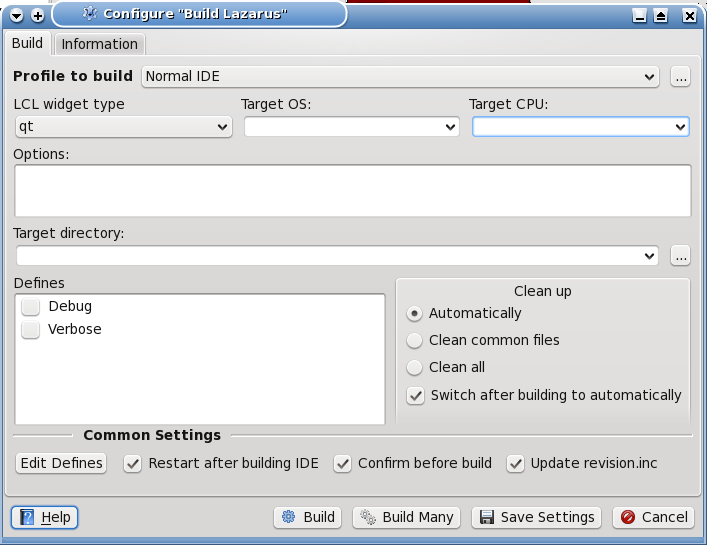
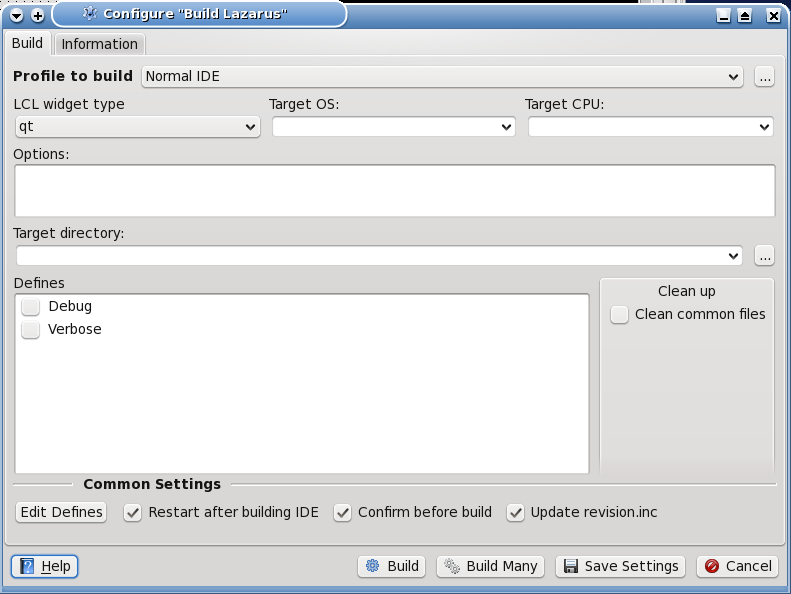
I installed RC1.4 and I stumbled into a problem. Some missing buttons in the "Configure Build Lazarus" dialogue. I did something wrong, or there's been a regression?

Here's a screenshot the dialogue of RC1.4 from svn from my last update (rev 47621):
http://www.bononiadocta.it/Lazarus/rev47621.png

And here's a screenshot of the same dialogue from the RC1.4 downloaded from sourceforge (rev 47789)
http://www.bononiadocta.it/Lazarus/rev47789.png

As I found the usual missing units because of stale ppu's leftover from 1.2.6, in order to rebuild I was forced to manually clean up ppu's because "common files" wasn't enough, and "Clean all" was missing from the dialogue.

Lazarus 1.4RC1 r47789 FPC 2.6.4 i386-linux-qt
Environment is Linux CentOs 6.
GTK or Qt doesn't make a difference, only the look of the buttons changes.

Giuliano

Giuliano Colla Project planning question: when it's 90% done, are we halfway or not yet?

Reply by email

Mattias Gaertner
to Giuliano Colla: Il 16/02/2015 23:38, Mattias Gaertner ha scritto: [...] I installed RC1.4 and I stumbled…
Show quoted text 13 lines
Il 16/02/2015 23:38, Mattias Gaertner ha scritto: > The Lazarus team would like to announce the first release candidate for the upcoming Version 1.4. > > We would like to invite all users to test this release candidate. [...] I installed RC1.4 and I stumbled into a problem. Some missing buttons in the "Configure Build Lazarus" dialogue. I did something wrong, or there's been a regression? Here's a screenshot the dialogue of RC1.4 from svn from my last update (rev 47621): http://www.bononiadocta.it/Lazarus/rev47621.png

Do you mean branches/fixes_1_4 or trunk?

And here's a screenshot of the same dialogue from the RC1.4 downloaded from sourceforge (rev 47789) http://www.bononiadocta.it/Lazarus/rev47789.png

Mattias

Reply by email

Unknown author
to Mattias Gaertner

Can you export the assigned key stroke shortcuts to an external file?

And then import them later?

The current shortcut key assignment interface of lazarus is a disaster.

md

Mattias Gaertner wrote 33 lines
On Thu, 19 Feb 2015 01:25:19 +0100 Giuliano Colla wrote: > Il 16/02/2015 23:38, Mattias Gaertner ha scritto: >> The Lazarus team would like to announce the first release candidate for the upcoming Version 1.4. >> >> We would like to invite all users to test this release candidate. > [...] > > I installed RC1.4 and I stumbled into a problem. Some missing buttons in > the "Configure Build Lazarus" dialogue. I did something wrong, or > there's been a regression? > > Here's a screenshot the dialogue of RC1.4 from svn from my last update > (rev 47621): > http://www.bononiadocta.it/Lazarus/rev47621.png Do you mean branches/fixes_1_4 or trunk? > And here's a screenshot of the same dialogue from the RC1.4 downloaded > from sourceforge (rev 47789) > http://www.bononiadocta.it/Lazarus/rev47789.png Mattias -- _______________________________________________ Lazarus mailing list http://lists.lazarus.freepascal.org/mailman/listinfo/lazarus

Reply by email

Giuliano Colla
to Mattias Gaertner: On Thu, 19 Feb 2015 01:25:19 +0100 Do you mean branches/fixes_1_4 or trunk? Mattias

Il 19/02/2015 02:13, Mattias Gaertner ha scritto:

Show quoted text 18 lines
On Thu, 19 Feb 2015 01:25:19 +0100 Giuliano Colla wrote: > Il 16/02/2015 23:38, Mattias Gaertner ha scritto: >> The Lazarus team would like to announce the first release candidate for the upcoming Version 1.4. >> >> We would like to invite all users to test this release candidate. > [...] > > I installed RC1.4 and I stumbled into a problem. Some missing buttons in > the "Configure Build Lazarus" dialogue. I did something wrong, or > there's been a regression? > > Here's a screenshot the dialogue of RC1.4 from svn from my last update > (rev 47621): > http://www.bononiadocta.it/Lazarus/rev47621.png Do you mean branches/fixes_1_4 or trunk?

It's branches/fixes_1_4 of a few days ago.

Also trunk as of yesterday is ok.

I didn't test against latest branches/fixes.

Giuliano

Giuliano Colla Project planning question: when it's 90% done, are we halfway or not yet?

Reply by email

zeljko
to Giuliano Colla: Il 16/02/2015 23:38, Mattias Gaertner ha scritto: [...] I installed RC1.4 and I stumbled…
Giuliano Colla wrote 18 lines
Il 16/02/2015 23:38, Mattias Gaertner ha scritto: > The Lazarus team would like to announce the first release candidate > for the upcoming Version 1.4. > > We would like to invite all users to test this release candidate. [...] I installed RC1.4 and I stumbled into a problem. Some missing buttons in the "Configure Build Lazarus" dialogue. I did something wrong, or there's been a regression? Here's a screenshot the dialogue of RC1.4 from svn from my last update (rev 47621): http://www.bononiadocta.it/Lazarus/rev47621.png And here's a screenshot of the same dialogue from the RC1.4 downloaded from sourceforge (rev 47789) http://www.bononiadocta.it/Lazarus/rev47789.png

It looks like that here when cpu is different than default (eg. x86_64 on 32 bit system). But as I can see your cpu is default - so bug.

z.

Reply by email

Mattias Gaertner
to Giuliano Colla: Il 19/02/2015 02:13, Mattias Gaertner ha scritto: It's branches/fixes_1_4 of a few days…
Show quoted text 25 lines
Il 19/02/2015 02:13, Mattias Gaertner ha scritto: > On Thu, 19 Feb 2015 01:25:19 +0100 > Giuliano Colla wrote: > >> Il 16/02/2015 23:38, Mattias Gaertner ha scritto: >>> The Lazarus team would like to announce the first release candidate for the upcoming Version 1.4. >>> >>> We would like to invite all users to test this release candidate. >> [...] >> >> I installed RC1.4 and I stumbled into a problem. Some missing buttons in >> the "Configure Build Lazarus" dialogue. I did something wrong, or >> there's been a regression? >> >> Here's a screenshot the dialogue of RC1.4 from svn from my last update >> (rev 47621): >> http://www.bononiadocta.it/Lazarus/rev47621.png > Do you mean branches/fixes_1_4 or trunk? > It's branches/fixes_1_4 of a few days ago. Also trunk as of yesterday is ok. I didn't test against latest branches/fixes.

Please do.

Mattias

Reply by email

JuuS
to Martin Frb: For now list is fine, lets determine more about it first. Thanks for the detailed…
Martin Frb wrote 12 lines
Have you checked, if in the new published project debugging is set up ? Project options > debugger. Is the checkbox set? Which debug info is chosen? Dwarf or Stabs? (And what happens if you use the other)? If all that is set correct, then can you please attach a log, as describe here: http://wiki.lazarus.freepascal.org/GDB_Debugger_Tips#Log_info_for_debug_session

Debugging option was set to automatic. Both programs had exactly the same settings in compiler options and debugging options.

One new result as well. To compare debugger options I opened the origProject, then opened the publProject, then re-opened the origProject. For fun, I compiled and tried to run...but got the debugger error...this made me think it was related to simply switching projects?

In any case, I shut down laz, opened the publProject and tried each debugging option in turn, all resulted in debugging error with the further result that the last option (Dwarf3) resulted in a compilation error. All it said was Error: Error while linking.

I set option back to automatic, and shut down laz.

I then ran laz through command line with LOG file to be written, as shown in the link you gave me.

And.......it ran perfectly no problems, no errors.

I've not attached the log imagining it will not help you in this case?

Also, the log file is quite large, appending it here would be over the list email size limit I think. How is that usually done then? Upload to a web site and then simply provide a link?

Any way let me know if I can provide anything else, or if you would like the resulting log file...

Reply by email

Juha Manninen
to Giuliano Colla: Il 16/02/2015 23:38, Mattias Gaertner ha scritto: [...] I installed RC1.4 and I stumbled…
Giuliano Colla wrote
I installed RC1.4 and I stumbled into a problem. Some missing buttons in the "Configure Build Lazarus" dialogue. I did something wrong, or there's been a regression?

No, it is a well thought of feature, not a regression. It depends on your directory access rights only. You are on Linux and run Lazarus as normal user. If you were allowed to select "Clean All", you would get error from OS.
The assumption is that once you install Lazarus under /usr/... it will not change and you don't need "Clean All". When installing packages and rebuilding Lazarus the changes will happen in your home directory and "startlazarus" starts the new executable from there.

We used to get reports that people had to run Lazarus as root. The change was made to prevent such reports. There used to be real bugs in the building process but they are fixed. (?)
If you find a _real_ situation where this does not work then please report.

Juha

Reply by email

Andrea Mauri
to Mattias Gaertner: The Lazarus team would like to announce the first release candidate for the upcoming…

Dear all,
I am testing Lazarus 1.4RC2 r FPC 2.6.4 i386-win32-win32/win64

I got a problem with Ttreeview.
I have a project in which I use a TTreeView with checkboxes. It worked with laz 1.2 fixes branch.
I tested a simple project with 1 form, 1 imagelist and 1 ttreeview filled with few items whose state index is set to 0. The stateimages property is set to imagelist1 that is filled on form creation with the following routine found on lazarus forum:

procedure TForm1.FormCreate(Sender: TObject);
var
     aSize: TSize;
     aBMP: TBitmap;
     aDetails: TThemedElementDetails;
     aRect: TRect;
begin
   aDetails:=ThemeServices.GetElementDetails(tbCheckBoxUncheckedNormal);
   aSize:=ThemeServices.GetDetailSize(aDetails);
   ImageList1.Width:=aSize.cx;
   ImageList1.Height:=aSize.cy;
   aBMP:=TBitmap.Create;
   with aBMP do
     begin
       SetSize(aSize.cx, aSize.cy);
       Transparent:=True;
       TransparentColor:=clForm;
       Brush.Color:=TransparentColor;
       Canvas.FillRect(0,0, Width,Height);
     end;
   aRect:=Rect(0, 0, aSize.cx, aSize.cy);
   ThemeServices.DrawElement(aBMP.Canvas.Handle, aDetails, aRect, nil);
   ImageList1.Add(aBMP, nil);
   aBMP.Canvas.FillRect(0,0, Width,Height);;
   aDetails:=ThemeServices.GetElementDetails(tbCheckBoxCheckedNormal);
   ThemeServices.DrawElement(aBMP.Canvas.Handle, aDetails, aRect, nil);
   ImageList1.Add(aBMP, nil);
   FreeAndNil(aBMP);
end;

Starting the project I got a ttreeview with unchecked boxes. Here the code for click on tree:

procedure TForm1.TreeView1Click(Sender: TObject);
var
   i: integer;
begin
   i:= TreeView1.Selected.Level;
end;

When I click on the checkbox of any treeview node I got a sigsegv error here:

function TTreeNode.GetLevel: Integer;
// root is on level 0
var
   ANode: TTreeNode;
begin
   Result := 0;
   ANode := Parent;		<----
   while Assigned(ANode) do
   begin
     Inc(Result);
     ANode := ANode.Parent;
   end;
end;

Thanks,
Andrea

Il 16/02/2015 23:38, Mattias Gaertner ha scritto:

Show quoted text 72 lines
The Lazarus team would like to announce the first release candidate for the upcoming Version 1.4. We would like to invite all users to test this release candidate. Please read below why everybody really should join the testing now. News in this Version http://wiki.lazarus.freepascal.org/Lazarus_1.4.0_release_notes On Windows the installer now allows 2 independent installations. http://wiki.lazarus.freepascal.org/Multiple_Lazarus#Installation_of_multiple_Lazarus About the release process: http://wiki.lazarus.freepascal.org/Lazarus_1.4_fixes_branch#Roadmap_to_1.4 The 1.4RC1 is built with fpc 2.6.4. The release candidate is available for download on SourceForge: http://sourceforge.net/projects/lazarus/files/ Choose your CPU, OS, distro and then the "Lazarus 1.4RC1" directory. Minimum requirements: Windows: 98, 2k, XP, Vista, 7, 32 or 64bit. On 64bit it is recommended to use the 32bit IDE. Win98 IDE needs building with flag -dWIN9XPLATFORM. FreeBSD/Linux: gtk 2.8 or qt4.5, 32 or 64bit. Mac OS X: 10.5 to 10.10, 10.9+ without IDE debugger (gdb works), LCL only 32bit, non LCL apps can be 64bit. == Why should everybody (including you) test the release candidate? == In the past weeks the Lazarus team has stabilized the 1.4 fixes branch. The resulting 1.4RC1 is now stable enough to be used by any one for test purposes. However many of the fixes and new features that where committed since the release of 1.2 required changes to the code of existing features too. While we have tested those ourself, there may still be problems that only occur with very specific configurations or one project in a million. Yes, it may be that you are the only person with a project, that will not work in the new IDE. So if you do not test, we can not fix it. Please do not wait for the final release, in order to test. It may be too late. Once the release is out we will have to be more selective about which fixes can be merged for further 1.4.x releases. So it may be, that we can not merge the fix you require. And then you will miss out on all the new features. == How to test == Download and install the 1.4RC1. - On Windows you can install as a 2ndary install, that will not affect your current install: http://wiki.lazarus.freepascal.org/Multiple_Lazarus#Installation_of_multiple_Lazarus - On other platforms, if you install to a new location you need to use --primary-config-path In either case you should make backups. (including your primary config) Open your project in the current Lazarus (1.2.6), and use "Publish Project" from the project menu. This creates a clean copy of your project. You can then open that copy in the RC1. Please test: - If you can edit forms in the designer - rename components / change properties in Object inspector / Add new events - Add components to form / Move components on form - Frames, if you use them - If you can navigate the source code (e.g. jump to implementation) - Auto completion in source code - Compile, debug and run - Anything else you use in your daily work Mattias -- _______________________________________________ Lazarus mailing list http://lists.lazarus.freepascal.org/mailman/listinfo/lazarus .

Reply by email

Juha Manninen
to Andrea Mauri
Andrea Mauri wrote 5 lines
I got a problem with Ttreeview. I have a project in which I use a TTreeView with checkboxes. It worked with laz 1.2 fixes branch. I tested a simple project with 1 form, 1 imagelist and 1 ttreeview filled with few items whose state index is set to 0.

Please report in bug tracker and attach the demo project there. It will be easier to test.

Juha

Reply by email

JuuS
to JuuS: Debugging option was set to automatic. Both programs had exactly the same settings in…

Some new developments!

Need to go somewhere, but I tried using laz in normal mode (not command line) and opened the debug output window. I did not compile, just F9 and the program worked just fine.

I then opened the origProject, compiled, ran and it ran fine.

I then opened the publProject again (no laz shutdowns), compiled, ran and it also ran fine.

So problem is no longer, as far as I can see, reproducible after simply running laz from command line with debug log.

HTH!?

JuuS wrote 52 lines
On 02/18/2015 10:45 PM, Martin Frb wrote: > > Have you checked, if in the new published project debugging is set up ? > > Project options > debugger. > Is the checkbox set? > Which debug info is chosen? Dwarf or Stabs? (And what happens if you use > the other)? > > If all that is set correct, then can you please attach a log, as > describe here: > http://wiki.lazarus.freepascal.org/GDB_Debugger_Tips#Log_info_for_debug_session > Debugging option was set to automatic. Both programs had exactly the same settings in compiler options and debugging options. One new result as well. To compare debugger options I opened the origProject, then opened the publProject, then re-opened the origProject. For fun, I compiled and tried to run...but got the debugger error...this made me think it was related to simply switching projects? In any case, I shut down laz, opened the publProject and tried each debugging option in turn, all resulted in debugging error with the further result that the last option (Dwarf3) resulted in a compilation error. All it said was Error: Error while linking. I set option back to automatic, and shut down laz. I then ran laz through command line with LOG file to be written, as shown in the link you gave me. And.......it ran perfectly no problems, no errors. I've not attached the log imagining it will not help you in this case? Also, the log file is quite large, appending it here would be over the list email size limit I think. How is that usually done then? Upload to a web site and then simply provide a link? Any way let me know if I can provide anything else, or if you would like the resulting log file... -- _______________________________________________ Lazarus mailing list http://lists.lazarus.freepascal.org/mailman/listinfo/lazarus

Reply by email

Mattias Gaertner
to Andrea Mauri: I am testing Lazarus 1.4RC2 r FPC 2.6.4 i386-win32-win32/win64 I got a problem with…
Show quoted text 27 lines
Dear all, I am testing Lazarus 1.4RC2 r FPC 2.6.4 i386-win32-win32/win64 [...] procedure TForm1.TreeView1Click(Sender: TObject); var i: integer; begin i:= TreeView1.Selected.Level; end; When I click on the checkbox of any treeview node I got a sigsegv error here: function TTreeNode.GetLevel: Integer; // root is on level 0 var ANode: TTreeNode; begin Result := 0; ANode := Parent; <---- while Assigned(ANode) do begin Inc(Result); ANode := ANode.Parent; end; end;

It probably means TreeView1.Selected is nil. If you think it should not be nil, then please create a bug report with a complete example.

Mattias

Reply by email

Andrea Mauri
to Mattias Gaertner: On Thu, 19 Feb 2015 10:47:18 +0100 It probably means TreeView1.Selected is nil. If you…

Il 19/02/2015 11:01, Mattias Gaertner ha scritto:

It probably means TreeView1.Selected is nil. If you think it should not be nil, then please create a bug report with a complete example.

Both FRClickNode and FSelectedNode are nil. Now I got the sigsegv error but it worked on laz 1.2 so yes, I think it is a bug. I already reported in the bugtracker.

Andrea

Reply by email

FreeMan
to Mattias Gaertner: On Thu, 19 Feb 2015 09:01:29 +0200 Please create a bug report. Mattias

Created #27497 , #27498 , #27500

Mattias Gaertner wrote 15 lines
On Thu, 19 Feb 2015 09:01:29 +0200 FreeMan wrote: > If see in osx qt, you can hard attack. set second shortcut via key grab, > then key grab not find that shortcut :) Please create a bug report. Mattias -- _______________________________________________ Lazarus mailing list http://lists.lazarus.freepascal.org/mailman/listinfo/lazarus

Reply by email

Giuliano Colla
to Mattias Gaertner: On Thu, 19 Feb 2015 02:33:31 +0100 Please do. Mattias

Il 19/02/2015 09:09, Mattias Gaertner ha scritto:

Show quoted text 7 lines
On Thu, 19 Feb 2015 02:33:31 +0100 Giuliano Colla wrote: > Il 19/02/2015 02:13, Mattias Gaertner ha scritto: >> On Thu, 19 Feb 2015 01:25:19 +0100 >> Giuliano Colla wrote: >>

[...]

>>> I installed RC1.4 and I stumbled into a problem. Some missing buttons in >>> the "Configure Build Lazarus" dialogue. I did something wrong, or >>> there's been a regression?

[...]

Show quoted text 9 lines
>> >> Do you mean branches/fixes_1_4 or trunk? >> > It's branches/fixes_1_4 of a few days ago. > > Also trunk as of yesterday is ok. > > I didn't test against latest branches/fixes. Please do.

Latest branches/fixes (i.e. Lazarus 1.4RC2 r47896 FPC 2.6.4 i386-linux-qt) is ok.
Tested GTK2 and Qt, i386 and X86_64.
Whatever it was, it's got fixed in the meantime.

Sorry for the noise.

Giuliano

Giuliano Colla Project planning question: when it's 90% done, are we halfway or not yet?

Reply by email

Giuliano Colla
to Juha Manninen: On Thu, Feb 19, 2015 at 1:10 PM, Giuliano Colla You installed it as root to a place where…

Il 19/02/2015 12:32, Juha Manninen ha scritto:

On Thu, Feb 19, 2015 at 1:10 PM, Giuliano Colla wrote: > Whatever it was, it's got fixed in the meantime. You installed it as root to a place where your normal user has no write access.

Then there's a bug, because the full scenario is:

The lazarus tree installed from rpm is in /usr/lib (or /usr/lib64) where normal user has no write access.
A custom executable is on ~/.lazarus_1.4 (--pcp= etc) where normal user has write access.
A "Build Lazarus" should therefore build a new custom executable in ~/.lazarus_1.4 where the normal user has write access, and actually it does.

Given this scenario, the only place where a "clean all" needs to work is on the writeable local tree: if sources are located on a non writeable path is not relevant.
Without a "clean all", a number of stale ppu's where left in place in my writeable path.
I could build only by removing by hand ppu's in my writeable path.

The appropriate check should be if the *target* path is writeable. If it's not, then it's impossible to build. If it is, then it's possible to clean it in any way: automatically, clean common, clean all.

Giuliano

Reply by email

Mattias Gaertner
to Giuliano Colla
Show quoted text 25 lines
Il 19/02/2015 12:32, Juha Manninen ha scritto: > On Thu, Feb 19, 2015 at 1:10 PM, Giuliano Colla > wrote: >> Whatever it was, it's got fixed in the meantime. > You installed it as root to a place where your normal user has no write access. Then there's a bug, because the full scenario is: The lazarus tree installed from rpm is in /usr/lib (or /usr/lib64) where normal user has no write access. A custom executable is on ~/.lazarus_1.4 (--pcp= etc) where normal user has write access. A "Build Lazarus" should therefore build a new custom executable in ~/.lazarus_1.4 where the normal user has write access, and actually it does. Given this scenario, the only place where a "clean all" needs to work is on the writeable local tree: if sources are located on a non writeable path is not relevant. Without a "clean all", a number of stale ppu's where left in place in my writeable path. I could build only by removing by hand ppu's in my writeable path. The appropriate check should be if the *target* path is writeable. If it's not, then it's impossible to build. If it is, then it's possible to clean it in any way: automatically, clean common, clean all.

The "Clean All" is calling "make clean". That only works in the Lazarus source directory.
There is a "clean up" for the project and its packages, but not yet for the IDE and its packages.
Missing feature.

Mattias

Reply by email

Martin Frb
to JuuS: Some new developments! Need to go somewhere, but I tried using laz in normal mode (not…
JuuS wrote 15 lines
Some new developments! Need to go somewhere, but I tried using laz in normal mode (not command line) and opened the debug output window. I did not compile, just F9 and the program worked just fine. I then opened the origProject, compiled, ran and it ran fine. I then opened the publProject again (no laz shutdowns), compiled, ran and it also ran fine. So problem is no longer, as far as I can see, reproducible after simply running laz from command line with debug log. HTH!?

Maybe there was an old file and the project was not fully rebuild. And maybe at some time something triggered this rebuild. If it happens again, backup the folder(s). Try the logfile again (can be sent directly to my mail, bypassing the list)

You can install the package "IdeLazLogger". This add a "logging" entry in the tool menu. And you can set a logfile, and log options while the IDE is running. Then if it happens again, you can just start logging without restarting the IDE.

Which gdb version do you have? (run gdb from terminal / or check the top of the logfile you created).

Note that according to my tests gdb 7.8.0 / 7.8.1 are less stable than gdb 7.7.x
So if your system easily allows to downgrade, then consider this.

Also, the log file is quite large, appending it here would be over the list email size limit I think. How is that usually done then? Upload to a web site and then simply provide a link?

(g)zip / bugtracker

Reply by email

JuuS
to Martin Frb

Will follow your tips and also try some things here to see if I can reproduce/find the error again in the next few days.

Thanks.

Martin Frb wrote 49 lines
On 19/02/2015 09:53, JuuS wrote: > Some new developments! > > Need to go somewhere, but I tried using laz in normal mode (not command > line) and opened the debug output window. I did not compile, just F9 and > the program worked just fine. > > I then opened the origProject, compiled, ran and it ran fine. > > I then opened the publProject again (no laz shutdowns), compiled, ran > and it also ran fine. > > So problem is no longer, as far as I can see, reproducible after simply > running laz from command line with debug log. > > HTH!? Maybe there was an old file and the project was not fully rebuild. And maybe at some time something triggered this rebuild. If it happens again, backup the folder(s). Try the logfile again (can be sent directly to my mail, bypassing the list) You can install the package "IdeLazLogger". This add a "logging" entry in the tool menu. And you can set a logfile, and log options while the IDE is running. Then if it happens again, you can just start logging without restarting the IDE. Which gdb version do you have? (run gdb from terminal / or check the top of the logfile you created). Note that according to my tests gdb 7.8.0 / 7.8.1 are less stable than gdb 7.7.x So if your system easily allows to downgrade, then consider this. > Also, the log file is quite large, appending it here would be over the > list email size limit I think. How is that usually done then? Upload to > a web site and then simply provide a link? (g)zip / bugtracker -- _______________________________________________ Lazarus mailing list http://lists.lazarus.freepascal.org/mailman/listinfo/lazarus

Reply by email

Unknown author
to FreeMan: If see in osx qt, you can hard attack. set second shortcut via key grab, then key grab…

Mr Freeman:

I appreciate your attempt at a response, but your communication is completely incoherent.

I am talking about saving assigned key stroke shortcuts to an external file and being able to import them from an external file.

Hell, I could use the entire settings for the compiler as well set to an external file for re-import later or on another computer.

If you have something you want to say, please add clarify nouns and verbs.

md

FreeMan wrote 19 lines
If see in osx qt, you can hard attack. set second shortcut via key grab, then key grab not find that shortcut :) On 19.02.2015 03:29, wrote: > Can you export the assigned key stroke shortcuts to an external file? > > And then import them later? > > The current shortcut key assignment interface of lazarus is a disaster. > > md -- _______________________________________________ Lazarus mailing list http://lists.lazarus.freepascal.org/mailman/listinfo/lazarus

Reply by email

Unknown author
to Juha Manninen

Do these XML files also have the keystroke assignments?

Where are the XML files located.

THanks.

Juha Manninen wrote 21 lines
On Thursday, February 19, 2015, <mailto:> < <mailto:>> wrote: Hell, I could use the entire settings for the compiler as well set to an external file for re-import later or on another computer. In fact all settings in Lazarus are stored in external XML files. You can copy them to another computer. Juha -- _______________________________________________ Lazarus mailing list http://lists.lazarus.freepascal.org/mailman/listinfo/lazarus

Reply by email

Giuliano Colla
to Mattias Gaertner: On Thu, 19 Feb 2015 13:44:03 +0100 The "Clean All" is calling "make clean". That only…

Il 19/02/2015 14:10, Mattias Gaertner ha scritto:

Show quoted text 5 lines
The "Clean All" is calling "make clean". That only works in the Lazarus source directory. There is a "clean up" for the project and its packages, but not yet for the IDE and its packages. Missing feature.

Is there a reason why a procedure CleanLazarusDestDir similar to CleanLazarusSrcDir could not be used to perform the cleanup when isRedirected is true?
All that is required, in a user path, is to clean up compiler generated files, without all the other stuff which cleanide or cleanlaz do.

Giuliano

Giuliano Colla Project planning question: when it's 90% done, are we halfway or not yet?

Reply by email

Giuliano Colla
to Mattias Gaertner: On Thu, 19 Feb 2015 13:44:03 +0100 The "Clean All" is calling "make clean". That only…

Il 19/02/2015 14:10, Mattias Gaertner ha scritto:

Show quoted text 32 lines
On Thu, 19 Feb 2015 13:44:03 +0100 Giuliano Colla wrote: > Il 19/02/2015 12:32, Juha Manninen ha scritto: >> On Thu, Feb 19, 2015 at 1:10 PM, Giuliano Colla >> wrote: >>> Whatever it was, it's got fixed in the meantime. >> You installed it as root to a place where your normal user has no write access. > Then there's a bug, because the full scenario is: > > The lazarus tree installed from rpm is in /usr/lib (or /usr/lib64) where > normal user has no write access. > A custom executable is on ~/.lazarus_1.4 (--pcp= etc) where normal user > has write access. > A "Build Lazarus" should therefore build a new custom executable in > ~/.lazarus_1.4 where the normal user has write access, and actually it does. > > Given this scenario, the only place where a "clean all" needs to work is > on the writeable local tree: if sources are located on a non writeable > path is not relevant. > Without a "clean all", a number of stale ppu's where left in place in my > writeable path. > I could build only by removing by hand ppu's in my writeable path. > > The appropriate check should be if the *target* path is writeable. If > it's not, then it's impossible to build. If it is, then it's possible to > clean it in any way: automatically, clean common, clean all. The "Clean All" is calling "make clean". That only works in the Lazarus source directory. There is a "clean up" for the project and its packages, but not yet for the IDE and its packages. Missing feature.

After some further analysis, I'm becoming convinced that clean all would be unnecessary, it clean auto didn't have a flaw in how package compilation is handled in TLazPackageGraph.

In a situation where lazarus tree is not writeable, and a different user path must be used, what happens currently is:

1. TLazPackageGraph.CheckIfCurPkgOutDirNeedsCompile checks from lazarus tree if the compilation is required.
2. If yes, it verifies if normal output dir is writeable. The check fails, and it uses the FallBackOutputDir with SetDirectoryOverride. Compilation output goes in the user path, and overwrites possible old ppu's and resources. That's OK.
3. If no compilation is required, compilation is skipped, and anything leftover in the user path remains untouched. That's the flaw.
4. When linking user path takes precedence over lazarus tree path (newly compiled must take precedence over old ones), and invalid leftovers abort the linking.

The issue can be solved by brute force, always forcing the compile when normal output dir is not writeable, or with more elegance, by checking also the fall back output dir before deciding if a new compilation is required.
The second solution would avoid unnecessary recompilations, e.g. when the custom version uses a different WS. In the current situation almost all packages appear to require compilation at every build, because compiler options in the lazarus tree are different from current options, while most of them actually do not.

If nobody detects a basic flaw in my considerations, I'd add an entry in the bugtracker, with target 1.6.

Now it's a bit late to start playing with TLazPackageGraph for 1.4, I believe.

Giuliano

Giuliano Colla Project planning question: when it's 90% done, are we halfway or not yet? -------------- next part -------------- An HTML attachment was scrubbed... URL: <http://lists.lazarus.freepascal.org/pipermail/lazarus/attachments/20150220/6fbb75bc/attachment.html>

Reply by email

Giuliano Colla
to Giuliano Colla

Il 20/02/2015 00:23, Giuliano Colla ha scritto:

Show quoted text 38 lines
Il 19/02/2015 14:10, Mattias Gaertner ha scritto: > On Thu, 19 Feb 2015 13:44:03 +0100 > Giuliano Colla wrote: > >> Il 19/02/2015 12:32, Juha Manninen ha scritto: >>> On Thu, Feb 19, 2015 at 1:10 PM, Giuliano Colla >>> wrote: >>>> Whatever it was, it's got fixed in the meantime. >>> You installed it as root to a place where your normal user has no write access. >> Then there's a bug, because the full scenario is: >> >> The lazarus tree installed from rpm is in /usr/lib (or /usr/lib64) where >> normal user has no write access. >> A custom executable is on ~/.lazarus_1.4 (--pcp= etc) where normal user >> has write access. >> A "Build Lazarus" should therefore build a new custom executable in >> ~/.lazarus_1.4 where the normal user has write access, and actually it does. >> >> Given this scenario, the only place where a "clean all" needs to work is >> on the writeable local tree: if sources are located on a non writeable >> path is not relevant. >> Without a "clean all", a number of stale ppu's where left in place in my >> writeable path. >> I could build only by removing by hand ppu's in my writeable path. >> >> The appropriate check should be if the *target* path is writeable. If >> it's not, then it's impossible to build. If it is, then it's possible to >> clean it in any way: automatically, clean common, clean all. > The "Clean All" is calling "make clean". That only works in the > Lazarus source directory. > There is a "clean up" for the project and its packages, but not yet for > the IDE and its packages. > Missing feature. After some further analysis, I'm becoming convinced that clean all would be unnecessary, it clean auto didn't have a flaw in how package compilation is handled in TLazPackageGraph.

please read "if clean auto didn't have a flaw"!!

Show quoted text 43 lines
In a situation where lazarus tree is not writeable, and a different user path must be used, what happens currently is: 1. TLazPackageGraph.CheckIfCurPkgOutDirNeedsCompile checks from lazarus tree if the compilation is required. 2. If yes, it verifies if normal output dir is writeable. The check fails, and it uses the FallBackOutputDir with SetDirectoryOverride. Compilation output goes in the user path, and overwrites possible old ppu's and resources. That's OK. 3. If no compilation is required, compilation is skipped, and anything leftover in the user path remains untouched. That's the flaw. 4. When linking user path takes precedence over lazarus tree path (newly compiled must take precedence over old ones), and invalid leftovers abort the linking. The issue can be solved by brute force, always forcing the compile when normal output dir is not writeable, or with more elegance, by checking also the fall back output dir before deciding if a new compilation is required. The second solution would avoid unnecessary recompilations, e.g. when the custom version uses a different WS. In the current situation almost all packages appear to require compilation at every build, because compiler options in the lazarus tree are different from current options, while most of them actually do not. If nobody detects a basic flaw in my considerations, I'd add an entry in the bugtracker, with target 1.6. Now it's a bit late to start playing with TLazPackageGraph for 1.4, I believe. Giuliano -- Giuliano Colla Project planning question: when it's 90% done, are we halfway or not yet? -- _______________________________________________ Lazarus mailing list http://lists.lazarus.freepascal.org/mailman/listinfo/lazarus
Giuliano Colla Project planning question: when it's 90% done, are we halfway or not yet? -------------- next part -------------- An HTML attachment was scrubbed... URL: <http://lists.lazarus.freepascal.org/pipermail/lazarus/attachments/20150220/c30397b0/attachment-0001.html>

Reply by email

Mattias Gaertner
to Giuliano Colla: Il 19/02/2015 14:10, Mattias Gaertner ha scritto: After some further analysis, I'm…
[...] After some further analysis, I'm becoming convinced that clean all would be unnecessary,

There are always cases when a clean all is needed. For example when an unit is moved to another package. The compiler options are exactly the same, but you have to delete the old ppu files.

Show quoted text 14 lines
it clean auto didn't have a flaw in how package compilation is handled in TLazPackageGraph. In a situation where lazarus tree is not writeable, and a different user path must be used, what happens currently is: 1. TLazPackageGraph.CheckIfCurPkgOutDirNeedsCompile checks from lazarus tree if the compilation is required. 2. If yes, it verifies if normal output dir is writeable. The check fails, and it uses the FallBackOutputDir with SetDirectoryOverride. Compilation output goes in the user path, and overwrites possible old ppu's and resources. That's OK. 3. If no compilation is required, compilation is skipped, and anything leftover in the user path remains untouched. That's the flaw.

What exactly is flawed?

Show quoted text 8 lines
4. When linking user path takes precedence over lazarus tree path (newly compiled must take precedence over old ones), and invalid leftovers abort the linking. The issue can be solved by brute force, always forcing the compile when normal output dir is not writeable, or with more elegance, by checking also the fall back output dir before deciding if a new compilation is required.

Do you mean line 3237?

The second solution would avoid unnecessary recompilations, e.g. when the custom version uses a different WS.

Most packages have $(LCLWidgetType) in their output directory.

In the current situation almost all packages appear to require compilation at every build, because compiler options in the lazarus tree are different from current options, while most of them actually do not.

1.4RC1 on Linux had a bug about comparing the -Cg
option in Makefile.compiled. That had been fixed.
Hopefully in 1.6 we have replaced Makefiles with fpmake.

Mattias

Reply by email

Juha Manninen
to Unknown author: Do these XML files also have the keystroke assignments? Where are the XML files located.…
Do these XML files also have the keystroke assignments? Where are the XML files located.

Yes, key mappings are in editoroptions.xml, section <KeyMapping>. On *nix systems the default location for config files is ~/.lazarus. It can be overridden by --pcp=xxx parameter when strarting Lazarus. On Windows I can never remember the path by hart but you can see it in View -> IDE internals -> About IDE -> Primary config directory.

Juha

Reply by email

Giuliano Colla
to Mattias Gaertner: On Fri, 20 Feb 2015 00:23:57 +0100 There are always cases when a clean all is needed. For…

Il 20/02/2015 01:32, Mattias Gaertner ha scritto:

Show quoted text 11 lines
On Fri, 20 Feb 2015 00:23:57 +0100 Giuliano Colla wrote: > [...] > After some further analysis, I'm becoming convinced that clean all would > be unnecessary, There are always cases when a clean all is needed. For example when an unit is moved to another package. The compiler options are exactly the same, but you have to delete the old ppu files.

Let's say, would be less necessary.

Show quoted text 27 lines
> it clean auto didn't have a flaw in how package > compilation is handled in TLazPackageGraph. > > In a situation where lazarus tree is not writeable, and a different user > path must be used, what happens currently is: > > 1. TLazPackageGraph.CheckIfCurPkgOutDirNeedsCompile checks from lazarus > tree if the compilation is required. > 2. If yes, it verifies if normal output dir is writeable. The check > fails, and it uses the FallBackOutputDir with SetDirectoryOverride. > Compilation output goes in the user path, and overwrites possible > old ppu's and resources. That's OK. > 3. If no compilation is required, compilation is skipped, and anything > leftover in the user path remains untouched. That's the flaw. What exactly is flawed? > 4. When linking user path takes precedence over lazarus tree path > (newly compiled must take precedence over old ones), and invalid > leftovers abort the linking. > > The issue can be solved by brute force, always forcing the compile when > normal output dir is not writeable, or with more elegance, by checking > also the fall back output dir before deciding if a new compilation is > required. Do you mean line 3237?

I rather mean line 3206.
If normal output directory (i.e. the not writeable one, in our case) doesn't need compile, no check is made on the fall back directory. If the fall back directory is empty (as it would be on a first time build) , a useless compilation is avoided, and this is Ok, but if it contains old ppu's (as it may happen after an update) the old ppu's are left in place, and will cause linking to abort.

I'll make some tests on the transition from 1.2.6 to 1.4RC1 which shows the problem, to see if some smarter checks on PackageSytem can help, or if, after all, a clean all is the only viable solution.

Are there cases where a package units directory contains units from more than one package?

Giuliano

Reply by email

Mattias Gaertner
to Giuliano Colla
Il 20/02/2015 01:32, Mattias Gaertner ha scritto: [...] > Do you mean line 3237?

That was fixes_1_4.

I rather mean line 3206.

I guess this line is in 1.4RC1. Please refer to fixes_1_4.

Show quoted text 6 lines
If normal output directory (i.e. the not writeable one, in our case) doesn't need compile, no check is made on the fall back directory. If the fall back directory is empty (as it would be on a first time build) , a useless compilation is avoided, and this is Ok, but if it contains old ppu's (as it may happen after an update) the old ppu's are left in place, and will cause linking to abort.

In this case the linker should only see the normal output directory of the package.
How can the linker see the fallback directory of the package?

Show quoted text 6 lines
I'll make some tests on the transition from 1.2.6 to 1.4RC1 which shows the problem, to see if some smarter checks on PackageSytem can help, or if, after all, a clean all is the only viable solution. Are there cases where a package units directory contains units from more than one package?

Yes, some people do that. It is not recommended.
The packages in the Lazarus sources do not share directories - neither source, nor output.

Mattias

Reply by email

Giuliano Colla
to Mattias Gaertner

Il 20/02/2015 17:30, Mattias Gaertner ha scritto:

Show quoted text 11 lines
On Fri, 20 Feb 2015 17:04:22 +0100 Giuliano Colla wrote: > Il 20/02/2015 01:32, Mattias Gaertner ha scritto: > [...] >> Do you mean line 3237? That was fixes_1_4. > I rather mean line 3206. I guess this line is in 1.4RC1. Please refer to fixes_1_4.

No it was in trunk.
In fixes_1_4 it's line 3214. No compile needed on current package output dir => exit.

Show quoted text 11 lines
> If normal output directory (i.e. the not writeable one, in our case) > doesn't need compile, no check is made on the fall back directory. > If the fall back directory is empty (as it would be on a first time > build) , a useless compilation is avoided, and this is Ok, but if it > contains old ppu's (as it may happen after an update) the old ppu's are > left in place, and will cause linking to abort. In this case the linker should only see the normal output directory of the package. How can the linker see the fallback directory of the package?

I'll make some more precise tests, sending al messages to a log file, to detect exactly what goes wrong.

For testing 1.4, I just tried to put myself in the shoes of someone not too expert installing 1.4 as an upgrade of 1.2.6, and I stumbled in this problem.

Giuliano

Reply by email

Mattias Gaertner
to Giuliano Colla
Show quoted text 14 lines
Il 20/02/2015 17:30, Mattias Gaertner ha scritto: > On Fri, 20 Feb 2015 17:04:22 +0100 > Giuliano Colla wrote: > >> Il 20/02/2015 01:32, Mattias Gaertner ha scritto: >> [...] >>> Do you mean line 3237? > That was fixes_1_4. > > >> I rather mean line 3206. > I guess this line is in 1.4RC1. Please refer to fixes_1_4. No it was in trunk.

trunk:

3205:  if APackage.AutoUpdate=pupManually then
3206:    exit(mrNo);

?

Mattias

Reply by email

Mattias Gaertner
to Giuliano Colla: Il 19/02/2015 14:10, Mattias Gaertner ha scritto: Is there a reason why a procedure…
Show quoted text 13 lines
Il 19/02/2015 14:10, Mattias Gaertner ha scritto: > The "Clean All" is calling "make clean". That only works in the > Lazarus source directory. > There is a "clean up" for the project and its packages, but not yet for > the IDE and its packages. > Missing feature. Is there a reason why a procedure CleanLazarusDestDir similar to CleanLazarusSrcDir could not be used to perform the cleanup when isRedirected is true? All that is required, in a user path, is to clean up compiler generated files, without all the other stuff which cleanide or cleanlaz do.

Trunk now cleans up the fallback directories, when the user selects the clean option.
Please test. If it works it can be merged to fixes_1_4.

Mattias

Reply by email

Giuliano Colla
to Mattias Gaertner: On Fri, 20 Feb 2015 18:29:15 +0100 trunk: 3205: if APackage.AutoUpdate=pupManually then…

Il 20/02/2015 19:18, Mattias Gaertner ha scritto:

Show quoted text 22 lines
On Fri, 20 Feb 2015 18:29:15 +0100 Giuliano Colla wrote: > Il 20/02/2015 17:30, Mattias Gaertner ha scritto: >> On Fri, 20 Feb 2015 17:04:22 +0100 >> Giuliano Colla wrote: >> >>> Il 20/02/2015 01:32, Mattias Gaertner ha scritto: >>> [...] >>>> Do you mean line 3237? >> That was fixes_1_4. >> >> >>> I rather mean line 3206. >> I guess this line is in 1.4RC1. Please refer to fixes_1_4. > No it was in trunk. trunk: 3205: if APackage.AutoUpdate=pupManually then 3206: exit(mrNo); ?

Sorry I was too hasty.

The piece of code was:

   // check the current output directory
   Result:=CheckIfCurPkgOutDirNeedsCompile(APackage,
              true,SkipDesignTimePackages,GroupCompile,
NeedBuildAllFlag,ConfigChanged,DependenciesChanged,Note);
   if Result=mrNo then begin
     // the current output is valid
     exit;
   end;

Which appeared to me to check only the default directory. But I had not seen that the current output directory is properly set (either default or fallback) in GetOutputDirType. So forget about my observations.

Giuliano

Giuliano Colla Project planning question: when it's 90% done, are we halfway or not yet?

Reply by email

JuuS
to Martin Frb: Maybe there was an old file and the project was not fully rebuild. And maybe at some time…

Hi, I found the problem and solution...strange...!

This is the problem where I opened up the published project as suggested in the testing instructions, compiled, and then get an immediate debugger error on running.

I restored the pristine published files and was able to immediately reproduce the problem.

So I did file diffs, nothing looked horrible but I started taking out lines in the published version that weren't in the running version(s).

Crazy! but the first thing I removed fixed the problem, so it wasn't a long process.

The offending line in the clean published PROJ.lpi file is:

<Icon Value="0"/>

( path to this line is <CONFIG>, <ProjectOptions>, <General> , full text below...)

Removing this line, and compiling and running function perfectly right off the bat.

It seems strange that no one else had this problem? Or is no else testing? ;-)

Anyway, HTH you track it down.

Oh, BTW, I didn't try the solution where running Laz from command line to output to a debug LOG file. If you remember, that removed the problem on my system during my first round of debugging...So apparently something in that process "fixed" the LPI file????

Here is the LPI section....

<?xml version="1.0" encoding="UTF-8"?>
<CONFIG>
<ProjectOptions>
<Version Value="9"/>
<General>
<SessionStorage Value="InProjectDir"/>
<MainUnit Value="0"/>
<Title Value="TwinPrime"/>
<ResourceType Value="res"/>
<UseXPManifest Value="True"/>
<Icon Value="0"/> <=== This must go </General>

Martin Frb wrote 49 lines
On 19/02/2015 09:53, JuuS wrote: > Some new developments! > > Need to go somewhere, but I tried using laz in normal mode (not command > line) and opened the debug output window. I did not compile, just F9 and > the program worked just fine. > > I then opened the origProject, compiled, ran and it ran fine. > > I then opened the publProject again (no laz shutdowns), compiled, ran > and it also ran fine. > > So problem is no longer, as far as I can see, reproducible after simply > running laz from command line with debug log. > > HTH!? Maybe there was an old file and the project was not fully rebuild. And maybe at some time something triggered this rebuild. If it happens again, backup the folder(s). Try the logfile again (can be sent directly to my mail, bypassing the list) You can install the package "IdeLazLogger". This add a "logging" entry in the tool menu. And you can set a logfile, and log options while the IDE is running. Then if it happens again, you can just start logging without restarting the IDE. Which gdb version do you have? (run gdb from terminal / or check the top of the logfile you created). Note that according to my tests gdb 7.8.0 / 7.8.1 are less stable than gdb 7.7.x So if your system easily allows to downgrade, then consider this. > Also, the log file is quite large, appending it here would be over the > list email size limit I think. How is that usually done then? Upload to > a web site and then simply provide a link? (g)zip / bugtracker -- _______________________________________________ Lazarus mailing list http://lists.lazarus.freepascal.org/mailman/listinfo/lazarus

Reply by email

Mattias Gaertner
to JuuS
[...] The offending line in the clean published PROJ.lpi file is: <Icon Value="0"/>

There was a bug. The read/write of this value didn't use the same default value. So, by removing it you changed the flag to 1, which means no icon.
I fixed the default value.
Note: The debugger error is a different thing. So, this is not yet fixed.

Mattias

Reply by email

JuuS
to Martin Frb: Maybe there was an old file and the project was not fully rebuild. And maybe at some time…

Hi, sorry I didn't answer...thought my other message would suffice...

So I restored original published project and the debugger again occurs (see earlier email re: ICON line in LPI file).

I installed the idelazlogger and have the output. But...again...I don't think it will help you. Simply logging the debug output fixes the debugger error!

After logging I checked the LPI file and the offending ICON line is gone...the logging action deleted it, just like the command line adding logging did.

here is my gdb output:
GNU gdb (Ubuntu 7.7.1-0ubuntu5~14.04.2) 7.7.1

Sorry it took me so long to respond, thot my last message would be sufficient...

Let me know if you want something else, I can reproduce the error easily...logging it appears to be another question entirely... :-(

Martin Frb wrote 49 lines
On 19/02/2015 09:53, JuuS wrote: > Some new developments! > > Need to go somewhere, but I tried using laz in normal mode (not command > line) and opened the debug output window. I did not compile, just F9 and > the program worked just fine. > > I then opened the origProject, compiled, ran and it ran fine. > > I then opened the publProject again (no laz shutdowns), compiled, ran > and it also ran fine. > > So problem is no longer, as far as I can see, reproducible after simply > running laz from command line with debug log. > > HTH!? Maybe there was an old file and the project was not fully rebuild. And maybe at some time something triggered this rebuild. If it happens again, backup the folder(s). Try the logfile again (can be sent directly to my mail, bypassing the list) You can install the package "IdeLazLogger". This add a "logging" entry in the tool menu. And you can set a logfile, and log options while the IDE is running. Then if it happens again, you can just start logging without restarting the IDE. Which gdb version do you have? (run gdb from terminal / or check the top of the logfile you created). Note that according to my tests gdb 7.8.0 / 7.8.1 are less stable than gdb 7.7.x So if your system easily allows to downgrade, then consider this. > Also, the log file is quite large, appending it here would be over the > list email size limit I think. How is that usually done then? Upload to > a web site and then simply provide a link? (g)zip / bugtracker -- _______________________________________________ Lazarus mailing list http://lists.lazarus.freepascal.org/mailman/listinfo/lazarus

Reply by email

martin
to JuuS
JuuS wrote 17 lines
I installed the idelazlogger and have the output. But...again...I don't think it will help you. Simply logging the debug output fixes the debugger error! After logging I checked the LPI file and the offending ICON line is gone...the logging action deleted it, just like the command line adding logging did. here is my gdb output: GNU gdb (Ubuntu 7.7.1-0ubuntu5~14.04.2) 7.7.1 Sorry it took me so long to respond, thot my last message would be sufficient... Let me know if you want something else, I can reproduce the error easily...logging it appears to be another question entirely... :-(

I guess we will have to let it rest for now.Maybe we will have more luck later

Reply by email

Schindler Karl-Michael

Hi,

I checked RC1 of 1.4 on Mac OS X and there is one thing, which i found. The patch of revision 47654, which fixes a 32/64bit issue in lcl/lclintf.pas and lcl/include/sysenvapis_mac.inc for all Mac OS X variants, has not been included. I tried it and it appears to be fine. Can someone please merge this revision into 1.4?

Thanks - Michael.

Reply by email

Mattias Gaertner
to Schindler Karl-Michael
Hi, I checked RC1 of 1.4 on Mac OS X and there is one thing, which i found. The patch of revision 47654, which fixes a 32/64bit issue in lcl/lclintf.pas and lcl/include/sysenvapis_mac.inc for all Mac OS X variants, has not been included. I tried it and it appears to be fine. Can someone please merge this revision into 1.4?

Done.

Mattias

Reply by email

Jürgen Hestermann
to Mattias Gaertner: The Lazarus team would like to announce the first release candidate for the upcoming…

I use Lazarus V1.4RC1 on Win7 and today I had a strange situation:

I started to build and run an application with F9. But my machine was quite slow so nothing (visible) happened for many seconds.
It could be that I then hit F9 again.
After a while I got an error message saying:

Stop current debugging and rebuild project?

But this message could not be stopped.
Clicking on Yes or No had no effect.
The message stayed (or reappeared quickly).
I had to exit from Lazarus and restart it to be able to continue.

Maybe someone can fix this easily.

Reply by email

Martin Frb
to Jürgen Hestermann
J?rgen Hestermann wrote 17 lines
I use Lazarus V1.4RC1 on Win7 and today I had a strange situation: I started to build and run an application with F9. But my machine was quite slow so nothing (visible) happened for many seconds. It could be that I then hit F9 again. After a while I got an error message saying: Stop current debugging and rebuild project? But this message could not be stopped. Clicking on Yes or No had no effect. The message stayed (or reappeared quickly). I had to exit from Lazarus and restart it to be able to continue. Maybe someone can fix this easily.

Tricky, we will need to try and reproduce it.
If you can reproduce, try getting a logfile
http://wiki.lazarus.freepascal.org/GDB_Debugger_Tips#Log_info_for_debug_session

In any case if it happens, you should be able to solve it by choosing "reset debugger" from "run" menu.

Reply by email

patspiper
to Martin Frb
Martin Frb wrote 25 lines
On 04/03/2015 16:56, J?rgen Hestermann wrote: > I use Lazarus V1.4RC1 on Win7 and today I had a strange situation: > > I started to build and run an application with F9. > But my machine was quite slow so nothing (visible) > happened for many seconds. > It could be that I then hit F9 again. > After a while I got an error message saying: > > Stop current debugging and rebuild project? > > But this message could not be stopped. > Clicking on Yes or No had no effect. > The message stayed (or reappeared quickly). > I had to exit from Lazarus and restart it to be able to continue. > > Maybe someone can fix this easily. > Tricky, we will need to try and reproduce it. If you can reproduce, try getting a logfile http://wiki.lazarus.freepascal.org/GDB_Debugger_Tips#Log_info_for_debug_session In any case if it happens, you should be able to solve it by choosing "reset debugger" from "run" menu.

It used to happen very frequently before Martin (IIRC) fixed some closely related issue. It happens now once in a blue moon. Difficult to reproduce :(

Stephano

Reply by email