Sign in Join

Live chat for Free Pascal, Lazarus, Delphi and every Pascal programmer.

Mailing lists / customdrawn / 2012-04

LazClock exercise

15 messages · 3 people · –

Reply by email Subscribe to this list Your subscription

Read-only archive. Use j and k to move between messages.

Giuliano Colla

I've run some comparisons to evaluate lazclock performance with different widgetsets, and options.

The Clock doesn't tell too much. With Customdrawn and original timer sometimes you see the seconds hand jump two seconds (meaning that it missed a tick), with new timer you see it a little less, but that's all.

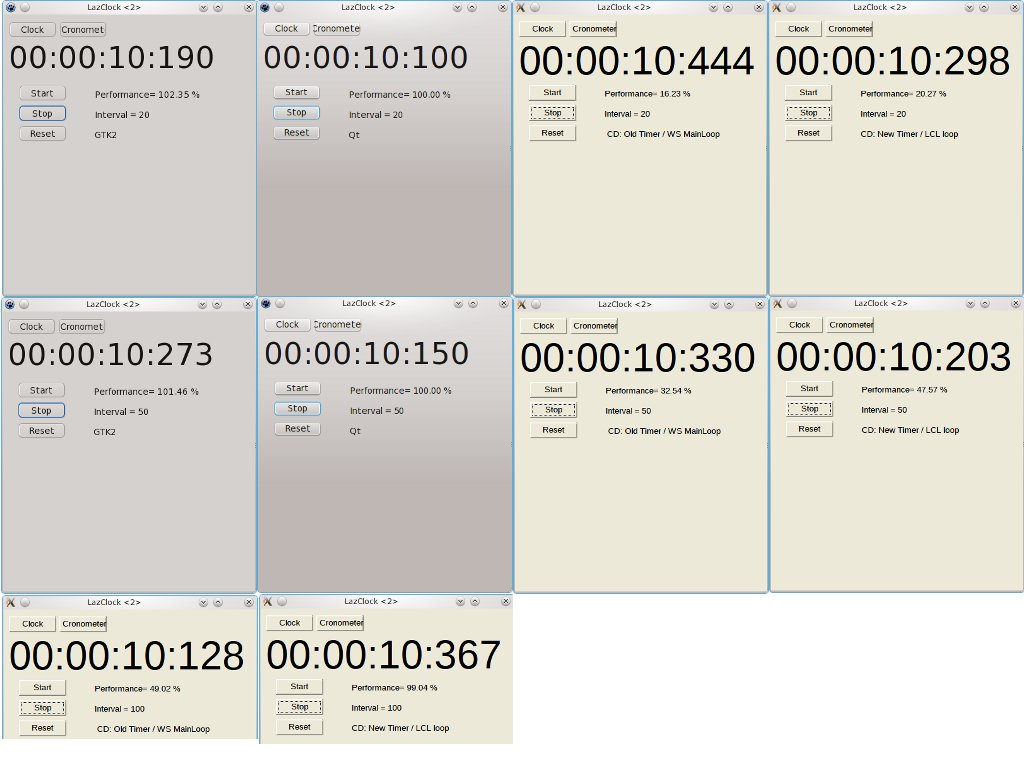
Cronometer tells much more, because you can evaluate the performance, i.e. the number of expected timer events in a given time (given timer interval), with respect to the actual events received.

I've modified lazclock to show this information, together with information about the environment.
I've been also obliged to make a couple of minor changes to make it compile: I'm using fpc 2.4.4. What has been used for lazclock? Attached the diff file.

Then I run it with GTK2 and Qt widgetset, and with CD widgetset both with old and new timer.
Screenshots of the results of those tests can be seen at: http://www.copeca.it/colla/LazClock_compare.jpg
(I've scaled the images to fit them in just one page)

As the drawing time (not considering X11 paint time) exceeds 60 ms, I tested not only with 20 ms interval, but also with 50 ms and 100 ms.

I leave it to you to draw your conclusions.

Giuliano

-------------- next part --------------
A non-text attachment was scrubbed...
Name: Lazclock.diff
Type: text/x-patch
Size: 6089 bytes
Desc: not available
URL: <http://lists.lazarus.freepascal.org/pipermail/customdrawn/attachments/20120401/6f834895/attachment.bin>

Giuliano Colla
to Giuliano Colla

Il 01/04/2012 13:47, Giuliano Colla ha scritto:

I've run some comparisons to evaluate lazclock performance with different widgetsets, and options.

.....

I leave it to you to draw your conclusions.

I don't believe it is fair to raise a problem without trying to offer a solution.
X11 backend crawls too slow to be of any use. But rethinking to the full picture I believe that the cause and the solution are just under our eyes.

Being Xlib the lowest level interface to the display, all the work must be done in the main thread.
Doing things in sequence means being slow. All other widgetsets, and backends, take advantage of higher level native functions, so that a lot of work is done in other threads, in parallel as much as possible. But reflecting over it, it came to my mind that Xlib isn't the only way to take advantage an X11 server: X11 provides Xt, the X toolkit!

Xt is a toolkit much like GTK or Qt or Windows widgets, provides similar functionality (at least the basic ones), except for one important thing: Xt widgets are just empty abstract containers. They must be custom drawn! You may decide that a widget is a button, and request a ButtonPress CallBack, but it's up to you to paint the button in the Up and Down state. Just what is needed for a customdrawn widgetset!

Both Qt and GTK can't take advantage of it, because they both are born multiplatform.
On the contrary, Motif, which is Unix-only, uses Xt. But in an X11 backend we don't need to be multiplatform. We may take advantage just of what X11 offers.
X11 doesn't provide timers, Xt does. X11 doesn't provide a MainLoop, Xt does, but permits to override it, X11 doesn't tell that a button has been pressed, Xt does, and so on.
The ugly X-only applications which come with each X11 installations (such as Xclock, xsetfonts, xvidtune, etc.) are based on Xt, with a few quick and dirty custom drawn widgets, no antialiasing enabled, etc., but this means that Xt is always available as a part of all X11 distributions:

[colla at localhost XToolkit]$ ldd /usr/bin/xvidtune linux-gate.so.1 => (0x008a5000)
libXxf86vm.so.1 => /usr/lib/libXxf86vm.so.1 (0x00101000) libXaw.so.7 => /usr/lib/libXaw.so.7 (0x001eb000)
libXmu.so.6 => /usr/lib/libXmu.so.6 (0x0012e000)
*libXt.so.6 => /usr/lib/libXt.so.6* (0x0018c000) libX11.so.6 => /usr/lib/libX11.so.6 (0x00916000)
libc.so.6 => /lib/libc.so.6 (0x005c8000)
libXext.so.6 => /usr/lib/libXext.so.6 (0x00c0a000) libXpm.so.4 => /usr/lib/libXpm.so.4 (0x03ec0000)
libSM.so.6 => /usr/lib/libSM.so.6 (0x00c29000)
libICE.so.6 => /usr/lib/libICE.so.6 (0x00cb7000)
libxcb.so.1 => /usr/lib/libxcb.so.1 (0x00a54000)
libdl.so.2 => /lib/libdl.so.2 (0x00754000)
libgcc_s.so.1 => /lib/libgcc_s.so.1 (0x007a4000)
/lib/ld-linux.so.2 (0x005a7000)
libuuid.so.1 => /lib/libuuid.so.1 (0x00c1d000)
libXau.so.6 => /usr/lib/libXau.so.6 (0x00a4f000)

Taking advantage of Xt would mean IMHO, that only part of the work done up to now in customdrawn should be revised, and only as far a X11 backend is concerned, making it much more similar to other backends.

I attach a list of the man pages related to Xt, just to give an idea of the available functionality.

I could take care of it, beginning with only the main form, and leaving all the rest as it is, (which won't give any advantage, but will permit to familiarize with the tool), and then taking care of the widgets, as long as I learn how to deal with a new beast.

What do you think about it?

Giuliano

-------------- next part --------------
An HTML attachment was scrubbed...
URL: <http://lists.lazarus.freepascal.org/pipermail/customdrawn/attachments/20120401/ab7c5f2e/attachment.html> -------------- next part --------------
An embedded and charset-unspecified text was scrubbed... Name: ManPages.txt
URL: <http://lists.lazarus.freepascal.org/pipermail/customdrawn/attachments/20120401/ab7c5f2e/attachment.txt>

Michael Schnell
to Giuliano Colla: I've run some comparisons to evaluate lazclock performance with different widgetsets, and…
Giuliano Colla wrote
With Customdrawn and original timer sometimes you see the seconds hand jump two seconds (meaning that it missed a tick), with new timer you see it a little less, but that's all.

IMHO: TTimer is specified not to miss an event, unless the main thread is busy for at least a complete period.

So missing a tick with a not very busy Project should be considered a bug, while delaying the event start for any amount of time less than a complete period for an arbitrary reason is allowed.

If the main thread is busy for more than a complete clock period, it is debatable what should happen, what should be allowed and what should be considered a bug:
- forcibly miss all but one tick (delete all registered timer events when one is handled)
- forcibly do all delayed ticks that occurred in the past in a row (count the ticks and schedule them all ASAP, stalling other (GUI and thread) events at that point in time)
- forcibly do all delayed ticks that occurred in the past merged with other Events (blur the Event queue by scheduling each timer event at it's own.
- do _some_ events and miss _some_ ticks

-Michael

Felipe Monteiro de Carvalho
to Michael Schnell
Michael Schnell wrote
IMHO: TTimer is specified not to miss an event, unless the main thread is busy for at least a complete period.

Missing a clock tick is not related to missing a TTimer event and I doubt that TTimer events are being lost here. LazClock does not use TTimer to count time, only to send invalidate requests, it calculates the time on its own to be precise about what time it really is regardless of any problems in TTimer. So when it looses a tick it actually means that since the last paint of the clock there was an interval of aprox. 2 seconds to the next paint. Of course the interval should never be that big unless you are running very CPU intersive programs together with LazClock.

Felipe Monteiro de Carvalho
Giuliano Colla
to Felipe Monteiro de Carvalho

Il 02/04/2012 09:37, Felipe Monteiro de Carvalho ha scritto:

Show quoted text 5 lines
On Mon, Apr 2, 2012 at 9:32 AM, Michael Schnell wrote: > IMHO: TTimer is specified not to miss an event, unless the main thread is > busy for at least a complete period. Missing a clock tick is not related to missing a TTimer event and I doubt that TTimer events are being lost here.

The problems appears to be not that TTimer events are lost, but that TTimer events aren't generated.
See the Cronometer test.

Show quoted text 9 lines
LazClock does not use TTimer to count time, only to send invalidate requests, it calculates the time on its own to be precise about what time it really is regardless of any problems in TTimer. So when it looses a tick it actually means that since the last paint of the clock there was an interval of aprox. 2 seconds to the next paint. Of course the interval should never be that big unless you are running very CPU intersive programs together with LazClock.

There was no other running application. Just normal background Desktop related activities.
I managed to make it skip a second just moving the mouse over the form, and thus generating many mousemove events, which apparently do keep the main loop too busy. We need to investigate further.

Giuliano Colla
to Michael Schnell: IMHO: TTimer is specified not to miss an event, unless the main thread is busy for at…

Il 02/04/2012 09:32, Michael Schnell ha scritto:

Show quoted text 25 lines
On 04/01/2012 01:47 PM, Giuliano Colla wrote: > With Customdrawn and original timer sometimes you see the seconds > hand jump two seconds (meaning that it missed a tick), with new timer > you see it a little less, but that's all. > IMHO: TTimer is specified not to miss an event, unless the main thread is busy for at least a complete period. So missing a tick with a not very busy Project should be considered a bug, while delaying the event start for any amount of time less than a complete period for an arbitrary reason is allowed. If the main thread is busy for more than a complete clock period, it is debatable what should happen, what should be allowed and what should be considered a bug: - forcibly miss all but one tick (delete all registered timer events when one is handled) - forcibly do all delayed ticks that occurred in the past in a row (count the ticks and schedule them all ASAP, stalling other (GUI and thread) events at that point in time) - forcibly do all delayed ticks that occurred in the past merged with other Events (blur the Event queue by scheduling each timer event at it's own. - do _some_ events and miss _some_ ticks

I'm convinced that there's no solution good for all cases. Depending on the usage of a timer, you may either want that it keeps a perfectly constant rate, or that it provides you the best it can. If you're sampling data from a measuring instrument, and need data 1ms apart, it is preferable to have data at time 1 - 2 - 4 - 5 - 6, than data at time 1 - 2 - 3.9 - 4.9 - 5.9.
In many other cases the opposite is true.
I think that
1) Everything should be fast and efficient enough to make such a case extremely rare.
2) The option of what to do should be left to the application, with an extra option in TTimer.

Michael Schnell
to Giuliano Colla
Giuliano Colla wrote
I'm convinced that there's no solution good for all cases.

Of course you are right, but AFAIK, there is no documentation regarding TTimer on that behalf.

At best there would be multiple Timer class variants or a property in TTimer defining how it should work. (But in fact this is not really a "CustomDrawn" issue but a more general question. _Here_ I just wanted to point what cases should be tested.

-Michael

Felipe Monteiro de Carvalho
to Giuliano Colla: Il 02/04/2012 09:32, Michael Schnell ha scritto: I'm convinced that there's no solution…
Giuliano Colla wrote
I'm convinced that there's no solution good for all cases. Depending on the usage of a timer, you may either want that it keeps a perfectly constant rate, or that it provides you the best it can.

I think that TTimer is by definition a timer with a good hability to mix events into the main loop but whose precision is low and will vary across widgetset. So we should focus in optimizing for a good mix of events in the main loop and for avoiding delaying timer messages for more then 100ms if possible. That should improve things for LazClock for example.

About your previous idea of threads: I think that threads cannot be utilized unless as a non-activated by default define because by definition LCL apps do not need threading support by default.

If you're sampling data from a measuring instrument, and need data 1ms apart, it is preferable to have data at time 1 - 2 - 4 - 5 - 6, than data at time 1 - 2 - 3.9 - 4.9 - 5.9.

Then they are using the wrong component for the task. TTimer is not suitable for talking to hardware, unless your precision is very low (like 100ms). That the minimal resolution of TTimer is theorically 1ms is just a theory, I doubt it really is close to that in LCL-Win32, LCL-Gtk, LCL-Cocoa, etc. Even in LCL-CustomDrawn I have no idea how is the precision of the Android timer for example, since the API in question does not guarantee any precision at all...

People that need such special timer precision really need to use a dedicated thread for talking to the hardware, make a loop in that thread and use a precision timer counting component (like EpikTimer) in a loop. TTimer is a native timer (where available) so it cannot be relied upon for high precision. Another idea would be expanding EpikTimer to support a higher level interface which builds a loop and adds event-driver programming, but all of this is unrelated to implementing TTimer.

2) The option of what to do should be left to the application, with an extra option in TTimer.

Unlikely to be useful if CustomDrawn-X11 would be the only one to support the high precision variant.

In Android at least implementing the high-precision variant of TTimer is impossible. The main thread cannot be controlled in Android, and the only way to get a good result would be the solution which I presented before: spawn a new thread and make a loop in it. But this offers no mixing of events into the main thread at all and the code is not running in the main thread. If you want to run the code in the main thread you could theorically send messages to it and synchronize, but then you loose the precision because you don't know how long the main thread will take to answer.

So summing up, I think that TTimer is unsuitable for high-precision applications by design.

Felipe Monteiro de Carvalho
Michael Schnell
to Felipe Monteiro de Carvalho
Felipe Monteiro de Carvalho wrote
I think that TTimer is by definition a timer with a good hability to mix events into the main loop

AFAIK that is why events that are scheduled while another Event of the same TTimer implementation is not yet done, are dropped. Otherwise a TTimer can easily stall the GUI.

-Michael

Giuliano Colla
to Felipe Monteiro de Carvalho: On Mon, Apr 2, 2012 at 10:08 AM, Giuliano Colla I think that TTimer is by definition a…

Il 02/04/2012 10:33, Felipe Monteiro de Carvalho ha scritto:

So summing up, I think that TTimer is unsuitable for high-precision applications by design.

TTimer in itself has no theoretical design limitations. Limitations arise only from widgetset implementation.
I verified that Qt timer is accurate to the millisecond. Just run the Cronometer of LazClock under Qt, and you'll see that the time shown is always an exact multiple of 20 ms. Customdrawn doesn't need to be more accurate than that, but if Qt platform can achieve it, why can't we?

Michael Schnell
to Giuliano Colla
Giuliano Colla wrote
TTimer in itself has no theoretical design limitations. Limitations arise only from widgetset implementation.

A possibly huge latency of course arises, when the thread that is supposed to handle the Timer events is busy with other stuff.

I don't know if it's possible to attach a QT timer to one thread while the GUI is handled by another one, But certainly this is not (easily) possible with the Lazarus WidgetSet implementation.

-Michael

Felipe Monteiro de Carvalho
to Giuliano Colla: Il 02/04/2012 10:33, Felipe Monteiro de Carvalho ha scritto: TTimer in itself has no…

Well, for me it is fine either way, since you are implementing you can do it in any way you prefer. I was just pointing out that if you write software which depends on a given precision for TTimer it will fail when you change your widgetset and that in some widgetsets it will be impossible to make it precise. So if you want a solution that works regardless of the widgetset you need to do it differently.

Felipe Monteiro de Carvalho
to Michael Schnell: Of course you are right, but AFAIK, there is no documentation regarding TTimer on that…
Michael Schnell wrote
Of course you are right, but AFAIK, there is no documentation regarding TTimer on that behalf.

Yes, but it is like that on purpose. It is not documented because no particular behavior is guaranteed and it might be different in each widgetset or even in various versions of the same widgetset, so no assumptions can be made. The exact behavior is considered therefore an implementation detail and people should avoid depending on implementation details.

The only way to make it guaranteed would be to make it run the even on another thread and make the timer completely threaded, just like the timer from Java is. Android adds another timer system which runs in the main thread and just like TTimer it has no guarantees whatsoever of any particular precision.

If Qt achieved a main thread timer with precision then I am really impressed, although I wonder if it really works the same in all of their platforms. In particular I doubt it works the same in Android because Android does not allow any kind of control over the main thread.

Felipe Monteiro de Carvalho
Michael Schnell
to Felipe Monteiro de Carvalho
Felipe Monteiro de Carvalho wrote
people should avoid depending on implementation details.

That should be documented, at least :)

The only way to make it guaranteed would be to make it run the even on another thread and make the timer completely threaded

Throwing the TTimer event in a Thread is not at all what anybody would want. This would ask for huge complexity in the user code.

What _might_ be desirable is to have is a property in TTimer, that can be set to one of those settings:
- default (do what is usually best, thus no change to the current definition of TTimer)
- don't schedule an event before the last one has been handled by the main Thread (loose as many ticks as necessary to provide lowest main thread overhead) (e.g. most useful for on a GUI displaying a varying embedded state)
- schedule all events in natural order (so they inter-mix with all other events, the event is a perfectly normal Main Thread event, no ticks are lost)
- schedule all collected events as soon as possible (only one event of this TTimer is scheduled normally, the next ones only increment a counter. When the event is scheduled the handler is called as often as the counter indicates. Thus the appropriate count of ticks is performed as fast as possible. (e.g. most useful with applications that rely on best Timer performance)

-Michael

Giuliano Colla
to Michael Schnell

Il 02/04/2012 15:36, Michael Schnell ha scritto:

Show quoted text 9 lines
On 04/02/2012 03:03 PM, Felipe Monteiro de Carvalho wrote: > people should avoid depending on implementation details. That should be documented, at least :) > The only way to make it guaranteed would be to make it run the even on > another thread and make the timer completely threaded Throwing the TTimer event in a Thread is not at all what anybody would want. This would ask for huge complexity in the user code.

It may (and should) be completely transparent.
It all depends on how it's implemented.
When you're using Qt widgetset (at least in Linux), what happens is more or less like that: the timer is handled in an appropriate thread, when it expires it sends a message which is received by the Qt loop, from there sent to the loop where the WaitMessage of the Lazarus Widgetset receives it from there used to inform the main loop which wakes up, and finally triggers the OnTimer event of your TTimer. (Rather inaccurate, but just to give the idea).

The result, as everything has been cleverly designed, that your OnTimer event triggers at the split millisecond. I don't know how many threads have been involved in all that, but, as long as it works, nobody cares. Most of all, the user doesn't have to worry about it. It's just a developer problem.

An OnClick event involves at least a couple more of threads, but you just see it as an event. The rest occurs behind the scenes.

Giuliano