

Catalog · How the catalog works
Militereum

Militereum is a firewall for your crypto wallets
- ★ 19 on GitHub
Anyone may press Interesting, signed in or not. It helps others find this project.
README
 Militereum
- simulates your transactions
- shows you exactly what tokens are about to exit your wallet BEFORE a transaction leaves your computer
- blocks suspicious transactions
- works with every EVM-compatible wallet, including MetaMask and Rabby and Ambire and Brave
- non-custodial, 100% uptime. you do not depend on our servers because there aren't any
- supports Ethereum and many other chains, including Polygon and Arbitrum and Optimism and Base
- available for Windows and macOS
- auditable open source code
Reason to be
Almost everybody in crypto — especially those who are in DeFi — has been phished, drained or rugged. Wallets are keepers of keys, but they don’t necessarily keep you safe.
Militereum is a firewall that once installed secures your crypto wallets. Militereum is chain-agnostic and works with every EVM-compatible crypto wallet, including MetaMask and Rabby and Ambire and Brave.
Each and everyone of your transactions is simulated, compared to 20+ known attack vectors, and potentially blocked if Militereum thinks it is unsafe.
Because Militereum is rooted into your operating system, the firewall can start automatically when you log into your computer, the software sends you system-wide notifications that do not depend on the availability of a web browser, and dapps cannot bypass it.
Setup
- Download Militereum for Windows or macOS
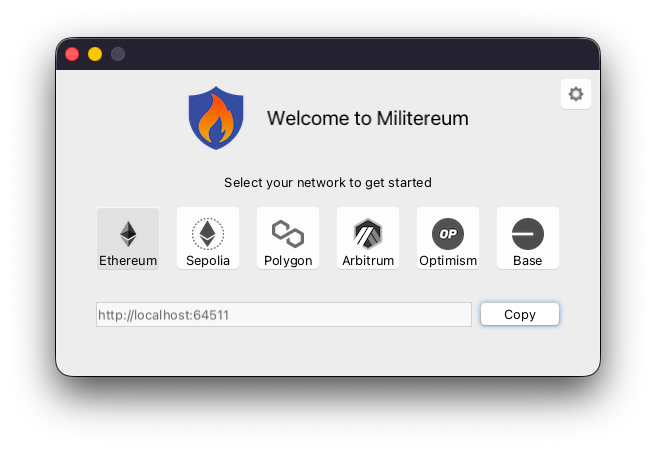
- Launch Militereum. The following window appears. Click on:
Copy
- Unlock MetaMask in your web browser
- Click on the hamburger icon in the upper-right corner
- Click on:
Networks - Click on the ellipsis for the network you will want to secure, for example: Ethereum
- Click on:
Edit - Open the RPC URL dropdown menu
- Click on:
Add RPC URL - Paste Militereum’s RPC URL
- Click on:
Add URL
Click here for more info on how to configure Militereum.
Running
As soon as your wallet has connected to Militereum, the firewall gets minimized and keeps running in the background.
Every raw transaction passes through Militereum and if it is suspicious, Militereum will block the transaction and prevent it from leaving your computer.
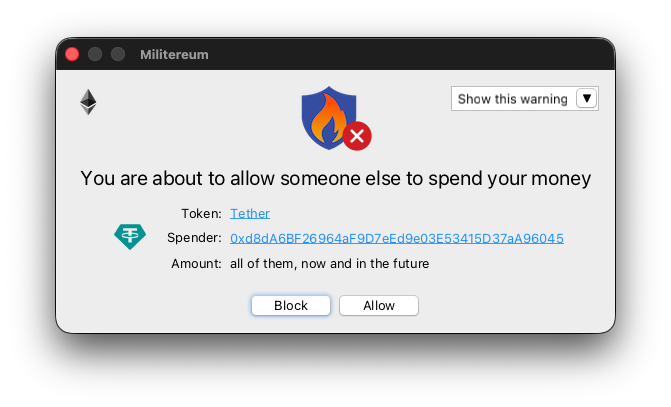
Here's an example. Navigate to Uniswap or Balancer. Initiate a swap from one of your tokens to another. Before Uniswap or Balancer can swap your token, you'll need to sign a so-called token allowance.
Every time you approve a token allowance, you are potentially exposing your wallet to an exploit. Uniswap and Balancer are very reputable, but any other dapp can potentially phish you for an allowance and drain your tokens from your wallet.
After your crypto wallet has approved the allowance, Militereum will intercept the transaction and prompt you with this window. From here, you can allow the transaction to happen, or prevent it from leaving your computer.
Besides unlimited token allowances, Militereum will block...
- you transferring more than 5k in US dollars
- you transacting with a sanctioned address
- you transacting with a smart contract that has not been verified
- you transacting with an address you have not transacted with before (this warning will stop most phishing attacks)
- you transacting with an address that has been identified as a phisher
- you transacting with a dormant contract where the last transaction with the smart contract was more than 30 days ago
- you trusting someone else to be able to transfer all your NFTs out of your wallet
- you buying a suspicious token that is probably an unwarranted airdrop
- you buying a token that lies about its own token supply
- you buying a honeypot token that is designed to pump but you cannot sell
- you buying a token that is unsupported by Uniswap
- you buying a censorable token that can blacklist you
- you buying a pausable token that can prevent you from swapping or selling
- you buying a token with an unlock event coming up within 3 months, inflating the supply and possibly decreasing the price
- you receiving a token without a DEX pair that you won't have the option to sell
- you receiving a low-DEX-score token that has little or no liquidity
- you approving a smart contract that is on the Revoke.Cash exploit list
- you depositing tokens into a yield-bearing vault, but another vault earns you higher yield while holding the same TVL (or more)
- you transacting with an address that got funded by a bad actor
- you delegating your wallet to an unknown smart contract (not a known EIP-7702 delegator)
- you transacting with an address that got blacklisted by USDC or USDT
- you mistakenly sending a token it its smart contract, where it will get permanently stuck
- you depositing money into a metamorphic smart contract that could be updated to divert your money elsewhere.


Militereum's warnings are provided for informational purposes only and should not be taken as financial advice. Remember to always do your own research before interacting with tokens.
License
Distributed under the GNU AGP v3.0 with Commons Clause license.
Sponsors
This project received a WAGBI grant from alchemy.com and is featured in Alchemy’s Dapp Store.
Disclaimer
Militereum is provided free of charge. There is no warranty. The authors do not assume any responsibility for bugs, vulnerabilities, or any other technical defects. Use at your own risk.