

Catalog · How the catalog works
Weather

JD Weather Library
- ★ 10 on GitHub
Anyone may press Interesting, signed in or not. It helps others find this project.
README
# JD Weather Library
About
- Provides the ability for developers to integrate with a choice of many weather services to fetch weather data, including conditions, alerts, forecasts, and maps.
- Standardizes weather data into a single common structure regardless of which service it came from.
- Support functions to describe which features are available and which are not in a given service.
- Lookup weather data by any given number of location information.
- Each weather service encapsulated in a DLL (Source Included).
- Add support for new services by writing a new DLL.
- REST API for web access to weather library
IMPORTANT NOTE
This library is currently in active development, and is not currently functional. It is actually the third complete iteration of this project.
This project is dead in the water.
Disclaimer
The code and resources in this repository are in no way guaranteed. The author(s) of the library are not responsible for any incorrect, corrupt, damaging, or otherwise undesired results. You take full responsibility to ensure this library suits your requirements. You also take full responsibility to abide by the chosen service(s) guidelines in their corresponding documentation. This includes limited number of requests, limited availability of information, presentation of weather data, and presentation of trademark information and logos. Be sure to thoroughly read the documentation for the chosen service(s) to gain knowledge of these requirements.
Supported Weather Services
- Weather Underground
- AccuWeather
- OpenWeatherMap
- Foreca
- Weather Source OnPOINT®
- National Weather Service
- DarkSky
DLL Library
How to Create Instance
- Implement objects for all interfaces found in
JD.Weather.Intf.pas. - This unit is shared across boundaries, and contains all common types, classes, interfaces, and functions required.
- For use of existing supported services, use or convert the unit in your project.
- For use of newly supported service, copy or convert the source of one of the existing services.
- You can also write a DLL using any programming language, such as C# or C++.
- Load the library
JDWeather.dlland get the proc address forCreateJDWeather. - There is a procedure type already defined in the interface unit, called
TCreateJDWeather. Call the functionCreateJDWeatherto obtain a new instance of aIJDWeatherinterface.
NOTE: In the future, this will not be necessary, as another component will be written to accommodate for this task.
  FLib:= LoadLibrary('JDWeather.dll');
  if FLib <> 0 then begin
    FCreateLib:= GetProcAddress(FLib, 'CreateJDWeather');
    if Assigned(FCreateLib) then begin
      try
        FWeather:= FCreateLib(ExtractFilePath(ParamStr(0)));
        LoadServices;
      except
        on E: Exception do begin
          raise Exception.Create('Failed to create new instance of "IJDWeather": '+E.Message);
        end;
      end;
    end else begin
      raise Exception.Create('Function "CreateJDWeather" not found!');
    end;
  end else begin
    E:= GetLastError;
    raise Exception.Create('Failed to load library "JDWeather.dll" with error code '+IntToStr(E));
  end;
How to Use
- Choose a service from
IJDWeather.Services Countreturns the number of servicesItems[]returns a given service by its index- Create an account with chosen service and obtain API key
- Use the
Supportproperty of a service to see what pieces of information are supported. - Wait until I get more stuff implemented and working here...
Test Application
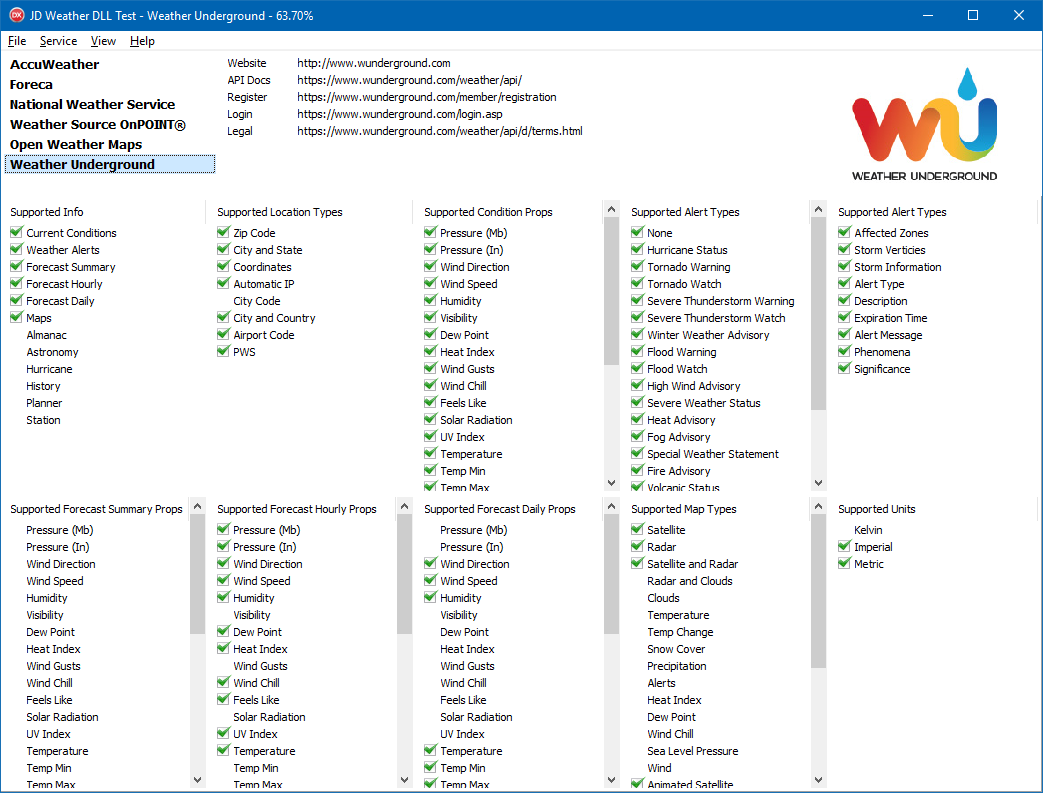
The test application is not actually utilizing the service APIs themselves, but rather just a proof of concept with dynamically loading multiple DLLs. It shows the following:
- Supported services, as it finds each DLL.
- URLs to access the particular service's resources.
- Logo to represent the selected service.
- All the properties which are supported for different info types.
REST API
You can acquire weather data through a global API which combines data from multiple weather services into one single output. The weather properties from each weather service are averaged together. You acquire a key which authenticates you, and you supply all your weather service keys into this central account. This way, if you start working with one weather service, and decide to use a different service instead, you can easily switch without having to re-write a majority of your code.
REST API Documentation
You can vew the documentation here to get a general idea of how it works.
Current State
This project is currently in massive development, and is not yet ready for production use. The whole concept of the project is still up in the air, but slowly becoming established.
The most complete service implemented so far is Weather Underground. Originally, OpenWeatherMap was the first. But the project was started over again in favor for the differences of Weather Underground, and that's when support was added for multiple services. Since then, more services have been added.
Future Plans
In the end, this entire system will be encapsulated inside a single component which can be installed into the Delphi IDE. It provides a multi-threaded environment which in turn automatically fetches weather data on a schedule.
Another major concept (already in the works) is to merge multiple weather data sources into one, averaging out each data point. This helps accomplish the following:
- More realistic weather data based on averages.
- Fill in pieces of weather data which are only supported by certain services.
- Access weather data through a REST API.