

Catalog · How the catalog works
FixAndroidLogger

Fixes the FireMonkey logging service so that adb logcat can be used to filter the logs
- ★ 11 on GitHub
Anyone may press Interesting, signed in or not. It helps others find this project.
README
FixAndroidLogger
This app shows how using the FMX.Platform.Logger.Android.Fix unit, you can change the tag used by FireMonkey so that you can use adb logcat to properly filter your logs for debugging.
In order to use it, all you have to do is include the FMX.Platform.Logger.Android.Fix unit in your project file.
Quick steps to use it
- Include or add FMX.Platform.Logger.Android.Fix in your project file.
- Include FMX.Platform.Logger.Android.Fix in the uses clause.
- Include the following code in when logging:
var LLogService: IFMXLoggingService;
var LLogPriority: IFMXTagPriority;
if TPlatformServices.Current.SupportsPlatformService(IFMXLoggingService, LLogService) and
    Supports(LLogService, IFMXTagPriority, LLogPriority) then
    begin
      LLogPriority.i('TagName', 'LogMessage');
    end;
adb logcat -s TagName:*
Demo
See the code in for how to use it.
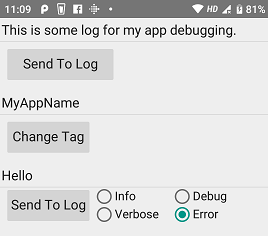
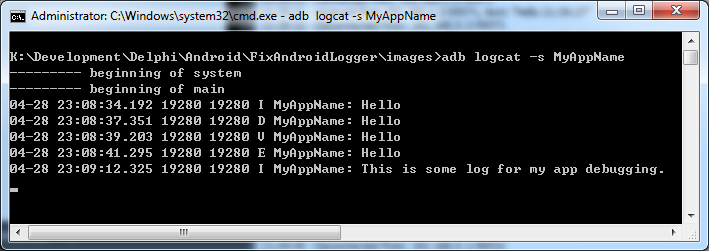
Once you have clicked on the Change Tag button, all your logs will be tagged with that name.
You can also have priority tags as well, so your tags can have debug, error, info or verbose priority.
To filter the tags using adb logcat, simply use the command
adb logcat -s MyAppNamewhere MyAppName is the tag name you have chosen to use.
Hope this helps with your debugging.
Enjoy,
Chee-Wee Chua,
Singapore.