

Catalog · How the catalog works
npp.connections

NotePad++ Plugin. Allows to connect to SQL Servers, execute SQL commands and views results
- ★ 17 on GitHub
Anyone may press Interesting, signed in or not. It helps others find this project.
README
npp.connections
[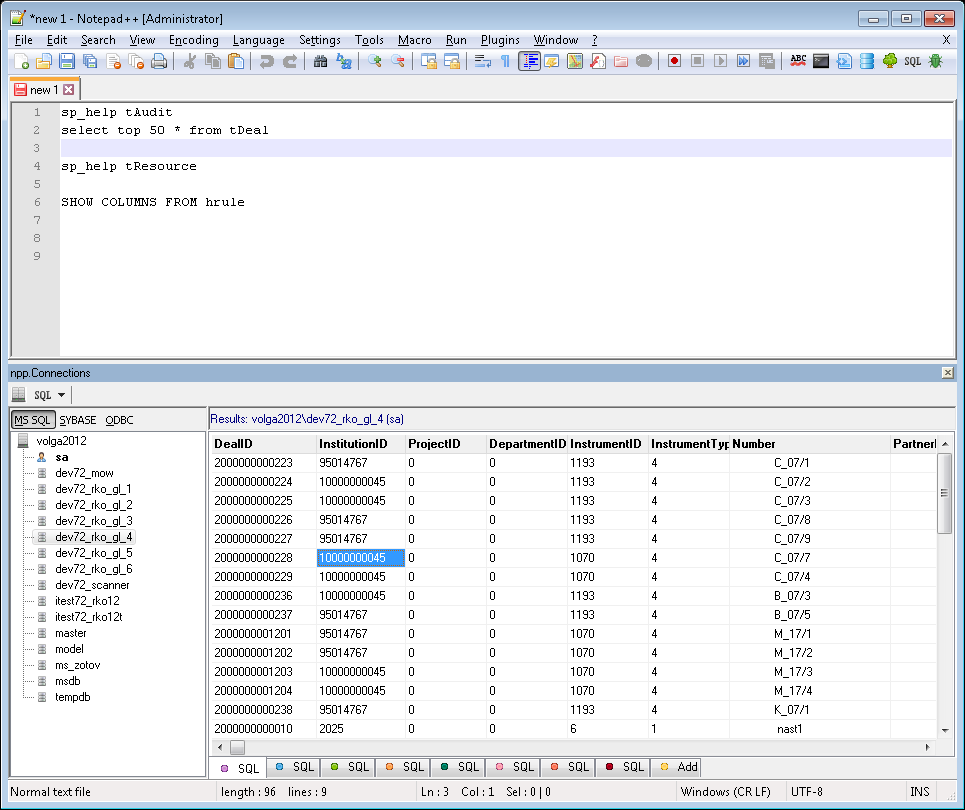](https://github.com/vladk1973/npp.connections)This plugin allows Notepad++ to connect to MS SQL or Sybase servers. ODBC data sources are also supported. Npp.connections work with MS SQL data sources that must be placed as aliases by "SQL Server Configuration Manager" tool. Sybase servers must be placed as aliases in \Sybase\ini\sql.ini file (default configuration ini-file in Sybase Client). After installation there will be two new buttons and two commands available in the menu: <ul> <li>Show Result panel - show panel with current connections and query results. Use pop-up menu to add an active connection on left side of the panel</li> <li>Execute SQL - execute selected text in Notepad++ as an SQL batch. For example, type and select this text: sp_help sysdatabases and then press CTRL+E. Results of this command will be shown in "npp.Connections" panel in special "SQL tab". You can copy SQL results to clipboard using pop-up menu</li> </ul>
To build npp.connections.dll:
<ol> <li>Open npp.connections.dpr</li> <li>Build npp.connections.dll [as a normal Delphi project]</li> </ol>