

FLED

Simple DOS editor with Hex and Compare functionality
- Active · last change 9-11-2026
- ★ 1 on GitHub
README
FLED
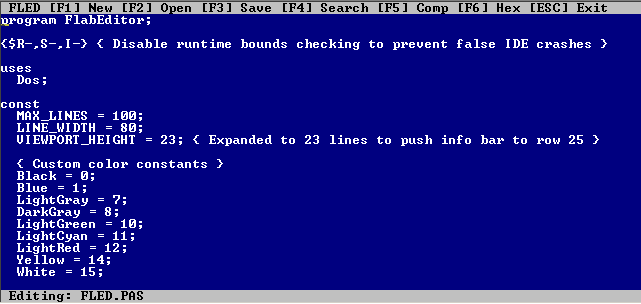
Simple DOS editor with Hex and Compare functionality
FLED (FlabEditor) – Text & Hex Editor
A fast, direct-VRAM text editor with hex and diff modes for DOS
📌 Overview
FLED (FlabEditor) is a lightweight, high-performance text editor written in Pascal for DOS environments. It leverages direct VRAM access and BIOS interrupts for fast rendering and input handling, avoiding slow DOS API calls.
🔹 Key Features
✅ Text Editing – Full cursor navigation, backspace, enter, and typing
✅ File Operations – New, Open, Save (F1–F3)
✅ Search – Find text with highlighted matches and "next match" navigation (F4)
✅ Hex Editor – Direct binary editing with ASCII preview (F6)
✅ File Comparison – Side-by-side diff viewer with Hex/ASCII modes (F5)
✅ Color UI – Customizable colors (CGA/EGA/VGA)
✅ Direct Hardware Access – Fast VRAM writes and BIOS keyboard input
🎯 How to Use
📝 Basic Controls
| Key | Action |
|---|---|
| Arrow Keys | Move cursor |
| Page Up / Page Down | Scroll viewport |
| Backspace | Delete character |
| Enter | New line |
| ESC | Exit editor |
📁 Menu Shortcuts
| Key | Function | Description |
|---|---|---|
| F1 | New | Clear buffer and start fresh |
| F2 | Open | Load a file (supports directory navigation) |
| F3 | Save | Save current buffer to file |
| F4 | Search | Find text, press N for next match |
| F5 | Compare | Side-by-side file diff (Hex/ASCII modes) |
| F6 | Hex Mode | Switch to hex editor (edit binary directly) |
| F7 (in Diff) | Toggle Mode | Switch between Combined, Hex Only, and ASCII Only views |
🔍 Search Mode
- Press F4 to open search.
- Type your query and press Enter.
- Matches are highlighted in cyan.
- Press N to jump to the next match.
- Press ESC to exit.
🔧 Hex Editor Mode
- Navigation: Arrow keys move the cursor (nibble-level precision).
- Editing: Type 0–9, A–F to modify bytes.
- Scrolling: Page Up / Page Down to navigate large files.
- ASCII Preview: Right side shows printable characters (
.for non-printable). - Exit: Press ESC to return to text mode (changes sync back to buffer).
📊 File Comparison (Diff)
- Press F5 and select two files.
- If files match exactly, a confirmation message appears.
- View Modes (toggle with F7):
- Combined: Hex + ASCII diff with color-coded differences (red = mismatch).
- Hex Only: Side-by-side hex dump.
- ASCII Only: Side-by-side text comparison.
- Navigation: Arrow keys / Page Up / Page Down to scroll.
- Exit: Press ESC.
⚙️ Other Information
🖥️ Technical Details
- Target Hardware: CGA/EGA/VGA (Color text mode, 80x25)
- VRAM Address:
$B800:0000(direct memory-mapped I/O) - Buffer Size:
- Text: 100 lines × 80 columns
- Viewport: 23 lines (info bar on row 25)
- File Handling:
- Supports binary and text files.
- Temporary file (
FLED$$$.TMP) used for hex ↔ text sync.
- Keyboard: Uses BIOS Interrupt 16h for fast, buffered input.
- Cursor Control: BIOS Interrupt 10h for hardware cursor positioning.
🎨 Color Scheme
| Color | Constant | Usage |
|---|---|---|
| White on Blue | $1F |
Default text editing area |
| Black on Light Gray | - | Menu bar, status bar, dialogs |
| Light Cyan | 11 |
Search highlights |
| Light Red | 12 |
Diff mismatches |
| Light Green | 10 |
File 2 (in diff mode) |
| Yellow | 14 |
Hex editor headers |
📦 Dependencies
- Compiler: Turbo Pascal or Free Pascal (DOS target)
- OS: MS-DOS or compatible (requires BIOS interrupts)
- Hardware: CGA/EGA/VGA display adapter
🚀 Usage Notes
- Command Line: Launch with a filename to open it immediately:
FLED MYFILE.TXT - Directory Navigation: In Open dialog, use arrow keys to select files, Enter to open, ESC to cancel.
- Hex Mode Sync: Changes in hex mode are automatically synced back to the text buffer.
- Limitations:
- Max 100 lines (hardcoded
MAX_LINES). - Lines longer than 80 characters are truncated.
- No undo/redo functionality.
- Max 100 lines (hardcoded
🐛 Known Quirks
- Direct VRAM Writes: Bypasses DOS, so some IDEs may crash (hence
$R-,S-,I-compiler directives). - Extended Keyboard: Uses Int 16h for scan codes (supports Page Up/Down, arrow keys).
- Temporary File:
FLED$$$.TMPis created during hex editing and deleted on exit.
📜 License & Credits
- Author: (Original code provided)
- Inspiration: Classic DOS text editors (e.g., Turbo Pascal IDE, Norton Editor)
- Purpose: Educational / Retro computing
"Fast, minimal, and built for speed—just like the good old days." 🚀