

Catalog · How the catalog works
RhoMarkdownViewer

- ★ 1 on GitHub
Anyone may press Interesting, signed in or not. It helps others find this project.
README
Rho Markdown Viewer
A Skia-backed markdown viewer component for FMX / Delphi 13 (RAD Studio 37.0).
This code was developed using a combination of Human effort and AI assistance.
The project was inspired by the VCL Markdown project from Alister Christie:
https://github.com/alisterchristie/NativeMarkdownViewer
This project was described on his YouTube Delphi channel:
https://www.youtube.com/@codegearguru
TRhoMarkdownViewer is a custom FireMonkey control that renders markdown
directly to a Skia canvas. It does not use a WebView, HTML, or an embedded
browser, and it installs into the IDE as a designable component on the
Rhody Controls palette page (or can be created entirely at runtime).
Because rendering goes through Skia (ISkParagraph / ISkCanvas) rather than
the platform text engine, it draws identically on Windows and macOS.
This is a from-scratch FMX/Skia rewrite of the VCL/GDI Kai Markdown Viewer — the non-visual parser, highlighter, and HTML layers were ported verbatim, and the entire visual layer (layout, paint, hit-testing, selection) was rebuilt on Skia. See Differences from the VCL original.
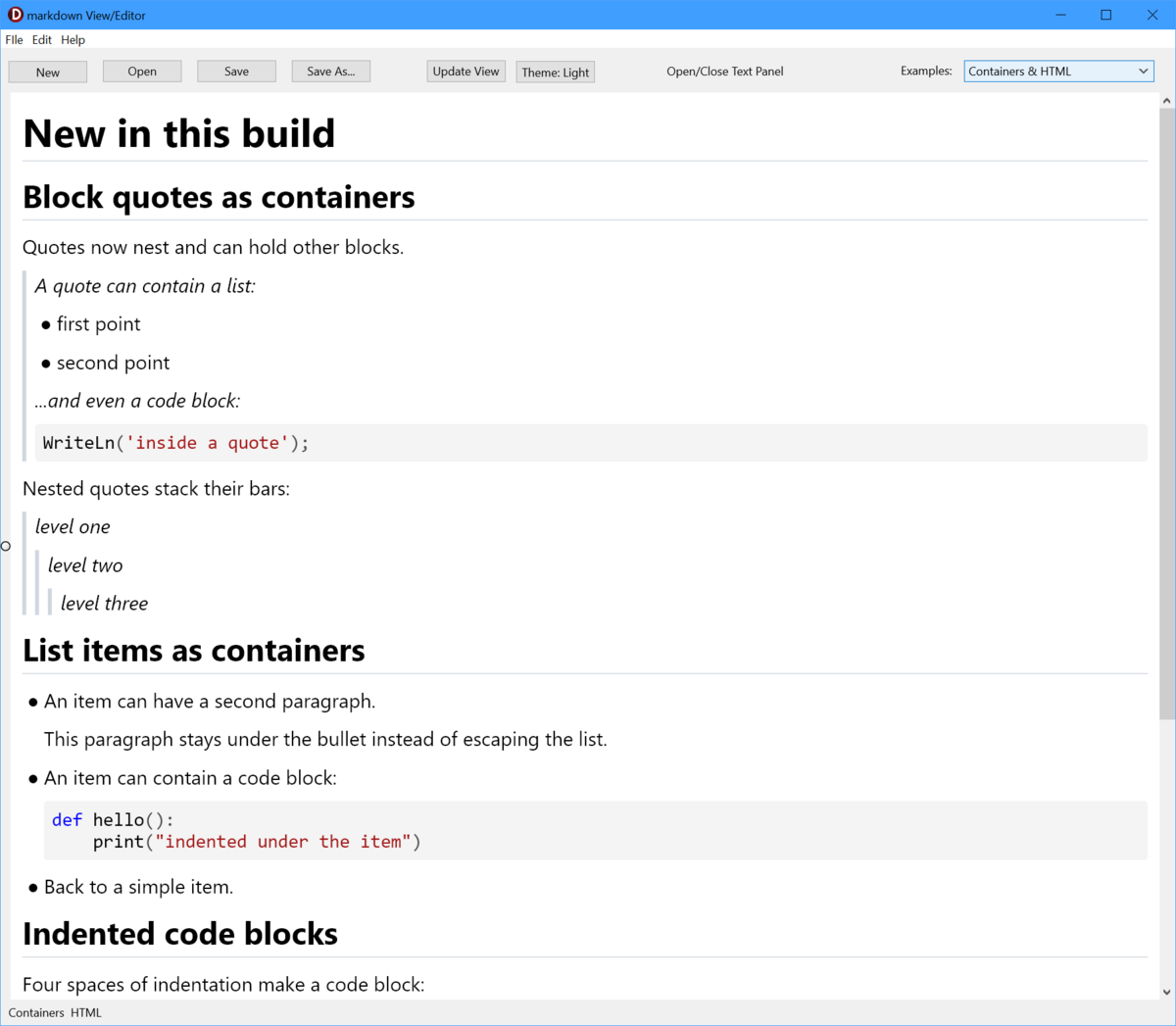
The <code>MDViewerEditor</code> demo with the text panel closed, rendering the “Containers & HTML” sample: nested quote bars, list items holding their own paragraphs and code blocks, and per-language syntax colouring.
Contents
Source/uRhoMarkdownViewer.pas— the control (TRhoMarkdownViewer)Source/uRhoMarkdownTypes.pas— block, inline-token, and source-map model typesSource/uRhoMarkdownParser.pas— markdown-to-block parsingSource/uRhoMarkdownHighlight.pas— pluggable code-block syntax highlighters and their registrySource/uRhoMarkdownHtml.pas— HTML export helpersSource/uRhoMarkdownMath.pas— optional LaTeX math engine binding (see Math)Source/uRhoMarkdownViewerReg.pas— design-timeRegisterPackages/RhoMarkdownViewer.dpk— runtime packagePackages/dclRhoMarkdownViewer.dpk— design-time packageDemo/— headless-friendly sample project, thesample.mdrendering corpus, andmath.mdMDViewerEditor/— AlphaFerro, a live side-by-side editor + preview demoTools/MarkdownRender/— a headless tool that renders a markdown file to a PNGTests/— a console DUnitX test suite for the non-visual layer
Features
Supported rendering includes:
- Headings (
#style and===/---setext underlines), with optional closing sequences (## Heading ##) - Underline rule beneath H1/H2 headings, with an independent, disableable colour (
HeadingRuleColor;TAlphaColors.Nullto switch it off) - Paragraphs
- Bold and italic spans
- Strikethrough spans
- Nested inline formatting (e.g. bold containing italic, or styled link text)
- Hard line breaks from two trailing spaces or a trailing backslash
- Escaped markdown punctuation
- HTML entities (named, decimal, and hex)
- Automatic links (
http://,https://,www.) - Angle-bracket URL and email autolinks
- Reference-style links — full
[text][ref], collapsed[ref][], and shortcut[ref] - Inline code
- Fenced code blocks — backtick or tilde (
~~~) fences, of any length, so a block can itself contain a fence - Indented code blocks (four-space, no fence)
- Syntax highlighting of fenced code blocks for 25+ languages (configurable via
SyntaxColors) - LaTeX math —
$x^2$inline,$$…$$blocks, and code fences taggedmath, typeset natively (optional; see Math) - Block quotes — including nested quotes and quotes that contain lists, headings, and code blocks
- Horizontal rules
- Ordered and unordered lists — both GFM ordered delimiters,
1.and1) - Nested list indentation
- Multi-paragraph list items and code blocks nested inside a list item
- Task lists with checked and unchecked boxes
- Clickable task checkboxes that toggle the source (
AllowTaskToggle) - Pipe tables with left, center, and right alignment, and escaped pipes (
\|) as cell content - Inline formatting and links inside table cells
- Images — block and true inline, scaled with alt-text fallback
- Image alignment — document-wide (
ImageAlign), per image (![]()), or by an enclosing alignment container - A whitelist of inline HTML — formatting tags plus
![]()with explicit sizing /blocks — the GitHub idiom for centring content, rendered as an alignment container- YAML front matter rendered as a metadata card (
name:/description:etc., as inskill.mdand Jekyll-style documents) - Clickable markdown links (
OnLinkClick, or the system browser by default) - In-page anchor links (
[text](#heading)) with GitHub-compatible slugs, plusScrollToAnchorfor programmatic navigation and tables of contents - Highlight spans using double equals (
==highlighted==) - Superscript (
^sup^) and subscript (~sub~) with true raised/lowered baselines - Common emoji shortcode parsing (e.g.
:smile:,:warning:) with a colour-emoji font fallback - Light and dark themes in one call (
ApplyTheme) - Vertical scrolling (wheel, scrollbar, keyboard, and edge auto-scroll while selecting)
- Mouse text selection across blocks, and
Ctrl/Cmd+Ato select all - Copy the selection as the original markdown (
Ctrl/Cmd+C) or as plain text (Ctrl/Cmd+Shift+C) - Find / search with live highlighting, a current-match colour, match counting, and
F3/Shift+F3navigation - Read the current selection as markdown or plain text via
SelectedText - Floating clipboard Copy button when hovering a code block (
ShowCodeCopyButton) - Configurable body and code fonts (
FontFamily,CodeFontFamily), font size, and content padding OnScrollfor synchronising an external editor or scrollbar- HTML export (
AsHtml,AsHtmlDocument) - PDF export (
SaveToPdf,SavePdfToStream) — paginated, with real selectable text - Headless layout and rendering (
MeasureDocument,RenderToCanvas) for offscreen/print/image use
Inline syntax examples
Strikethrough uses double tildes, highlight uses double equals, and super/sub use carets and tildes:
This is ~~no longer current~~ and this is ==highlighted==.
Here is a formula: E = mc^2^, and water is H~2~O.
Emoji shortcodes are parsed automatically:
This is a success :check: and a warning :warning:.Inline emphasis nests, and link text can be formatted:
This is **bold with _italic_ inside**, and a [**bold link**](https://example.com/).End a line with two spaces or a backslash to force a hard line break, and prefix punctuation with a backslash to render it literally:
First line.<two spaces>
Second line, same paragraph.

\*not italic\* and \[not a link\]
A line of text underlined with = or - becomes a heading; HTML entities decode;
and URLs are linked automatically:
Title becomes an H1
===================

© 2024 — 100 × 200
https://www.embarcadero.com/  <support@example.com>
Reference-style links resolve from definitions in the document:
Read the [DocWiki][docwiki].

[docwiki]: https://docwiki.embarcadero.com/
Tables support the alignment row and inline markdown inside cells:
| Name        | Status  | Align Center | Align Right |
| :---        | :---    | :---:        | ---:        |
| **Current** | `active`| centered     | $100.00     |
| ~~Retired~~ | plain   | text         | $2.50       |
Nested containers
Block quotes are container blocks: they nest, and they can hold any other block — a list, a heading, or a fenced code block.
> A quote can contain a list:
>
> - first point
> - second point
>
> ...and a code block:
>
> ```pascal
> WriteLn('inside a quote');
> ```

> level one
>> level two
>>> level three
List items are containers too. Content indented under the bullet and separated by a blank line stays inside the item — a second paragraph, or a code block:
- An item with a second paragraph.

  This paragraph stays under the bullet.

- An item with a code block:

  ```python
  def hello():
      print("indented under the item")
Four spaces of indentation (no fence) also make a code block:

```markdown
    procedure Indented;
    begin
      WriteLn('lines are preserved');
    end;
Inline HTML whitelist
A small, safe subset of inline HTML is interpreted and mapped onto the same
inline styling the markdown syntax uses. Everything else — attributed tags,
<script>, <iframe>, unknown tags — is left literal, which is the safe
default for a viewer.
| Tags | Rendered as |
|---|---|
|
bold |
|
italic |
<u> <ins> |
underline |
<s> <del> <strike> |
strikethrough |
<mark> |
highlight |
/ |
subscript / superscript |
<code> `` |
inline code (monospace) |
| ` | |
| ` | line break |
Water is H<sub>2</sub>O, press <kbd>Enter</kbd>, and <b>bold with <i>italic</i></b>.![]() is supported with src, alt, width, and height. Widths may be a
percentage of the content width or a pixel count, and — matching how GitHub
renders a README — a root-relative src="/images/x.png" resolves against
BasePath:
<img src="images/diagram.png" width="80%" alt="a diagram at 80% width">Note: the HTML whitelist affects on-screen rendering.
AsHtmlexport currently escapes these tags rather than passing them through.
Block alignment containers
One block-level HTML construct is interpreted, because it is the idiom a README
uses to centre content — markdown itself has no syntax for it:
… and … (also left and
right). The wrapper is consumed and its content is laid out with that
alignment, so the same file centres here and on GitHub.
<p align="center">
  <img src="images/logo.png" width="240" alt="logo">
</p>

<div align="right">
Right-aligned prose, and *inline markdown still works* inside the container.
</div>
Only a recognised align value makes a container: a bare ``, an
unfamiliar alignment, or an unterminated wrapper keeps the documented default of
rendering literally, so arbitrary block HTML is never silently swallowed.
Images can also be aligned without any container. ImageAlign
(riaLeft — the default — riaCenter, riaRight) places every image in the
document, an ![]() attribute overrides it for one image, and an
enclosing alignment container wins over both:
Viewer.ImageAlign := riaCenter;YAML front matter
A YAML front-matter header — a --- block at the very top of the document,
closed by --- or ... — is rendered as a metadata card: a tinted panel with
each key in bold beside its value. This is what makes skill.md, Jekyll, and
Hugo-style documents display cleanly instead of turning the closing --- into a
stray heading.
---
name: delphi-fmx
description: "Specialist in FireMonkey (FMX) and Delphi mobile development."
model: opus
---

# The document body follows as normal.
Parsing is intentionally shallow — top-level key: value pairs, with indented or
colon-less lines folded into the preceding value and surrounding quotes stripped
— which covers typical headers without pulling in a full YAML engine.
Basic usage
Add uRhoMarkdownViewer to your uses clause and create the control like any
other FMX control:
uses
  uRhoMarkdownViewer;

var
  Viewer: TRhoMarkdownViewer;
begin
  Viewer := TRhoMarkdownViewer.Create(Self);
  Viewer.Parent := Self;
  Viewer.Align := TAlignLayout.Client;
  Viewer.MarkdownText := '# Hello' + sLineBreak + sLineBreak + 'This is **markdown**.';
end;
You can also assign lines directly, or load from a file:
Viewer.Markdown.Assign(Memo1.Lines);

Viewer.LoadFromFile('README.md');   // reads UTF-8, sets BasePath automatically
LoadFromFile reads the file as UTF-8 (honouring a BOM when present) and sets
BasePath to the file's folder, so relative image paths resolve. You can also set
BasePath yourself:
Viewer.BasePath := ExtractFilePath(Application.ExeName);Links and in-page anchors
By default, clicking a markdown link opens it with the system browser. To handle
links yourself, assign OnLinkClick:
Viewer.OnLinkClick :=
  procedure(Sender: TObject; const AUrl: string)
  begin
    ShowMessage(AUrl);
  end;
In-page anchor links work out of the box. A link whose target begins with #
scrolls to the heading whose GitHub-style slug matches, so tables of contents in
a README behave as they do on GitHub:
See [Differences from the original](#differences-from-the-vcl-original).You can also jump programmatically, and build a table of contents using the same slug rule the viewer resolves against:
if not Viewer.ScrollToAnchor('installation') then
  ShowMessage('no such heading');

Anchor := RhoHeadingSlug('Getting Started');   // -> 'getting-started'
Slugs follow GitHub's rule — lower-cased, punctuation dropped, spaces turned into
hyphens — computed from the rendered heading text, so inline markup in a
heading does not leak into the anchor. Repeated headings disambiguate as
slug, slug-1, slug-2.
Note: if you assign
OnLinkClick, your handler receives anchor links too, and internal navigation no longer happens automatically — callScrollToAnchor(AUrl)from your handler when the target starts with#.
Task checkboxes
Task list checkboxes render in every document. Set AllowTaskToggle := True to
make them clickable — a click flips [ ] / [x] in the underlying markdown
source and fires OnTaskToggle:
Viewer.AllowTaskToggle := True;
Viewer.OnTaskToggle :=
  procedure(Sender: TObject; const AText: string; AChecked: Boolean)
  begin
    // Viewer.MarkdownText has already been updated; mirror it wherever you like.
  end;
Find and search
The component owns the search mechanism — matching, highlighting, and
scrolling a hit into view — and the host owns the find bar. Highlighting
needs the laid-out paragraphs, which are not reachable from outside; the UI, by
contrast, needs no privileged access, so baking one in would only fight the
host's styling. (The same reasoning as ApplyTheme being a method.)
Viewer.SearchCaseSensitive := False;
Viewer.SearchWholeWords    := False;
Viewer.SearchText          := EditFind.Text;   // highlights; does not scroll
Viewer.FindNext;                               // moves to the next match

LabelCount.Text := Format('%d of %d',
  [Viewer.SearchMatchIndex + 1, Viewer.SearchMatchCount]);
API: SearchText, SearchCaseSensitive, SearchWholeWords,
SearchHighlightColor, SearchCurrentMatchColor (all published),
SearchMatchCount / SearchMatchIndex (public, read-only), FindNext,
FindPrevious, ClearSearch, and the OnSearchChange event — which is what a
find bar drives its n of m counter from. F3 and Shift+F3 step through
matches while a search is active.
Two deliberate behaviours worth knowing:
- Assigning
SearchTexthighlights but does not scroll. An incremental find bar assigns on every keystroke, and yanking the view each time is unusable — the host callsFindNextto move. - Matching runs over the rendered text, not the markdown source, so a search
never matches
**around a bold word, a link URL, or an entity name the reader cannot see. It is also within a block: a phrase spanning a paragraph break is not found.
MDViewerEditor has a working find bar (Edit ▸ Find…, Ctrl+F) as the
reference example of the host's half.
Theming and colours
ApplyTheme sets every colour surface — including the code-syntax palette — from
one curated theme in a single call:
Viewer.ApplyTheme(rtDark); // or rtLightTheming is a method, not a published property, deliberately: a published
Theme would re-apply on .fmx load and clobber colours a host had set by hand.
Every colour stays individually overridable afterwards. All colours are
TAlphaColor:
Viewer.BackgroundColor := TAlphaColors.White;
Viewer.LinkColor       := TAlphaColors.Deepskyblue;
Viewer.HeadingRuleColor := TAlphaColors.Null;   // hide the H1/H2 underline rule
Individual colour surfaces: BackgroundColor, TextColor, LinkColor,
CodeBackgroundColor, QuoteBarColor, RuleColor, HeadingRuleColor,
HighlightColor, and SelectionColor.
Syntax highlighting
Fenced code blocks are highlighted when the opening fence carries a language tag, matched case-insensitively against a registry of built-in highlighters:
```pascal
procedure Hello;
begin
  WriteLn('Hi');   // greet
end;
```
Built-in languages (with the fence tags that select them):
| Language | Tags |
|---|---|
| Delphi / Object Pascal | pascal, objectpascal, objpas, delphi, pas, dpr, dpk, pp, lpr |
| Delphi form file | dfm |
| Antimony (SBML model language) | antimony, ant, sb |
| C / C++ / C# | c; cpp, c++, cxx, cc, hpp; cs, csharp, c# |
| Java / JavaScript / TypeScript | java; js, javascript; ts, typescript |
| Go / Rust / PHP | go; rs, rust; php |
| Python / Ruby | py, python; rb, ruby |
| SQL | sql |
| HTML / XML / CSS | html, htm; xml; css |
| JSON / YAML | json; yaml, yml |
| Shell / INI | sh, bash, shell; ini, cfg, conf |
Token colours are exposed through the SyntaxColors property, which is an
expandable node in the Object Inspector (it is a TPersistent and streams into
the .fmx). Each token kind has a colour: PlainColor, KeywordColor,
CommentColor, StringColor, NumberColor, TypeColor, PreprocessorColor,
SymbolColor.
Viewer.SyntaxColors.KeywordColor := TAlphaColors.Navy;A colour defaults to TAlphaColors.Null, meaning "unset — follow the viewer's
TextColor", so an untouched palette follows the theme while an explicit colour
always wins. ApplyTheme retunes the whole palette for light or dark.
An unrecognised or missing language tag falls back to plain, unhighlighted code.
Additional languages can be registered at runtime with
TMarkdownSyntaxHighlighterRegistry.RegisterHighlighter.
Images
Images use standard markdown syntax, and render both as their own block and inline within a paragraph:

An icon  sits right in the text flow.Local paths resolve against BasePath (set automatically by LoadFromFile).
Images scale down to the content width and are never upscaled — unless an
HTML ![]() requests an explicit size, which is honoured (and may
upscale, clamped to the content width). Missing, unreadable, and remote images
fall back to italic alt text; remote URLs are deliberately never fetched, so
layout never performs network I/O.
Math (LaTeX)
Formulas are typeset natively — no WebView, no MathJax, no browser:
The roots of $ax^2+bx+c=0$ are given by

$$
\frac{-b \pm \sqrt{b^2-4ac}}{2a}
$$

```math
\sum_{i=1}^{n} i = \frac{n(n+1)}{2}
```
$…$ is inline, $$…$$ is display style (either inside a paragraph or as its
own block), and a code fence tagged math is display math — GitHub's own
spelling. Inline formulas sit on the text baseline; display blocks are centred.
It is optional, and it degrades
Math is a specialist need, so an application that does not want it deploys
nothing extra and pays nothing. The engine is loaded dynamically at first use,
never linked. When it is absent — or MathEnabled is False, or the LaTeX does
not parse — the formula renders as its literal LaTeX source, styled as code.
Nothing is ever swallowed, and a document containing math still reads sensibly.
To enable it, deploy beside the executable:
| Windows | ratex_ffi.dll |
| macOS | libratex_ffi.dylib |
| both | fonts\KaTeX_*.ttf — all 20 faces |
Both locations can be overridden, and availability queried:
RhoSetMathLibraryPath('C:\MyApp\lib\ratex_ffi.dll');
RhoSetMathFontDir('C:\MyApp\fonts');
if not RhoMathAvailable then
  ShowMessage(RhoMathLastError);
Getting the binaries
The math support bundle on this project's Releases page contains everything above — the library for Windows and macOS, all 20 fonts, and the licence files — ready to unzip beside your executable. It is a separate download on purpose: an application that does not want math never fetches it.
To build the library yourself instead, you need only the FFI crate of RaTeX:
git clone https://github.com/erweixin/RaTeX
cd RaTeX
cargo build --release -p ratex-ffi                                # Windows  -> target\release\ratex_ffi.dll
cargo build --release -p ratex-ffi --target aarch64-apple-darwin  # macOS    -> libratex_ffi.dylib
The fonts are the KaTeX_*.ttf files in that repository's fonts/ folder.
Upstream RaTeX publishes releases for Android, iOS, Flutter, JVM, npm and a CLI,
but not a plain desktop library, which is why the bundle here exists.
If you redistribute the bundle with your own application, note that the two
halves are under different licences: RaTeX itself is MIT, but the KaTeX fonts
are under the SIL Open Font License 1.1. Keep KaTeX-fonts-NOTICE.txt and
SIL-OFL-1.1.txt (both included in the bundle, and both in RaTeX's licenses/
folder) with whatever you ship.
How it works
The engine is RaTeX, a pure-Rust, KaTeX-compatible layout engine. It returns a display list — positioned glyphs, rules and paths in em units — which the viewer replays straight onto the Skia canvas, so a formula stays vector at any size.
Laid-out formulas are cached in em units, so they are measured once per document and survive every resize and repaint.
Dollar signs in ordinary prose
$ is common in prose, so a span becomes math only when it really looks like
one. None of these are touched:
it costs $5 and $10, or US$100 and CA$200
an escaped \$x\$ stays literal, and `$x^2$` in a code span stays code
The rules: no whitespace immediately inside a delimiter, no opening $ directly
after a letter or digit, no closing $ directly before a digit, no backtick
inside a span, and no line break inside one. A $$ block must be closed, or it
is left as ordinary text.
Selection, copy and export
A formula copies as its LaTeX source, which is what you want to paste. HTML
export emits $…$ / $$…$$ wrapped in and, ready for a client-side KaTeX or MathJax; exported
HTML cannot carry the display list, so it is not typeset here.
HTML export
The current document can be exported to HTML. AsHtml returns a fragment;
AsHtmlDocument wraps it in a complete page with an optional title:
Fragment := Viewer.AsHtml;
Page     := Viewer.AsHtmlDocument('My Notes');
The conversion is also available without a control through MarkdownToHtml /
MarkdownToHtmlDocument in uRhoMarkdownHtml.
PDF export
SaveToPdf writes the document as a paginated PDF and returns the page count;
SavePdfToStream does the same into a stream. Skia writes the PDF directly, so
there is no printer driver, external tool, or HTML round trip involved.
Pages := Viewer.SaveToPdf('notes.pdf');            // US Letter, 1" margins

var Opt := TRhoPdfOptions.Defaults;
Opt.SetPageSize(rpsA4);
Opt.BodyFontSize := 10;
Pages := Viewer.SaveToPdf('notes-a4.pdf', Opt);
The export goes through the same layout and paint path as the screen, so syntax colouring, tables, images, math, front-matter cards and alignment all print as they render. Text is real PDF text — selectable and searchable in a reader.
TRhoPdfOptions measures everything in points (1/72"):
| Option | Default | Meaning |
|---|---|---|
PageWidth, PageHeight |
612 × 792 | Page size; SetPageSize takes rpsLetter, rpsA4, rpsLegal or rpsA5 (swap the two for landscape) |
MarginLeft/Top/Right/Bottom |
72 | Page margins |
BodyFontSize |
11 | Printed body size. The whole document is scaled from the screen FontSize, so headings and code keep their proportions. 0 prints FontSize literally |
Scale |
1 | A further zoom on top; below 1 fits more on a line |
PageNumbers |
True | Page number in the footer |
PaintBackground |
True | Paint the theme background, so a dark viewer gives a dark PDF. Set False for white paper with a light theme |
Pages break between blocks, so a paragraph, table or image is not sliced across a page, and a heading is carried over with the content beneath it. Only a block taller than a page is split. The selection, search highlights and the code block's hover Copy button are left out of the export.
Links are drawn but not clickable in the PDF: Skia's PDF backend supports link annotations, but the Delphi binding does not expose them.
Headless rendering
MeasureDocument lays the document out at a given width and returns its full
height, and RenderToCanvas paints it to any ISkCanvas — neither needs the
control to be parented or shown. This drives Tools/MarkdownRender, which renders
a markdown file straight to a PNG through the real layout and paint path:
MarkdownRender.exe input.md output.png [width] [fontSize] [links|select|html|pdf|anchors|search <term>] [dark] [center|right]The pdf mode also writes the document as a PDF beside the PNG and reports its
page count.
Keyboard navigation
When the viewer has focus (macOS uses ⌘ in place of Ctrl):
- Up / Down arrows
- Page Up / Page Down
- Home / End
- Space / Shift+Space
- Ctrl/Cmd+A — select all
- Ctrl/Cmd+C — copy the selection as markdown
- Ctrl/Cmd+Shift+C — copy the selection as plain text
- F3 / Shift+F3 — next / previous search match (while a search is active)
- Escape — clear the selection
Demo application
AlphaFerro (MDViewerEditor/AlphaFerro.dproj) is a live side-by-side editor:
a TMemo on the left and a TRhoMarkdownViewer on the right. It demonstrates
two-way scroll synchronisation (via OnScroll), clickable task checkboxes
mirrored back into the editor (AllowTaskToggle + OnTaskToggle), drag-and-drop
of a .md file onto the preview, and a set of sample documents — including one
that showcases the container-block and inline-HTML features.
It also doubles as a small markdown editor: New, Open, Save and
Save As on the toolbar and the File menu, with the current file name in the
window title; File ▸ Export as PDF…; a Find bar (Edit ▸ Find…,
Ctrl+F) wired to the viewer's search API; a light/dark theme switch; and a
toggle that hides the editor pane so the preview fills the window. Its
Help ▸ About box is itself markdown, rendered by TRhoMarkdownViewer.
Demo/sample.md is the rendering corpus: a single document that exercises every
implemented feature, and the closest thing to a visual regression suite.
Differences from the VCL original
This port matches the VCL predecessor's markdown coverage and then goes beyond it, but a few interactive features from the original are intentionally not part of this version.
Ahead of the original:
- Skia rendering — identical output on Windows and macOS
- Light and dark themes (
ApplyTheme) - Designable, streamable
SyntaxColors - Nested container blocks: nested quotes, list-in-quote, quotes holding any block, multi-paragraph list items, and code blocks inside list items
- Indented (four-space) code blocks
- An inline HTML whitelist, including
![]()with explicit sizing /alignment containers and a document-wideImageAlign- True inline images (not just block images)
- True super/subscript baselines
- Emoji / symbol colour-font fallback
- The Antimony syntax highlighter
- LaTeX math, typeset natively (optional)
- PDF export
- A headless render-to-image tool
Not in this version (present in the VCL original):
- In-place editing of the rendered source (
ReadOnly := False), undo/redo, caret navigation, and the associated editing shortcuts — this viewer is read-only. - Incremental streaming (
AppendMarkdownText): the whole document is reparsed on every change.
Building
Delphi 13 = RAD Studio 37.0. Source rsvars.bat before msbuild so it can
find the Delphi targets.
Packages (Win32 — the design package must match the 32-bit IDE, and the runtime package must match the design package; build the runtime one first):
call "C:\Program Files (x86)\Embarcadero\Studio\37.0\bin\rsvars.bat"
msbuild Packages\RhoMarkdownViewer.dproj    /t:Build /p:Config=Debug /p:Platform=Win32
msbuild Packages\dclRhoMarkdownViewer.dproj /t:Build /p:Config=Debug /p:Platform=Win32
Applications link the component's units statically through the search path, so an app can be Win64 even though the packages are Win32.
AlphaFerro editor (Win64):
msbuild MDViewerEditor\AlphaFerro.dproj /t:Build /p:Config=Debug /p:Platform=Win64Tests
Tests/RhoMarkdownTests.dpr is a console DUnitX runner covering the model,
parser, highlighter, and HTML layers — no FMX or Skia dependency, so the
non-visual layer stays testable without a UI.
msbuild Tests\RhoMarkdownTests.dproj /t:Build /p:Config=Debug /p:Platform=Win64
Tests\RhoMarkdownTests.exe --exitbehavior:Continue
Markdown coverage — what is not supported
This is a practical markdown renderer, not a conformant CommonMark implementation. Everything listed under Features works; the list below is an inventory of what does not, verified by rendering each construct rather than inferred from the code. Unsupported syntax always degrades to visible literal text — nothing is silently dropped.
| Construct | Example | Behaviour |
|---|---|---|
| Multi-backtick code spans | ``code with ` inside`` |
Only single-backtick spans are parsed. |
| Angle-bracket link destinations | [a](https://github.com/hsauro/RhoMarkdownViewer/blob/HEAD/url) |
The destination is cut at the first space. |
| Footnotes | [^1] |
GFM extension; renders literally. |
| HTML blocks | , `<table>`, a bare |
Beyond the inline HTML whitelist and the align containers, block-level HTML renders literally. |
| Lazy block-quote continuation | a > line continued on the next line without > |
The continuation escapes the quote. Prefix every line with >. |
Also out of scope, being neither CommonMark nor GFM: definition lists,
admonition/alert blocks (> [!NOTE]), and custom directives. Math ($…$,
$$…$$, and a math fence) is supported — see Math — as an
optional feature that falls back to showing the LaTeX source.
Nested containers are supported — nested block quotes, lists and code blocks
inside quotes, and multi-paragraph or code-bearing list items all render — as are
four-space indented code blocks, tilde and long code fences, and align
containers. Those were the historic gaps and are now closed.
It is intended for application help, notes, preview panes, and embedded documentation, where native cross-platform rendering and simple deployment matter more than exhaustive markdown compatibility.