

delphi-claude

- Active · last change 10-5-2026
- ★ 1 on GitHub
README
Claude Code for Delphi (RAD Studio 13 and Delphi 10 Seattle)
English | Українська
An IDE integration package that does for Delphi what the Claude Code extension does for VS Code:
- a Claude Code panel inside the IDE (dockable like the Project Manager or Messages) with a full terminal;
- Claude sees the Delphi editor, gets the current selection, opens files and shows proposed changes as a diff that you accept or reject in the IDE.
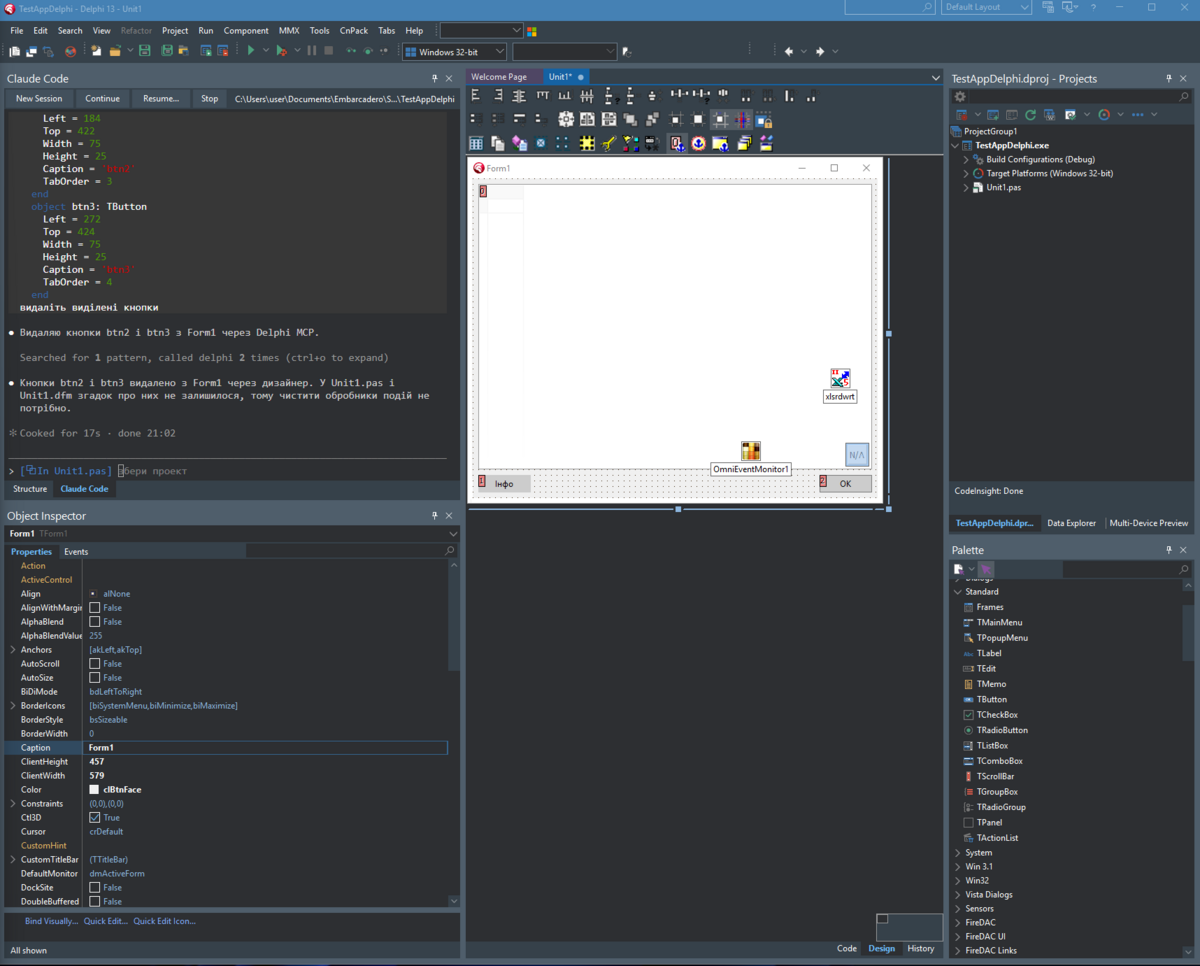
How it works
It uses the same protocol as the VS Code, JetBrains and Neovim integrations:
- The package starts a WebSocket server on
127.0.0.1(+::1) on a random port. - It writes
%USERPROFILE%\.claude\ide\<port>.lock(pid,workspaceFolders,ideName,authToken). The token (128-bit, CSPRNG) is checked in thex-claude-code-ide-authorizationheader. - Claude Code finds the lock file and connects as an MCP client (JSON-RPC 2.0 over WebSocket).
MCP tools provided by the IDE
| Tool | What it does in Delphi |
|---|---|
openFile |
opens a file, optionally selecting the range between startText/endText |
openDiff |
shows a diff window (colored line diff + editable tab); waits for Accept / Reject |
getCurrentSelection / getLatestSelection |
selected text and position in the active editor |
getOpenEditors |
open tabs (path, active, modified) |
getWorkspaceFolders |
project folders of the current project group |
getDiagnostics |
Error Insight (LSP) errors/warnings for open files |
checkDocumentDirty / saveDocument |
editor buffer state and saving |
close_tab / closeAllDiffTabs |
closing diff windows (and unmodified tabs) |
Notifications from the IDE: selection_changed (every ~300 ms when the selection/cursor changes)
and at_mentioned (the "Send Selection to Claude" command).
Delphi tools for Claude (the delphi MCP server)
Claude Code uses the IDE connection itself and shows the model only getDiagnostics from it,
so Delphi-specific tools are served as a second MCP server, delphi (Streamable HTTP,
POST http://127.0.0.1:<port>/mcp, same token as a Bearer header). The panel and
Open in External Console start Claude with --mcp-config pointing at it, so the tools appear
as mcp__delphi__* and Claude asks for permission before using them like any MCP tool.
| Tool | What it does |
|---|---|
buildProject |
builds a project with MSBuild using its .dproj settings (active config/platform by default); returns errors, warnings and hints and shows them in the Claude Build tab of the Messages window |
getProjectInfo |
project group, active config/platform, framework, output file, defines, search paths, namespaces, units and forms |
getFormComponents |
a form as it is in the designer now (unsaved changes included): components and the DFM text, or one component's DFM block |
getSelectedComponents |
components selected in the form designer, with their DFM blocks |
setComponentProperties |
changes properties through the designer: nested (Font.Size), enums/sets, clRed-style identifiers, component references, Items/Lines, event handlers (created if missing); returns old/new values |
createComponent / deleteComponent |
drops a registered component on the form (name, parent, bounds, properties) / deletes one |
captureForm |
PNG of a VCL form or control as drawn in the designer; Claude opens it with its Read tool |
getDebugState |
the debugged process: state, current thread with call stack and source around the current line, the exception when stopped on one, all threads |
evaluateExpression |
evaluates a Delphi expression in the stopped process (like Evaluate/Modify); side effects only when allowed |
setBreakpoint / listBreakpoints / removeBreakpoint |
source breakpoints with an optional condition and pass count |
debugControl |
start (Run with debugging, like F9), stepOver, stepInto, runUntilReturn, runToCursor, pause (waits for the next stop and returns the new state), run, terminate |
setLogpoint / getLogpointHits / removeLogpoint |
logpoints: a line records Delphi expressions (and optionally the call stack) each time it runs, and the program goes on; read the hits as a table |
getFileHistory |
the IDE's local history of a file (__history\name.~N~): list of versions or the text of one |
runTests |
builds a DUnitX project (found in the group) and runs it: each failing test with its message and the file/line of the test method; also in the Claude Tests tab of Messages |
pasteDfm |
creates components from DFM text the way Ctrl+V does in the designer: nested controls, collections, events; returns the real names |
getUnitOutline |
a unit's structure with line ranges: uses, types and members, routines and method bodies |
findSymbol / findReferences |
declarations and uses of a name in the project's sources and text forms, comments and strings skipped; findReferences has every use checked by DelphiLSP (the compiler) and groups them by the declaration they refer to (TOrder.Create apart from TObject.Create), form files apart |
renameSymbol |
renames across units and forms: with declaration ("OrderLogic.pas:23", from findReferences) only the uses of that symbol, as DelphiLSP resolves them; a dry run lists the occurrences with ids, then exactly the chosen ones are changed (open files in the editor, undoable; closed files keep their encoding) |
getUnitDependencies / showProjectMap |
how units use each other (largest, most used, cycles) / the interactive map for the user |
captureApp / getAppUI / appAction |
the running program: pictures of its windows, its UI Automation tree, and click/type/set text like a user (the user's foreground window keeps the focus) |
listConnections / getDatabaseSchema / runQuery |
the FireDAC connections of the project's forms, the schema behind them, and read-only queries (one SELECT, run in a transaction that is rolled back) |
analyzeModernization |
candidates for win64, unicode, bde (BDE/dbExpress/ADO to FireDAC) or warnings (a full build grouped by warning code), with advice |
getMemoryLeaks |
the FastMM4/FastMM5 leak report of the program grouped by class, with allocation stacks |
showTimeline |
opens the Claude Timeline for the user |
Designer changes are not saved automatically: review them in the IDE and save or revert the form.
Slash commands. The delphi server also offers ready workflows as MCP prompts; Claude Code shows them as
commands: /mcp__delphi__make-tests-pass, /mcp__delphi__hunt-bug <what goes wrong>,
/mcp__delphi__screenshot-to-form <image>, /mcp__delphi__crud-form <table>, /mcp__delphi__modernize <scenario>,
/mcp__delphi__explain-architecture, /mcp__delphi__review-changes [focus], /mcp__delphi__commit-message.
A claude started outside the IDE can use the tools of the most recently started IDE with
claude --mcp-config "%USERPROFILE%\.claude\ide\delphi-mcp.json".
The Claude Code panel
The panel works the same way as the VS Code integrated terminal:
clauderuns in a Windows ConPTY (pseudo console, Windows 10 1809+);- output is rendered by xterm.js (the same engine VS Code uses) in WebView2;
- xterm.js, the terminal page and
WebView2Loader.dllare embedded in the BPL as resources, nothing else to copy. Only the Microsoft Edge WebView2 Runtime is required (included in Windows 11).
Panel buttons: New Session, Continue (claude --continue), Resume... (claude --resume), Stop, + (new tab), x (close tab).
After a session ends, pressing Enter in the panel starts a new one.
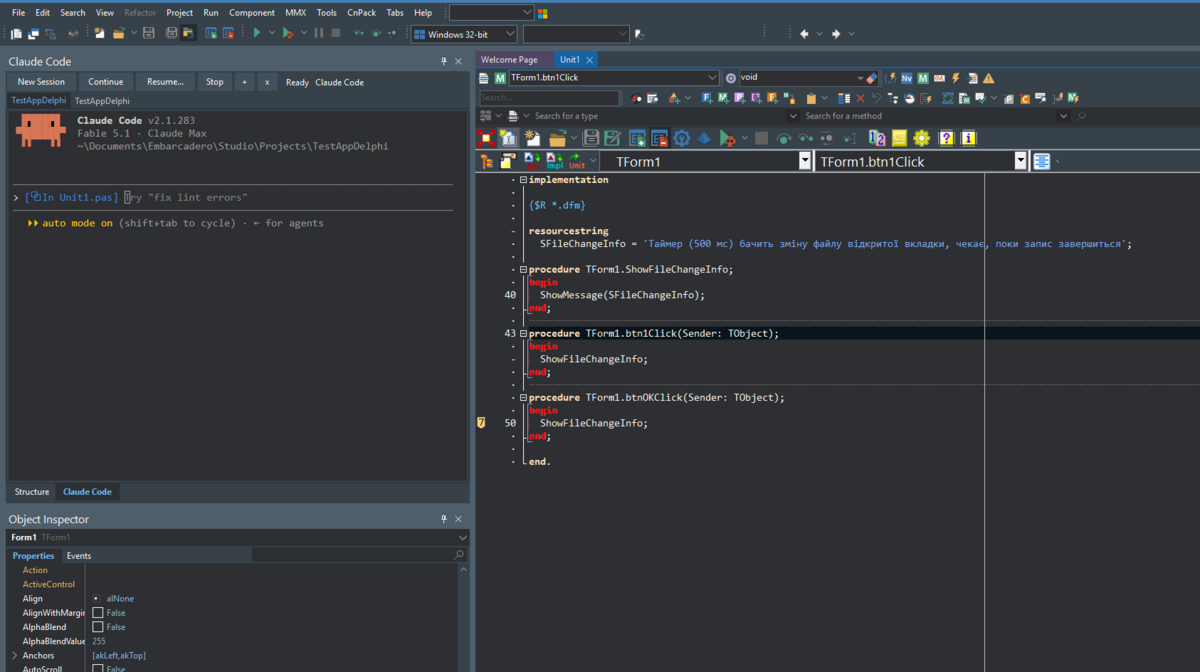
Tabs. Each tab is a separate Claude Code session. Open Claude Code switches to the tab of the active project's folder (or opens one); + opens a new tab for the current project, x or a middle-click closes a tab (and stops its session). A tab shows ● while Claude works and ! when it waits for you; the toolbar buttons and Send Selection / context menu requests act on the active tab.
Keyboard in the panel:
- all keys (Esc, Ctrl+C, Ctrl+R, Shift+Tab...) go to Claude;
- Ctrl+C copies when text is selected, Ctrl+V / Shift+Insert paste text; a copied picture (screenshot) is saved as PNG and its path pasted so Claude attaches it; copied files become
@-mentions; - files dragged onto the terminal from Explorer or the Project Manager are pasted as
@-mentions (pictures as paths; all selected nodes, a project stands for its folder); items dragged from the Structure view become@file#Lx-y(a method gives its body, a type its declaration); - function keys bound to IDE commands (F9, F7, F12...) run those IDE commands;
- Ctrl+Shift+Alt+C returns focus to the code editor (in the editor, the same shortcut opens/focuses the panel).
The panel's status line shows Working..., Waiting for you or Ready with Claude's current title. When a turn ends or Claude asks for you while the panel is hidden or the IDE is in the background, the IDE flashes on the taskbar and the panel caption gets *.
Closing the panel or the IDE ends the session together with all its child processes (Job Object). Terminal colors follow the light or dark IDE theme; the font is taken from the code editor.
Build and install
Requirements: RAD Studio / Delphi 13 (BDS 37.0) or Delphi 10 Seattle (BDS 17.0, see below) and the Claude Code CLI installed (claude on PATH).
build.batOutput: bin\Win32\ClaudeCodeIDE370.bpl (for bin\bds.exe) and bin\Win64\ClaudeCodeIDE370.bpl (for the 64-bit IDE bin64\bds.exe).
Close the IDE and register the package (for both IDEs):
powershell -ExecutionPolicy Bypass -File install.ps1Or manually: Component → Install Packages… → Add… and pick the BPL matching the IDE bitness.
Uninstall: install.ps1 -Uninstall.
build.bat finds Delphi via the registry (RootDir of BDS\37.0); to override: build.bat "C:\path\to\Studio\37.0". In PowerShell run it as .\build.bat.
Delphi 10 Seattle
build-seattle.bat
powershell -ExecutionPolicy Bypass -File install.ps1 -BdsVersion 17.0
Output: bin\Seattle\ClaudeCodeIDE230.bpl (Seattle has a 32-bit IDE only). Seattle has no Winapi.WebView2 and
Winapi.UIAutomation, so build-seattle.bat compiles them from the sources of a newer Delphi (10.4 or later, Delphi 13
by default): build-seattle.bat "C:\path\to\Studio\17.0" "C:\path\to\Studio\37.0".
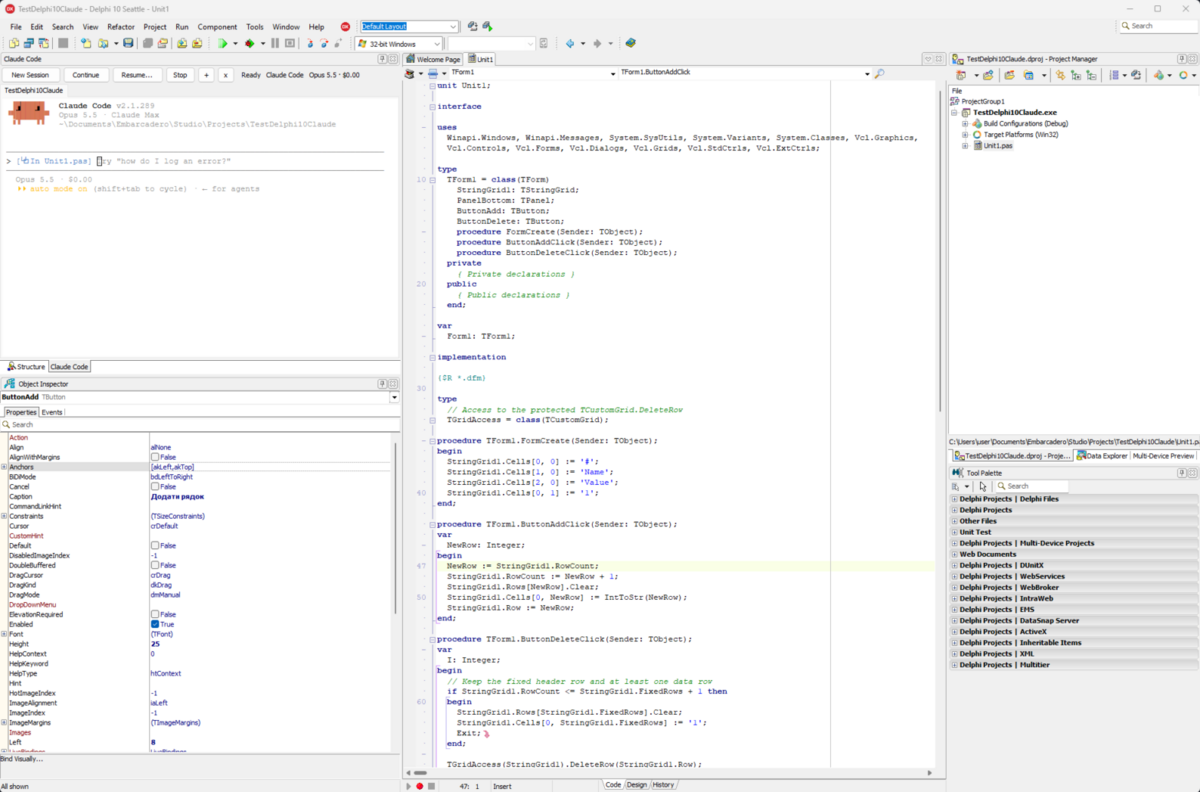
What Seattle's IDE lacks, and so the package does without there:
- proposed changes are always shown in the diff window: reviewing them in the code editor needs the editor API of Delphi 11;
- the code editor's popup menu gets no Claude items (the Project Manager and Messages menus do);
- no DelphiLSP (Delphi 10.4 and later):
findReferencesandrenameSymbolwork on the text of the sources, without telling apart symbols of the same name, and say so in their answer; - the package's windows keep the regular VCL look instead of the IDE theme;
getDiagnosticsreports every Error Insight message as an error, and Error Insight parses each file synchronously (a second or two per file in a large project), so for all open files it stops after 10 seconds, the active file first.
Debugging in the 64-bit IDE (it debugs through lldb):
- breakpoints and logpoints need Project Options → Building → Delphi Compiler → Linking → Include debug information in the executable (
DCC_DebugInfoInExe);debugControlwarns when it is off; - the IDE's debugger sometimes has no call stack for its Open Tools API (the Call Stack view still shows it). Then the debugger tools give the stopped frame only, with a note, instead of letting the IDE fail.
Usage
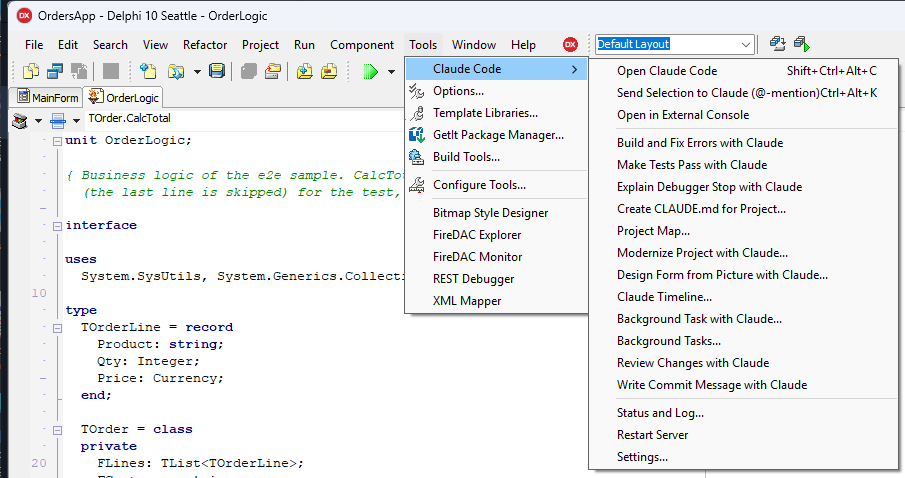
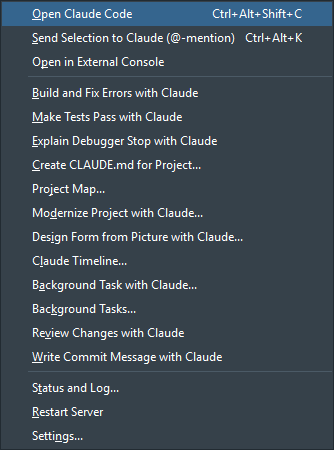
Menu Tools → Claude Code:
-
Open Claude Code (
Ctrl+Shift+Alt+C): opens the Claude Code panel and startsclaudein the active project folder. Claude getsCLAUDE_CODE_SSE_PORT/ENABLE_IDE_INTEGRATIONand connects to the IDE automatically. -
Open in External Console: the same in a separate console window (if WebView2 is unavailable).
-
Build and Fix Errors with Claude: saves modified files, builds the active project and, if the build fails, pastes the errors into the Claude panel as a request (press Enter to send).
-
Explain Debugger Stop with Claude: when the debugged program is stopped (breakpoint, exception, pause), pastes the exception, the current line with its source and the call stack into the Claude panel as a request.
-
Make Tests Pass with Claude: runs the DUnitX tests (
runTests) and, if some fail, pastes them into the panel with the request to fix the code and run the tests again until they pass. -
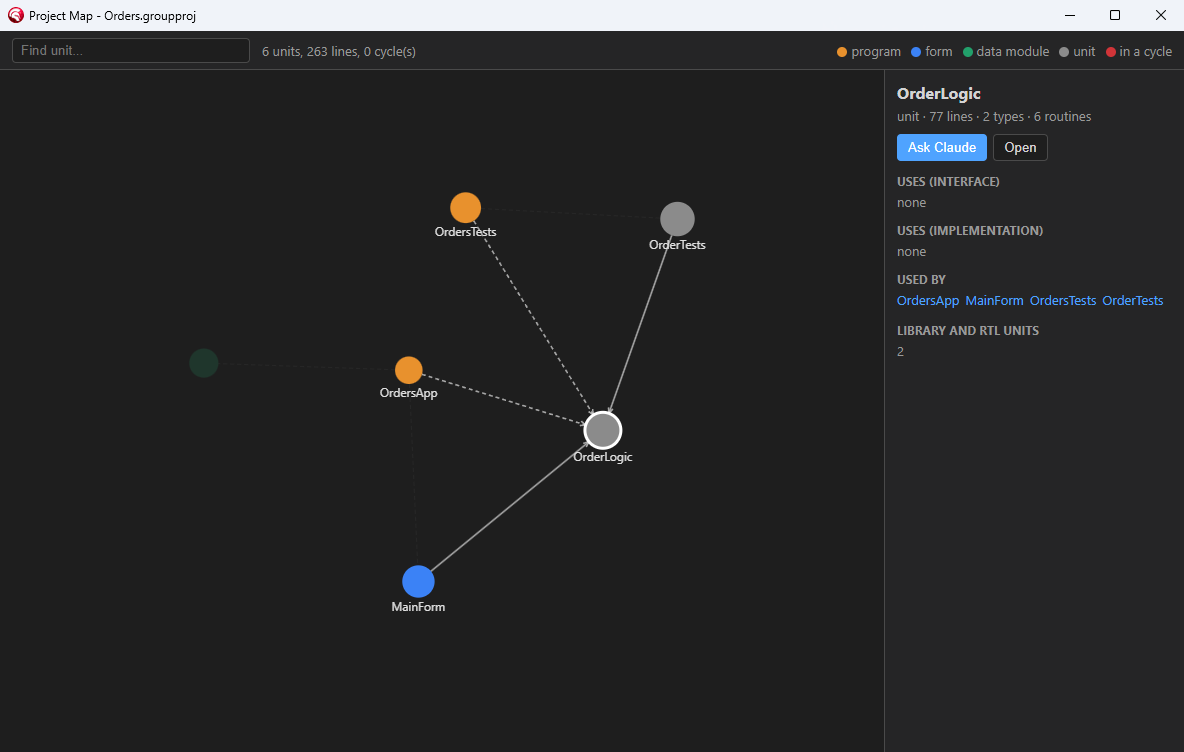
Project Map...: the unit dependency graph in a window: size, forms and data modules, cycles; click a unit for what it uses and what uses it, double-click to open it, Ask Claude to get it explained.
-
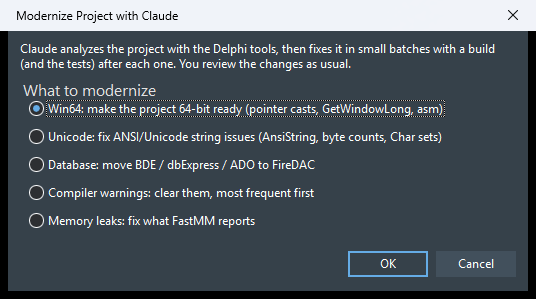
Modernize Project with Claude...: choose Win64, Unicode, database (BDE/dbExpress/ADO to FireDAC), compiler warnings or memory leaks; Claude analyzes the project and fixes it in batches with a build after each one.
-
Design Form from Picture with Claude...: takes a screenshot, mockup or sketch (from the clipboard or a file) and has Claude build it on the form open in the designer: it writes the controls as DFM, creates them with
pasteDfm, comparescaptureFormwith the picture and adjusts until they match. The request is pasted, so you can add what the picture does not show. -
Claude Timeline...: Claude's turns with the files each one changed (see below).
-
Background Task with Claude...: Claude works on a task in a separate process (
claude -p) while you go on: DUnitX tests or XML documentation for the unit in the editor, clearing the compiler warnings, or a request of your own. Its file edits are applied right away and recorded in the Claude Timeline (review and rewind them there); it may read, edit and use the Delphi tools, but not run shell commands. Background Tasks... lists the tasks with their state, cost and Claude's summary; Continue in Panel opens a task's conversation in the panel. The IDE flashes on the taskbar when a task ends. -
Review Changes with Claude: Claude reviews the uncommitted changes (
git diff HEAD) for bugs, object lifetime, exceptions, encoding, threads and.dfm/code consistency, builds and runs the tests, ranks the findings and fixes the clear ones through the usual review of changes; it never stages or commits. -
Write Commit Message with Claude: a message for the staged (or all uncommitted) changes in the style of the recent commits.
-
Create CLAUDE.md for Project...: writes a "Delphi project" section into the project's
CLAUDE.md(type, framework, platforms, build command, source encoding, forms, DUnitX projects, when to use themcp__delphi__*tools). Only the part betweenandis generated; you review it in the diff window first. -
Send Selection to Claude (
Ctrl+Alt+K): adds@file#Lx-yfor the selected code to Claude's prompt; in the form designer it pastes the selected components as DFM text. -
Status and Log…: port, number of connected clients, lock file, log.
-
Restart Server: restarts with a new port and token (running sessions need
/ideto reconnect). -
Settings…: the panel and external console commands, model (
--model), permission mode (--permission-mode), other arguments, whether Claude gets the Delphi tools, whether Claude's file changes are applied to open editors, whether context-menu requests are sent right away, whether proposed changes are reviewed in the code editor instead of the diff window, whether Claude's turns are recorded for the timeline, and whether opening the panel continues the project's last conversation (on by default; only interactive conversations count, and New Session always starts afresh), and whether the panel shows the session's model, context use and cost (through a Claude Code status line,POST /statusline; Claude Code shows the same line; skipped when you have astatusLineof your own).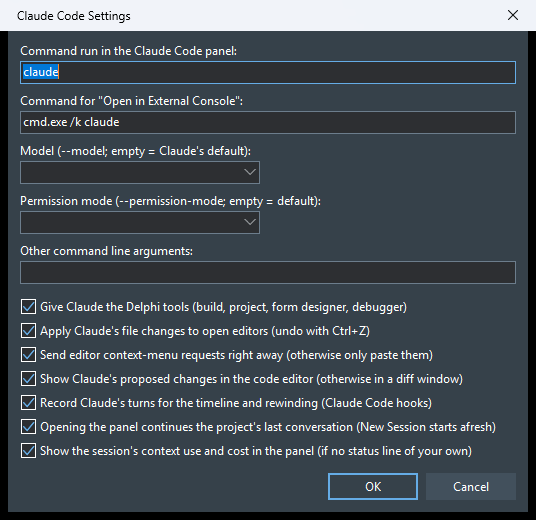
Context menus
- Code editor → Claude Code: Explain, Refactor, Find Bugs, Write DUnitX Test, Add XML Documentation
send a request with
@file#Lx-yfor the selection (or the current line) and submit it; Ask Claude About This... only puts the reference into the prompt. The request texts can be changed in%USERPROFILE%\.claude\delphi-prompts.json, e.g.{"explain": "Поясни цей код: {ref}"}(keys:explain,refactor,review,test,doc,ask). Explain This Value (debugger), available while the debugged program is stopped, evaluates the selected expression (or the identifier under the cursor, e.g.Order.Customer) and asks Claude what the value means at this point, with the current line and the call stack; Claude evaluates related expressions to find where a wrong value comes from. - Project Manager → Add to Claude Context: puts
@file(or@folder/for a project) for the selected nodes into the prompt. - Messages → Fix Build Errors with Claude: the same as the Tools menu command (the Messages view does not expose the text of its lines, so the project is rebuilt to collect the errors).
The status bar of each code editor window shows Claude: off / connected / working / waiting for you.
If Claude Code is already running in a separate terminal in the project folder, run /ide there and choose Delphi.
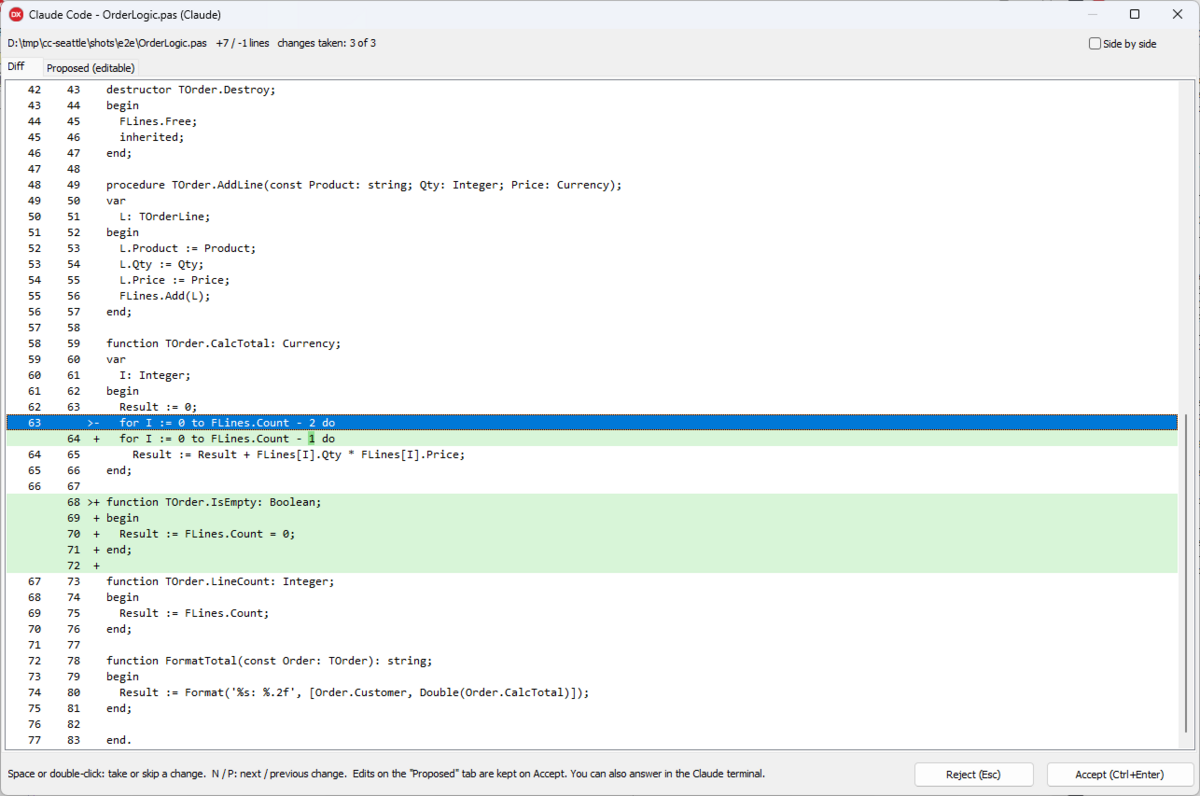
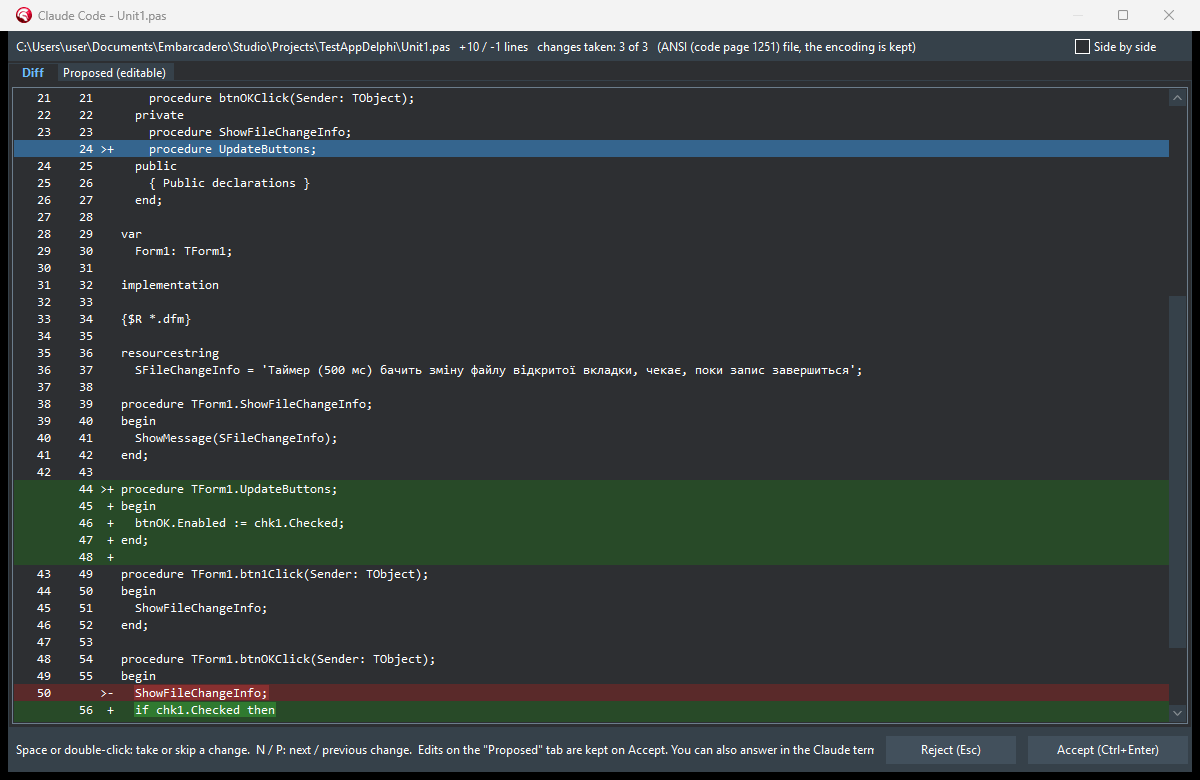
When Claude proposes an edit, a diff window opens: Accept (Ctrl+Enter) sends the content (including your edits from the Proposed tab), then Claude writes the file; Reject (Esc) or closing the window rejects the edit. You can also answer in the Claude terminal; the window then closes by itself. The diff window shows the changed part of each line highlighted, unified or side by side (the choice is remembered). Single changes can be skipped: Space or double-click takes/skips the change under the cursor, N / P move between changes; Accept writes only the taken changes (taking none is a rejection).
Reviewing changes in the editor
With Settings… → Show Claude's proposed changes in the code editor, the proposal goes straight into the editor
(as one undoable edit) instead of a diff window. Added and changed lines get a green background, places where lines
were removed a red marker, and a bar above the editor shows the number of changes, the removed text of the current one
and the buttons Previous / Next (Ctrl+Alt+PgUp/PgDn), Undo this change (Ctrl+Alt+Z), Accept all
(Ctrl+Alt+Enter) and Reject all (Ctrl+Alt+Backspace). You can edit the text while reviewing: the highlighting
is always the difference from the original. Accept saves the file and answers Claude with the text as it is; Reject puts
the original back byte for byte. Forms, project files, new files and tabs with unsaved changes still use the diff window.
Claude Timeline
With Settings… → Record Claude's turns, sessions started from the IDE get Claude Code hooks (--settings) that
report each request, each file about to be edited and the end of each turn to the IDE (POST /hook, same token).
Tools → Claude Code → Claude Timeline lists the turns with their files and changed lines; Show Diff shows what
a turn did to a file, Rewind to Before This Turn puts every file changed in that turn or later back exactly as it
was (open editors change in place and can be undone with Ctrl+Z). Claude's conversation itself is not changed.
The IDE answers a hook only after it has handled it, so a file is copied before Claude writes it (if the IDE is busy
for more than 5 seconds, Claude goes on without waiting). The hooks settings file
(%USERPROFILE%\.claude\ide\<port>.delphi-settings.json) is removed when the IDE closes; files left by an IDE that
crashed are removed at the next start.
Files Claude changes on disk
- An open, unmodified editor tab picks up Claude's change right away as one undoable edit (Ctrl+Z in the editor restores the previous text) and is saved by the IDE, so there is no "file changed on disk" prompt and the file keeps its encoding. Tabs with unsaved edits are not touched; a note appears on the Claude Code tab of the Messages window.
- ANSI files (e.g. cp1251): Claude reads them as UTF-8 and every non-ASCII character arrives as
�. The diff window and the editor sync put the original characters back (whole unchanged lines, and runs of�in changed lines when the text around them matches). Lines that could not be repaired are reported. - After an accepted diff, a Delphi source (
.pas,.dpr,.dpk,.inc) that Claude saved as UTF-8 without a BOM is converted back to ANSI if it was ANSI, or gets a UTF-8 BOM, so the compiler reads its non-ASCII text correctly. - Turn it off in Settings… ("Apply Claude's file changes to open editors").
Layout
ClaudeCodeIDE.dpk                 design-time package (rtl, vcl, designide, IndySystem, IndyCore)
src/ClaudeCode.WebSocket.pas      RFC 6455 WebSocket server on Indy (loopback only, token check)
src/ClaudeCode.Mcp.pas            MCP / JSON-RPC: IDE channel (WebSocket, lock file) and the "delphi" server (HTTP)
src/ClaudeCode.Build.pas          MSBuild runner and compiler output parser
src/ClaudeCode.TextSync.pas       encodings, restoring lost characters, changed span (no ToolsAPI)
src/ClaudeCode.EditorSync.pas     applies disk changes to open editors, fixes encodings after a diff
src/ClaudeCode.ComponentProps.pas DFM text and setting properties from JSON via RTTI (no ToolsAPI)
src/ClaudeCode.FormTools.pas      form designer tools
src/ClaudeCode.DebugTools.pas     debugger tools (state, evaluate, breakpoints, stepping)
src/ClaudeCode.ContextMenus.pas   editor, Project Manager and Messages context menu entries
src/ClaudeCode.FileHistory.pas    the IDE's __history backups (getFileHistory)
src/ClaudeCode.SettingsForm.pas   Settings dialog
src/ClaudeCode.ClaudeMd.pas       Create CLAUDE.md for Project
src/ClaudeCode.IdeBackend.pas     tool implementations via the Open Tools API
src/ClaudeCode.DiffForm.pas       diff window
src/ClaudeCode.Diff.pas           line diff (LCS)
src/ClaudeCode.Launcher.pas       starting the CLI with the right environment
src/ClaudeCode.TerminalPanel.pas  dockable IDE window
src/ClaudeCode.TerminalFrame.pas  panel frame: xterm.js + ConPTY, buttons, keyboard
src/ClaudeCode.WebViewHost.pas    lightweight WebView2 host (the page survives re-docking)
src/ClaudeCode.ConPty.pas         Windows pseudo console + Job Object
src/terminal/                     terminal page and .rc files for resources
src/ClaudeCode.Wizard.pas         IDE wizard: menu, timers, settings
src/ClaudeCode.Process.pas        running console programs, background jobs (no ToolsAPI)
src/ClaudeCode.PascalIndex.pas    Object Pascal tokenizer, declarations, occurrences, outlines (no ToolsAPI)
src/ClaudeCode.CodeTools.pas      getUnitOutline, findSymbol, findReferences, renameSymbol
src/ClaudeCode.DelphiLsp.pas      client of DelphiLSP.exe (textDocument/definition) for resolving names
src/ClaudeCode.TestRunner.pas     running DUnitX executables, NUnit XML / console results (no ToolsAPI)
src/ClaudeCode.AppAutomation.pas  window pictures, UI Automation tree and actions (no ToolsAPI)
src/ClaudeCode.ProjectMap.pas     unit dependency graph and cycles (no ToolsAPI)
src/ClaudeCode.ProjectMapForm.pas Project Map window (WebView2, src/terminal/projectmap.html)
src/ClaudeCode.DbInfo.pas         FireDAC connections in DFM text, read-only SQL check (no ToolsAPI)
src/ClaudeCode.DbTools.pas        schema and queries through FireDAC (RTTI), in a background thread
src/ClaudeCode.Modernize.pas      modernization checks and FastMM leak reports (no ToolsAPI)
src/ClaudeCode.ModernizeForm.pas  Modernize Project dialog
src/ClaudeCode.Prompts.pas        MCP prompts (slash commands) of the delphi server
src/ClaudeCode.Timeline.pas       turns and file snapshots from Claude Code hooks (no ToolsAPI)
src/ClaudeCode.TimelineForm.pas   Claude Timeline window
src/ClaudeCode.InlineDiff.pas     reviewing proposed changes in the code editor
src/ClaudeCode.IdeTrees.pas       what is dragged from the Project Manager and Structure view (RTTI)
src/ClaudeCode.BackgroundTasks.pas background tasks (claude -p), their dialog and window
tests/e2e/                        sample project group for end-to-end tests in a real IDE
tests/e2e-test.mjs                end-to-end test of the tools in a running IDE with tests/e2e open
tests/mcp-call.mjs, ide-call.mjs  call one tool of a running IDE (delphi server / IDE channel)
tests/TestHost.dpr                console host with a fake backend
tests/protocol-test.mjs           protocol test (Node, raw WebSocket)
tests/PanelHost.dpr               the panel in a plain VCL window: starts claude, types text, takes a screenshot
third_party/                      xterm.js 6.0 (MIT), WebView2Loader 1.0.4191 (BSD, Microsoft)
Testing without the IDE
cd tests
dcc32 -B -NSSystem;System.Win;Winapi;Vcl -U../src -NU../dcu/test -E. TestHost.dpr
TestHost.exe 20        # prints PORT and TOKEN
TestHost.exe build     # builds tests/buildsample with MSBuild (success, then a compile error)
node protocol-test.mjs <PORT> <TOKEN>

# the panel outside the IDE (the working folder must be trusted by Claude)
dcc32 -B -NSSystem;System.Win;Winapi;Vcl;Vcl.Imaging -U../src -R../src -NU../dcu/test -E. PanelHost.dpr
PanelHost.exe C:\path\to\project C:\tmp\out   # out: panelhost.log, panelhost.dump.txt, panelhost.png
End-to-end tests in a real IDE
tests/e2e is a project group (a VCL app with a form, a FireDAC/SQLite data module and a DUnitX project, with a
deliberate bug in TOrder.CalcTotal) for trying the tools in a second IDE instance with its own registry profile, so
the IDE you work in is not touched:
rem once: copy your profile, register the package you built (any output folder)
reg copy HKCU\Software\Embarcadero\BDS\37.0 HKCU\Software\Embarcadero\ClaudeDev\37.0 /s /f
rem ...then set Known Packages of ClaudeDev\37.0 to that ClaudeCodeIDE370.bpl
set CLAUDE_DELPHI_LOGFILE=%TEMP%\claude-delphi.log
bds.exe -rClaudeDev -ns tests\e2e\Orders.groupproj
The lock file %USERPROFILE%\.claude\ide\<port>.lock of that instance has the port and token; then
node tests/mcp-call.mjs <port> <token> runTests, ... getUnitOutline '{"unit":"OrderLogic"}',
node tests/ide-call.mjs <port> <token> openDiff '{...}' and so on. CLAUDE_DELPHI_LOGFILE makes the package write
its log to a file.
The whole suite (about 90 checks, 10–15 minutes) runs against such an instance:
node tests/e2e-test.mjs <port> <token> <folder of the opened copy of tests\e2e> <bds.exe PID> [sections]Sections (comma-separated, all by default): code, tests, forms, debug, app, project, db, modernize,
inline, timeline, prompts. Open a copy of tests/e2e, not the folder itself: the test edits, restores and
deletes files there, runs the program and clicks through IDE windows (Project Map, Claude Timeline, confirmations).
A stress test of the read-only tools runs against any large project open in such an instance: outlines of every unit, references and modernization scans over the whole project, a build, 30 open editors, a burst of 40 parallel requests and repeated rounds while watching the IDE's memory and handles:
node tests/stress-test.mjs <port> <token> <bds.exe PID> [units to outline, default 300]Limitations
getDiagnosticsreturns Error Insight (LSP) data for open files; usebuildProjectfor real compiler output.buildProjectcompiles files from disk: unsaved editor changes are reported inunsavedFilesunlesssaveModifiedis set.characterpositions are UTF-16 indexes computed from the editor buffer; they have not been verified against every IDE edge case (tabs, very long lines).- Encoding repair only sees files written through an accepted diff or open in the editor; files Claude writes in auto-accept mode while closed keep whatever encoding Claude used.
- The debugger API has no list of local variables: Claude reads the code around the current line and evaluates what it needs. Exception class/message come from evaluating
ExceptObject(best effort). - Call stack frames are named from the source (the method around the line), not by the debugger: formatting the debugger's frame headers makes the Delphi 13 debugger kernel assert.
- Logpoints are breakpoints that stop and continue the program: fine for events and loops of hundreds of iterations, slow for very hot code (use
maxHitsor a condition). findSymbolreads the code, not the compiler's symbol tables.findReferencesandrenameSymbolfind occurrences by name and then ask DelphiLSP (its own process, configured from the active project's search paths and the IDE library path) which declaration each one is; DelphiLSP has no find-references of its own, so a name used in thousands of places is checked only up to 600 occurrences / 90 s. Form files, units of other projects of the group and code the compiler cannot read stay "not resolved". Only Win32/Win64; the first check starts the server (a few seconds).getAppUI/appActionneed UI Automation: VCL windowed controls are exposed well, graphic controls (TLabel, TSpeedButton) and FMX only partly; then x/y on the picture fromcaptureAppworks. Keys are posted to the focused control (Ctrl/Alt shortcuts may not reach the program); after Enter, Tab, Esc or Backspace followed by more text the keys pause for 100 ms so they arrive in order. While a logpoint holds the program for a moment,captureApp,getAppUIandappActionwait (up to 5 s) instead of failing.- Database tools support FireDAC connections (with the drivers installed in the IDE).
- The timeline records files changed through Claude's Edit/Write/MultiEdit tools; files changed by shell commands are not recorded.