

Catalog · How the catalog works
StormTicker

- ★ 1 on GitHub
Anyone may press Interesting, signed in or not. It helps others find this project.
README
⚡ StormTicker — Asynchronous Desktop News Matrix & Weather Suite
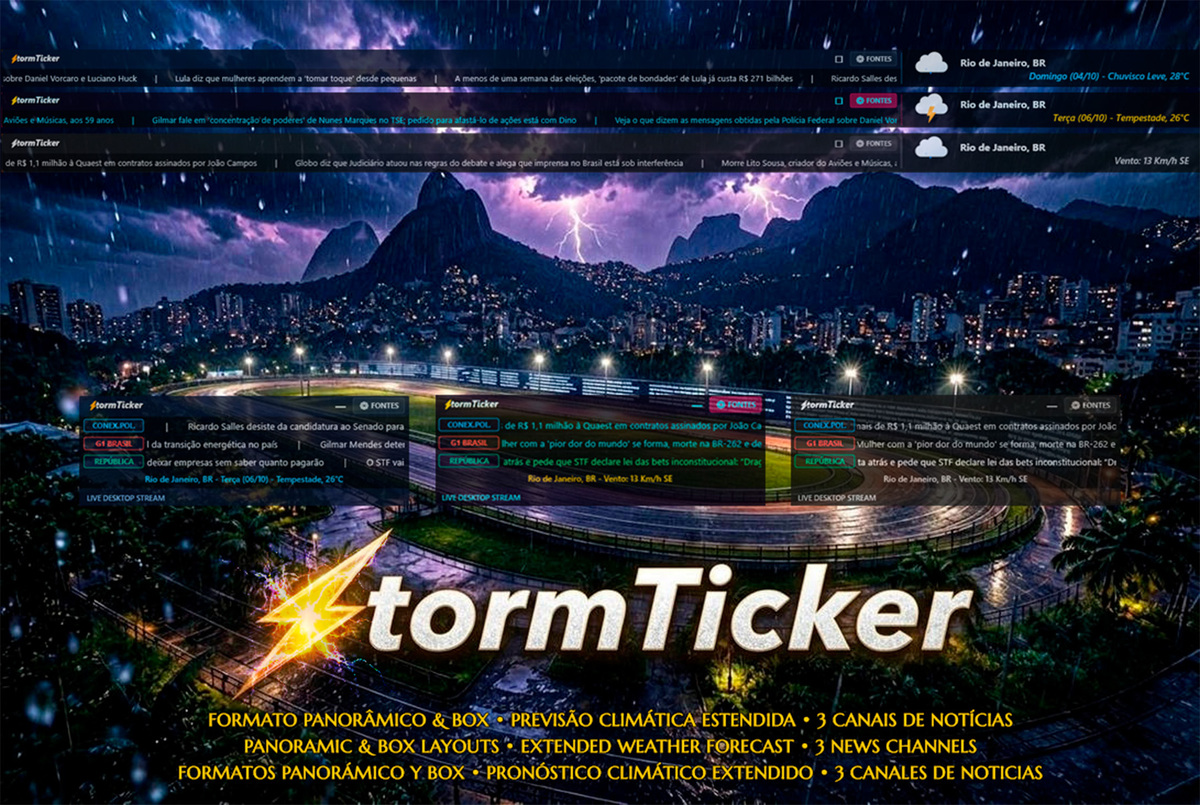
A high-performance, asynchronous news ticker matrix and weather suite for Rainmeter.
Featuring hardware-accelerated DirectWrite text streaming, dual display form factors (Panoramic Ribbon & Desktop Box), live Open-Meteo meteorological telemetry with 3-day forecast rotation, zero-editor visual feed management, full trilingual localization (English default, Portuguese, Spanish), and interactive headline scrubbing.
⚡ Upgrade to StormTicker Pro (10 Channels)
Want to run up to 10 completely independent channels simultaneously with full desktop matrix coverage, multi-city 3D weather art, and a 100% ad-free experience?
👉 Unlock StormTicker Pro on DeviantArt
| Feature | StormTicker (Standard) | StormTicker Pro |
|---|---|---|
| Concurrent News Lines | 3 Channels | 10 Channels |
| Stream Experience | Includes Promo Row | 100% Clean / Ad-Free |
| Form Factors | Panoramic & Box | Panoramic & Box |
| Visual Themes | 3 Themes | 6 Hand-Crafted Themes |
| Weather Engine | Open-Meteo Live + 3-Day Forecast | 3D WeatherArt + 3 Locations + Moon Lunation + AQI |
| Direct Portal Navigation | ✅ Included | ✅ Included |
| DirectWrite Hardware Acceleration | ✅ 60 FPS | ✅ 60 FPS |
| Smart Hover Freeze & Mouse Scrubbing | ✅ Included | ✅ Included |
| Individual Speed Tuning per Row | ✅ 0.5x to 1.5x (3 Rows) | ✅ 0.5x to 1.5x (All 10 Rows) |
| Custom Refresh Intervals (15m to 6h) | ✅ Full Selector | ✅ Full Selector |
| Settings GUI Configuration | Tabs 1–3 Unlocked | All 10 Tabs Unlocked |
| Lifetime Updates & Priority Support | Community | VIP / Pro Support |
📖 Overview
StormTicker is an original, ground-up desktop information suite engineered for traders, developers, and news enthusiasts who want continuous, real-time market and news feeds without cluttering their workspace.
Running silky-smooth, asynchronous news lines powered by Lua and DirectWrite, StormTicker streams real-time RSS/Atom headlines at a high frame rate (50–60 FPS) with a sub-1% CPU footprint.
🌟 Key Features
🚀 Asynchronous DirectWrite Matrix
- True Multi-Stream Concurrency: 3 independent news channels operating on separate speed factors (0.5x to 1.5x), producing a non-repetitive visual rhythm across your desktop.
- Hardware-Accelerated Container Clipping: Every channel is confined within dedicated DirectWrite shape containers for tear-free rendering.
- Direct Portal & Article Dispatch: Clicking on any channel badge opens the publication's root homepage; clicking on any headline opens that exact article in your browser.
- Seamless Infinite Loop: Proprietary Lua wrap-around logic seamlessly recycles headlines when the end of a batch is reached without stutter or visual jumps.
- Dynamic Auto-Height: The widget dynamically resizes its height to fit only active rows, cleanly stacking lines with zero wasted space.
📺 Dual Display Form Factors
- Panoramic Ribbon (
Panoramic\*.ini): Full-width, single-line ticker designed for top-screen docking. Features continuous multi-channel streaming, split-flap airport transition for weather telemetry, and interactive cursor click-to-open article dispatch (OpenPanLink) with auto-resume timeout protection. - Modular Desktop Box (
Box\*.ini): Compact, self-contained desktop widget displaying 3 synchronized headline rows alongside an integrated meteorological HUD strip.
🌦️ Integrated Meteorological HUD (Open-Meteo)
- Live Weather Telemetry: Real-time temperature, condition status, and wind speed/direction.
- 3-Day Forecast Rotation: Cyclical rotation showcasing upcoming forecasts (Tomorrow, Day+2, Day+3) with high-quality Meteocons vector icons.
- Zero API Keys Required: Seamlessly connects to Open-Meteo out-of-the-box. Coordinates and units can be customized directly in Settings.
🎨 3 Hand-Crafted Visual Themes
Switch themes instantly with a single click or through the context menu:
- ⚡ Wall Street: Classic carbon black background with signature electric green badges and crisp typography.
- 🌆 Cyberpunk: Neon cyan badges and vivid magenta accents for modern dark terminal setups.
- 🥈 Stealth: Minimalist titanium monochrome with muted grayscale accents.
🌐 Trilingual Localization Engine (i18n)
- Native Runtime Localization: Full support for English (default), Portuguese (
pt-BR), and Spanish (es-ES) across all UI elements, weather conditions, dialogs, and settings tabs. SafeUpperLatin Normalization: Custom Lua capitalization engine preserving accented characters (CÉU LIMPO,PANCADAS,CONDIÇÃO) without Windows-1252 corruption.- First-Run Onboarding Wizard: Automatically opens the Settings Manager upon first installation, welcoming users in English.
- Right-Click Context Menu: Direct access to
⚙️ Settings / Configurationfrom anywhere on the skin background.
🎛️ Visual Feed & Settings Manager
- Tabbed Settings GUI (
Settings.ini): Graphical control center with dedicated tabs for Channels 1–3, Weather Settings, Font selection, and Update Intervals. - Native Edit Dialogs: Click any Tag or URL box to edit feeds directly in a standard Windows input box — zero text editor editing required.
🧠 Smart Hover & Interactivity
- Selective Row Freeze: Hovering over any channel pauses only that specific row, while other channels continue scrolling uninterrupted.
- Interactive Mouse Scroll Scrubbing: Roll the mouse wheel over any hovered channel to scrub forward or backward through headlines at your own pace.
- Extrapolated Multi-Line Tooltips: Expanded 620px viewport with intelligent text wrapping prevents headline truncation.
📦 Installation & Quick Start
- Ensure Rainmeter 4.5+ (or higher) is installed on Windows 10 or 11.
- Download the official
StormTicker_1.2.3.rmskinpackage from the Releases page. - Double-click the
.rmskinfile and follow the standard Rainmeter installation prompt. - On first load, the First-Run Setup Wizard will launch automatically to welcome you and open the Settings Manager.
- In the Rainmeter Manage window, select your preferred layout and theme:
- Desktop Box Card:
StormTicker > Box > Box StormTicker.ini(or Cyberpunk, Stealth) - Panoramic Ribbon:
StormTicker > Panoramic > Panoramic StormTicker.ini(or Cyberpunk, Stealth)
- Desktop Box Card:
- Right-click anywhere on the skin and select ⚙️ Settings / Configuration (or click the header gear button) to configure your RSS feeds, weather coordinates, and preferred language.
🗺️ Release History
🌟 Version 1.2.3
- Feed Edit Live Propagation: Editing a channel URL or tag now waits for the dialog to close and refreshes all loaded skins — the new feed appears within seconds instead of requiring a manual refresh.
- Metric/Imperial Toggle Fix: The unit switcher refreshed skins via an invalid config path (forward slashes) — the refresh silently never fired. Units now propagate live.
- Scroll Speed Clarification: The speed selector label now states "(Box mode only)" in all three languages — per-channel speeds drive individual Box rows, while Panoramic streams at a shared uniform rate.
🌟 Version 1.2.2
- Theme Renamed to Wall Street: The default theme is now "Wall Street" (skins
Box Wall Street/Panoramic Wall Street,@Resources/Themes/Wall Street.inc), matching StormTicker Pro naming. - In-Skin Header Tooltips: Hovering the mode-toggle and the SOURCES button now shows a themed tooltip inside the title bar (replacing native Windows tooltips) in English, Portuguese, and Spanish — matching the StormTicker Pro behavior.
- Headline Tooltip Alignment Fix: Headline tooltips explicitly reset text alignment to left, preventing centering bleed after a header tooltip was shown.
🌟 Version 1.2.1
- Live Weather Coordinates: Latitude/longitude now propagate instantly to active skins — entering new coordinates updates the weather within seconds (previously required a full reload).
- Reverse Geocoding Fix: Added missing
RegExpon theMeasureGeocodingWebParser parent — city names now resolve correctly after coordinate input. - Unit Toggle Crash Fix: Replaced an undefined
WriteIniKeyhelper that silently crashed the metric/imperial switch in Settings. - Invalid Input Feedback: Malformed coordinate input now shows a localized hint instead of failing silently.
🌟 Version 1.2.0
- English Default & First-Run Wizard: English set as default out-of-the-box language, with an automated onboarding wizard opening Settings on first boot.
- 100% Internationalized Settings: Replaced all hardcoded Portuguese strings across Settings with dynamic
#Lang_*#localization variables in English, Portuguese, and Spanish. - Interactive Panoramic Click-to-Open: Clicking on headlines in Panoramic mode now resolves the underlying article and opens it directly in the default browser (
OpenPanLink). SafeUpperLatin Engine: Enhanced uppercase transformation ensuring accented characters in Portuguese and Spanish headlines render cleanly without encoding defects.- Persistent Settings Navigation: Active tab state is preserved across reloads and feed edit operations.
- Right-Click Settings Integration: Direct access to
⚙️ Settings / Configurationfrom the context menu of all Box and Panoramic themes.
🌟 Version 1.1.0
- Dual Form Factor Architecture: Introduction of Panoramic Ribbon and Desktop Box layouts.
- Extended Weather Engine: 3-day forecast rotation powered by Open-Meteo.
- Trilingual Localization: English, Portuguese, and Spanish language catalogs.
- Modernized Settings GUI: Tabbed interface with visual feed controls.
🌟 Version 1.0.0
- Initial release featuring 3-channel asynchronous DirectWrite news streaming.
📄 License & Attribution
Copyright (c) 2026 Geovane Souza (@Geovanesou). All Rights Reserved.
Distributed under the Proprietary Software License for personal desktop customization.