

Catalog · How the catalog works
tvDMX

Port of Randy Beck's tvDMX (easy to use object-oriented data entry system for Borland Pascal's Turbo Vision) to FreePascal and FreeVision
- ★ 1 on GitHub
Anyone may press Interesting, signed in or not. It helps others find this project.
README
tvDMX-FP
A modern FreePascal / FreeVision reimplementation of tvDMX, Randolph Beck's Turbo Vision data-entry toolkit (© 1992–98). It reproduces tvDMX's behaviour and feel on a current toolchain (FPC 3.2.2, win64), using the original DOS sources as the specification rather than transliterating them.
Published with Randy's blessing. The original code can be downloaded from https://www.randybeck.com/tvdmx.shtml.
tvDMX-FP is a small library of FreeVision views built around one idea — a picture template that describes a record as a sequence of typed fields — plus a set of ready-to-run sample programs that show it off.
Contents
- Why a reimplementation, not a port
- Quick start
- Repository layout
- Core concept: the picture template
- Field codes
- Library reference
- Samples
- Mouse on Windows
- Credit
Why a reimplementation, not a port
The original tvDMX targets 16-bit DOS: it stores raw pointers inside picture
strings (Move(ptr, S[2], 4) — 4-byte pointers), reads record data through
Seg:Ofs memory casts, and relies on Turbo Pascal's data-type layouts. On win64
(8-byte pointers, flat memory) a faithful transliteration would mean invasive,
corruption-prone surgery. tvDMX-FP keeps the design — a picture template
describing typed fields laid out in a record buffer — and implements it cleanly:
- Field data lives in an explicit, safe byte buffer (
TDmxData). - Pointers live in proper records, never inside strings.
- The hex viewer renders the byte buffer directly (no
Seg:Ofs).
Obsolete DOS/16-bit machinery — int 21h/int 17h printing, packed-date pointer
tricks, memory-paragraph guards — is deliberately dropped. A few original
accessories are intentionally not ported: the "experimental" SideShoe
frozen-column view, the Paradox table/password dialogs, the DOS-screen viewer,
and direct printer I/O.
Quick start
# build + run a sample (exe lands in bin/, units are searched under src/)
sh build.sh samples/accounts.pas && ./bin/accounts.exe

# run the console regression tests
sh build.sh tests/testtempl.pas && ./bin/testtempl.exe
sh build.sh tests/testedit.pas  && ./bin/testedit.exe
build.sh wraps FPC:
FPC -O2 -Fusrc -Fusamples/timedb -FEbin -FUbin/units <path/to/file.pas>so any program builds with sh build.sh <path/to/file.pas>. The compiler is
expected at c:\lazarus\fpc\3.2.2\bin\x86_64-win64\fpc.exe (the default installation path)
Repository layout
| Path | What |
|---|---|
src/ |
the tvDMX-FP library units |
tests/ |
console regression tests (testtempl, testedit, …) |
samples/ |
interactive demo programs (accounts, hexedit, …) |
samples/timedb/ |
the multi-file timesheet demo (timesheet + tsmodel) |
reference/ |
Randolph Beck's original tvDMX 2.6 sources — the spec |
Core concept: the picture template
Everything in the library is driven by a picture string parsed into a
TDmxTemplate. A run of a field-code letter is one field; the letters give the
type and width, and surrounding punctuation is the display picture. The template
computes a record layout (each field's byte offset and size) and knows how to
format a field for display and parse edited text back into the buffer.
uses DmxTempl, DmxData;
var
  Tmpl: TDmxTemplate;
  Data: TDmxData;
  rec: Integer;
begin
  Tmpl := TDmxTemplate.Create(' ssssssssssssssssss|($rr,rrr.zz)| WWWWW ');
  Data := TDmxData.Create(Tmpl.RecordSize);   { record size from the template }

  rec := Data.Append;                          { a blank record }
  Tmpl.StoreText(0, Data.Rec(rec)^, Data.RecSize, 'Ada Lovelace');
  Tmpl.StoreText(1, Data.Rec(rec)^, Data.RecSize, '1234.50');
  Tmpl.StoreText(2, Data.Rec(rec)^, Data.RecSize, '42');

  WriteLn(Tmpl.Render(Data.Rec(rec)^, Data.RecSize));
  { ->   Ada Lovelace      │ $ 1,234.50 │    42  }
end;
The record buffer is a plain array of bytes; the same buffer feeds the on-screen views, the reports, and CSV persistence.
Field codes
| Code(s) | Type | Notes |
|---|---|---|
s S # |
string | S forces upper case; # accepts digits only |
c C 0 |
char array | C forces upper case; 0 accepts digits only |
X |
boolean | shown as Y/N (glyphs configurable) |
B J |
byte / shortint | 1 byte |
W I |
word / integer | 2 bytes |
L |
longint | 4 bytes |
R r |
real (double) | uppercase = no negatives; z keeps trailing zeroes; Z zero-fills |
H |
hex | unsigned, shown as hex digits (HHHH:HHHH) |
D |
duration | minutes stored as longint, shown 2h30m, typed 2h 30m |
K / k |
checkbox/radio | one bit in a shared bank word (K=checkbox, k=radio) |
| ` | ` | delimiter |
~text~ |
literal caption | drawn verbatim (used as a field label) |
$ ( ) , . |
numeric decor | currency, parentheses-for-negative, grouping, decimal point |
A numeric field may also be typed as an arithmetic expression ((3+4)*2,
1200/12, 2^10, |x|, pi, %), evaluated on commit.
Library reference
DmxTempl — the picture-template engine
TDmxTemplate parses a picture and provides the record layout, formatting and
editing primitives that every other unit builds on.
| Member | Purpose |
|---|---|
Create(const Template: AnsiString) |
parse a picture; sets RecordSize, DisplayWidth/Height |
FieldCount, Field(i): TDmxField |
inspect parsed fields (kind, width, offset, …) |
Render(const Rec; RecLen): string |
the whole record as a display line |
FormatField / EditText |
format one field for display / for editing |
StoreText(fi; var Rec; RecLen; s) |
parse text back into the buffer |
AcceptsChar / AcceptsEdit |
per-type keystroke filtering (+ live range check) |
ColumnHeader([captions]) |
a header line aligned to the template's columns + bars |
SetRange(fi, min, max) |
live numeric range (reject past max, clamp on store) |
SetDateFields / SetTimeFields |
validated date/time sub-fields (1..12, 0..23, …) |
SetShowZeroes(fi, show) |
render a zero as blank instead of 0 |
SetReadOnly(fi, ro) |
mark a field read-only (skipped in editing, still written) |
SetEnum(fi, [choices]) |
turn a byte/word field into a pick-list |
Zeroize / ZeroizeRecord |
clear a field / the whole record |
GetNumeric(fi; Rec; RecLen): Double |
read any numeric or duration field as a number |
Formatting is locale-aware through module globals: DmxDecimalChar,
DmxThousandChar (the equivalent of tvDMX's showDecPt / showComma), plus the
DmxBoolTrue/False, DmxCheckChar, DmxRadioChar glyphs and
DmxDurationDayMinutes (minutes per d, default 480). FormatDuration and
ParseDuration are exposed for direct use.
DmxData — the record store
TDmxData is a growable, fixed-record-size byte buffer. Records are laid out by
a template, so the on-disk form is just the records back to back.
Create(ARecSize) · Count · Rec(i): Pointer · Append · InsertAt(i) ·
DeleteAt(i) · Clear · Base · TotalBytes · LoadFromFile · SaveToFile.
DmxView — TDmxBrowse, a scrolling record grid
One record per row, the template supplying the columns, with a highlighted
current cell and vertical/horizontal scroll. Cells edit in place (type, Enter,
per-type filtering); Ins/cmDmxAddRec add a record, cmDmxDelRec deletes,
Ctrl-T/Ctrl-Y zeroize a field/record, Ins (while editing) toggles
overtype. Assign OnRecalc to recompute read-only columns after each edit.
var b: PDmxBrowse;
b := New(PDmxBrowse, Init(bounds, Tmpl, Data, ' Header line'));
b^.OnRecalc := @RecalcProc;   { optional derived-field hook }
DmxForm — TDmxForm, a single-record entry form
Lays one record out in two dimensions from a multi-line template (labels + input
masks). The current field is always in edit mode; Tab/Enter/arrows navigate,
Ctrl-F pops up a roomy 255-char editor for the current field, Space/letters
cycle enum & cluster fields. ReleaseAtEnds lets it sit inside a dialog;
OnRecalc recomputes derived fields.
DmxForms — EntryBox
One call builds a centred modal dialog around a TDmxForm on a working copy of a
record, with OK/Cancel commit / rollback:
if EntryBox('Edit item', Tmpl, MyRec, SizeOf(MyRec)) = cmOK then
  { MyRec now holds the edited values };
DmxGroupGrid — TDmxGroupGrid, a grouped matrix view
Groups the records of a TDmxData into an outline tree by N key columns, rolls
up M value columns into the group rows, and draws a frozen label column
(left), horizontally-scrollable value columns, a frozen per-row Total
(right), and a pinned grand-totals footer. Group rows collapse/expand; leaf
value cells edit in place through the template's field parse, with roll-ups
recomputed live.
var g: PDmxGroupGrid;
g := New(PDmxGroupGrid, Init(bounds, Tmpl, Data,
       [0, 1, 2],           { key columns: group by field 0, 1; leaf = field 2 }
       [3, 4, 5, 6, 7]));   { value columns to roll up }
g^.LabelHead := 'Group';
g^.OnLabel := @LabelProc;   { (level, keyValue, rec) -> display name }
g^.Rebuild;
Key methods: Rebuild, Recompute, ExpandAll, CollapseAll, ToggleCollapse.
DmxHex — TDmxHexView, a hex/ASCII viewer & editor
A hex dump over a raw byte buffer. With ReadOnly := True it is a scroll-only
memory window; with ReadOnly := False it is an overtype editor — Tab switches
the hex/ASCII panes, hex digits and printable chars patch bytes in place, a live
offset readout shows in the header, and Ctrl-G/cmHexGoto jumps to an offset.
cmHexToggleEdit flips view/edit. The buffer is fixed length — editing
overwrites, never inserts.
DmxWin — ready-made windows
Wrap a view + frame in one constructor:
TDmxBrowseWindow.Init(bounds, title, number, Tmpl, Data, header)— hosts aTDmxBrowse; the browse is exposed as.Browse.TDmxHexWindow.Init(bounds, title, number, Data, len, readOnly)— hosts aTDmxHexView, exposed as.Hex.
DmxRep — text & CSV reports
TDmxReport writes a TDmxData as a tabular text report (label header, optional
line numbers, pagination, page-start/end callbacks) or as CSV, using the template
as the column layout. One-call helpers and a CSV round-trip:
ReportToFile(Tmpl, Data, name, lineNumbers)— tabular text.ReportToCsv(Tmpl, Data, name, sep)— CSV export.CsvFromFile(Tmpl, Data, name, hasHeader, sep)— CSV import (the inverse ofCsvToFile), one record per line.
DmxCalc — arithmetic-expression evaluator
EvalExpr(s): TCalcResult evaluates + - * / % ^, unary minus, parentheses,
|abs| and pi. EvalToText(s, decimals) passes plain numbers/text through and
only evaluates real formulas; LooksLikeExpr(s) reports whether a string is one.
The numeric fields use it for formula entry.
DmxMCalc — pop-up calculator accessory
OpenCalc inserts (or wakes) a single modeless calculator on the desktop —
expression line, memory (M+/MR/MC), √, running result — reusing DmxCalc.
Summon it with cmCalcPop.
ConMouse — EnableConsoleMouse
See Mouse on Windows.
Samples
All samples live under samples/ and build with sh build.sh samples/<name>.pas.
Common controls: arrows move · type / Enter edits · F6 switches
window · Alt+F3 closes a window · Alt+X exits · the mouse works.
| Sample | Demonstrates |
|---|---|
accounts |
The classic tvDMX Accounts browse: a record grid through one picture (name, SSN mask, money, date, WW:WW time), plus an F2 hex window (F4 toggles edit, Ctrl-G goto). 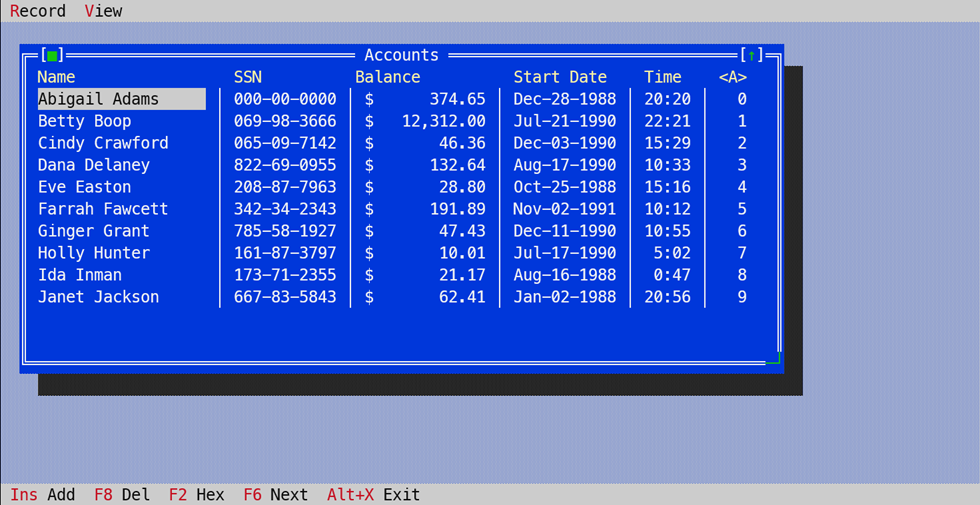 |
personal |
TDmxForm — a single-record EDIT RECORD entry form with labels, input masks, enum pick-lists and checkbox/radio clusters. 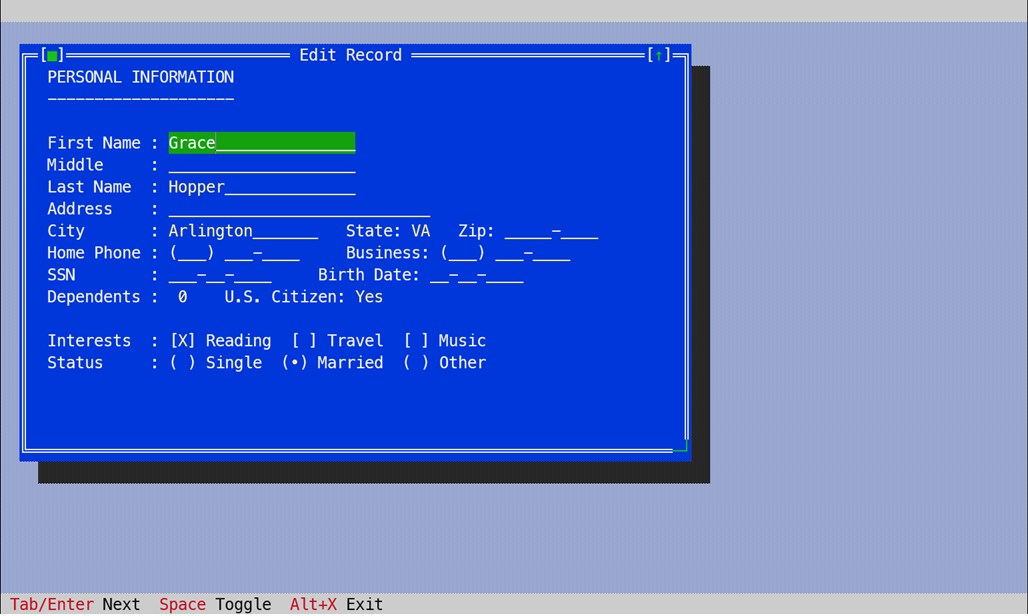 |
workshop |
The "edit the template and the toolkit does the rest" generic browse — change two strings to describe any record. |
wideshop |
A deliberately very wide record (26 columns) to exercise horizontal scrolling and the ◄/► in-cell markers. |
samples |
The Payroll (browse) and Invoice (form) windows, both driving read-only computed fields through the OnRecalc hook. 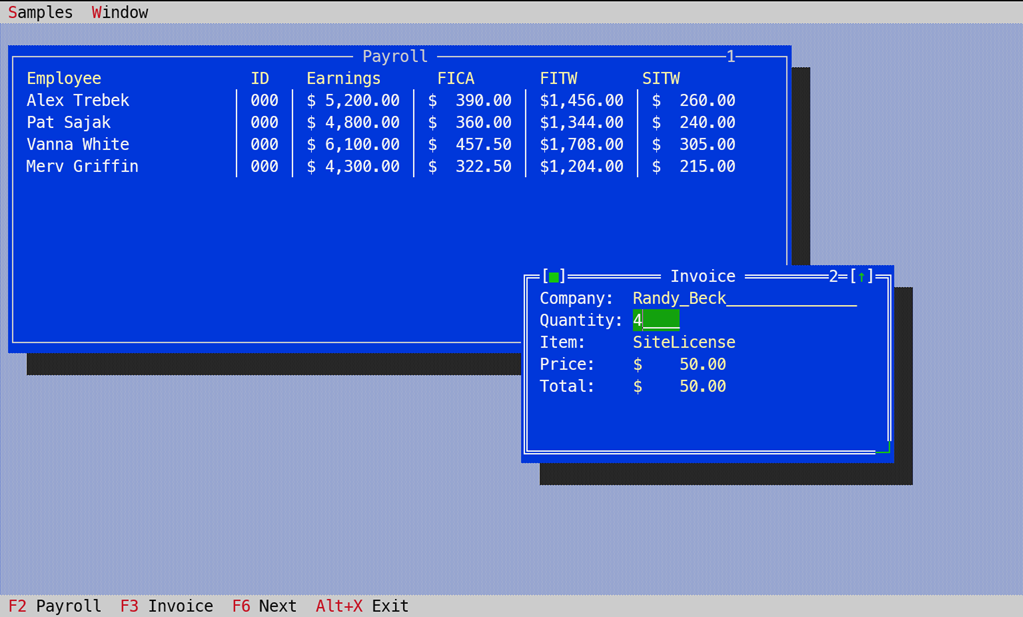 |
testforms |
EntryBox modal record editor and the DmxMCalc pop-up calculator. |
hexedit |
A standalone file hex editor: F3 opens any file, edit it (Tab panes, overtype, Ctrl-G goto), F2 saves it back. 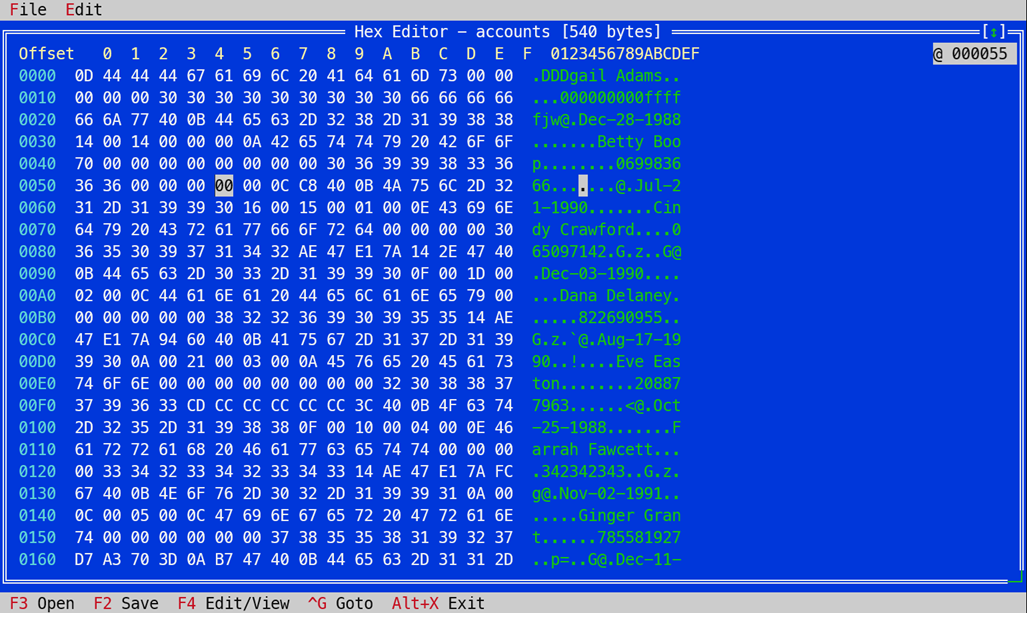 |
timedb/timesheet |
A full consultant timesheet (see below). |
The timesheet (samples/timedb/)
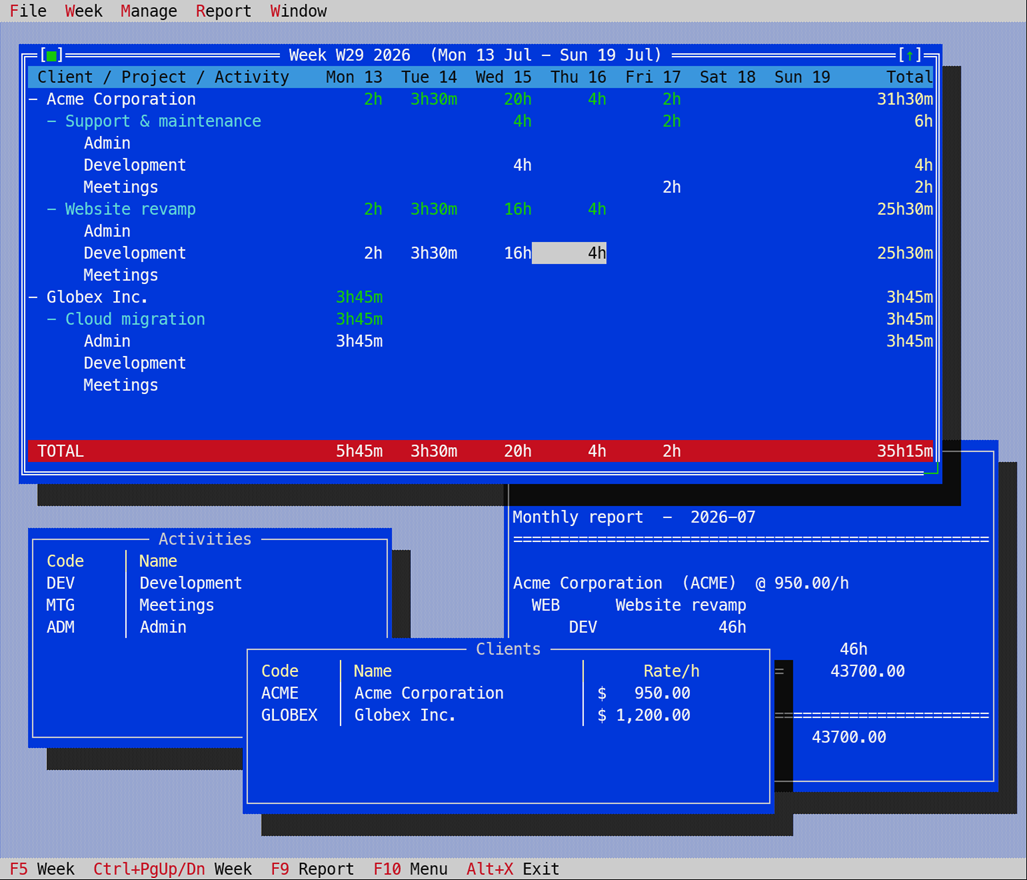
A multi-file application that reimagines a consultant timesheet tvDMX-native:
every dataset — clients (Code, Name, Rate/h), projects, activities, the weekly
grid, invoices — is a TDmxData record store described by a picture template and
persisted as CSV under ./tsdata. tsmodel.pas is the model; timesheet.pas
is the UI.
- Manage → Clients / Projects / Activities (
F2/F3/F4) — editableTDmxBrowsegrids;Insadds,F8deletes,Ctrl+Ssaves. - Week sheet (
F5) — aTDmxGroupGrid: a Client → Project → Activity outline with a column per weekday and a frozen Total, group subtotals and a red TOTAL footer. Type durations into a leaf day cell (2h 30m,45m,1:30,2.5); the roll-ups update live.Enter/+/-collapse or expand a group,Ctrl+PgUp/Ctrl+PgDnstep weeks,Ctrl+Wshows money-per-client for the week. - Report → Monthly report (
F9) — hours grouped by client → project → activity with totals and money;Ctrl+PgUp/PgDnchange month,F7exports a.txt,F8generates invoices. - Report → Invoices — a browse of generated invoices;
Ctrl+Vviews one and exports it to CSV.
The reusable CSV import the demo needed (DmxRep.CsvFromFile) was promoted
into the library; the grouped week view is the library's TDmxGroupGrid.
Mouse on Windows
FreeVision/FPC enable ENABLE_MOUSE_INPUT but never clear the console's
QuickEdit mode, which on modern Windows swallows mouse clicks for text
selection — so the mouse looks dead. ConMouse.EnableConsoleMouse (call it right
after Application.Init) clears QuickEdit and sets the extended flags, and clicks
start flowing.
Credit
All design credit to Randolph Beck, author of tvDMX — an homage to a lovely piece of craft.
Reimplemented for FreePascal / FreeVision by Jessie Wadman, with Randy's blessing.