

Catalog · How the catalog works
Codebot.CpuGraph

- ★ 1 on GitHub
Anyone may press Interesting, signed in or not. It helps others find this project.
README
CPU Graph
A desktop widget which graphs CPU usage. It sits quietly in the background monitoring every core of your processor. Press a hotkey to review the recent activity of your CPU, and press it again to hide the graph.
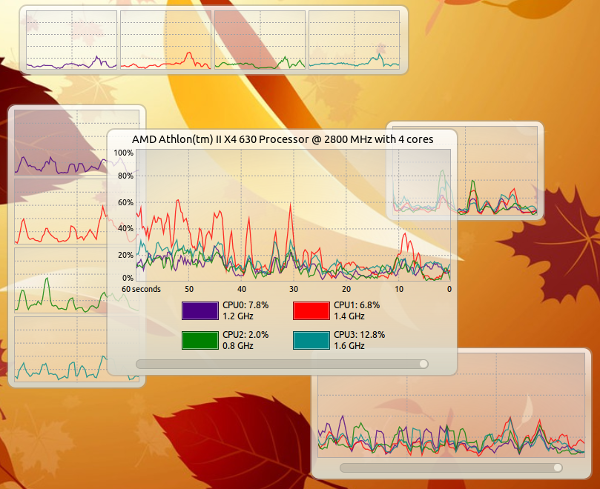
CPU Graph can be adjusted to a variety of layouts
Version 1.1.0, written by using Free Pascal, Lazarus, and the Codebot Pascal Library.
Features
- Smooth curved lines for every core, drawn in twelve distinct colors
- A time slider to look back through up to one hour of history
- A borderless widget you can drag anywhere and resize from any corner
- A layout which adapts to the size of the window
- Live usage and clock speed for each core
- A tray icon with a menu to show or hide the graph and to quit
Using CPU Graph
Press Ctrl + Alt + U to show or hide the graph. The tray icon menu does the same thing.
Drag the widget to move it. Move the mouse near a corner to reveal a resize grip, then drag the grip to resize the widget.
Click the colored box beside a core in the stats area to hide or show that core in the graph.
Drag the slider below the graph to look back in time. Move it all the way to the right to return to the live view.
Layouts
The widget picks a layout based on its size:
- Large: one graph showing every core, with a caption, scales, a timeline, and stats for each core underneath
- Short or narrow: a grid of small graphs, one for each core, so many cores fit on screen without a huge window
- Width: narrow graphs show the last 20 or 30 seconds, while wider graphs show the last 60 seconds
Smoothing
Samples are averaged into one second buckets fixed to the clock, then joined with curves. A curve never changes shape once it is drawn. To make this possible the graph runs about two and a half seconds behind real time.
Building
CPU Graph builds with Lazarus using the GTK3 widgetset. It depends on these packages from the Codebot Pascal Library.