

consolesama

Samarinda Console
- Active · last change 11-2-2026
- ★ 1 on GitHub
README
Consolesama
Consolesama (Samarinda Console) is a fast, lightweight, and modern terminal emulator for Linux, built with Floria Toolkit (Ft), ftpas, and Free Pascal.
Combining the declarative elegance of FTML (Floria Toolkit Markup Language) for window chrome with high-performance native Pascal terminal rendering, Consolesama provides a clean desktop experience inspired by classic GNOME and MATE Terminal.
Demo
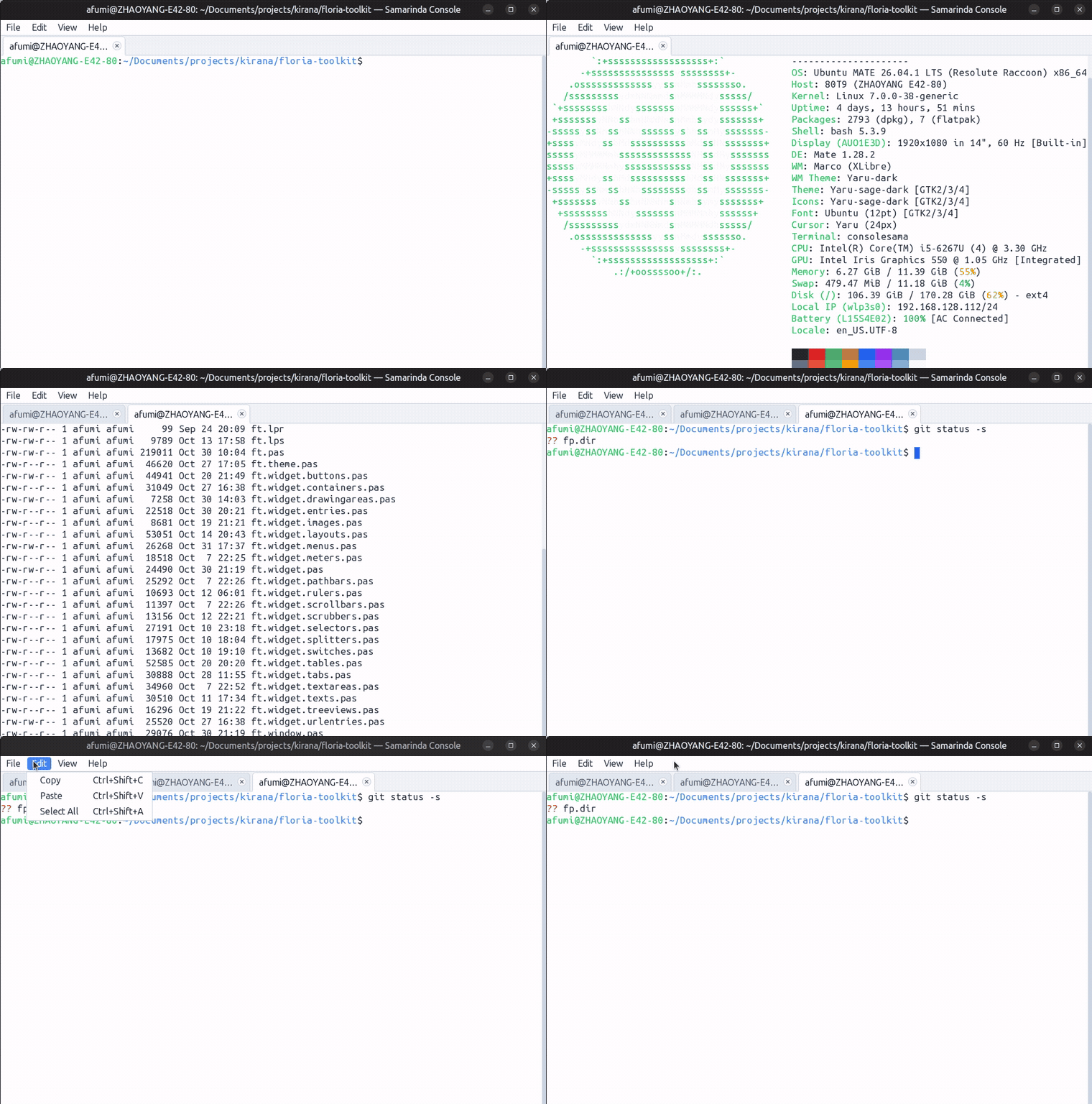
Features
- Hybrid Declarative & Native Architecture:
- Window chrome (menu bar, tabs notebook, status bar, and anchor layouts) is declaratively described in
consolesama.ftmland compiled directly into executable resources viaftml_embed. - Terminal panes run as high-performance native
TFtDrawingAreacanvases with 2D vector graphics.
- Window chrome (menu bar, tabs notebook, status bar, and anchor layouts) is declaratively described in
- Robust VT100 / VT220 / xterm Emulator Core:
- Complete ANSI & SGR formatting: bold, dim, italic, underline, reverse video, 16 ANSI colors, 256-color palette, and 24-bit TrueColor RGB.
- Alternate screen buffer support for full-screen CLI apps (
vim,htop,less,nano). - Terminal buffer reflow on window resize with height preservation and prompt stabilization (no cursor drift or prompt duplication).
- Bracketed paste mode and OSC title reporting.
- Crisp Monospace Typography:
- Monospace font rendering (defaults to
Ubuntu Mono 13) with HarfBuzz shaping and FreeType/FontConfig integration. - Sub-pixel anti-aliased character drawing powered by the Floria 2D vector canvas.
- Monospace font rendering (defaults to
- Interactive Multi-Tab Management:
- Open and close tabs with shortcuts (
Ctrl+Shift+T/Ctrl+Shift+W) or UI close buttons. - Tab title maximum width constraints (
maxTabWidth: 220;) and automatic text ellipsis truncation (...) for long titles (e.g. deep directory paths). - Full title tooltips on tab hover.
- Horizontal tab strip scrolling with
</>chevron navigation buttons and mouse wheel support when tabs exceed container width.
- Open and close tabs with shortcuts (
- Desktop Menus & Keyboard Accelerators:
- Complete desktop menu bar with accelerators: Copy/Paste, Select All, Font Zoom, Dark Mode toggle, and navigation.
- Native clipboard integration via X11 selection and ICCCM/EWMH protocols.
- Status Bar & Developer Aids:
- Optional bottom status bar displaying active terminal dimensions, PID, and debug statistics (
--debugor-d).
- Optional bottom status bar displaying active terminal dimensions, PID, and debug statistics (
Architecture
flowchart TD
    subgraph UI ["Window Chrome (Declarative FTML)"]
        F["consolesama.ftml"] -->|Embedded via ftml_embed| R["consolesama.res"]
        R --> W["TConsoleSamaWindow (TFtFTMLForm)"]
        W --> MB["MenuBar (#menuBar)"]
        W --> NB["Notebook (#tabHost)"]
        W --> SB["StatusBar (#statusBar)"]
    end

    subgraph Core ["Terminal Engine (Native Object Pascal)"]
        NB --> TView["TConsoleTerminalView (TFtDrawingArea)"]
        TView --> VT["TVtEmulator (consolesama.vt.pas)"]
        TView --> PTY["TTerminalPTY (consolesama.pty.pas)"]
        PTY --> Shell["/bin/bash (Forkpty Subprocess)"]
    end

    subgraph Graphics ["Rendering & Display"]
        VT --> Canvas["TFtCanvas (Floria Vector Engine)"]
        Canvas --> X11["Native X11 / XCB Server"]
    end
Keyboard Shortcuts
| Shortcut | Action |
|---|---|
Ctrl+Shift+T |
Open a new terminal tab |
Ctrl+Shift+W |
Close current terminal tab |
Ctrl+Shift+N |
Open a new terminal window |
Ctrl+Shift+C |
Copy selected text to clipboard |
Ctrl+Shift+V |
Paste text from clipboard |
Ctrl+Shift+A |
Select all terminal output |
Ctrl+Plus (Ctrl+=) |
Zoom in (increase font size) |
Ctrl+Minus |
Zoom out (decrease font size) |
Ctrl+0 |
Reset font size to default |
Ctrl+Shift+D |
Toggle dark / light theme mode |
Shift+PageUp |
Scroll up terminal history |
Shift+PageDown |
Scroll down terminal history |
Ctrl+Q |
Quit application |
Requirements
- Linux Operating System with native X11 / XCB display server.
- Free Pascal Compiler (FPC) 3.2.0 or newer.
- Pasbuild project and build manager.
- Floria Toolkit Core Libraries:
florialib:0.0.1-SNAPSHOTftpas:0.0.1-SNAPSHOT
Building & Testing
Consolesama is managed with project.xml and Pasbuild. A convenient ./build.sh script is provided for common workflows:
1. Compile Consolesama
./build.sh compileThe executable binary is generated at target/consolesama.
2. Run Tests
Consolesama includes a comprehensive test suite (42 unit tests) covering VT emulation, PTY lifecycle, terminal resize reflow, key translation, and window management:
./build.sh test3. Launch Consolesama
./build.sh runTo run with the developer status bar enabled:
./build.sh run --debug4. Regenerate FTML Resources
If you modify src/main/ftml/consolesama.ftml:
./build.sh ftmlProject Structure
consolesama/
????????? assets/
???   ????????? consolesama.gif         # Showcase animation
????????? src/
???   ????????? main/
???   ???   ????????? ftml/
???   ???   ???   ????????? consolesama.ftml # Declarative UI layout & menu definitions
???   ???   ????????? pascal/
???   ???       ????????? consolesama.pas          # Application entry point
???   ???       ????????? consolesama.window.pas   # Main form & UI event bindings
???   ???       ????????? consolesama.terminal.pas # Custom drawing area & terminal canvas
???   ???       ????????? consolesama.vt.pas       # VT100/VT220/xterm emulator state machine
???   ???       ????????? consolesama.pty.pas      # POSIX pseudoterminal process management
???   ???       ????????? consolesama.keys.pas     # X11 keysym to ANSI sequence mapper
???   ???       ????????? consolesama.res          # Compiled binary FTML resource
???   ????????? test/
???       ????????? pascal/                      # Unit test suites (42 tests)
????????? build.sh                             # Build, test, and run automation
????????? project.xml                          # Pasbuild project descriptor
????????? README.md                            # Documentation
License
Consolesama is released under the Mozilla Public License 2.0 (MPL-2.0).
Copyright (c) 2026 Dio Affriza.