

FluentToggleSwitch-VCL

Windows 11 toggle switch for the VCL
- Active · last change 9-25-2026
- ★ 1 on GitHub
README
 FluentToggleSwitch-VCL
TFluentToggleSwitch is a Windows 11 toggle switch for the VCL. It looks and behaves like the one in Windows 11, and draws itself with GDI+ instead of wrapping a system control, so it looks the same on Windows 7, 8, 10 and 11.
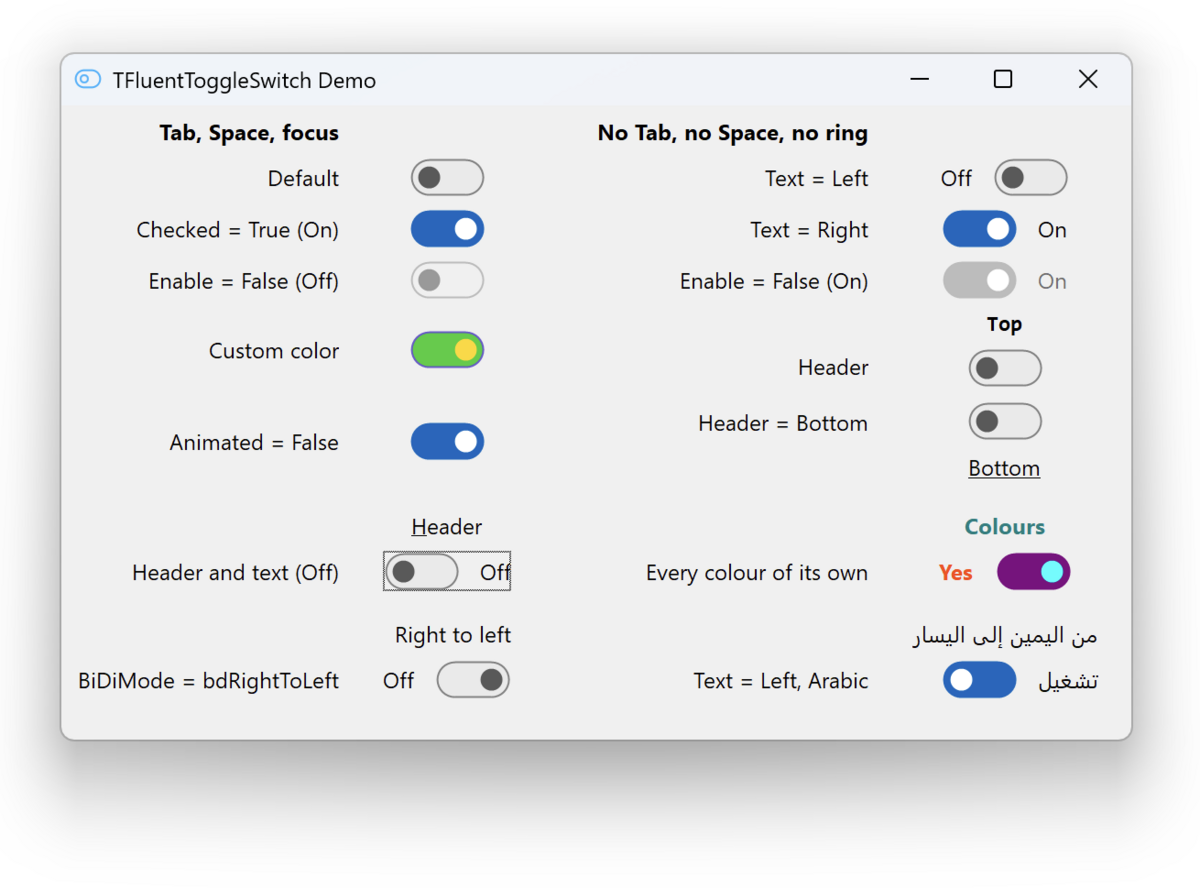
Why TFluentToggleSwitch?
The VCL has no toggle switch that looks current: Vcl.WinXCtrls.TToggleSwitch
shows its age, and the third-party ones bring dependencies with them.
What you get:
- the WinUI 3 design: a pill-shaped track, a thumb that grows under the pointer and stretches when pressed, the timings of the WinUI template
- the Windows accent colour, followed while the program runs
- mouse, keyboard and touch: click, drag the thumb, press the space bar
- a caption on either side and a header above or below, with an accelerator
(
&Soundmakes Alt+S work the switch) - a read-only state, a focus ring by the Windows rules, colours to override one by one
- right-to-left forms:
BiDiModemirrors the switch, thumb, caption and header - correct on high DPI, and after a form moves between monitors of different scale
What you won't deal with:
- dependencies beyond the RTL, the VCL and GDI+
- a system control underneath, and the way it changes from one Windows to the next
- a timer ticking while nothing moves
Installation
Delphi 13 Florence, Win32 and Win64, from the 32-bit IDE or the 64-bit one.
- Unpack a release
where it can stay, keeping the version in the path:
FluentToggleSwitch-VCL\<version>. The next upgrade is then a one-line edit. - Add its
sourcedirectory to Tools | Options | Language | Delphi | Library, once for every platform you build for. - Open
FluentToggleSwitch.groupproj, build FluentToggleSwitchR, then build and install FluentToggleSwitchD.
TFluentToggleSwitch appears on the Fluent page of the palette. Only the
designer needs the packages: a project that creates the switch from code
compiles with step 2 alone.
Open the demo only after that. If the IDE reports Class TFluentToggleSwitch not found when a form opens, the design-time package is not installed in this
IDE: answer Cancel — Ignore strips the switches from the form.
Upgrading from an older release: see CHANGELOG, which says what to remove first.
note: 12.1 Athens can build the packages from packages\*.dpk; that route is
not tested here.
Basic usage
uses
  Fluent.ToggleSwitch;

Toggle := TFluentToggleSwitch.Create(Self);
Toggle.Parent := Self;
Toggle.ShowText := True;
Toggle.TextOn := 'Enabled';
Toggle.TextOff := 'Disabled';
Toggle.OnChange := HandleChange;OnChangefires on every change of the value, from code as well as from the userOnClickfires only when the user toggles the switch, after the value has movedHeaderTextandShowHeaderadd a header; the control grows and moves itself so the switch stays where you put it- every colour starts at
clDefault, which leaves it to the theme; assigning one paints that colour in every interaction state ReadOnlyshows a value the user may not change, without greying it out
Full reference: docs/API.md.
Things to know
- the packages keep their
.dcubeside themselves; your project compiles the component fromsourceunder its own compiler settings - a built
.bplcarries the compiler version in its name,FluentToggleSwitchR370.bplunder Florence; the.dcpkeeps the plain name - changing the component means rebuilding both packages and restarting the IDE: the design-time package has the runtime one as a dependency
Project structure
source/     the component, and a design-time unit with the palette registration
packages/   the runtime package and the design-time one
resources/  the palette icon and the artwork it came from
demo/       a form showing the switch in its variants
tests/      DUnitX tests with a memory leak monitor of their own
docs/       the API reference and screenshots
Licence
MIT. See LICENSE.