

FTDI_Delphi

- Active · last change 11-5-2026
- ★ 1 on GitHub
README
FTDI ChipID Tools — User Guide
This repo contains two Delphi VCL apps in separate folders. Each app needs FTChipID.dll (Win32 1.1.0) next to its .exe.
| App | Folder | Open project |
|---|---|---|
| NewGenChipID | NewGenChipID/ |
NewGenChipID\NewGenChipID.dproj |
| RandomChipID | RandomChipID/ |
RandomChipID\RandomChipID.dproj |
Runtime extras:
- Both apps:
FTChipID.dll - RandomChipID (Random Serial button): also needs FTDI D2XX (
FTD2XX.dll) and an installed FTDI driver
Quick comparison
| NewGenChipID | RandomChipID | |
|---|---|---|
| Purpose | Generate / compare serial from Chip ID (deterministic) | Validate Key Good + randomize serial and write to chip |
| Extra columns | Gen Serial from Chip ID, Match | Key Good |
| Check rule | Serial == last 12 of PKV_MakeKey(ChipID) |
PKV_CheckKey(ChipID + Serial) = KEY_GOOD (0) |
| Write EEPROM | No | Yes — Random Serial (via FTD2XX) |
| Double-click | Copies Gen Serial to clipboard | None |
Do not confuse: Match (NewGen) and Key Good (Random) use different formulas — results may differ.
NewGenChipID
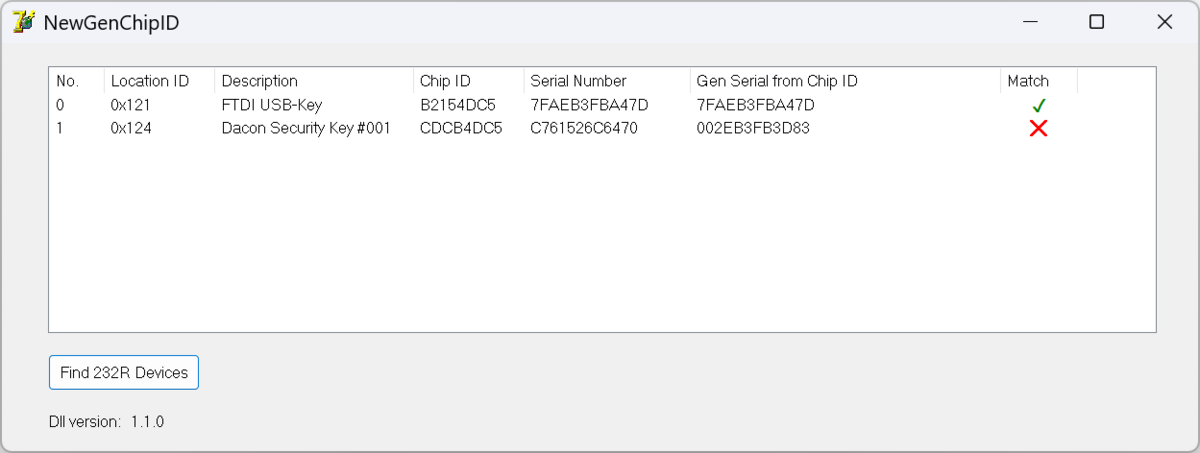
What it does
Reads connected FTDI 232R devices and:
- Shows Location ID, Description, Chip ID, Serial Number
- Computes Gen Serial from Chip ID with
PKV_MakeKey, then takes the last 12 characters - Match column: compares the device Serial to Gen Serial
- Equal → green check
- Not equal → red X
Main features
| Feature / UI | Behavior |
|---|---|
| Find 232R Devices | Scan devices via FTChipID.dll and fill the list |
| Gen Serial from Chip ID | Copy(PKV_MakeKey(ChipID), last 12) |
| Match | Serial == Gen Serial |
| Double-click row | Copy Gen Serial to the clipboard |
How to use
- Plug in a USB key (232R) — FTDI driver installed
- Run
NewGenChipID.exe(FTChipID.dllin the same folder) - Click Find 232R Devices
- Review Gen Serial / Match — double-click a row to copy Gen Serial
RandomChipID
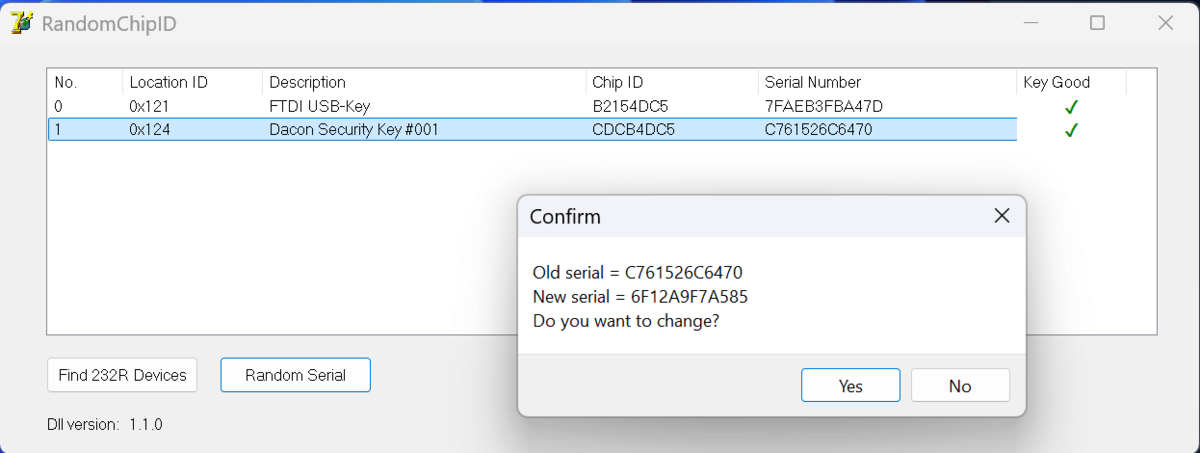
What it does
Lists the same device fields, but focuses on Key Good validation (aligned with DexonBundlePro SecurityKey-style concat check) and can generate a new serial and program it into EEPROM.
Columns
No. | Location ID | Description | Chip ID | Serial Number | Key Good
Main features
| Feature / UI | Behavior |
|---|---|
| Find 232R Devices | Scan devices and evaluate Key Good for each row |
| Key Good | PKV_CheckKey(ChipID + Serial) — pass (= 0) green check; fail red X + invalid dialog |
| Random Serial | Select a row → generate a Key Good serial → confirm → write via FTD2XX → refresh list |
Key Good formula
KeyStatus := PKV_CheckKey(ChipID + SerialNumber);
Pass when KeyStatus = 0 (KEY_GOOD / FTID_SUCCESS)ChipID= 8 hex charsSerial= 12 chars- Combined length 20 → input to
PKV_CheckKey(checksum / key structure)
Random Serial formula (PKV_MakeRandomSerial)
Serial = (8 random hex chars) + checksum(ChipID + 8 random hex chars)Then verified again with PKV_CheckKey(ChipID + Serial) before writing to the chip.
How to use — list / validate
- Plug in a USB key
- Run
RandomChipID.exe(FTChipID.dllin the same folder) - Click Find 232R Devices
- Check the Key Good column
How to use — randomize and write Serial
- Click Find 232R Devices so the list is populated
- Select a device row
- Click Random Serial
- Review Old / New serial in the confirm dialog → Yes to proceed
- Wait for EEPROM write; the list refreshes automatically
- Confirm Key Good is green and Serial has changed
Warning: writing a new serial overwrites EEPROM permanently. Do not use on critical keys by accident.
KeyUtil functions (summary)
| Function | Used by | Meaning |
|---|---|---|
PKV_MakeKey(Seed) |
NewGenChipID | Build a full deterministic key from Chip ID (seed) |
PKV_CheckKey(ChipID+Serial) |
RandomChipID | Validate ChipID+Serial as a good key |
PKV_MakeRandomSerial(ChipID) |
RandomChipID | Random 12-char serial that still passes PKV_CheckKey for that Chip ID |
hexaToInt |
Both (indirectly) | Hex string → Int64 |
Build
After rsvars.bat (Embarcadero Studio):
msbuild NewGenChipID\NewGenChipID.dproj /p:Config=Debug /p:Platform=Win32
msbuild RandomChipID\RandomChipID.dproj /p:Config=Debug /p:Platform=Win32
The on-screen DLL version label should show 1.1.0.
For technical notes and DLL bug history, see handoff.md.