

RhoHexColorPicker

- Active · last change 10-5-2026
- ★ 1 on GitHub
README
TRhoHexColorPicker (FMX)
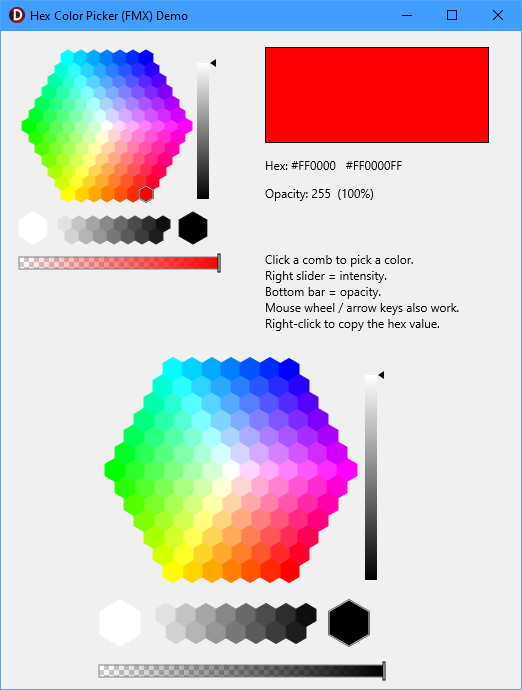
A honeycomb / hexagonal color picker control for FireMonkey (FMX), with an
intensity slider, an opacity (alpha) bar, and a right-click "copy hex" menu. It is
a FireMonkey port of the classic VCL TRhoHexaColorPicker from mbColorLib.
Built and tested with Delphi 13 (RAD Studio 37.0), Win32 and Win64.
This code was developed using a combination of Human effort and AI assistance.
Features
- Hexagonal grid of color "combs" with a separate black-to-white strip.
- Intensity slider (0–100%) that re-shades the whole grid, with a smooth gradient and arrow or rectangle marker.
- Opacity / alpha bar with a checkerboard + gradient preview; the selected color is a full ARGB value.
- Right-click copy menu with three live formats:
#RRGGBB,#RRGGBBAA, and$AARRGGBB(DelphiTAlphaColorliteral). - Mouse-wheel and arrow-key navigation; live hover hint (RGB / hex).
- Pure RTL + FMX — no external dependencies.
- Works at design time on Win32 and Win64; usable in code with zero install.
Requirements
- RAD Studio / Delphi with FireMonkey (developed on Delphi 13 / 37.0).
- Windows (Win32 + Win64). The drawing is standard FMX
TCanvas, so other FMX platforms are likely workable but untested.
Screenshot
Installation (design-time component)
The component ships as a runtime + design-time package pair.
- Open
Package/RhoHexColorPickerFmx.groupproj. - With platform Win32 selected, Build
RhoHexColorPickerFmxRT(the runtime package), then build it again for Win64 if you target 64-bit apps. - Build
RhoHexColorPickerFmxDT(the design package, Win32). - Right-click
RhoHexColorPickerFmxDT▸ Install.
TRhoHexColorPicker appears on the Tool Palette under Rhody Components.
To use it in your applications, add the Source folder to Tools ▸ Options ▸
Language ▸ Delphi ▸ Library ▸ Library path (per platform), or add
Source/RhoHexColorPickerFmx.pas to your project directly.
Notes
- The IDE is 32-bit, so the design package and a Win32 build of the runtime package are required to install; build the runtime for Win64 as well so 64-bit apps can link it.
- If the component is greyed out for Win64 on the palette, rebuild the Win32
runtime package and reinstall the design package (the platform support comes from
[ComponentPlatformsAttribute]on the class, read from the Win32 runtime BPL). - Coexistence with the original VCL mbColorLib: this control was deliberately
named
TRhoHexColorPicker/ unituRhoHexColorPickerFmx(dropping the "a") so it does not collide with the VCLTHexaColorPicker/HexaColorPickerunit inmbColorLibDXE8. Both can be installed at the same time.
Quick start
Design time
Drop a TRhoHexColorPicker on an FMX form and handle OnChange:
procedure TForm1.RhoHexColorPicker1Change(Sender: TObject);
begin
  Rectangle1.Fill.Color := RhoHexColorPicker1.SelectedColor;
  Caption := RhoHexColorPicker1.HexRGB;     // e.g. '#3C8DC0'
end;
In code (no install required)
Add RhoHexColorPickerFmx to uses and create it at runtime:
uses uHexColorPickerFmx;

var
  Picker: TRhoHexColorPicker;
begin
  Picker := TRhoHexColorPicker.Create(Self);
  Picker.Parent := Self;                 // required, or it won't show
  Picker.Position.Point := PointF(16, 16);
  Picker.SelectedColor := TAlphaColors.Red;
  Picker.OnChange := PickerChange;
end;
A runnable demo is included (Demo/DemoProject.dproj, form DemoMain) — it builds the control in
code and shows a live swatch, hex readout, and opacity, so you can try the control
without installing the package.
API
Properties
| Property | Type | Notes |
|---|---|---|
SelectedColor |
TAlphaColor |
The committed color (ARGB, includes alpha). |
SelectedAlpha |
Byte |
Opacity 0–255 (default 255). |
Intensity |
Integer |
Center intensity 0–100 (default 100). |
IntensityIncrement |
Integer |
Wheel/key step (default 1). |
SliderVisible |
Boolean |
Show the intensity slider (default True). |
OpacityVisible |
Boolean |
Show the opacity bar (default True). |
SliderMarker |
TMarker |
smArrow or smRect. |
NewArrowStyle |
Boolean |
Alternate arrow marker. |
SliderWidth |
Integer |
Slider width in px (default 12). |
BackgroundColor |
TAlphaColor |
Fill behind the combs (claNull = transparent). |
IntensityText |
string |
Label used in the intensity hint. |
HintFormat |
string |
Hover hint template (%r %g %b %hex). |
ColorUnderCursor |
TAlphaColor |
Read-only; color under the mouse. |
Events
| Event | Fires when |
|---|---|
OnChange |
The selected color changes. |
OnIntensityChange |
The intensity slider moves. |
OnAlphaChange |
The opacity bar moves. |
Methods
| Method | Returns |
|---|---|
HexRGB / HexRGBA / HexARGB |
string — selected color as #RRGGBB / #RRGGBBAA / $AARRGGBB. |
CopyHexToClipboard |
Copies #RRGGBB via IFMXClipboardService. |
GetColorAtPoint(X, Y) / GetHexColorAtPoint(X, Y) |
Color / hex at a local point. |
GetHexColorUnderCursor |
Hex of the color under the cursor. |
SelectCombIndex(i) / GetSelectedCombIndex |
Select / read by comb tab index. |
Project layout
Source/
  RhoHexColorPickerFmx.pas        the control (TRhoHexColorPicker)
  RhoHexColorPickerFmxReg.pas     design-time Register (palette: "Rhody Components")
Package/
  RhoHexColorPickerFmxRT.dpk      runtime package
  RhoHexColorPickerFmxDT.dpk      design-time package (install this)
  RhoHexColorPickerFmx.groupproj  project group (build RT -> DT)
Demo/
  DemoProject.dproj            in-code demo project
  DemoMain.pas / .fmx          in-code demo form
Credits & license
Derived from mbColorLib (the VCL color-picker library by Werner Lehmann / MXS). The hexagonal comb-layout math is from the original; the FireMonkey rendering, input handling, opacity bar, and copy menu are the FMX port.
Retain the original mbColorLib license terms for the derived portions. Add your chosen license for this distribution here (e.g. MPL/MIT) before publishing.