

Catalog · How the catalog works
Yutani.CHAOS

Yutani CHAOS - Complete Holographic AI Operating System Interface Skia4delphi version
- ★ 1 on GitHub
Anyone may press Interesting, signed in or not. It helps others find this project.
README
Yutani.CHAOS
Yutani CHAOS - Complete Holographic AI Operating System Interface Skia4delphi version v0.1
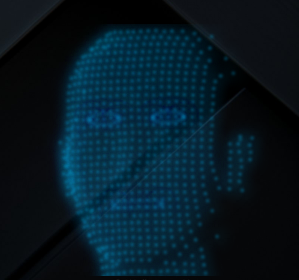
https://github.com/user-attachments/assets/9e80b987-3fdb-4115-a56a-436368bf6348
A dynamic, real-time particle-based holographic AI face rendered entirely from scratch using Delphi and Skia4Delphi. Instead of standard UI controls, this module renders a 3D-projected particle system onto an off-screen Skia surface, encodes it, and pushes it directly to a borderless, click-through Windows layered window.
Perfect for assistant overlays, sci-fi UIs, or just putting a cool holographic face on your desktop.
Delphi Skia4Delphi Platform ✨ Features
Procedural Particle System: Generates a 3D face from a depth map (depthmap.png).
Build-Up & Tear-Down: The face dynamically assembles itself (scanline build-up) and falls apart with physics-based gravity when closed.
Interactive Tracking: The eyes and face parallax track the mouse cursor.
Dynamic Expressions: Supports blinking, and different mouth states (Closed, Min, Mid, Full).
Custom Rendering Pipeline: Bypasses VCL controls, manually drawing to an ISkSurface, exporting to a PNG stream, and rendering via UpdateLayeredWindow for zero-lag transparent windows.
Glow & Circuitry: Glowing nodes with flickering hologram effects and connecting circuit lines between particles.
🚀 Getting Started Prerequisites
Delphi (VCL)
Skia4Delphi
Windows OS (due to UpdateLayeredWindow API usage)
Installation
Clone the repo.
Ensure Skia is in your library paths.
Place a depthmap.png in your executable directory (or let the fallback procedural ring generate).
🎮 Sample Included
The repository includes a sample project demonstrating how to control the interface.
Available Controls in the Demo:
Start / Stop: Triggers the build-up animation (Start) and the physics tear-down fade (Stop).
Mouth Buttons: Closed, Min, Mid, Full (to change facial expressions).
Eye Buttons: Open, Mid, Closed (to manually override eye states).
Part of Yutani Engine https://github.com/LaMitaOne/Yutani-Building-better-worlds