

RhoSkiaCodeEditor

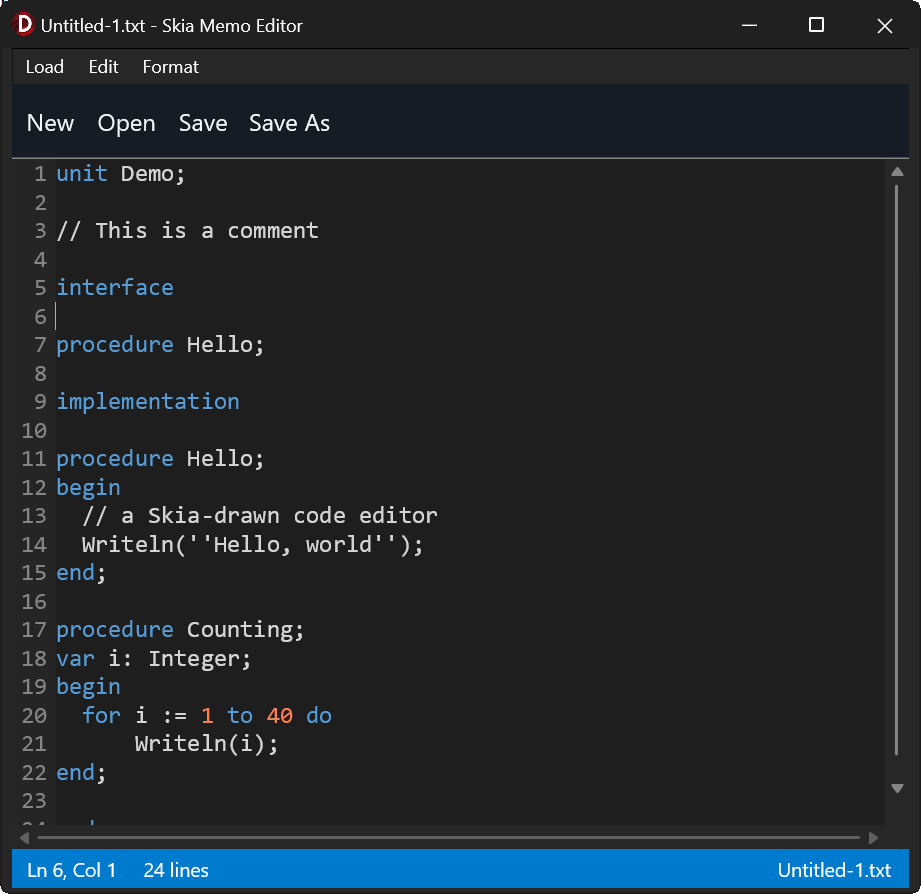
Skia based code editor with syntax highlighting, line numbers etc
- Active · last change 10-5-2026
- ★ 1 on GitHub
README
TSkiaCodeEditor
An owner-drawn, Skia-backed code editor control for FireMonkey (FMX) / Delphi. A memo-like control with a line-number gutter, pluggable syntax highlighting, find/replace, word wrap, and error markers — that behaves identically on Windows and macOS.
This code was developed using a combination of Human effort and AI assistance.
Why it exists
FMX's TMemo routes through different presenters per OS: the FMX-drawn
styled presenter on Windows, and a native NSTextView on macOS. Per-character
colouring, gutter alignment, and caret arithmetic tuned on one platform silently
diverge on the other, because the underlying text layout and metrics engines are
not the same. No amount of patching unifies them.
TSkiaCodeEditor removes the native presenter from the loop. Every glyph is
measured and drawn with Skia, so there is one paint path and one set of
metrics on every platform. Text layout never touches TTextLayout,
Canvas.MeasureText, or native text services.
Features
-
Skia rendering — one paint path, identical metrics on Windows and macOS.
-
Pluggable syntax highlighting — a pure, per-line tokenizer
(text, stateIn) -> (runs, stateOut). Lex state flows line to line, so multi-line constructs (block comments) work. A ready-madeTSimpleHighlighterships with Pascal, C-like, and Antimony presets. -
Word wrap — optional; off by default so the fast no-wrap path stays default.
-
Editing — full keyboard editing, selection (shift/drag/double-click word), clipboard, and undo/redo with typing coalesced into sensible steps.
-
Find / replace — with a built-in docked find bar, highlight-all matches, match case, and whole word. Or supply your own UI.
-
Markers — host-owned annotations for parser errors: whole-line tints or wavy underlines, with own-drawn multi-line, per-run-coloured tooltips on hover.
-
Owned scrolling — real scrollbars, not a
TScrollBox(whose overlay scrollbars and inertia differ between Windows and macOS). -
Lazy work — only visible rows are ever laid out or tokenized.
Requirements
- RAD Studio / Delphi 13 (BDS 37.0) — developed and built against this. It should work on Delphi 12, the first version to bundle Skia, but that has not been tested.
- Skia, which ships with RAD Studio — no external Skia4Delphi dependency. Enable it for your application: Project > Options > Application > Skia → Enable Skia.
Installation
- Open the project group
Packages\RhoFMXEditorGroup.groupproj(or the two.dpkfiles individually). - Build
SkiaCodeEditor(the runtime package) for every platform you target. - Install
dclSkiaCodeEditor(the design-time package). Design-time packages are loaded by the IDE, which is a 32-bit process — build this one for Win32 regardless of what your application targets. - Add the
Sourcefolder to your project's Library path (or its unit search path) so the compiler can find the units.
TSkiaCodeEditor then appears on the Rhody Controls palette page, for
FireMonkey forms.
You can also skip packages entirely and just add the four units from Source
to your project — the component works fine constructed in code.
Quick start
uses uSkiaCodeEditor;

Editor := TSkiaCodeEditor.Create(Self);
Editor.Parent := Self;
Editor.Align := TAlignLayout.Client;

// Batteries included: pick a comment/string style and add keywords.
Editor.Highlighter.UseAntimony;
Editor.Highlighter.AddKeywords(['species', 'compartment', 'model', 'end']);

Editor.WordWrap := True;
Editor.SetText(TFile.ReadAllText('model.txt'));
Ctrl/Cmd+F opens the built-in find bar; Ctrl/Cmd+G fires OnRequestGotoLine so
the host can prompt for a line number (the control never pops dialogs itself).
API reference
Two conventions run through the whole API:
- Lines and columns are 1-based in everything public —
CaretLine,GoToLine,AddMarker,LineText. (Internally they are 0-based; the boundary converts.) - The control never pops dialogs. Where a UI is needed it either ships one
you can turn off (
BuiltInFindUI) or fires an event for you to handle (OnRequestGotoLine).
Document text
| Member | Description |
|---|---|
procedure SetText(const AText: string) |
Replace the whole document. Normalises CRLF/CR to LF. Resets caret, clears undo history and markers, and clears Modified. |
function GetText: string |
The whole document, lines joined with #10. |
function LineCount: Integer |
Number of logical lines (not visual rows). |
function LineText(ALine: Integer): string |
Text of one line, 1-based. '' if out of range. |
Modified state / change notification
| Member | Description |
|---|---|
property Modified: Boolean |
The dirty flag. Becomes True on any edit; SetText (load) clears it. Set it back to False yourself after saving. Read it in your form's OnCloseQuery to decide whether to prompt "save changes?". |
event OnChange: TNotifyEvent |
Fires only when the text is mutated (typing, delete, paste, replace, undo/redo) — not on caret moves and not on SetText/load. Use it to enable a Save action or flag the title bar. |
Modified is the persistent state; OnChange is the live notification behind
it. Undo does not clear Modified (matches TMemo) — the flag stays set
even if you undo back to the on-disk text. See the exit-prompt cookbook below.
Navigation
| Member | Description |
|---|---|
procedure GoToLine(ALine: Integer) |
1-based. Caret to the line's start, scrolled roughly centred. Clamped to the document. |
property CaretLine: Integer |
Read-only, 1-based. |
property CaretColumn: Integer |
Read-only, 1-based. |
property SelText: string |
Read-only. The current selection, '' if none. |
event OnCaretChange |
Fires after any caret move or edit. Drive a status bar off this. |
Undo / redo
| Member | Description |
|---|---|
procedure Undo / procedure Redo |
One step. Consecutive typed characters coalesce into a single step; any caret move or click breaks the run. |
function CanUndo: Boolean / function CanRedo: Boolean |
For enabling menu items. |
History is bounded at 1000 steps and is cleared by SetText. Every text
mutation — typing, paste, ReplaceAll — goes through one choke point, so
everything is undoable, and ReplaceAll is a single step.
Clipboard and selection
These are the same operations as the built-in keyboard shortcuts, exposed as
public methods so you can wire them to an Edit menu (Cut/Copy/Paste/Delete/
Select All) and get behaviour identical to the keystrokes. Clipboard access goes
through IFMXClipboardService — cross-platform, no native text services — and
every text mutation is undoable through the usual choke point.
| Member | Description |
|---|---|
procedure CopySelection |
Copy the selection to the clipboard. No-op if nothing is selected. |
procedure CutSelection |
Copy the selection, then delete it. No-op if nothing is selected. |
procedure PasteClipboard |
Insert the clipboard text at the caret, replacing any selection. No-op if the clipboard holds no text. |
procedure DeleteSelection |
Delete the selection without touching the clipboard. No-op if nothing is selected. |
procedure SelectAll |
Select the whole document. |
procedure ShowBuiltInFindBar |
Open the docked find/replace bar programmatically — the same as Ctrl/Cmd+F when BuiltInFindUI is on. Wire it to a Find menu item. |
Gate Cut / Copy / Delete on whether there's a selection: Editor.SelText <> ''.
Paste can stay enabled (it no-ops on an empty clipboard). Undo / Redo menu items
pair naturally with CanUndo / CanRedo above.
procedure TfrmMain.mnuCutClick(Sender: TObject);   begin FEditor.CutSelection;   end;
procedure TfrmMain.mnuCopyClick(Sender: TObject);  begin FEditor.CopySelection;  end;
procedure TfrmMain.mnuPasteClick(Sender: TObject); begin FEditor.PasteClipboard; end;
procedure TfrmMain.mnuSelectAllClick(Sender: TObject); begin FEditor.SelectAll;  end;
Comment toggle
procedure ToggleLineComment;          // Ctrl/Cmd+/
property LineCommentPrefix: string;   // '' => derive from the Highlighter
ToggleLineComment acts on the selected lines (or the caret's line if there's no
selection). If any target line is uncommented it comments the whole block;
otherwise it uncomments. The prefix is inserted at column 0 (flush left,
regardless of indentation — the WinEdt/Spyder convention), with a trailing space
(# code); the line's own indentation is preserved after the marker, so
uncommenting restores it exactly (the prefix and one optional following space are
removed). Blank lines are commented too (an empty line gets a bare marker, no
trailing space), the selection is preserved (so repeated toggles work), and the
whole thing is one undo step.
The prefix is resolved as: LineCommentPrefix if you set it, else the editor's
TSimpleHighlighter's configured line comment, else nothing (no-op). So
Editor.Highlighter.UsePython alone makes Ctrl/Cmd+/ insert #; set
LineCommentPrefix explicitly to override, or to drive the toggle with a
hand-written tokenizer.
Context menu
BuiltInContextMenu (default True): right-clicking shows a built-in popup —
Cut / Copy / Paste / Select All / Toggle Comment — wired to the public
methods, with Cut/Copy enabled only when there's a selection and Toggle Comment
only when a comment prefix is available. Right-clicking places the caret when
there's no selection (so Paste lands where you pointed) and leaves an existing
selection intact. Set it False to suppress it, or assign your own
PopupMenu (the standard TControl property) to replace it.
Find and replace
Matches are single-line (the search string never contains a newline).
type TFindOption  = (foMatchCase, foWholeWord, foWrapAround);
TFindOptions = set of TFindOption;| Member | Description |
|---|---|
function FindNext(const ASearch: string; AOptions: TFindOptions = [foWrapAround]): Boolean |
Selects and centres the next match after the caret/selection. |
function FindPrevious(...) |
Same, backwards. |
function ReplaceCurrent(const ASearch, AReplace: string; AOptions = [foWrapAround]): Boolean |
Replaces the selection if it is a match, then advances to the next one. |
function ReplaceAll(const ASearch, AReplace: string; AOptions: TFindOptions = []): Integer |
Returns the count. One undo step. |
procedure HighlightMatches(const ASearch: string; AOptions: TFindOptions = []) |
Tint every visible occurrence. FindNext/FindPrevious call this for you. |
procedure ClearHighlightMatches |
Drop the highlights. Esc does this too. |
function CountMatches(const ASearch: string; AOptions; out ACurrentIndex: Integer): Integer |
Document-wide match total (M) and the current match's 1-based ordinal (N). The built-in find bar shows "N of M" off this. |
The built-in find bar shows a live "N of M" counter as you type and step
through matches. Unlike the paint-time highlight (visible lines only),
CountMatches scans the whole document — cheap per search, but O(document) per
keystroke, so cap or debounce it if you wire it to a huge file yourself.
The match you are on is painted in FindMatchColor; the others in the weaker
FindHighlightColor. Matches are located per visible line at paint time, so
highlight-all costs nothing on a large document.
Custom find UI: set BuiltInFindUI := False and handle OnRequestFind
(fired on Ctrl/Cmd+F). Drive the methods above from your own controls, and call
HighlightMatches / ClearHighlightMatches as the user types.
Markers and tooltips
Host-owned annotations — errors, warnings, "look here". Purely visual: they never move the caret or the selection.
type TMarkerKind = (mkTint, mkSquiggle); // rectangle behind text | wavy underline| Member | Description |
|---|---|
procedure AddMarker(ALine, ACol, ALen: Integer; AKind; AColor; const AMessage: string = '') |
The general one. ALen <= 0 means "to end of line". |
procedure AddMarker(ALine, ACol, ALen; AKind; AColor; const ATip: TTipText) |
As above, with a rich tooltip. |
procedure MarkLine(ALine: Integer; AKind; AColor; const AMessage | ATip) |
The whole line. |
procedure MarkWordAt(ALine, ACol: Integer; AKind; AColor; const AMessage | ATip) |
Grows the span over the word at ACol. Use when a parser gives a token's position but not its length. Falls back to a single character if ACol isn't on a word. |
procedure ClearMarkers |
Remove all. |
function MarkerCount: Integer |
|
function MarkerMessageAt(ALine, ACol: Integer): string |
Message of the first marker covering that position, else ''. Drive a status bar or your own tooltip off this. |
property MarkersClearOnEdit: Boolean |
Default True. Any edit drops all markers — they describe text that just changed. SetText always drops them. |
Out-of-range lines are ignored, not raised: a parser reporting a line past EOF must not crash the editor.
Tooltips
Hovering a marker for 500 ms shows a tooltip, drawn with Skia (not FMX Hint),
so it can be multi-line with per-run colour and bold. It is dismissed by any
key, click, scroll, or mouse-leave.
type TTipRun  = record Text: string; Color: TAlphaColor; Bold: Boolean; end;
     TTipLine = TArray<TTipRun>;
     TTipText = TArray<TTipLine>;

function TipRun(const AText: string; AColor: TAlphaColor = TAlphaColors.Null;
  ABold: Boolean = False): TTipRun;
function TipLine(const ARuns: array of TTipRun): TTipLine;
function Tip(const ALines: array of TTipLine): TTipText;
A run whose Color is TAlphaColors.Null uses TooltipTextColor. Passing a
plain string message instead of a TTipText yields one default-coloured run
per #10 line — so the simple case stays a one-liner.
Syntax highlighting
The editor owns a TSimpleHighlighter lazily; first access installs it as the
tokenizer. Changing keywords, rules, or colours re-lexes automatically.
function Highlighter: TSimpleHighlighter; // note: a function, not a propertyTSimpleHighlighter member |
Description |
|---|---|
procedure UsePascal |
// line; { } and (* *) blocks; '...' strings; case-insensitive. |
procedure UseCLike |
// line; /* */ block; "..." strings; case-sensitive. |
procedure UseAntimony |
// and # line; /* */ block; "..." strings; case-sensitive. |
procedure UsePython |
# line; ''' and """ triple-quote blocks; '...' and "..." strings; case-sensitive. Triple-quoted strings/docstrings are coloured like comments — see note. |
procedure AddKeyword(const AWord: string) / AddKeywords(const AWords: array of string) |
|
procedure ClearKeywords / ClearRules |
|
procedure AddLineComment(const APrefix: string) |
|
procedure AddBlockComment(const AOpen, AClose: string) |
Multi-line. |
procedure AddStringDelimiter(const ADelim: Char) |
|
property CaseSensitive: Boolean |
|
property KeywordColor, StringColor, CommentColor, NumberColor |
TAlphaColor. |
A preset sets comment and string rules only — keywords are added separately.
Ready-made keyword lists for each preset live in uLanguageKeywords, so you
don't have to type them out:
uses uSkiaCodeEditor, uLanguageKeywords;

Editor.Highlighter.UsePython;
Editor.Highlighter.AddKeywords(PythonKeywords);
The constants are PascalKeywords, CKeywords, AntimonyKeywords, and
PythonKeywords (each a TArray<string>). It's a data-only unit with no
dependency on the editor, so the lists work with a hand-written tokenizer too —
add more with AddKeywords, or start from ClearKeywords for a different set.
Python triple-quoted strings. The tokenizer has a multi-line block comment rule but no multi-line string rule, so
UsePythonmodels'''…'''and"""…"""as block comments. They therefore render inCommentColor, notStringColor— a deliberate, common simplification (docstrings read comment-like), and the only way to get multi-line spans without a bigger lexer. Single-line'…'/"…"are ordinary strings.
Writing your own tokenizer
The contract is pure and per-line, which is what keeps re-lexing one edited line cheap. Lex state flows line to line, so multi-line constructs work.
type TTokenizeLineProc = reference to function(const ALine: string;
  AStateIn: TLexState; out ARuns: TTokenRunArray): TLexState;

type TTokenRun = record
  StartCol: Integer;   // 0-based column into the line
  Length: Integer;
  Color: TAlphaColor;
  Bold, Italic: Boolean;
end;
Install with SetTokenizer(AProc); force a full re-lex with
InvalidateAllTokens. Runs must be ascending and non-overlapping; gaps fall
back to TextColor. Return lsDefault (0) for "no continuation", or any other
integer to encode your own state (e.g. "inside a block comment").
TTokenRun.Boldand.Italicare carried through but not yet rendered — the painter uses one font. Token colour works today.
Appearance
| Property | Default | Notes |
|---|---|---|
FontFamily: string |
per-platform | Consolas on Windows, Menlo on macOS, DejaVu Sans Mono elsewhere. Live: rebuilds metrics and re-lays out. |
FontSize: Single |
13 |
Live. |
Monospace: Boolean |
True |
Requests the integer-advance fast path. It is used only if the face really is fixed-pitch — see below. |
GutterVisible: Boolean |
True |
Off ⇒ text starts at x = 0. The gutter auto-sizes to the widest line number. |
WordWrap: Boolean |
False |
On ⇒ hides the horizontal scrollbar. |
HighlightCurrentLine: Boolean |
False |
Faint full-width band behind the caret's line (all its rows when wrapped). Opt-in. |
BracketMatching: Boolean |
True |
Outline the ()[]{} pair around the caret. Naive — doesn't skip brackets in strings/comments. |
BackgroundColor |
white | |
TextColor |
black | Also the fallback for gaps between token runs. |
GutterColor / GutterTextColor |
$FFF0F0F0 / $FF808080 |
|
CaretColor |
black | |
SelectionColor |
$400078D7 |
Use alpha < FF. |
FindMatchColor |
$A0FF9800 |
The match you're on. |
FindHighlightColor |
$40FFC107 |
Every other visible match. Keep it weaker. |
CurrentLineColor |
$18808080 |
The current-line band; only shown when HighlightCurrentLine. Keep alpha low. |
BracketMatchColor |
$A0A0A0A0 |
Outline stroke around each matched bracket. |
TooltipColor / TooltipTextColor / TooltipBorderColor |
$FF2D2D30 / $FFF0F0F0 / $FF6E6E70 |
All colour properties merely repaint. Font properties rebuild Skia metrics.
Everything is a live setter — no BeginUpdate/EndUpdate needed.
Monospaceis a request, not an assertion. Skia does not fail on a missing font family — it silently substitutes a default, proportional typeface. Taking the fixed-advance fast path against such a face renders text correctly but drifts the caret further from the glyph the further right you go. SoRebuildFontMetricsmeasures'0','W'and'i', and only uses the fast path when their advances agree. Set a proportionalFontFamily(or name a font that isn't installed) and the editor quietly falls back to per-character measurement — slower, but always correct.
Behaviour
| Property | Default | Notes |
|---|---|---|
BuiltInFindUI: Boolean |
True |
Ctrl/Cmd+F shows the docked find bar. False ⇒ fires OnRequestFind. |
HighlightAllMatches: Boolean |
True |
False ⇒ only the current match is highlighted. |
MarkersClearOnEdit: Boolean |
True |
|
BuiltInContextMenu: Boolean |
True |
Right-click shows a built-in Cut/Copy/Paste/Select All/Toggle Comment popup. False, or assign your own PopupMenu, to take over. |
LineCommentPrefix: string |
'' |
Token for ToggleLineComment. Empty ⇒ taken from the Highlighter. |
Events
| Event | When |
|---|---|
OnCaretChange: TNotifyEvent |
After any caret move or edit. |
OnChange: TNotifyEvent |
After any text mutation (not caret moves, not load). |
OnRequestGotoLine: TNotifyEvent |
Ctrl/Cmd+G. Show a prompt, then call GoToLine. |
OnRequestFind: TNotifyEvent |
Ctrl/Cmd+F, only when BuiltInFindUI = False. |
Keyboard
| Key | Action |
|---|---|
| Arrows, Home, End, PgUp, PgDn | Move caret. Hold Shift to extend the selection. |
| Ctrl + ←/→ (Win), Option + ←/→ (mac) | Jump by word. Add Shift to select by word. (On macOS Ctrl+← / → is a system Spaces shortcut, so Option is used there.) |
| Ctrl/Cmd + C, X, V | Copy, cut, paste (via IFMXClipboardService — no native text services). |
| Ctrl/Cmd + A | Select all. |
| Ctrl/Cmd + Z | Undo. **Shift+**Ctrl/Cmd+Z or Ctrl+Y to redo. |
| Ctrl/Cmd + F | Find bar, or OnRequestFind. |
| Ctrl/Cmd + G | OnRequestGotoLine. |
| Ctrl/Cmd + / | Toggle line comment on the selection (or caret line). |
| Right-click | Built-in context menu (Cut/Copy/Paste/Select All/Toggle Comment), when BuiltInContextMenu. |
| Esc | Dismiss the find bar, its highlights, and any tooltip. Leaves the caret alone. |
| Double-click | Select the word. |
| Mouse wheel | Scroll three lines per notch. |
With WordWrap on, Up/Down/PgUp/PgDn move by visual row and Home/End act on
the visual row. A vertical run keeps its horizontal position, so moving down
past a short line and back up returns you to the column you started from.
Cookbook: showing parser errors
Re-mark the document after each parse:
Editor.ClearMarkers;

// Squiggle the offending token, with a rich multi-line tooltip.
Editor.MarkWordAt(10, Col, mkSquiggle, TAlphaColors.Red,
  Tip([ TipLine([TipRun('Error', TAlphaColors.Red, True),
                 TipRun(' in reaction rate "k9*S0S1"')]),
        TipLine([TipRun('  syntax error, unexpected element name')]) ]));

// Or tint a whole line when you only have a line number.
Editor.MarkLine(12, mkTint, $30FF0000, 'unused species');
Watch the column. A parser may report a position inside a quoted sub-expression rather than a column in the line. Antimony does exactly this:
Antimony: Error in model string, line 10:  In the reaction rate "k9*S0S1":
Error when parsing input 'k9*S0 S1' at position 8: syntax error, ...
position 8 is an offset into 'k9*S0 S1', not into line 10. Use LineText to
find the sub-expression in the line, then add the offset:
P := Pos('k9*S0 S1', Editor.LineText(10));
if P > 0 then
  Editor.MarkWordAt(10, P + 8 - 1, mkSquiggle, TAlphaColors.Red, ErrText);
MarkWordAt then grows the span over the whole offending token, because the
parser told you where it starts but not how long it is.
Cookbook: a status bar
OnCaretChange fires after every caret move and every edit, so one handler
keeps a status bar current.
// In the form declaration:
//   procedure EditorCaretChange(Sender: TObject);
Editor.OnCaretChange := EditorCaretChange;

procedure TfrmMain.EditorCaretChange(Sender: TObject);
begin
  Status.Text := Format('Ln %d, Col %d   %d lines',
    [FEditor.CaretLine, FEditor.CaretColumn, FEditor.LineCount]);
  // Surface the error under the caret, if any.
  ErrLabel.Text := FEditor.MarkerMessageAt(FEditor.CaretLine, FEditor.CaretColumn);
end;
Cookbook: prompt to save on exit
Put the check in the form's OnCloseQuery — that single handler catches every
exit path (the window's close button and a Quit menu that just calls Close).
Reset Modified after each save; SetText clears it on load automatically.
TDialogService is asynchronous, so you can't decide CanClose inline: hold
the close, ask, and re-close from the callback. Defer that Close with
TThread.ForceQueue so it runs after the dialog stack unwinds — calling
Close re-entrantly from inside a modal dialog can crash.
procedure TfrmMain.SaveDocument(const AFileName: string);
begin
  TFile.WriteAllText(AFileName, FEditor.GetText);
  FEditor.Modified := False;              // on disk now => no longer dirty
end;

procedure TfrmMain.mnuQuitClick(Sender: TObject);
begin
  Close;                                  // routes through OnCloseQuery
end;

procedure TfrmMain.FormCloseQuery(Sender: TObject; var CanClose: Boolean);
begin
  if FForceClose or (not FEditor.Modified) then
  begin
    CanClose := True;                     // nothing unsaved, or already resolved
    Exit;
  end;
  CanClose := False;                      // hold; decide in the callback
  TDialogService.MessageDialog('Save changes before closing?',
    TMsgDlgType.mtConfirmation,
    [TMsgDlgBtn.mbYes, TMsgDlgBtn.mbNo, TMsgDlgBtn.mbCancel], TMsgDlgBtn.mbYes, 0,
    procedure(const AResult: TModalResult)
    begin
      if AResult = mrCancel then Exit;    // stay open
      if AResult = mrYes then SaveDocument(CurrentFile);
      FForceClose := True;                // let the re-close through
      TThread.ForceQueue(nil, procedure begin Close; end);
    end);
end;
FForceClose is a Boolean field on the form.
Layout
| Folder | Contents |
|---|---|
Source |
The component. Add this to your library path. |
Packages |
Runtime (SkiaCodeEditor) and design-time (dclSkiaCodeEditor) packages. |
Demo |
A working host application: theming, file open/save, go-to-line, status bar. |
Source units:
uCodeEditorTypes.pas— shared token, marker, and tooltip types. Its own unit so the editor and highlighters can both use it with no circular dependency.uSkiaCodeEditor.pas— the control.uSyntaxHighlighter.pas—TSimpleHighlighter, a configurable tokenizer.uLanguageKeywords.pas— ready-made keyword lists (PascalKeywords,CKeywords,AntimonyKeywords,PythonKeywords) for the presets. Data only.uFindBar.pas—TFindBar, the built-in docked find/replace bar.uSkiaCodeEditorReg.pas— design-time registration only.
Developing the component
Open Packages\RhoFMXEditorGroup.groupproj — a project group of the runtime
package, the design package, and the demo. Edit the component units and press
F9 on the demo: because the demo links Source statically (via its unit search
path), your changes recompile straight into it, with no package rebuild. Rebuild
and reinstall the design package only when you need refreshed design-time
behaviour (e.g. a newly published property in the Object Inspector).
Design notes
Batteries included, overridable. Every subsystem ships a working default the
host can replace: the highlighter via the Highlighter property or
SetTokenizer; the find UI via BuiltInFindUI / OnRequestFind.
Visual rows, not logical lines. With word wrap on, one line may occupy several visual rows. Rows are the vertical coordinate everywhere — and with wrap off, every line is exactly one row, so there is no second code path.
Tooltips are drawn with Skia, not FMX Hint. A native hint service can do
neither multi-line nor per-run colour, and renders through different machinery
on each OS — the very divergence this component exists to avoid.
Status
Windows and macOS: developed and tested on real hardware — editing, caret/hit accuracy, selection, clipboard (incl. cross-app), scrolling, word wrap, find, and the file dialogs all verified on both.
Scope is a Latin code editor: accented Latin, typographic punctuation, and
common symbols are covered by the single primary font (Consolas / Menlo). CJK
and emoji glyphs are not supported — the control uses one typeface with no
fallback chain, by design, so they render as tofu. (Committed IME text still
inserts through the normal key path, so Option-key / dead-key Latin input works;
only multi-keystroke CJK composition is out of scope.) See "CJK / non-Latin" in
the non-goals of CLAUDE.md for the rationale and the additive design if it's
ever needed.
macOS notes
A couple of macOS behaviours that affect a host app rather than the control itself, learned while testing the demo:
- Key auto-repeat. macOS suppresses key-repeat for character keys —
press-and-hold shows the accent picker instead. To get Windows-style
hold-to-repeat, disable it for your app at startup (before the first window):
{$IFDEF MACOS} // uses Macapi.Foundation, Macapi.Helpers; TNSUserDefaults.Wrap(TNSUserDefaults.OCClass.standardUserDefaults) .setBool(False, StrToNSStr('ApplePressAndHoldEnabled')); {$ENDIF} - Window title. A runtime
Form.Captiondoesn't reliably show in the macOS window title bar. Show document names in your own UI (a status bar or toolbar label) rather than relying on the title — the demo does this. - File dialog filters.
NSOpenPanelgreys out files that don't match the active filter, and*.*is not "all files" there. LeaveTOpenDialog.Filterempty on macOS (seeDemo/ufMain.pas) to allow selecting any file.
Licence
MIT — see LICENSE.